> ## Documentation Index
> Fetch the complete documentation index at: https://docs.open-metadata.org/llms.txt
> Use this file to discover all available pages before exploring further.
# Getting Started
> Set up your environment and make your first API call in minutes
# Getting Started
Get up and running with the OpenMetadata API and SDKs. This guide walks you through authentication, SDK installation, and making your first API call.
## Prerequisites
* A OpenMetadata account (cloud or self-hosted instance)
* Your instance base URL (e.g., `https://your-company.open-metadata.org/api`)
* **Python 3.11+**, **Java 21+**, or **Go 1.19+** (depending on your SDK choice)
You need a JWT token to authenticate API requests. There are two ways to get one:
**Bot Token** (recommended for automation)
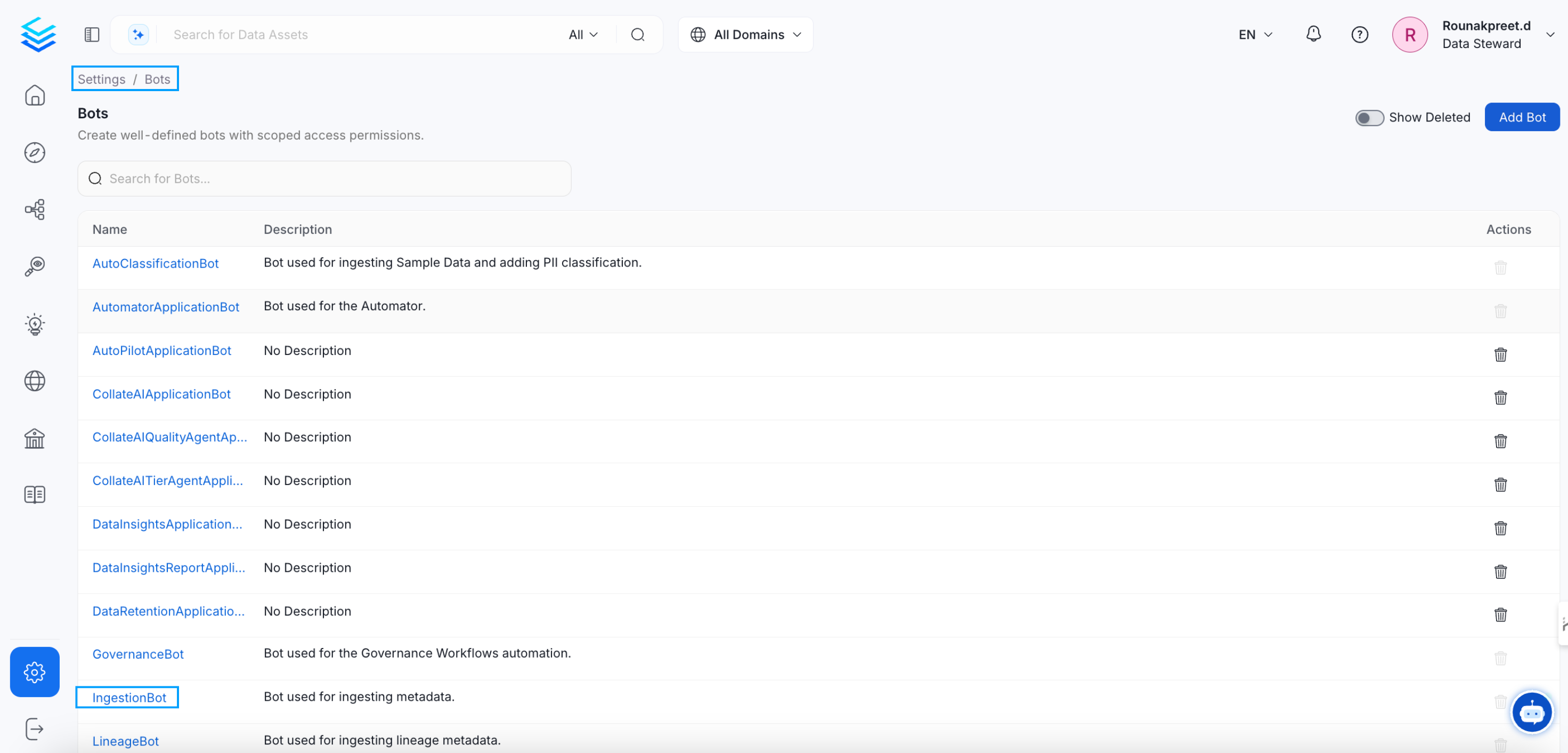
1. Navigate to **Settings > Bots** in the OpenMetadata UI
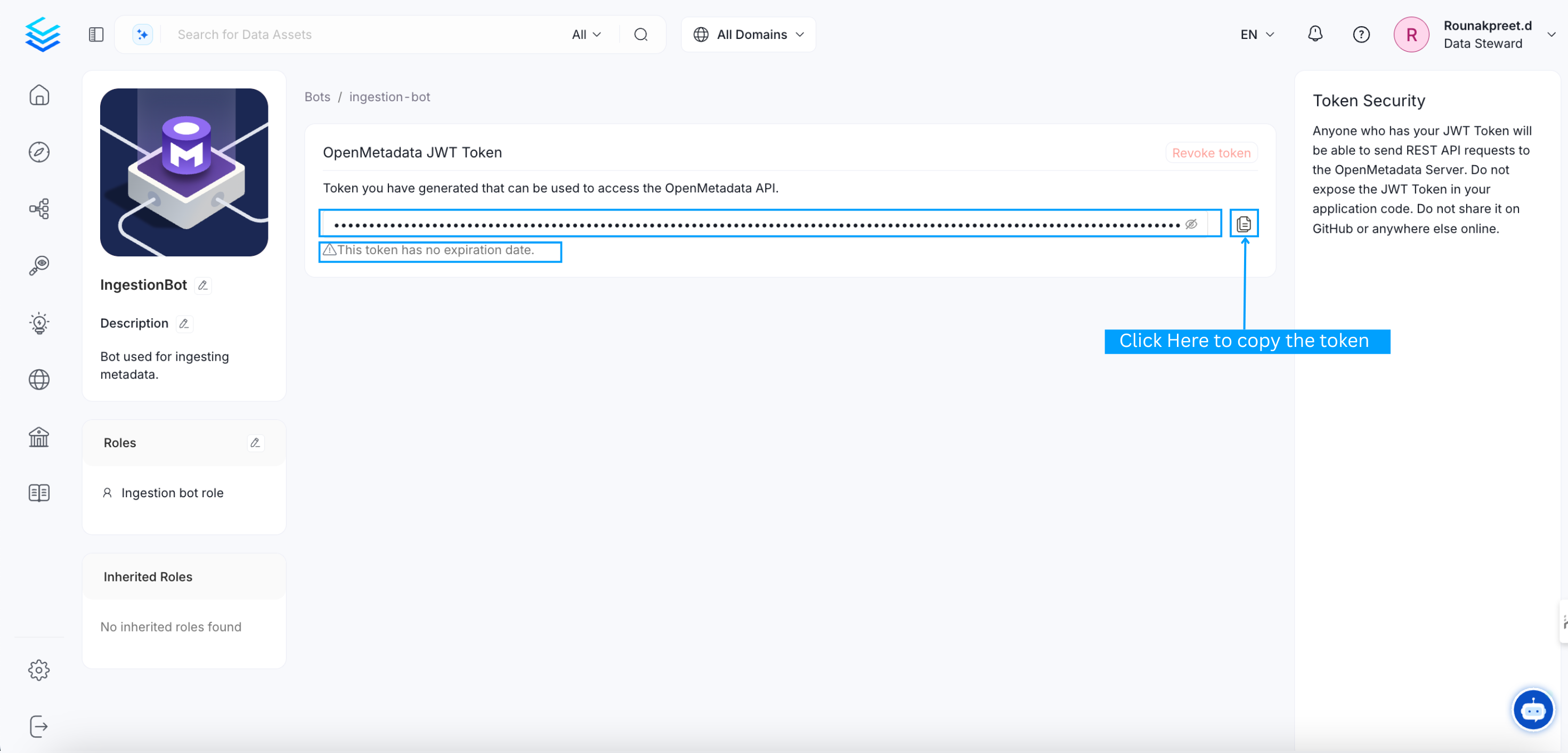
2. Click on the **ingestion-bot** (or create a new bot for your use case)
3. Copy the JWT token from the bot details page
 **Personal Access Token** (for development)
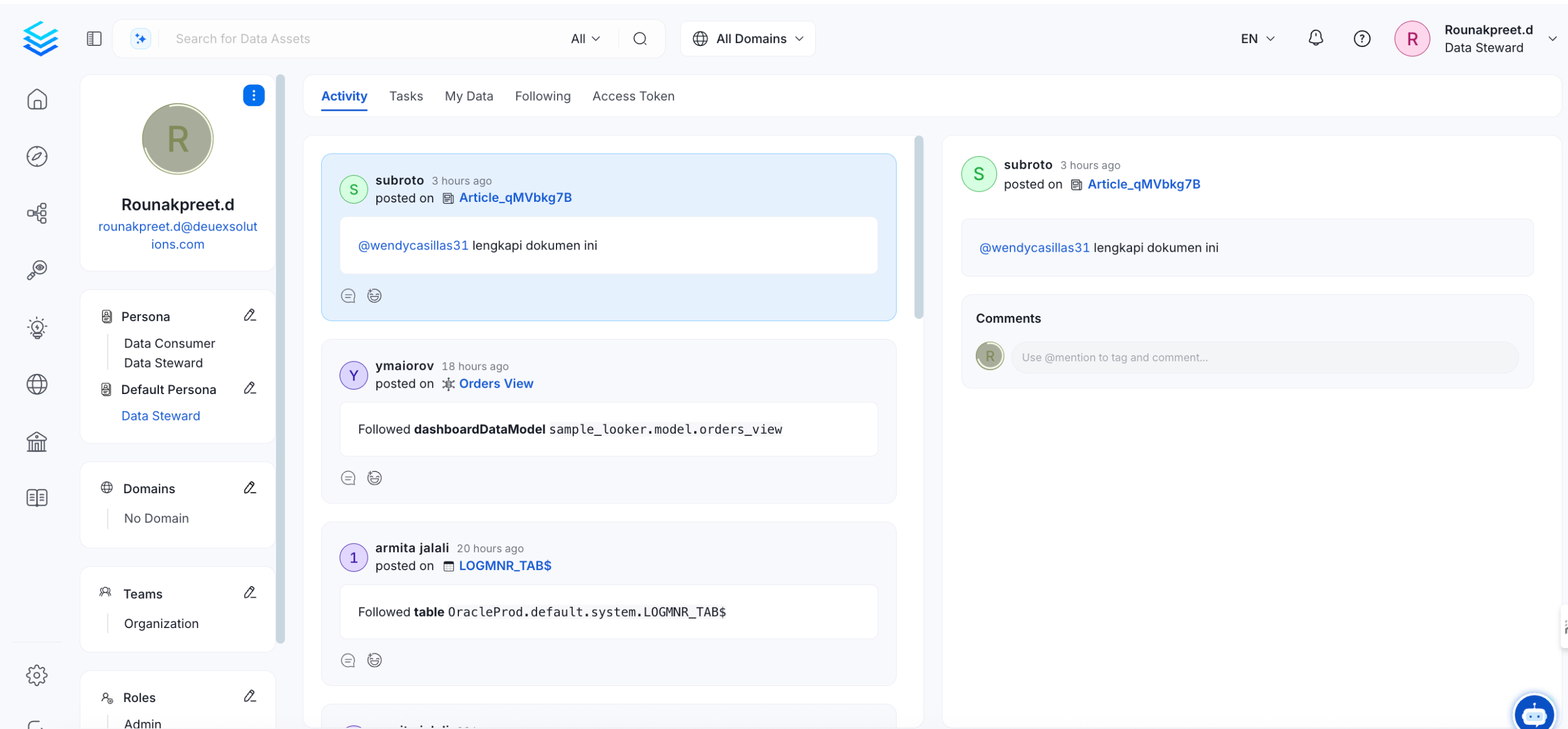
1. Click your profile image in the top-right corner
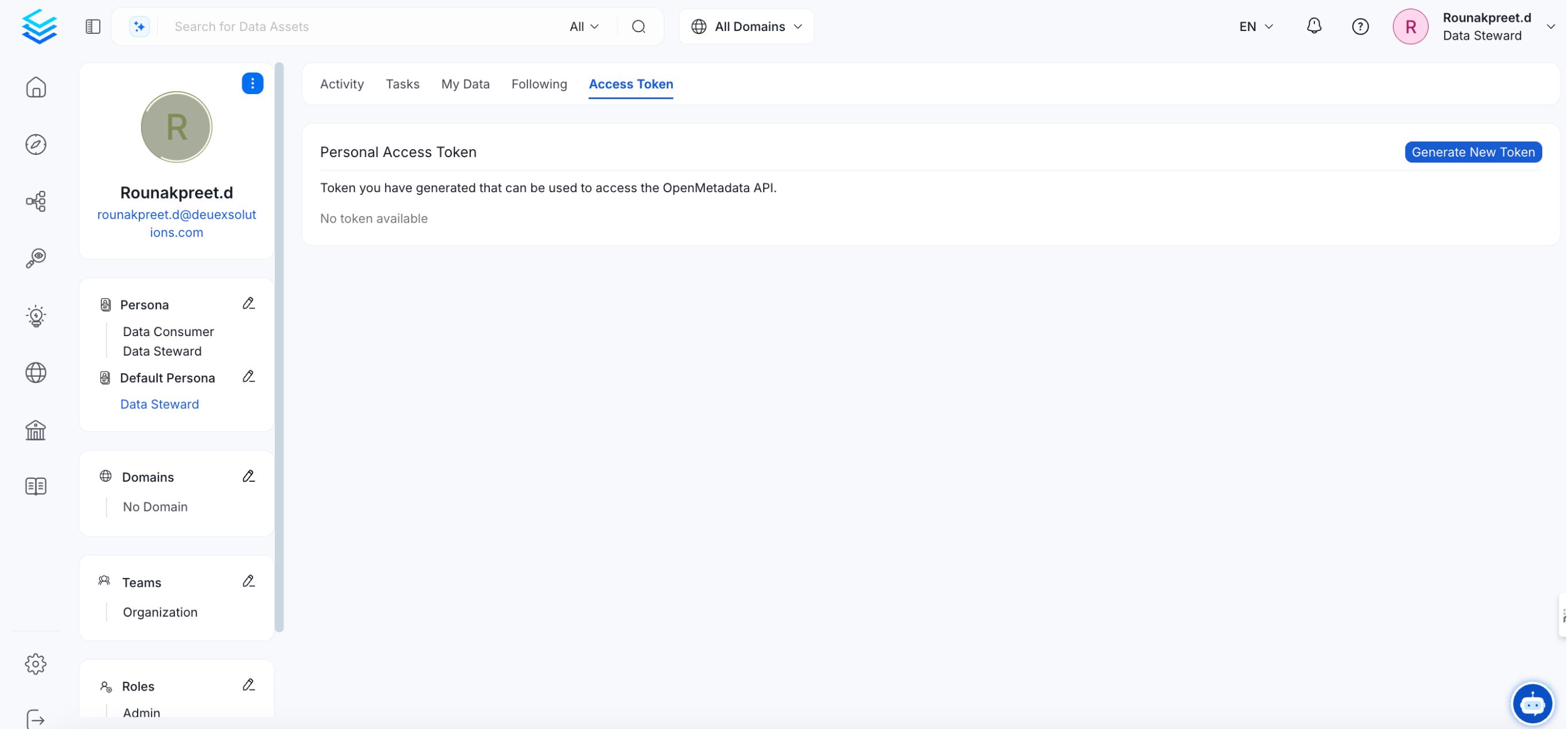
2. Go to the **Access Token** tab
3. Click **Generate New Token**
**Personal Access Token** (for development)
1. Click your profile image in the top-right corner
2. Go to the **Access Token** tab
3. Click **Generate New Token**
 Your JWT token carries full API privileges. Keep it secure — never share tokens in publicly accessible areas such as GitHub repositories or client-side code.
Choose your preferred language and install the SDK:
```bash Python theme={null}
pip install "openmetadata-ingestion~=1.12.1"
```
```xml Java (Maven) theme={null}
org.open-metadata
openmetadata-java-client
1.12.1
```
```bash Go theme={null}
go get github.com/open-metadata/openmetadata-sdk/openmetadata-go-client
```
Or skip SDK installation and use cURL to interact with the REST API directly.
Set up the connection to your OpenMetadata instance:
```python Python theme={null}
from metadata.sdk import configure
configure(
host="https://your-company.open-metadata.org/api",
jwt_token="your-jwt-token"
)
```
```java Java theme={null}
import org.openmetadata.sdk.client.OpenMetadataClient;
import org.openmetadata.sdk.config.OpenMetadataConfig;
OpenMetadataConfig config = OpenMetadataConfig.builder()
.serverUrl("https://your-company.open-metadata.org/api")
.accessToken("your-jwt-token")
.build();
OpenMetadataClient client = new OpenMetadataClient(config);
```
```go Go theme={null}
import ometa "github.com/open-metadata/openmetadata-sdk/openmetadata-go-client/pkg/ometa"
restConfig := ometa.NewRestConfig(
"https://your-company.open-metadata.org",
"", // APIVersion
0, // Retry -> defaults to 3
0, // RetryWait -> defaults to 30 seconds
nil, // RetryCodes -> defaults to [429, 504]
"your-jwt-token",
)
client, err := ometa.NewRest(restConfig)
```
```bash cURL theme={null}
# Set your token as an environment variable
export OPENMETADATA_TOKEN="your-jwt-token"
export OPENMETADATA_HOST="https://your-company.open-metadata.org/api/v1"
```
List the tables in your catalog to verify everything is working:
```python Python theme={null}
from metadata.sdk import Tables
for table in Tables.list().auto_paging_iterable():
print(f"{table.fullyQualifiedName}: {table.description}")
```
```java Java theme={null}
TablesApi tablesApi = client.buildClient(TablesApi.class);
TableList tables = tablesApi.listTables(null, 10, null, null, null);
for (Table table : tables.getData()) {
System.out.println(table.getFullyQualifiedName());
}
```
```go Go theme={null}
resp, err := rest.Get("tables", map[string]string{"limit": "10"})
if err != nil {
log.Fatal(err)
}
defer resp.Body.Close()
var result struct {
Data []struct {
FullyQualifiedName string `json:"fullyQualifiedName"`
} `json:"data"`
}
if err := json.NewDecoder(resp.Body).Decode(&result); err != nil {
log.Fatal(err)
}
for _, table := range result.Data {
fmt.Println(table.FullyQualifiedName)
}
```
```bash cURL theme={null}
curl -X GET "$OPENMETADATA_HOST/tables?limit=10" \
-H "Authorization: Bearer $OPENMETADATA_TOKEN" \
-H "Content-Type: application/json"
```
You should see a JSON response like this:
```json Expected Response theme={null}
{
"data": [
{
"id": "a]f1c8e2-4b3a-4e5f-9c6d-7e8f9a0b1c2d",
"name": "customers",
"fullyQualifiedName": "mysql-prod.analytics.customers",
"description": "Core customer records",
"tableType": "Regular",
"columns": [ ... ],
"service": { "id": "...", "type": "databaseService" }
}
],
"paging": {
"total": 142,
"after": "eyJsaW1pdCI6MTAsIm9mZnNldCI6MTB9"
}
}
```
The `paging.after` cursor can be passed to the next request to paginate through results. See the [Pagination guide](/v1.12.x/api-reference/pagination) for details.
The SDKs provide a fluent API for creating and managing resources. Here's how to create a table programmatically:
```python Python theme={null}
from metadata.sdk import Tables, configure
from metadata.generated.schema.api.data.createTable import CreateTableRequest
from metadata.generated.schema.entity.data.table import Column, DataType
# Initialize the SDK
configure(host="https://your-company.open-metadata.org", jwt_token="your-jwt-token")
# Create and persist the table
table = Tables.create(CreateTableRequest(
name="customers",
databaseSchema="mysql-prod.analytics.public",
description="Customer master table",
columns=[
Column(name="id", dataType=DataType.BIGINT, description="Primary key"),
Column(name="name", dataType=DataType.VARCHAR, dataLength=255, description="Customer name"),
Column(name="email", dataType=DataType.VARCHAR, dataLength=255, description="Email address"),
],
))
print(f"Created: {table.fullyQualifiedName}")
```
```java Java theme={null}
import org.openmetadata.sdk.client.OpenMetadataClient;
import org.openmetadata.sdk.config.OpenMetadataConfig;
import org.openmetadata.sdk.fluent.builders.TableBuilder;
import org.openmetadata.sdk.fluent.builders.ColumnBuilder;
// Create and persist the table in one fluent chain
Table table = new TableBuilder(client)
.name("customers")
.description("Customer master table")
.schemaFQN("mysql-prod.analytics.public")
.addColumn("id", "BIGINT", "Primary key")
.column(ColumnBuilder.varchar("name", 255))
.column(ColumnBuilder.varchar("email", 255))
.tags("PII.Sensitive", "Tier.Tier1")
.create();
System.out.println("Created: " + table.getFullyQualifiedName());
```
```bash cURL theme={null}
curl -X POST "$OPENMETADATA_HOST/tables" \
-H "Authorization: Bearer $OPENMETADATA_TOKEN" \
-H "Content-Type: application/json" \
-d '{
"name": "new_table",
"databaseSchema": "mysql-prod.analytics",
"columns": [
{
"name": "id",
"dataType": "BIGINT",
"description": "Primary key"
},
{
"name": "name",
"dataType": "VARCHAR",
"dataLength": 255,
"description": "Customer name"
}
]
}'
```
The Java SDK uses a fluent `.withXXX()` pattern for building request objects, while the Python SDK uses typed dataclasses with nested constructors. Both provide full type safety and IDE autocompletion.
## Common Use Cases
Search and explore metadata across your entire catalog.
Create, update, and manage tables, dashboards, pipelines, and more.
Define test suites and monitor data quality metrics programmatically.
Manage domains, glossaries, classifications, and tags.
Provision users, teams, and manage organizational structure.
Create and validate data contracts for your assets.
## What's Next?
Deep dive into auth methods and token management.
Understand error codes and how to handle them.
Learn how to paginate through large result sets.
Your JWT token carries full API privileges. Keep it secure — never share tokens in publicly accessible areas such as GitHub repositories or client-side code.
Choose your preferred language and install the SDK:
```bash Python theme={null}
pip install "openmetadata-ingestion~=1.12.1"
```
```xml Java (Maven) theme={null}
org.open-metadata
openmetadata-java-client
1.12.1
```
```bash Go theme={null}
go get github.com/open-metadata/openmetadata-sdk/openmetadata-go-client
```
Or skip SDK installation and use cURL to interact with the REST API directly.
Set up the connection to your OpenMetadata instance:
```python Python theme={null}
from metadata.sdk import configure
configure(
host="https://your-company.open-metadata.org/api",
jwt_token="your-jwt-token"
)
```
```java Java theme={null}
import org.openmetadata.sdk.client.OpenMetadataClient;
import org.openmetadata.sdk.config.OpenMetadataConfig;
OpenMetadataConfig config = OpenMetadataConfig.builder()
.serverUrl("https://your-company.open-metadata.org/api")
.accessToken("your-jwt-token")
.build();
OpenMetadataClient client = new OpenMetadataClient(config);
```
```go Go theme={null}
import ometa "github.com/open-metadata/openmetadata-sdk/openmetadata-go-client/pkg/ometa"
restConfig := ometa.NewRestConfig(
"https://your-company.open-metadata.org",
"", // APIVersion
0, // Retry -> defaults to 3
0, // RetryWait -> defaults to 30 seconds
nil, // RetryCodes -> defaults to [429, 504]
"your-jwt-token",
)
client, err := ometa.NewRest(restConfig)
```
```bash cURL theme={null}
# Set your token as an environment variable
export OPENMETADATA_TOKEN="your-jwt-token"
export OPENMETADATA_HOST="https://your-company.open-metadata.org/api/v1"
```
List the tables in your catalog to verify everything is working:
```python Python theme={null}
from metadata.sdk import Tables
for table in Tables.list().auto_paging_iterable():
print(f"{table.fullyQualifiedName}: {table.description}")
```
```java Java theme={null}
TablesApi tablesApi = client.buildClient(TablesApi.class);
TableList tables = tablesApi.listTables(null, 10, null, null, null);
for (Table table : tables.getData()) {
System.out.println(table.getFullyQualifiedName());
}
```
```go Go theme={null}
resp, err := rest.Get("tables", map[string]string{"limit": "10"})
if err != nil {
log.Fatal(err)
}
defer resp.Body.Close()
var result struct {
Data []struct {
FullyQualifiedName string `json:"fullyQualifiedName"`
} `json:"data"`
}
if err := json.NewDecoder(resp.Body).Decode(&result); err != nil {
log.Fatal(err)
}
for _, table := range result.Data {
fmt.Println(table.FullyQualifiedName)
}
```
```bash cURL theme={null}
curl -X GET "$OPENMETADATA_HOST/tables?limit=10" \
-H "Authorization: Bearer $OPENMETADATA_TOKEN" \
-H "Content-Type: application/json"
```
You should see a JSON response like this:
```json Expected Response theme={null}
{
"data": [
{
"id": "a]f1c8e2-4b3a-4e5f-9c6d-7e8f9a0b1c2d",
"name": "customers",
"fullyQualifiedName": "mysql-prod.analytics.customers",
"description": "Core customer records",
"tableType": "Regular",
"columns": [ ... ],
"service": { "id": "...", "type": "databaseService" }
}
],
"paging": {
"total": 142,
"after": "eyJsaW1pdCI6MTAsIm9mZnNldCI6MTB9"
}
}
```
The `paging.after` cursor can be passed to the next request to paginate through results. See the [Pagination guide](/v1.12.x/api-reference/pagination) for details.
The SDKs provide a fluent API for creating and managing resources. Here's how to create a table programmatically:
```python Python theme={null}
from metadata.sdk import Tables, configure
from metadata.generated.schema.api.data.createTable import CreateTableRequest
from metadata.generated.schema.entity.data.table import Column, DataType
# Initialize the SDK
configure(host="https://your-company.open-metadata.org", jwt_token="your-jwt-token")
# Create and persist the table
table = Tables.create(CreateTableRequest(
name="customers",
databaseSchema="mysql-prod.analytics.public",
description="Customer master table",
columns=[
Column(name="id", dataType=DataType.BIGINT, description="Primary key"),
Column(name="name", dataType=DataType.VARCHAR, dataLength=255, description="Customer name"),
Column(name="email", dataType=DataType.VARCHAR, dataLength=255, description="Email address"),
],
))
print(f"Created: {table.fullyQualifiedName}")
```
```java Java theme={null}
import org.openmetadata.sdk.client.OpenMetadataClient;
import org.openmetadata.sdk.config.OpenMetadataConfig;
import org.openmetadata.sdk.fluent.builders.TableBuilder;
import org.openmetadata.sdk.fluent.builders.ColumnBuilder;
// Create and persist the table in one fluent chain
Table table = new TableBuilder(client)
.name("customers")
.description("Customer master table")
.schemaFQN("mysql-prod.analytics.public")
.addColumn("id", "BIGINT", "Primary key")
.column(ColumnBuilder.varchar("name", 255))
.column(ColumnBuilder.varchar("email", 255))
.tags("PII.Sensitive", "Tier.Tier1")
.create();
System.out.println("Created: " + table.getFullyQualifiedName());
```
```bash cURL theme={null}
curl -X POST "$OPENMETADATA_HOST/tables" \
-H "Authorization: Bearer $OPENMETADATA_TOKEN" \
-H "Content-Type: application/json" \
-d '{
"name": "new_table",
"databaseSchema": "mysql-prod.analytics",
"columns": [
{
"name": "id",
"dataType": "BIGINT",
"description": "Primary key"
},
{
"name": "name",
"dataType": "VARCHAR",
"dataLength": 255,
"description": "Customer name"
}
]
}'
```
The Java SDK uses a fluent `.withXXX()` pattern for building request objects, while the Python SDK uses typed dataclasses with nested constructors. Both provide full type safety and IDE autocompletion.
## Common Use Cases
Search and explore metadata across your entire catalog.
Create, update, and manage tables, dashboards, pipelines, and more.
Define test suites and monitor data quality metrics programmatically.
Manage domains, glossaries, classifications, and tags.
Provision users, teams, and manage organizational structure.
Create and validate data contracts for your assets.
## What's Next?
Deep dive into auth methods and token management.
Understand error codes and how to handle them.
Learn how to paginate through large result sets.