> ## Documentation Index
> Fetch the complete documentation index at: https://docs.open-metadata.org/llms.txt
> Use this file to discover all available pages before exploring further.

# Configure dbt workflow

> Learn to configure dbt workflows in OpenMetadata with our step-by-step guide. Streamline data lineage, documentation, and metadata management effortlessly.

export const ConnectorDetailsHeader = ({name, icon, stage, availableFeatures, unavailableFeatures = [], availableFeaturesCollate = []}) => {
  const showSubHeading = availableFeatures?.length > 0 || unavailableFeatures?.length > 0 || availableFeaturesCollate?.length > 0;
  const totalAvailableFeatures = [...availableFeatures || [], ...availableFeaturesCollate || []];
  return <div className="container">
      <div className="Heading">
        <div className="flex items-center gap-3">
          {icon && <div className="IconContainer">
              <img src={icon} alt={name} noZoom className="ConnectorIcon" />
            </div>}
          <h1 className="ConnectorName">{name}</h1>
          <span className={`StageBadge ${stage === 'PROD' ? 'prod' : 'beta'}`}>
            {stage}
          </span>
        </div>
      </div>
      {showSubHeading && <div className="SubHeading">
          <div className="FeaturesHeading">Feature List</div>
          <div className="FeaturesList">
            {totalAvailableFeatures.map(feature => <div className="FeatureTag AvailableFeature" key={feature}>
                ✓ {feature}
              </div>)}
            {unavailableFeatures.map(feature => <div className="FeatureTag UnavailableFeature" key={feature}>
                ✕ {feature}
              </div>)}
          </div>
        </div>}
    </div>;
};

<ConnectorDetailsHeader icon="/public/images/connectors/dbt.webp" name="dbt" stage="PROD" availableFeatures={["Metadata", "Queries", "Lineage", "Tags", "Tiers", "Domains", "Custom Properties", "Glossary", "Owners", "Descriptions", "Tests", "Exposures"]} />

# Configure dbt workflow

Learn how to configure the dbt workflow to ingest dbt data from your data sources.

<Note>
  **Prerequisites for dbt Core**: Before configuring the workflow, ensure you have set up artifact storage. dbt Core requires artifacts (manifest.json, catalog.json) to be accessible to OpenMetadata.

  See the [Storage Configuration Overview](/v1.12.x/connectors/database/dbt/storage-configuration-overview) for setup guides:

  * [AWS S3](/v1.12.x/connectors/database/dbt/storage-s3-guide) | [Google Cloud Storage](/v1.12.x/connectors/database/dbt/storage-gcs-guide) | [Azure Blob](/v1.12.x/connectors/database/dbt/storage-azure-guide) | [HTTP Server](/v1.12.x/connectors/database/dbt/storage-http-guide) | [Local/Shared Filesystem](/v1.12.x/connectors/database/dbt/storage-local-guide)

  **This step is not required for dbt Cloud** - artifacts are managed automatically via API.
</Note>

<Tip>
  * OpenMetadata supports both **dbt Core** and **dbt Cloud** for databases. After metadata ingestion, OpenMetadata extracts model information from dbt and integrates it accordingly.
  * Additionally, **dbt Cloud** supports executing models directly. OpenMetadata enables ingestion of these executions as a **Pipeline Service** for enhanced tracking and visibility.
</Tip>

## Configuration

Once the dbt metadata ingestion pipeline runs successfully and the service entities are available in OpenMetadata, dbt metadata is automatically ingested and associated with the corresponding data assets.

As part of dbt ingestion, OpenMetadata can ingest and apply the following metadata from dbt:

* dbt models and their relationships
* Model and source lineage
* dbt tests and test execution results
* dbt tags
* dbt owners
* dbt descriptions
* dbt tiers
* dbt glossary terms

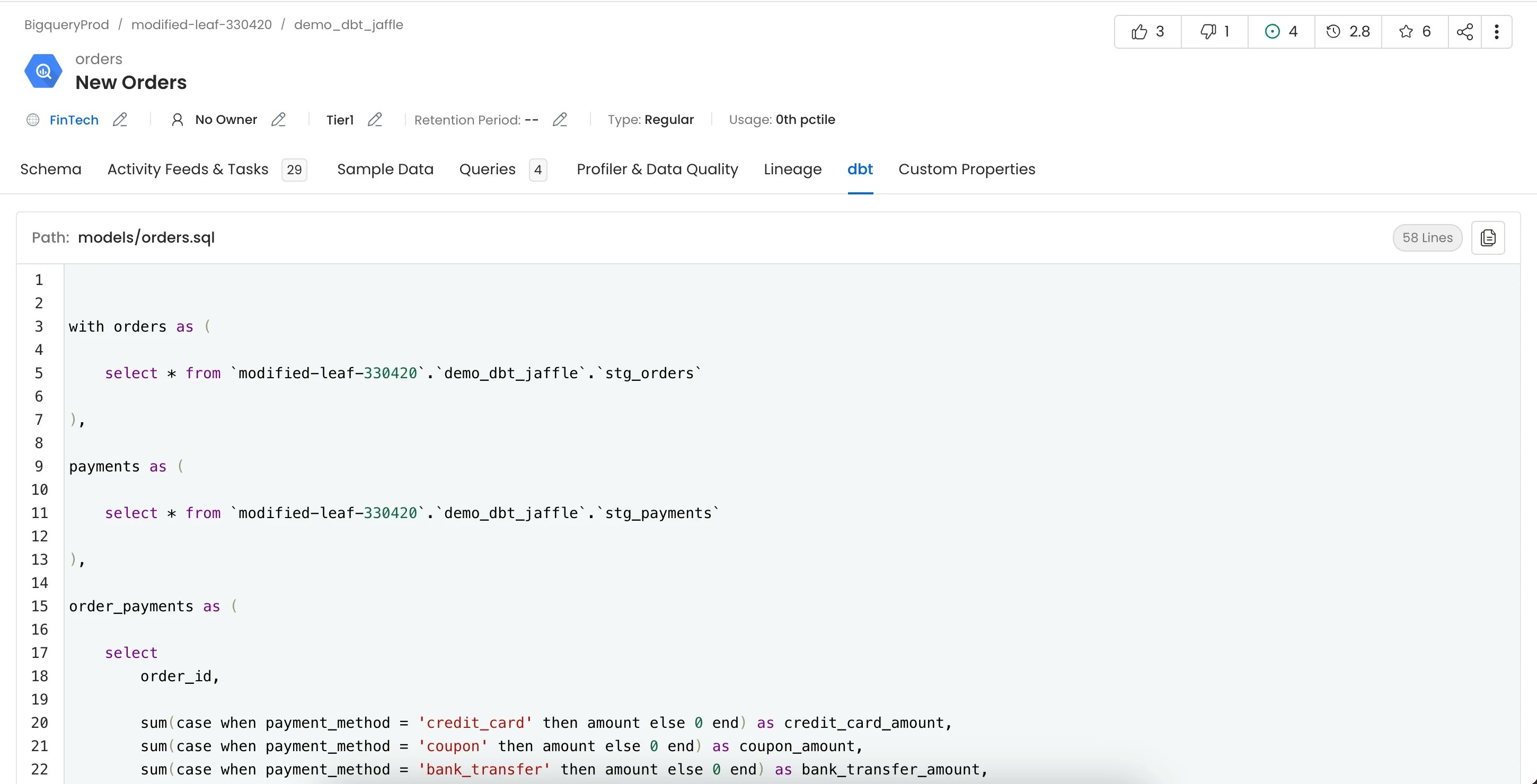
This ingestion enriches the Table Entity and **populates the dbt tab on the Table Entity page**, providing a consolidated view of dbt-related context for each table.

<Note>
  No additional manual configuration is required in the UI after a successful dbt ingestion run.
</Note>

<img src="https://mintcdn.com/openmetadata/cpYhk0oyurO_-Qc1/public/images/features/ingestion/workflows/dbt/dbt-features/dbt-query.webp?fit=max&auto=format&n=cpYhk0oyurO_-Qc1&q=85&s=9dd17afc5db94f9e0f258534f9619196" alt="dbt" width="2900" height="1480" data-path="public/images/features/ingestion/workflows/dbt/dbt-features/dbt-query.webp" />

We can create a workflow that will obtain the dbt information from the dbt files and feed it to OpenMetadata. The dbt Ingestion will be in charge of obtaining this data.

### 1. Add a dbt Ingestion

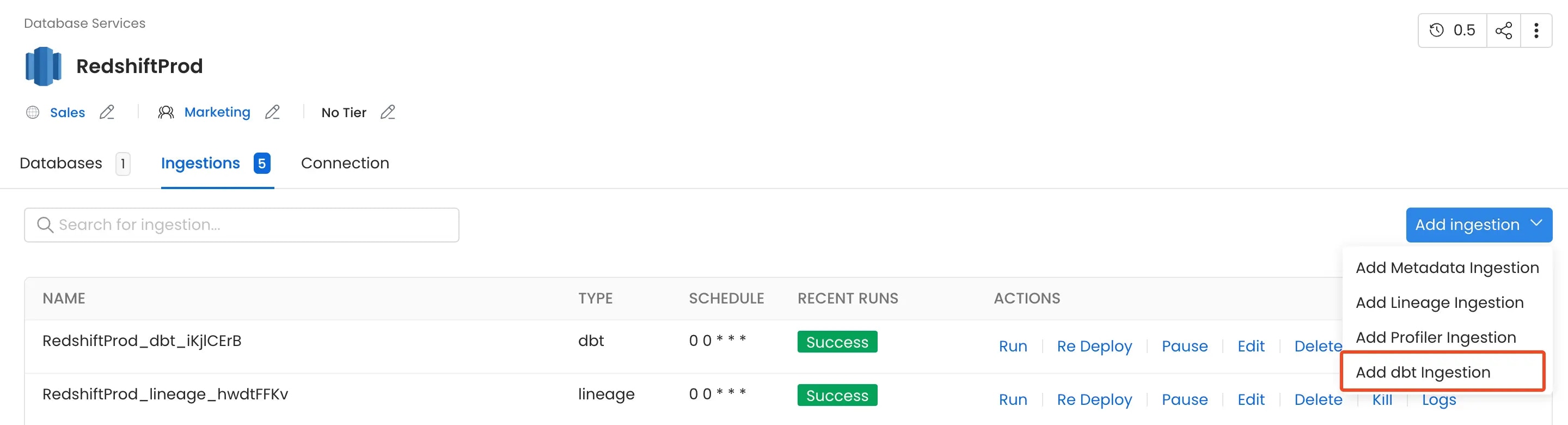
From the Service Page, go to the Ingestions tab to add a new ingestion and click on Add dbt Ingestion.
<img src="https://mintcdn.com/openmetadata/cpYhk0oyurO_-Qc1/public/images/features/ingestion/workflows/dbt/add-ingestion.webp?fit=max&auto=format&n=cpYhk0oyurO_-Qc1&q=85&s=87652a2e2af38cfd84c9dfa8c0ce62cf" alt="add-ingestion" width="2880" height="780" data-path="public/images/features/ingestion/workflows/dbt/add-ingestion.webp" />

### 2. Configure the dbt Ingestion

Here you can enter the configuration required for OpenMetadata to get the dbt files (manifest.json, catalog.json and run\_results.json) required to extract the dbt metadata.
Select any one of the source from below from where the dbt files can be fetched:
<Tip>
  Only the `manifest.json` file is required for dbt ingestion.
</Tip>

### dbt Core

#### AWS S3 Buckets

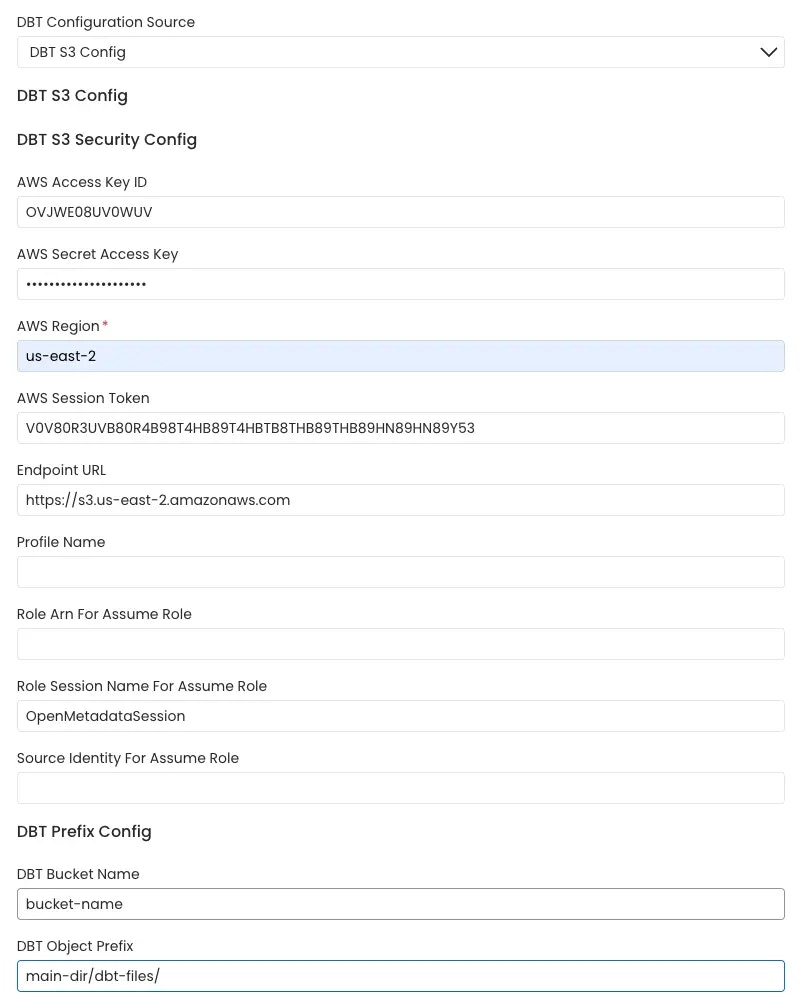
OpenMetadata connects to the AWS s3 bucket via the credentials provided and scans the AWS s3 buckets for `manifest.json`, `catalog.json` and `run_results.json` files.

The name of the s3 bucket and prefix path to the folder in which the dbt files are stored can be provided. In the case where these parameters are not provided all the buckets are scanned for the files.

Follow the link [here](/v1.12.x/connectors/database/dbt/setup-multiple-dbt-projects) for instructions on setting up multiple dbt projects.
<img src="https://mintcdn.com/openmetadata/cpYhk0oyurO_-Qc1/public/images/features/ingestion/workflows/dbt/aws-s3.webp?fit=max&auto=format&n=cpYhk0oyurO_-Qc1&q=85&s=90ce0bd03b43ef2310c290d7bbad556d" alt="aws-s3-bucket" width="806" height="1008" data-path="public/images/features/ingestion/workflows/dbt/aws-s3.webp" />

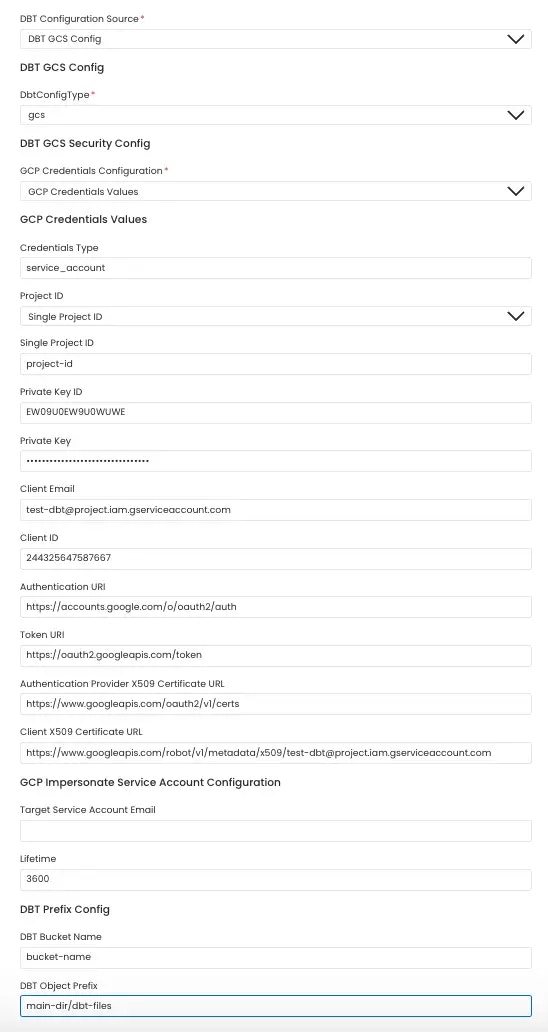
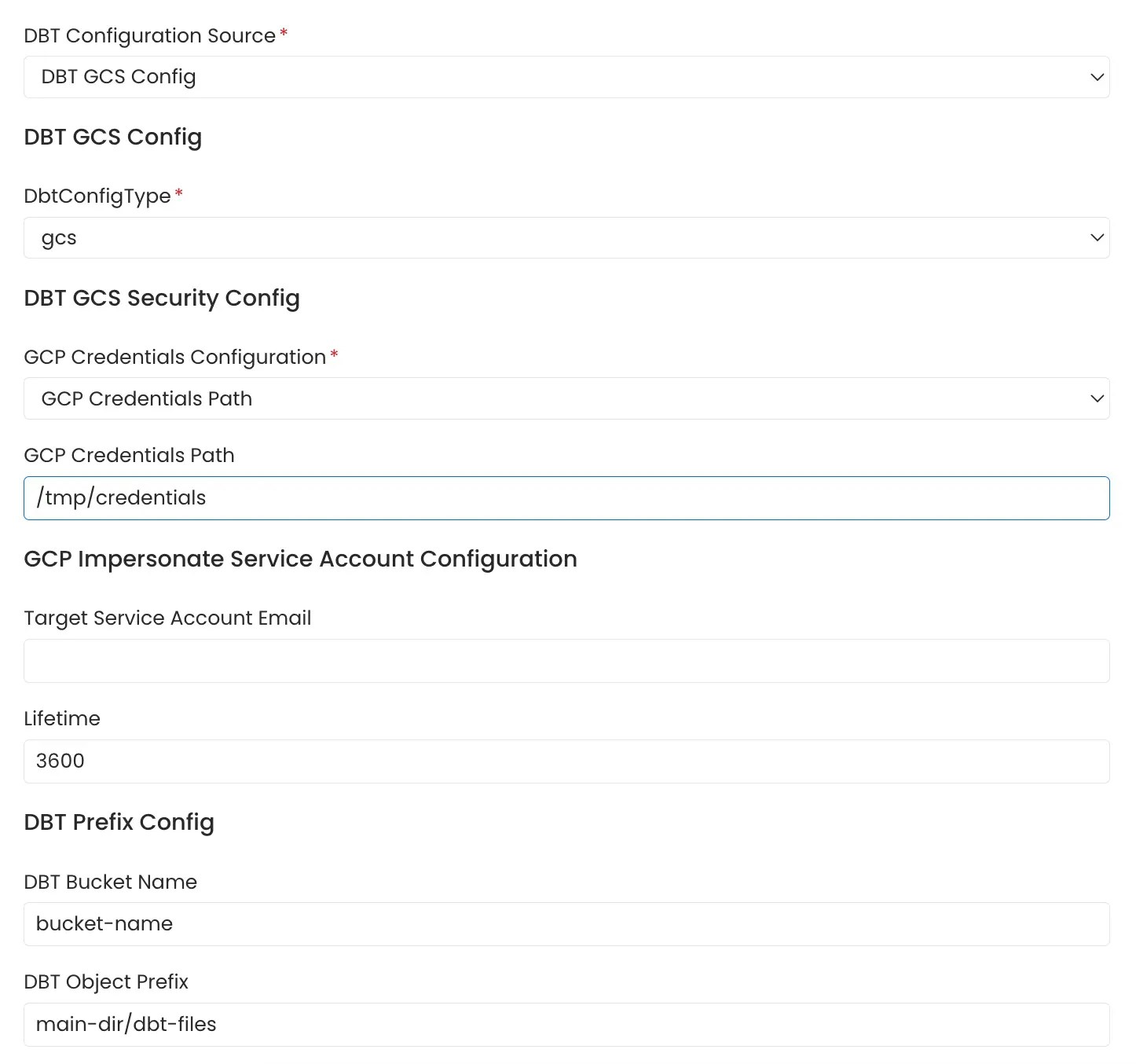
#### Google Cloud Storage Buckets

OpenMetadata connects to the GCS bucket via the credentials provided and scans the gcp buckets for `manifest.json`, `catalog.json` and `run_results.json` files.

The name of the GCS bucket and prefix path to the folder in which the dbt files are stored can be provided. In the case where these parameters are not provided all the buckets are scanned for the files.

GCS credentials can be stored in two ways:

**1.** Entering the credentials directly into the form

Follow the link [here](/v1.12.x/connectors/database/dbt/setup-multiple-dbt-projects) for instructions on setting up multiple dbt projects.

<img src="https://mintcdn.com/openmetadata/cpYhk0oyurO_-Qc1/public/images/features/ingestion/workflows/dbt/gcp-bucket-form.webp?fit=max&auto=format&n=cpYhk0oyurO_-Qc1&q=85&s=d1234d9e2886a263fbabf06295c04e9d" alt="gcp-storage-bucket-form" width="548" height="1032" data-path="public/images/features/ingestion/workflows/dbt/gcp-bucket-form.webp" />

**2.** Entering the path of file in which the GCS bucket credentials are stored.
<img src="https://mintcdn.com/openmetadata/cpYhk0oyurO_-Qc1/public/images/features/ingestion/workflows/dbt/gcp-bucket-path.webp?fit=max&auto=format&n=cpYhk0oyurO_-Qc1&q=85&s=729601eb7f4313ca7d83786f93dd8253" alt="gcp-storage-bucket-path" width="1446" height="1354" data-path="public/images/features/ingestion/workflows/dbt/gcp-bucket-path.webp" />

For more information on Google Cloud Storage authentication click [here](https://cloud.google.com/docs/authentication/getting-started#create-service-account-console).

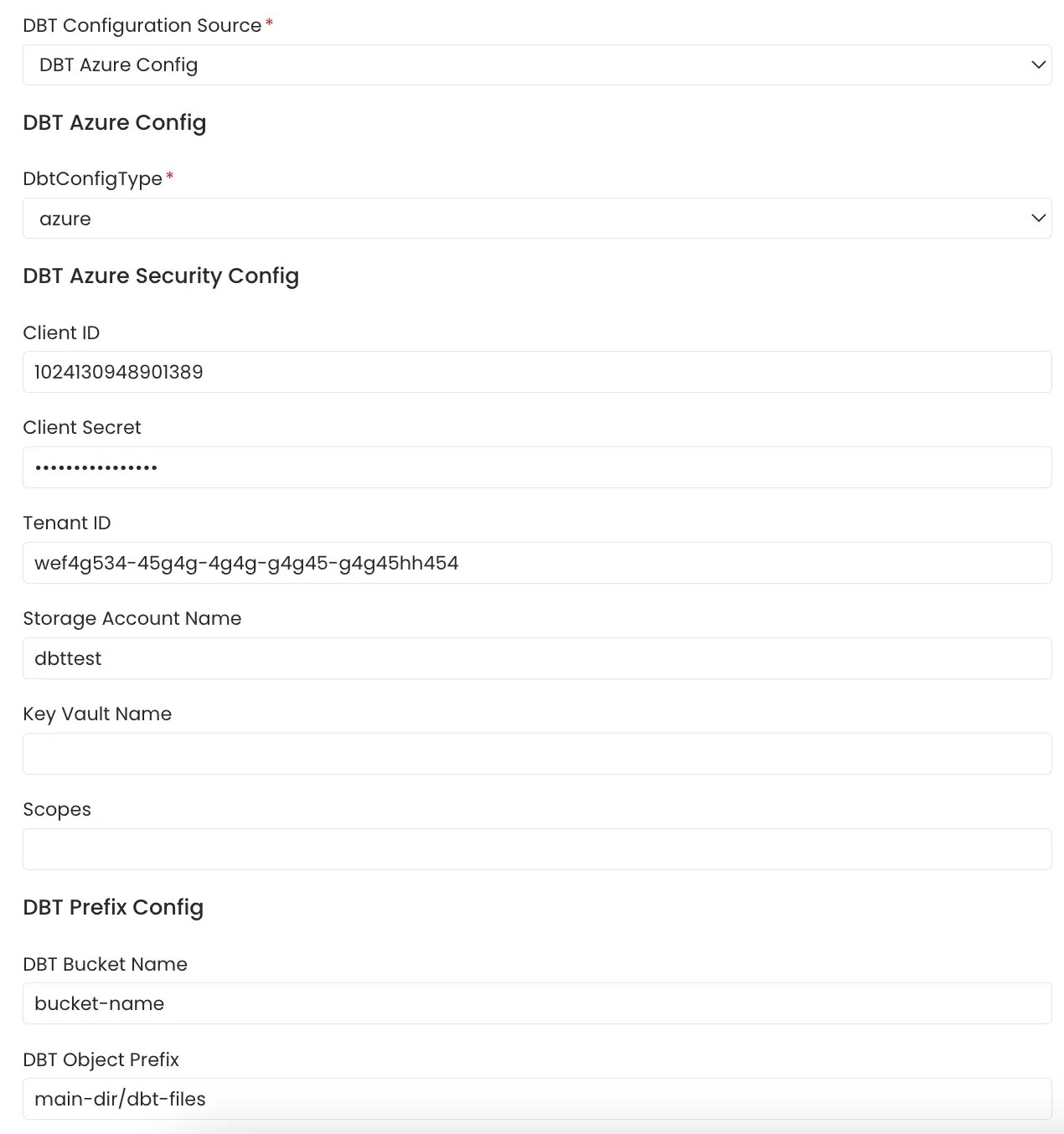
#### Azure Storage Buckets

OpenMetadata connects to Azure Storage using the credentials provided and scans the configured storage containers for `manifest.json`, `catalog.json` and `run_results.json` files.

The Azure Storage account, container name, and optional folder (prefix) path where the dbt files are stored can be provided. If these parameters are not provided, all accessible containers in the storage account are scanned for the files.

Follow the link [here](/v1.12.x/connectors/database/dbt/setup-multiple-dbt-projects) for instructions on setting up multiple dbt projects.
<img src="https://mintcdn.com/openmetadata/cpYhk0oyurO_-Qc1/public/images/features/ingestion/workflows/dbt/azure-config.webp?fit=max&auto=format&n=cpYhk0oyurO_-Qc1&q=85&s=6129da26e8e195b12f6a42f4e694bd9d" alt="azure-bucket" width="1270" height="1354" data-path="public/images/features/ingestion/workflows/dbt/azure-config.webp" />

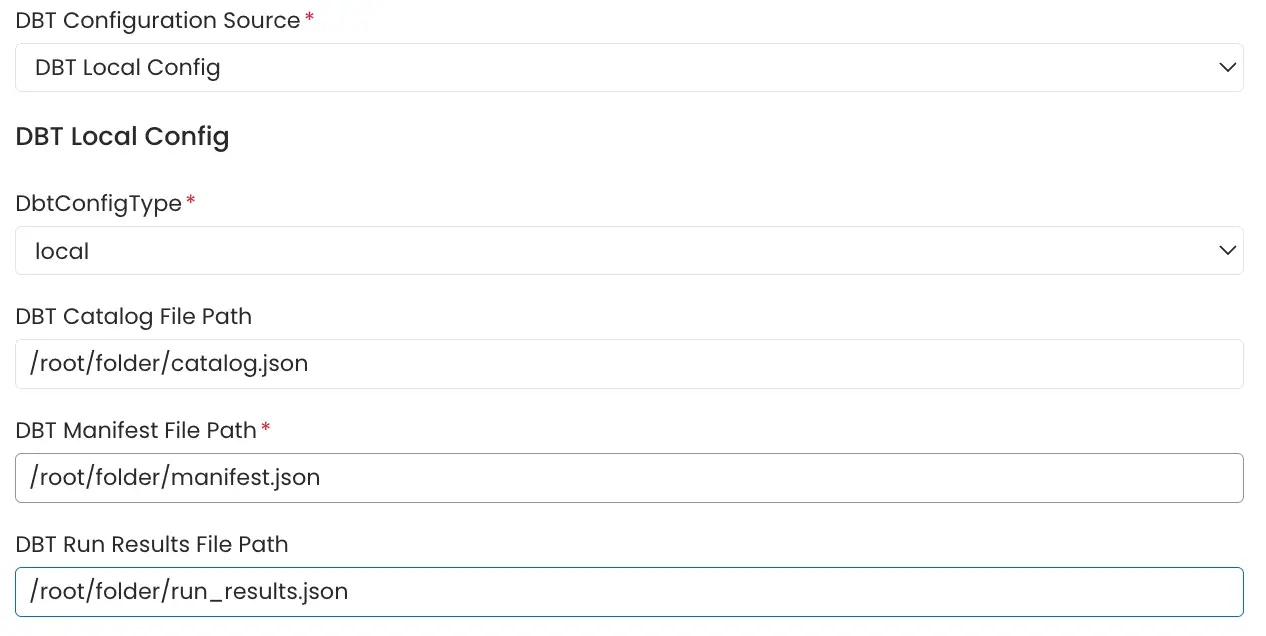
#### Local Storage

Path of the `manifest.json`, `catalog.json` and `run_results.json` files stored in the local system or in the container in which OpenMetadata server is running can be directly provided.
<img src="https://mintcdn.com/openmetadata/cpYhk0oyurO_-Qc1/public/images/features/ingestion/workflows/dbt/local-storage.webp?fit=max&auto=format&n=cpYhk0oyurO_-Qc1&q=85&s=3e7412081e30c036845f5e2ad7b7513f" alt="local-storage" width="1266" height="636" data-path="public/images/features/ingestion/workflows/dbt/local-storage.webp" />

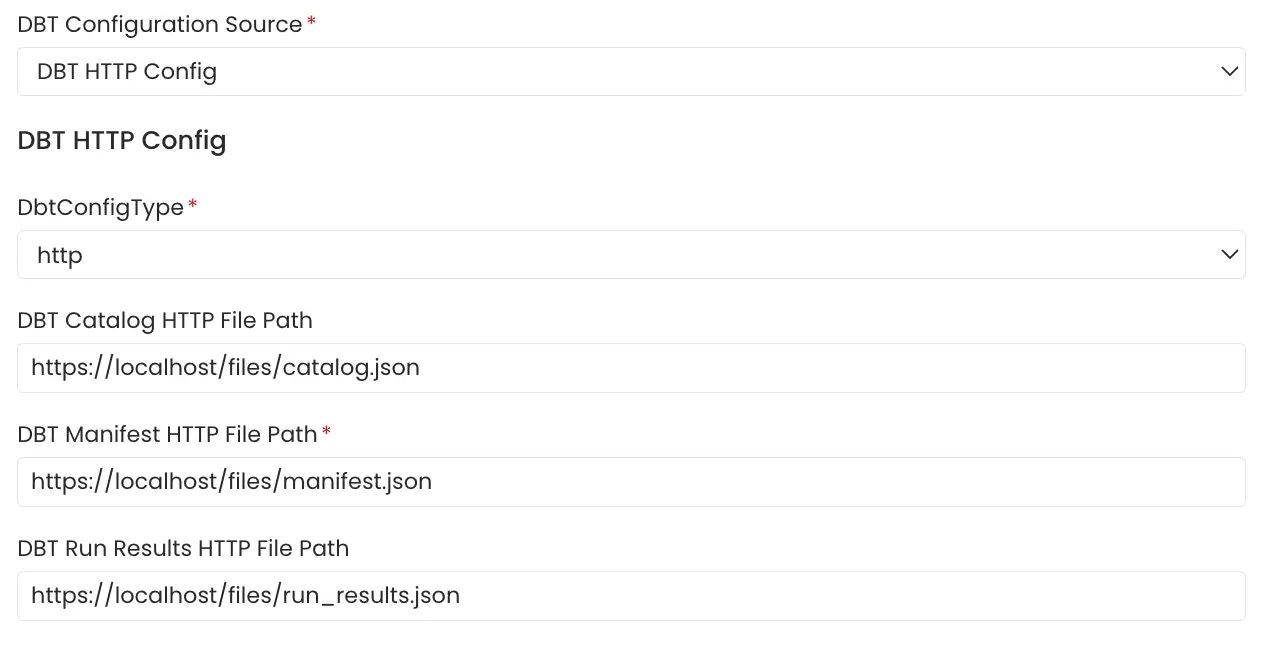
#### File Server

File server path of the `manifest.json`, `catalog.json` and `run_results.json` files stored on a file server directly provided.
<img src="https://mintcdn.com/openmetadata/cpYhk0oyurO_-Qc1/public/images/features/ingestion/workflows/dbt/file_server.webp?fit=max&auto=format&n=cpYhk0oyurO_-Qc1&q=85&s=d603dcd6273ab92a1ee622611fde8ef9" alt="file-server" width="1278" height="646" data-path="public/images/features/ingestion/workflows/dbt/file_server.webp" />

### dbt Cloud

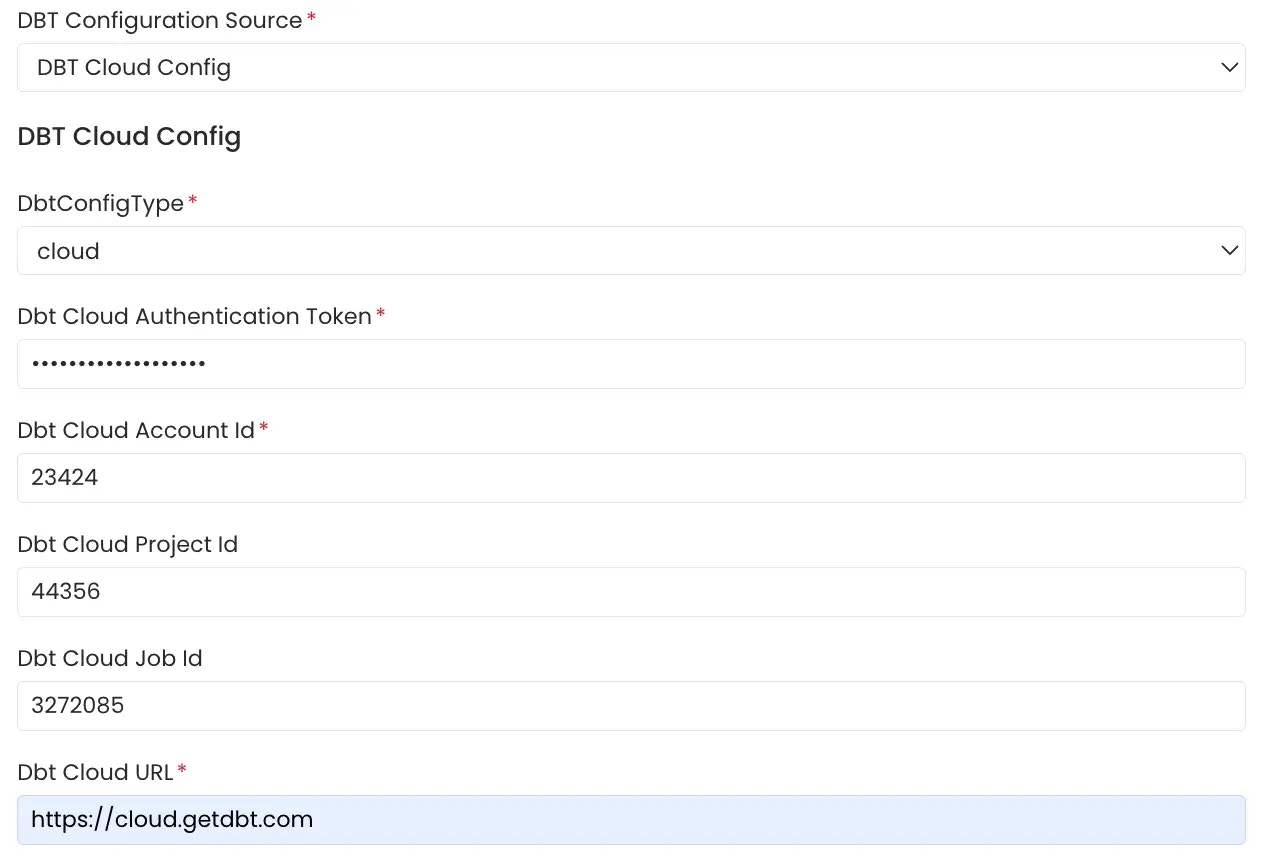
Click on the the link [here](https://docs.getdbt.com/guides/getting-started) for getting started with dbt cloud account setup if not done already.
The APIs need to be authenticated using an Authentication Token. Follow the link [here](https://docs.getdbt.com/docs/dbt-cloud-apis/service-tokens) to generate an authentication token for your dbt cloud account.

The `Account Viewer` permission is the minimum requirement for the dbt cloud token.
<Tip>
  The dbt Cloud workflow leverages the [dbt Cloud v2](https://docs.getdbt.com/dbt-cloud/api-v2#/) APIs to retrieve dbt run artifacts (manifest.json, catalog.json, and run\_results.json) and ingest the dbt metadata.

  It uses the [/runs](https://docs.getdbt.com/dbt-cloud/api-v2#/operations/List%20Runs) API to obtain the most recent successful dbt run, filtering by account\_id, project\_id and job\_id if specified. The artifacts from this run are then collected using the [/artifacts](https://docs.getdbt.com/dbt-cloud/api-v2#/operations/List%20Run%20Artifacts) API.

  Refer to the code [here](https://github.com/open-metadata/OpenMetadata/blob/main/ingestion/src/metadata/ingestion/source/database/dbt/dbt_config.py#L142)
</Tip>

<img src="https://mintcdn.com/openmetadata/cpYhk0oyurO_-Qc1/public/images/features/ingestion/workflows/dbt/dbt-cloud.webp?fit=max&auto=format&n=cpYhk0oyurO_-Qc1&q=85&s=eb3e651ab441c0dee4a1de70fa2a4767" alt="dbt-cloud" width="1270" height="868" data-path="public/images/features/ingestion/workflows/dbt/dbt-cloud.webp" />

<Tip>
  The fields for `Dbt Cloud Account Id`, `Dbt Cloud Project Id` and `Dbt Cloud Job Id` should be numeric values.

  To know how to get the values for `Dbt Cloud Account Id`, `Dbt Cloud Project Id` and `Dbt Cloud Job Id` fields check [here](/v1.12.x/connectors/database/dbt/run-dbt-workflow-externally).
</Tip>

### 3. Schedule and Deploy

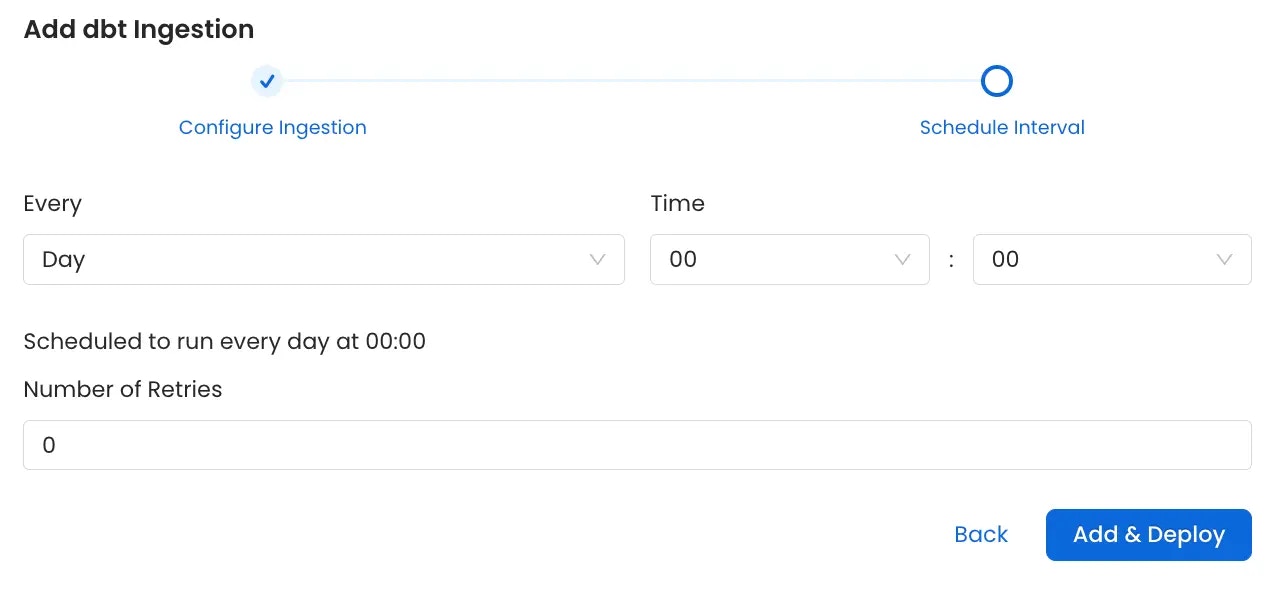
After clicking Next, you will be redirected to the Scheduling form. This will be the same as the Metadata Ingestion. Select your desired schedule and click on Deploy to find the lineage pipeline being added to the Service Ingestions.

<img src="https://mintcdn.com/openmetadata/cpYhk0oyurO_-Qc1/public/images/features/ingestion/workflows/dbt/schedule-and-deploy.webp?fit=max&auto=format&n=cpYhk0oyurO_-Qc1&q=85&s=36ecd0708169ea094d8137d749ce272e" alt="schedule-and-deploy" width="1282" height="590" data-path="public/images/features/ingestion/workflows/dbt/schedule-and-deploy.webp" />