> ## Documentation Index
> Fetch the complete documentation index at: https://docs.open-metadata.org/llms.txt
> Use this file to discover all available pages before exploring further.
# Ingest Glossary from dbt | Official Documentation
> Import glossary definitions from dbt projects to align semantic metadata with business context and governance.
# Ingest Glossary from dbt
Ingest the table and column level glossary terms from `manifest.json` file
## Requirements
For dbt Glossary, Glossary terms must be created or present in OpenMetadata beforehand for data ingestion to work.
## Steps for ingesting dbt Glossary
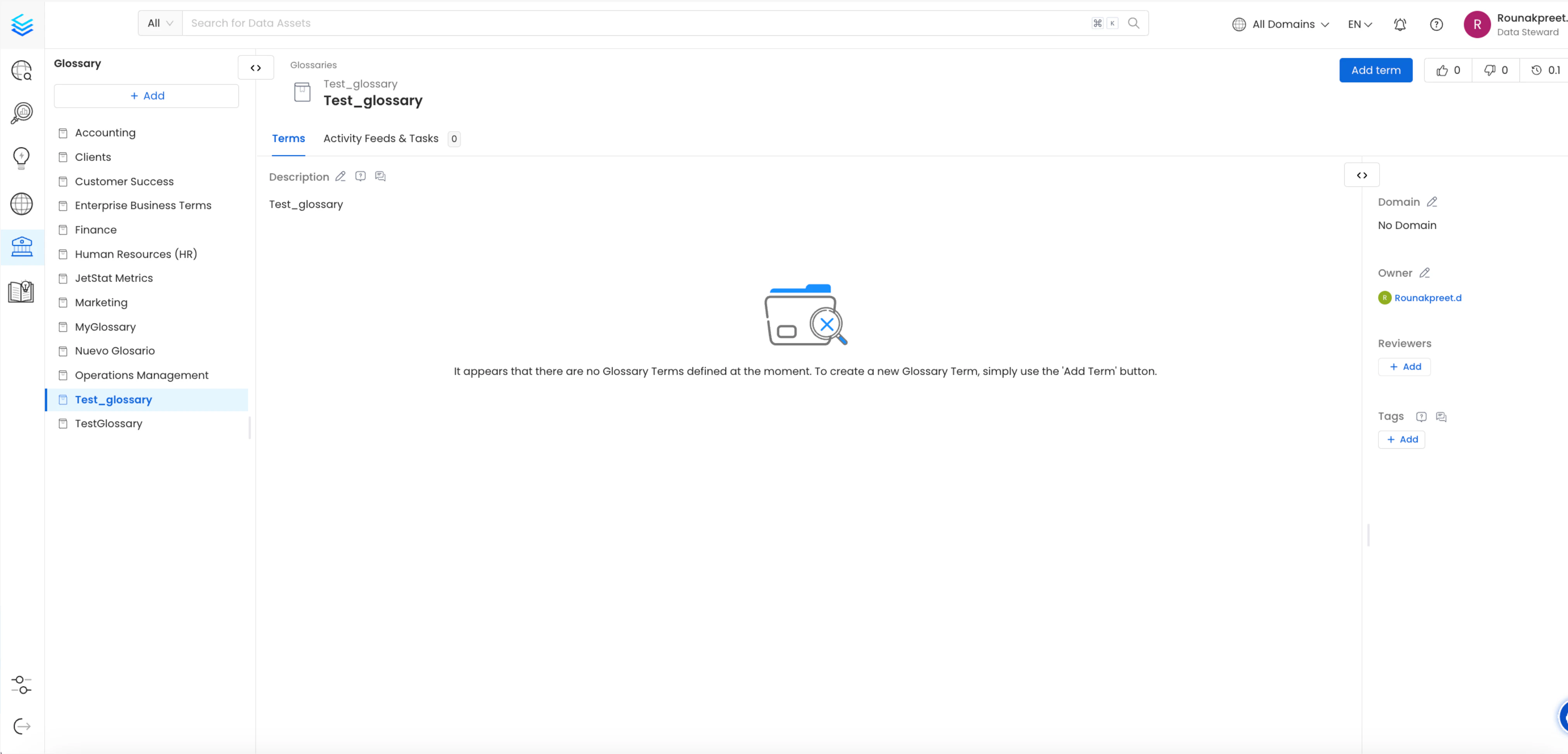
### 1. Create a Glossary at OpenMetadata or Select a previously added glossary
A Glossary Term is a preferred terminology for a concept. In a Glossary term, you can add tags, synonyms, related terms to build a conceptual semantic graph, and also add reference links.
For details on creating glossary terms, refer to the [OpenMetadata documentation](/v1.12.x/how-to-guides/data-governance/glossary/create-terms)
To view created Glossary Terms, navigate to the Glossary section within OpenMetadata `govern->glossary->glossary_name->glossary_term_name`
OpenMetadata also supports creating nested Glossary Terms, allowing you to organize them hierarchically and seamlessly ingest them into dbt.
 ### 2. Add Table-Level Glossary term information in schema.yml file
To associate glossary terms with specific tables in your dbt model, you'll need their Fully Qualified Names (FQNs) within OpenMetadata.
#### Steps to Get Glossary Term FQNs:
1. Navigate to the desired glossary term in OpenMetadata's glossary section.
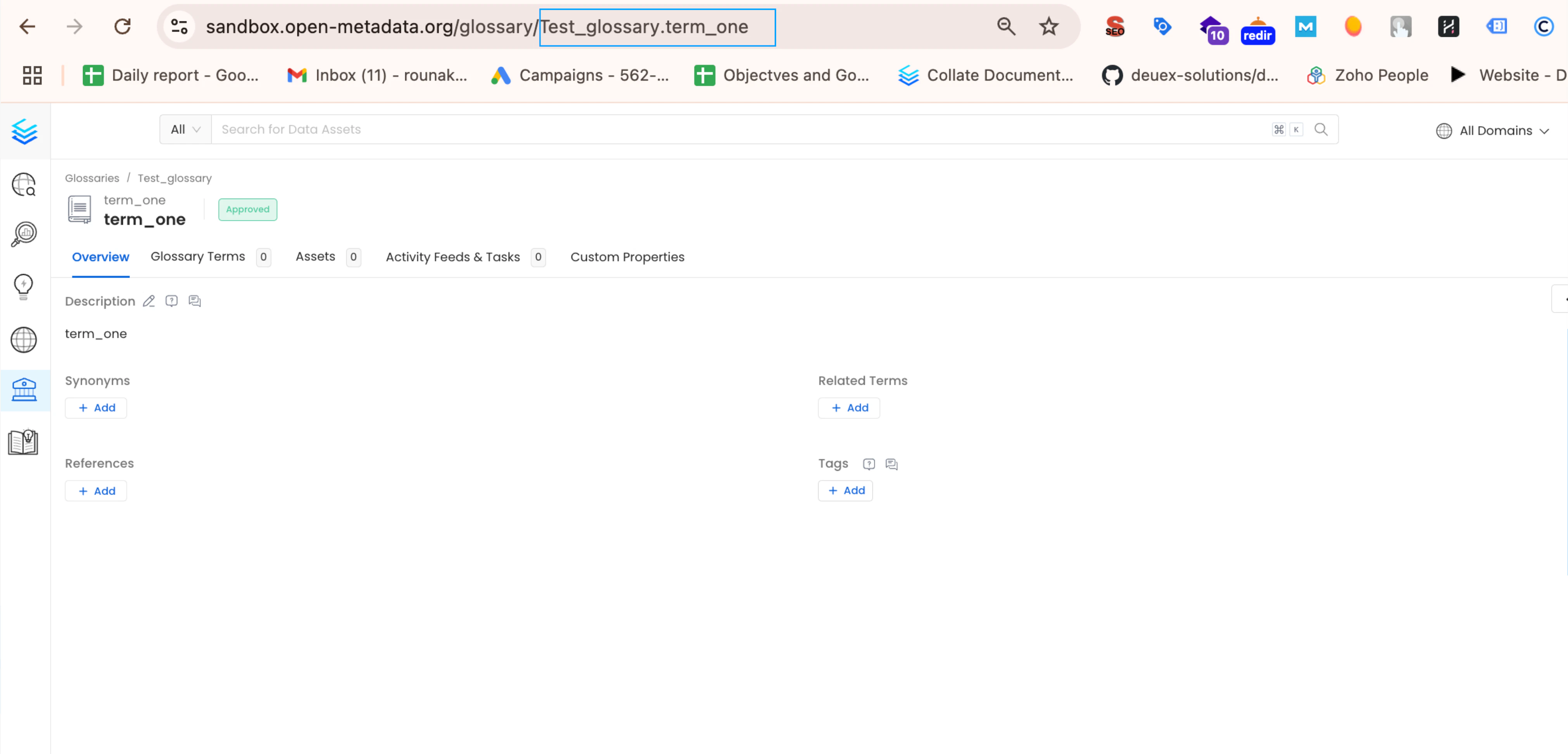
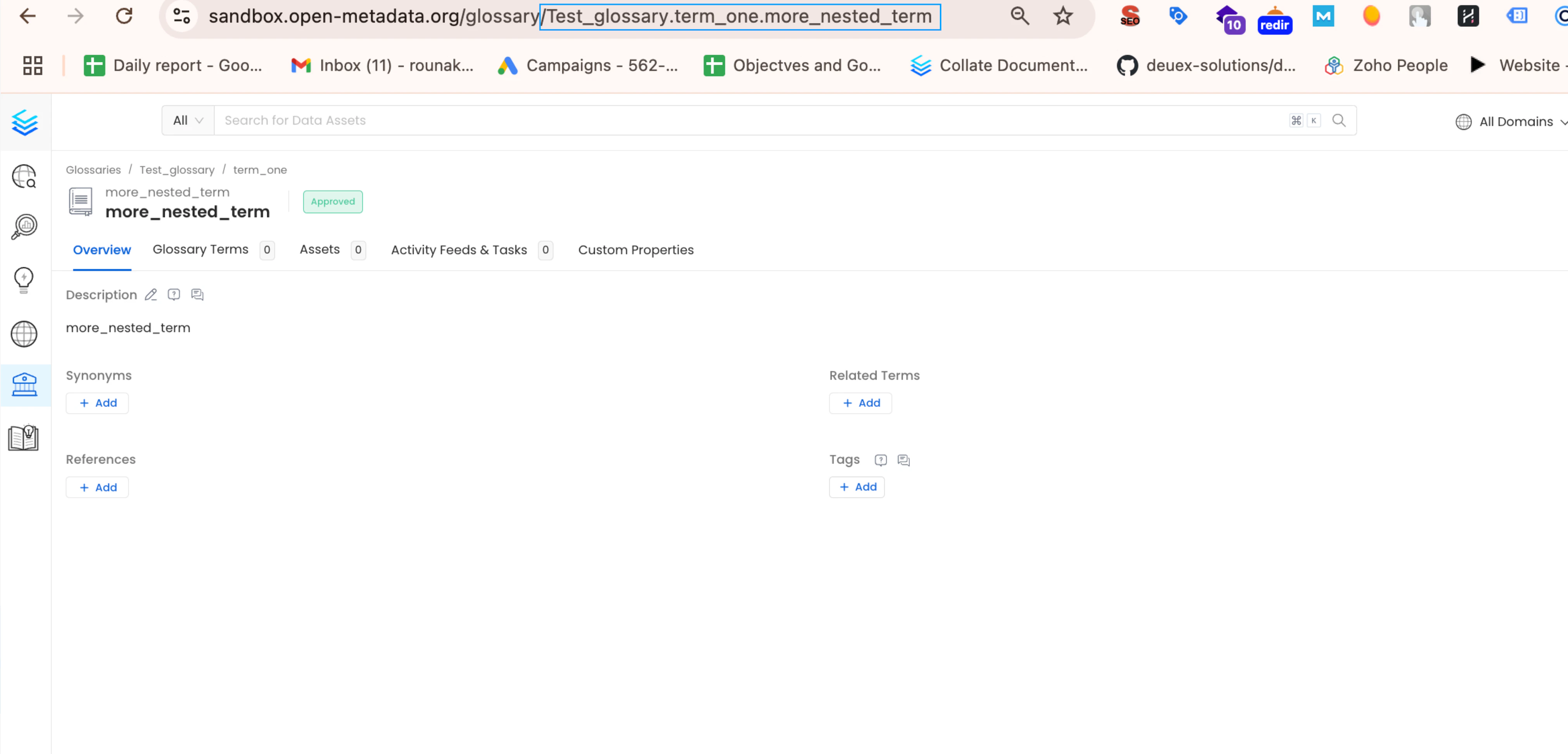
2. The glossary term's details page will display its FQN e.g. `Glossary_name.glossary_term` in the url like `your-uri/glossary/Glossary_name.glossary_term`.
#### Example
Suppose you want to add the glossary terms `term_one` (FQN: `Test_Glossary.term_one`) and `more_nested_term` (FQN: `Test_Glossary.term_two.nested_term.more_nested_term`) to the customers table in your dbt model.
To get FQN for `term_one` (`Test_Glossary.term_one`), navigate to `govern->glossary->Test_Glossary->term_one`.
And for `more_nested_term` (`Test_Glossary.term_two.nested_term.more_nested_term`), navigate to `govern->glossary->Test_Glossary->term_two->nested_term->more_nested_term`.
you can see the current url containing the glossary term FQNs as **[https://localhost:8585/glossary/\`Test\_Glossary.term\_two.nested\_term.more\_nested\_term\`](https://localhost:8585/glossary/`Test_Glossary.term_two.nested_term.more_nested_term`)**
### 2. Add Table-Level Glossary term information in schema.yml file
To associate glossary terms with specific tables in your dbt model, you'll need their Fully Qualified Names (FQNs) within OpenMetadata.
#### Steps to Get Glossary Term FQNs:
1. Navigate to the desired glossary term in OpenMetadata's glossary section.
2. The glossary term's details page will display its FQN e.g. `Glossary_name.glossary_term` in the url like `your-uri/glossary/Glossary_name.glossary_term`.
#### Example
Suppose you want to add the glossary terms `term_one` (FQN: `Test_Glossary.term_one`) and `more_nested_term` (FQN: `Test_Glossary.term_two.nested_term.more_nested_term`) to the customers table in your dbt model.
To get FQN for `term_one` (`Test_Glossary.term_one`), navigate to `govern->glossary->Test_Glossary->term_one`.
And for `more_nested_term` (`Test_Glossary.term_two.nested_term.more_nested_term`), navigate to `govern->glossary->Test_Glossary->term_two->nested_term->more_nested_term`.
you can see the current url containing the glossary term FQNs as **[https://localhost:8585/glossary/\`Test\_Glossary.term\_two.nested\_term.more\_nested\_term\`](https://localhost:8585/glossary/`Test_Glossary.term_two.nested_term.more_nested_term`)**
 In your dbt schema.yml file for the `customers` table model, add the Glossary Term FQNs under `model->name->meta->openmetadata->glossary`
The format should be a list of strings, like this: ` [ 'Test_Glossary.term_one', 'Test_Glossary.term_two.nested_term.more_nested_term' ]`.
For details on dbt meta follow the link [here](https://docs.getdbt.com/reference/resource-configs/meta)
```yml theme={null}
models:
- name: customers
meta:
openmetadata:
glossary: [
'Test_Glossary.term_one',
'Test_Glossary.term_two.nested_term.more_nested_term',
]
description: This table has basic information about a customer, as well as some derived facts based on a customer's orders
columns:
- name: customer_id
description: This is a unique identifier for a customer
tests:
- unique
- not_null
```
After adding the Glossary term information to your schema.yml file, run your dbt workflow.
The generated `manifest.json` file will then include the FQNs under `node_name->meta->openmetadata->glossary` as `[ 'Test_Glossary.term_one', 'Test_Glossary.term_two.nested_term.more_nested_term' ]`
```json theme={null}
"model.jaffle_shop.customers": {
"raw_sql": "sample_raw_sql",
"compiled": true,
"resource_type": "model",
"depends_on": {},
"database": "dev",
"schema": "dbt_jaffle",
"config": {
"enabled": true,
"alias": null,
"meta": {
"openmetadata": {
"glossary": [
"Test_Glossary.term_one",
"Test_Glossary.term_two.nested_term.more_nested_term"
]
}
}
}
}
```
### 3. Add Column-Level Glossary term information in `schema.yml` file
To associate a glossary term with a specific column in your dbt model, follow these steps:
1. Locate the `customer_id` column within the `customers` table model in your `schema.yml` file.
2. Under the `customer_id` column definition, add the glossary term FQNs under `model->name->columns->column_name->meta->openmetadata->glossary` as ` [ 'Test_Glossary.term_two.nested_term' ]`.
```yml theme={null}
models:
- name: customers
meta:
openmetadata:
glossary: [
'Test_Glossary.term_one',
'Test_Glossary.term_two.nested_term.more_nested_term',
]
description: This table has basic information about a customer, as well as some derived facts based on a customer's orders
columns:
- name: customer_id
description: This is a unique identifier for a customer
meta:
openmetadata:
glossary: [
'Test_Glossary.term_two.nested_term'
]
tests:
- unique
- not_null
```
After adding the Glossary term information to your schema.yml file, run your dbt workflow.
The generated `manifest.json` file will then include the FQNs under `node_name->columns->column_name->meta->openmetadata->glossary` as `[ 'Test_Glossary.term_two.nested_term' ]`
```json theme={null}
"model.jaffle_shop.customers": {
"raw_sql": "sample_raw_sql",
"compiled": true,
"resource_type": "model",
"depends_on": {},
"database": "dev",
"schema": "dbt_jaffle",
"columns": {
"customer_id": {
"name": "customer_id",
"description": "This is a unique identifier for a customer",
"meta": {
"openmetadata": {
"glossary": [
"Test_Glossary.term_two.nested_term"
]
}
},
"data_type": null,
"constraints": [],
"quote": null,
"tags": []
},
}
}
```
### 4. Viewing the Glossary term on tables and columns
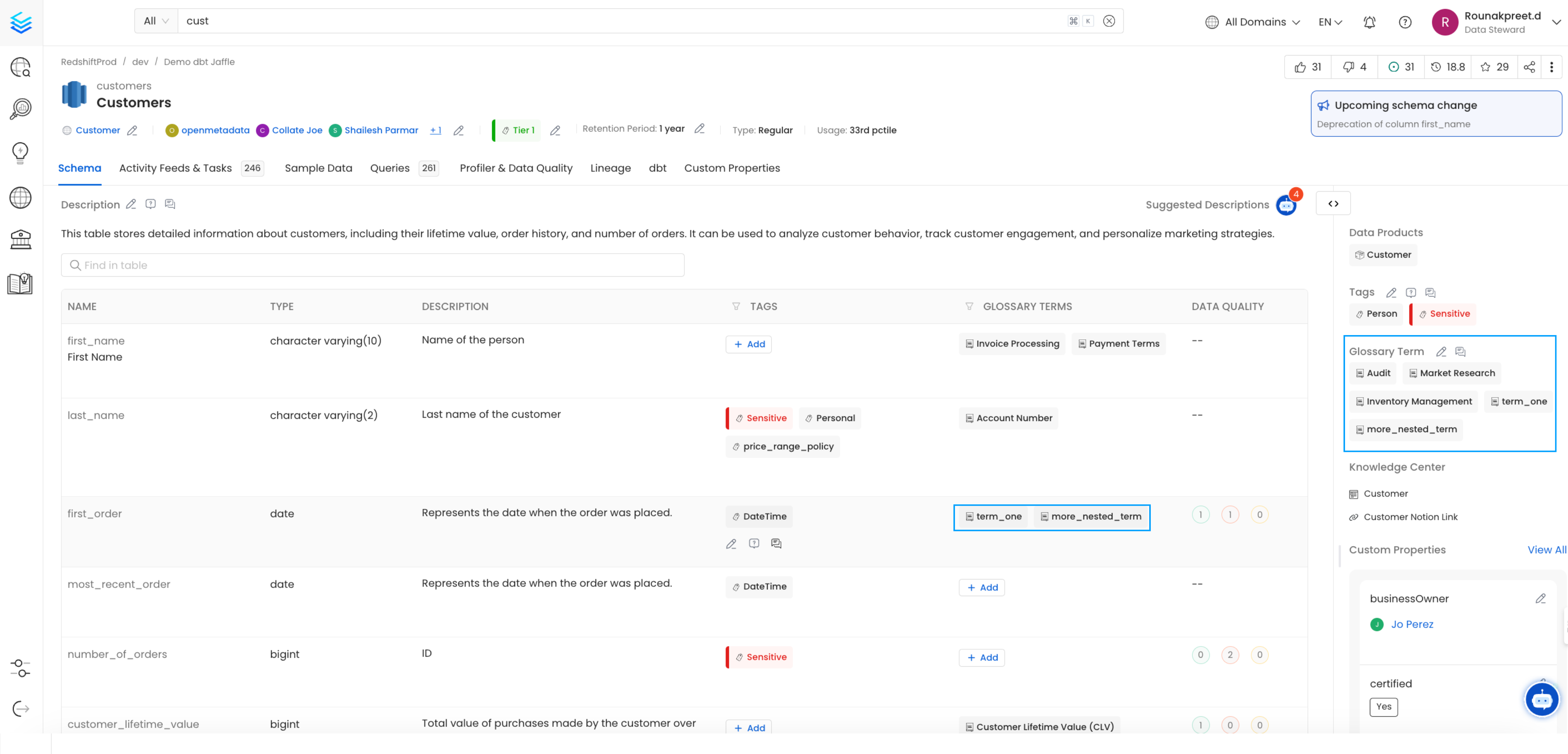
Table and Column level Glossary term ingested from dbt can be viewed on the node in OpenMetadata
In your dbt schema.yml file for the `customers` table model, add the Glossary Term FQNs under `model->name->meta->openmetadata->glossary`
The format should be a list of strings, like this: ` [ 'Test_Glossary.term_one', 'Test_Glossary.term_two.nested_term.more_nested_term' ]`.
For details on dbt meta follow the link [here](https://docs.getdbt.com/reference/resource-configs/meta)
```yml theme={null}
models:
- name: customers
meta:
openmetadata:
glossary: [
'Test_Glossary.term_one',
'Test_Glossary.term_two.nested_term.more_nested_term',
]
description: This table has basic information about a customer, as well as some derived facts based on a customer's orders
columns:
- name: customer_id
description: This is a unique identifier for a customer
tests:
- unique
- not_null
```
After adding the Glossary term information to your schema.yml file, run your dbt workflow.
The generated `manifest.json` file will then include the FQNs under `node_name->meta->openmetadata->glossary` as `[ 'Test_Glossary.term_one', 'Test_Glossary.term_two.nested_term.more_nested_term' ]`
```json theme={null}
"model.jaffle_shop.customers": {
"raw_sql": "sample_raw_sql",
"compiled": true,
"resource_type": "model",
"depends_on": {},
"database": "dev",
"schema": "dbt_jaffle",
"config": {
"enabled": true,
"alias": null,
"meta": {
"openmetadata": {
"glossary": [
"Test_Glossary.term_one",
"Test_Glossary.term_two.nested_term.more_nested_term"
]
}
}
}
}
```
### 3. Add Column-Level Glossary term information in `schema.yml` file
To associate a glossary term with a specific column in your dbt model, follow these steps:
1. Locate the `customer_id` column within the `customers` table model in your `schema.yml` file.
2. Under the `customer_id` column definition, add the glossary term FQNs under `model->name->columns->column_name->meta->openmetadata->glossary` as ` [ 'Test_Glossary.term_two.nested_term' ]`.
```yml theme={null}
models:
- name: customers
meta:
openmetadata:
glossary: [
'Test_Glossary.term_one',
'Test_Glossary.term_two.nested_term.more_nested_term',
]
description: This table has basic information about a customer, as well as some derived facts based on a customer's orders
columns:
- name: customer_id
description: This is a unique identifier for a customer
meta:
openmetadata:
glossary: [
'Test_Glossary.term_two.nested_term'
]
tests:
- unique
- not_null
```
After adding the Glossary term information to your schema.yml file, run your dbt workflow.
The generated `manifest.json` file will then include the FQNs under `node_name->columns->column_name->meta->openmetadata->glossary` as `[ 'Test_Glossary.term_two.nested_term' ]`
```json theme={null}
"model.jaffle_shop.customers": {
"raw_sql": "sample_raw_sql",
"compiled": true,
"resource_type": "model",
"depends_on": {},
"database": "dev",
"schema": "dbt_jaffle",
"columns": {
"customer_id": {
"name": "customer_id",
"description": "This is a unique identifier for a customer",
"meta": {
"openmetadata": {
"glossary": [
"Test_Glossary.term_two.nested_term"
]
}
},
"data_type": null,
"constraints": [],
"quote": null,
"tags": []
},
}
}
```
### 4. Viewing the Glossary term on tables and columns
Table and Column level Glossary term ingested from dbt can be viewed on the node in OpenMetadata