> ## Documentation Index
> Fetch the complete documentation index at: https://docs.open-metadata.org/llms.txt
> Use this file to discover all available pages before exploring further.
# Ingest Lineage from dbt | Official Documentation
> Ingest dbt lineage to build upstream and downstream traceability for models, columns, and data products.
# Ingest Lineage from dbt
Ingest the lineage information from dbt `manifest.json` file into OpenMetadata.
OpenMetadata extracts the lineage information from the `depends_on` and `compiled_query/compiled_code` keys from the manifest file.
To capture lineage, the `compiled_code` field must be present in the `manifest.json` file.
* If `compiled_code` is missing, lineage will **not** be captured for that node.
* To ensure `compiled_code` is populated in your dbt manifest, run the following commands in your dbt project:
* `dbt compile`
* `dbt docs generate`
### 1. Lineage information from dbt "depends\_on" key
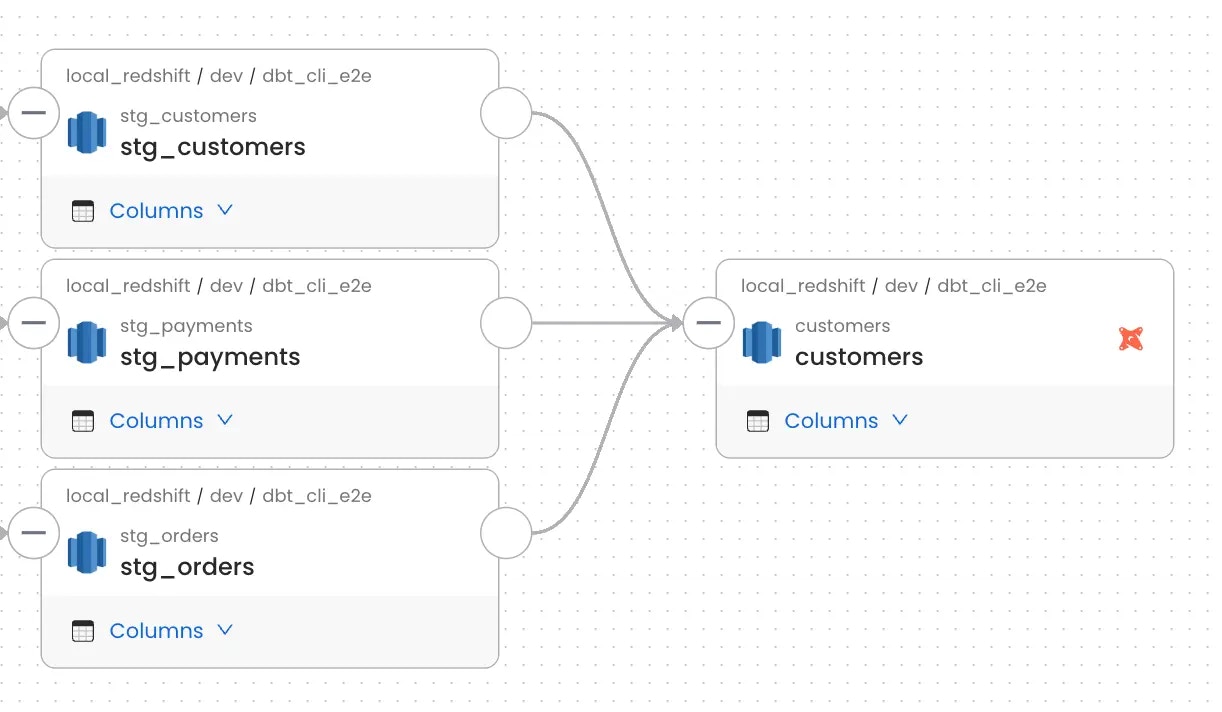
Openmetadata fetches the lineage information from the `manifest.json` file. Below is a sample `manifest.json` file node containing lineage information under `node_name->depends_on->nodes`.
```json theme={null}
"model.jaffle_shop.customers": {
"compiled": true,
"resource_type": "model",
"depends_on": {
"macros": [],
"nodes": [
"model.jaffle_shop.stg_customers",
"model.jaffle_shop.stg_orders",
"model.jaffle_shop.stg_payments"
]
}
}
```
For the above case the lineage will be created as shown in below:
 ### 2. Lineage information from dbt queries
Openmetadata fetches the dbt query information from the `manifest.json` file.
Below is a sample `manifest.json` file node containing dbt query information under `node_name->compiled_code` or `node_name->compiled_sql`.
```json theme={null}
"model.jaffle_shop.customers": {
"compiled": true,
"resource_type": "model",
"compiled_code": "Query for the model"
}
```
The query from dbt will be parsed by the Lineage parser to extract source and target tables to create the lineage.
The lineage may not be created if the lineage parser is not able to parse the query. Please check the logs for any errors in this case.
### 2. Lineage information from dbt queries
Openmetadata fetches the dbt query information from the `manifest.json` file.
Below is a sample `manifest.json` file node containing dbt query information under `node_name->compiled_code` or `node_name->compiled_sql`.
```json theme={null}
"model.jaffle_shop.customers": {
"compiled": true,
"resource_type": "model",
"compiled_code": "Query for the model"
}
```
The query from dbt will be parsed by the Lineage parser to extract source and target tables to create the lineage.
The lineage may not be created if the lineage parser is not able to parse the query. Please check the logs for any errors in this case.