> ## Documentation Index
> Fetch the complete documentation index at: https://docs.open-metadata.org/llms.txt
> Use this file to discover all available pages before exploring further.
# Ingest Tiers from dbt | OpenMetadata Data Tiering Guide
> Ingest dbt tier metadata to support quality scoring and classification for critical datasets and models.
# Ingest Tiers from dbt
Ingest the table-level tier from `manifest.json` file
## Requirements
For dbt Tier, Tiers must be created or present in OpenMetadata beforehand for data ingestion to work.
## Steps for ingesting dbt Tier
### 1. Add a Tier at OpenMetadata or Select a Tier
Tiering is an important concept of data classification in OpenMetadata. Tiers should be based on the importance of data. Using Tiers, data producers or owners can define the importance of data to an organization.
For details on adding or selecting tiers, refer to the [OpenMetadata documentation](/v1.12.x/how-to-guides/data-governance/classification/tiers#what-are-tiers)
### 2. Add Table-Level Tier information in schema.yml file
Suppose you want to add the Tier `Tier2` to a table model `customers`.
Go to your schema.yml file at dbt containing the table model information `customers` and add the tier FQN under `model->name->meta->openmetadata->tier` as `Tier.Tier2`.
For more details on dbt meta field follow the link [here](https://docs.getdbt.com/reference/resource-configs/meta)
```yml theme={null}
models:
- name: customers
meta:
openmetadata:
tier: 'Tier.Tier2'
description: This table has basic information about a customer, as well as some derived facts based on a customer's orders
columns:
- name: customer_id
description: This is a unique identifier for a customer
tests:
- unique
- not_null
```
After adding the tier information to your `schema.yml` file, run your dbt workflow. The generated `manifest.json` file will then reflect the tier assignment. You'll find it under `node_name->config->meta->openmetadata->tier` as `Tier.Tier2`.
```json theme={null}
"model.jaffle_shop.customers": {
"raw_sql": "sample_raw_sql",
"compiled": true,
"resource_type": "model",
"depends_on": {},
"database": "dev",
"schema": "dbt_jaffle",
"config": {
"enabled": true,
"alias": null,
"meta": {
"openmetadata": {
"tier": "Tier.Tier2"
}
}
}
}
```
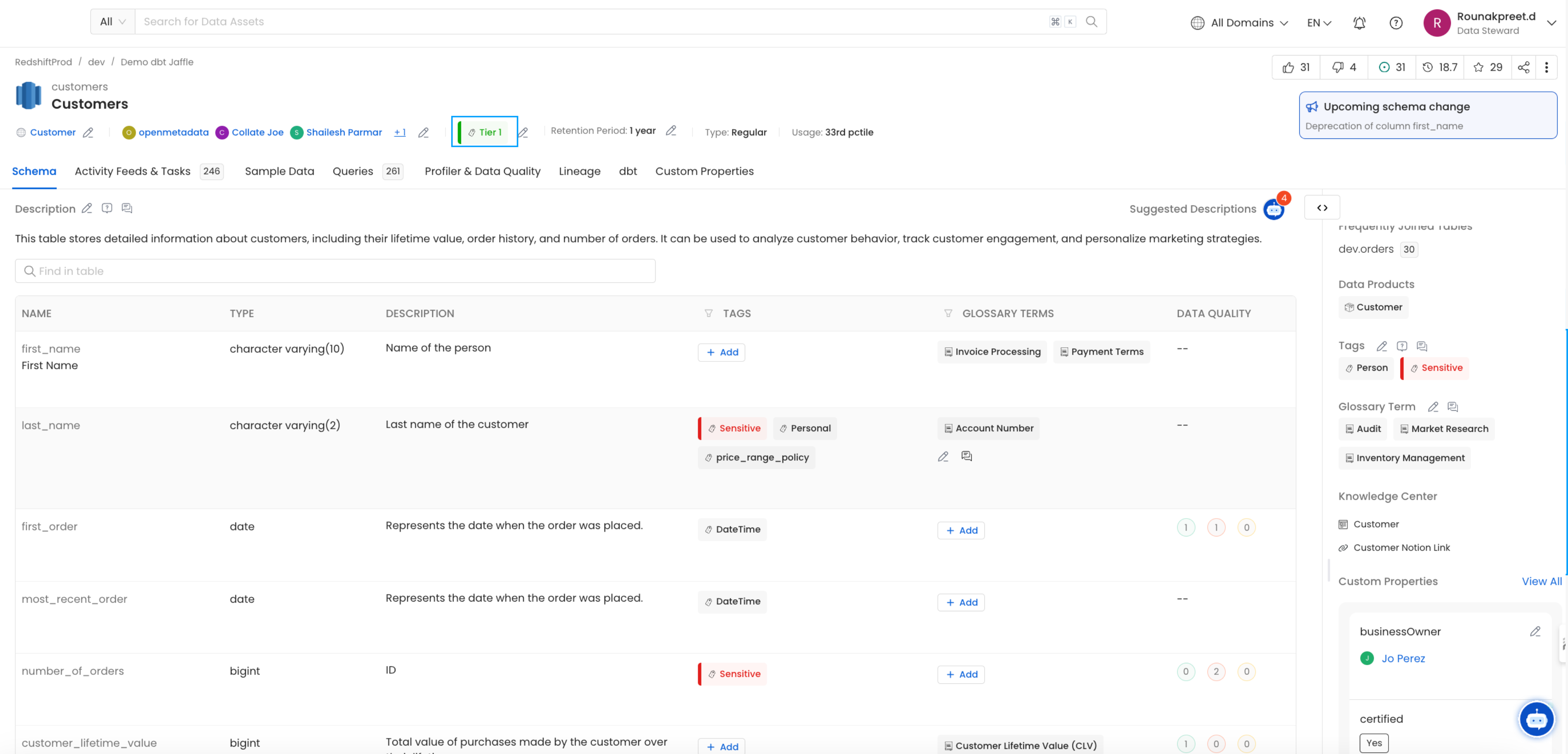
### 3. Viewing the Tier on tables
Table level Tier ingested from dbt can be viewed on the node in OpenMetadata