> ## Documentation Index
> Fetch the complete documentation index at: https://docs.open-metadata.org/llms.txt
> Use this file to discover all available pages before exploring further.
# Great Expectations | OpenMetadata Data Quality Integration
> Integrate Great Expectations with OpenMetadata for automated data quality validation. Complete setup guide, connector configuration, and best practices.
# Great Expectations
For Data Quality tests the open source python package Great Expectations stands out from the crowd. For those of you who don't know, [Great Expectations](https://greatexpectations.io/) is a shared, open standard for data quality. It helps data teams eliminate pipeline debt, through data testing, documentation, and profiling. Learn more about the product in [their documentation](https://docs.greatexpectations.io/docs/). With this tutorial, we show you how to configure Great Expectations to integrate with OpenMetadata and ingest your test results to your table service page.
## Requirements
### OpenMetadata Requirements
You will to have OpenMetadata version 0.12 or later.
To deploy OpenMetadata, follow the procedure to [Try OpenMetadata in Docker](/v1.12.x/quick-start/local-docker-deployment).
Before ingesting your tests results from Great Expectations you will need to have your table metadata ingested into OpenMetadata. Follow the instruction in the [Connectors](/v1.12.x/connectors) section to learn more.
### Python Requirements
You will need to install our Great Expectations submodule
```shell theme={null}
pip3 install 'openmetadata-ingestion[great-expectations]'
```
## Great Expectations Setup
### Configure your checkpoint file
Great Expectations integration leverage custom actions. To be able to execute custom actions you will need to run a checkpoint file.
```yaml theme={null}
[...]
action:
module_name: metadata.great_expectations.action
class_name: OpenMetadataValidationAction
config_file_path: path/to/ometa/config/file/
database_service_name:
database_name:
schema_name:
table_name:
expectation_suite_table_config_map:
my_first_suite_name:
database_name:
schema_name:
table_name:
my_other_suite_name:
database_name:
schema_name:
table_name:
[...]
```
In your checkpoint yaml file, you will need to add the above code block in `action_list` section.
**Properties**:
* `module_name`: this is OpenMetadata submodule name
* `class_name`: this is the name of the class that will be used to execute the custom action
* `config_file_path`: this is the path to your `config.yaml` file that holds the configuration of your OpenMetadata server
* `database_service_name`: \[Optional] this is an optional parameter. If not specified and 2 tables have the same name in 2 different OpenMetadata services, the custom action will fail
* `database_name`: \[Optional] The database name as it appears in OpenMetadata. For table-based validations (`SqlAlchemyDatasourceBatchSpec`), this is inferred from the batch spec. **Required** for query-based or dataframe validations (`RuntimeQueryBatchSpec`, `RuntimeDataBatchSpec`) where the table context must be explicitly specified.
* `schema_name`: \[Optional] The schema name as it appears in OpenMetadata. For table-based validations, this is inferred from the batch spec. **Required** for query-based or dataframe validations. Defaults to *default* if not specified.
* `table_name`: \[Optional] The table name as it appears in OpenMetadata. For table-based validations, this is inferred from the batch spec. **Required** for query-based or dataframe validations where the table cannot be automatically determined.
* `expectation_suite_table_config_map`: \[Optional] A dictionary mapping expectation suite names to their target OpenMetadata tables. Required when running multi-table checkpoints, where different expectation suites should send results to different tables. Each entry specifies the `database_name`, `schema_name` and `table_name` for routing validation results.
**Multi-Table Checkpoints**
When validating **multiple tables in a single checkpoint**, use the `expectation_suite_table_config_map` parameter to route validation results to the correct OpenMetadata tables. This is necessary because:
* Each expectation suite may target a different table
* The checkpoint action needs to know where to send each suite's results
* Without the mapping, all results would attempt to go to the same default table
**Example scenario:** You have a checkpoint validating both `users` and `orders` tables with separate expectation suites (`users_suite` and `orders_suite`). The `expectation_suite_table_config_map` ensures `users_suite` results go to the `users` table and the `orders_suite` go to the `orders` table.
For single-table checkpoints, this parameter is not needed - the table information is provided directly or inferred from the batch spec.
**Note**
If you are using Great Expectation `DataContext` instance in Python to run your tests, you can use the `run_checkpoint` method as follows:
```python theme={null}
data_context.run_checkpoint(
checkpoint_name="my_checkpoint",
batch_request=None,
run_name=None,
list_action={
"name": "my_action_name",
"action": {
"module_name": "metadata.great_expectations.action",
"class_name": "OpenMetadataValidationAction",
"config_file_path": "path/to/ometa/config/file/",
"database_service_name": "my_service_name",
},
,}
)
```
### Create your `config.yaml` file
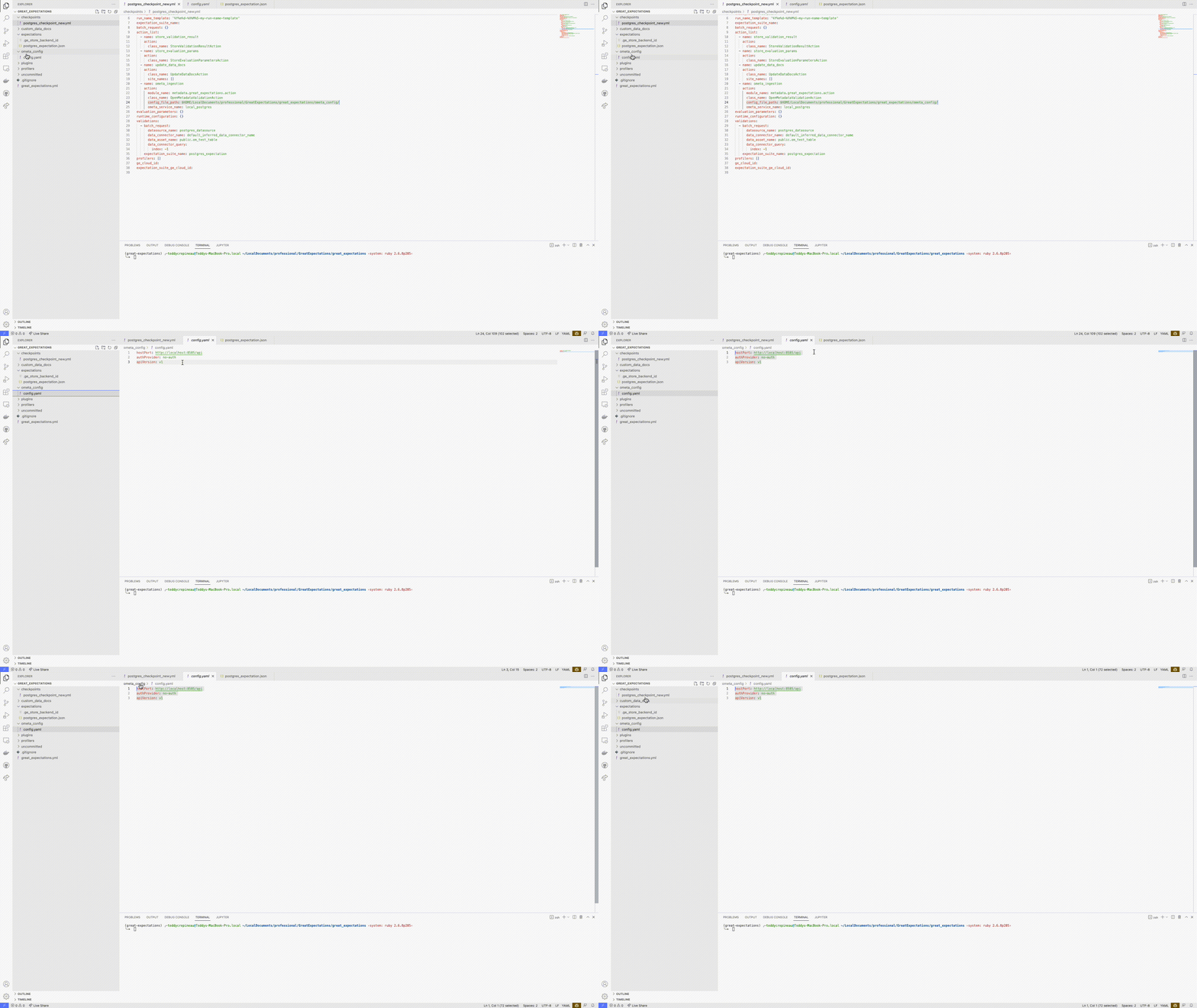
To ingest Great Expectations results in OpenMetadata, you will need to specify your OpenMetadata security configuration for the REST endpoint. This configuration file needs to be located inside the `config_file_path` referenced in step 2 and named `config.yaml`.
```yaml theme={null}
hostPort: http://localhost:8585/api
authProvider: azure
apiVersion: v1
securityConfig:
clientSecret: {{ env('CLIENT_SECRET') }}
authority: my
clientId: 123
scopes:
- a
- b
```
You can use environment variables in your configuration file by simply using `{{ env('') }}`. These will be parsed and rendered at runtime allowing you to securely create your configuration and commit it to your favorite version control tool. As we support multiple security configurations, you can check out the [Enable Security](/v1.12.x/deployment/security) section for more details on how to set the `securityConfig` part of the `yaml` file.
 ### Run your Great Expectations Checkpoint File
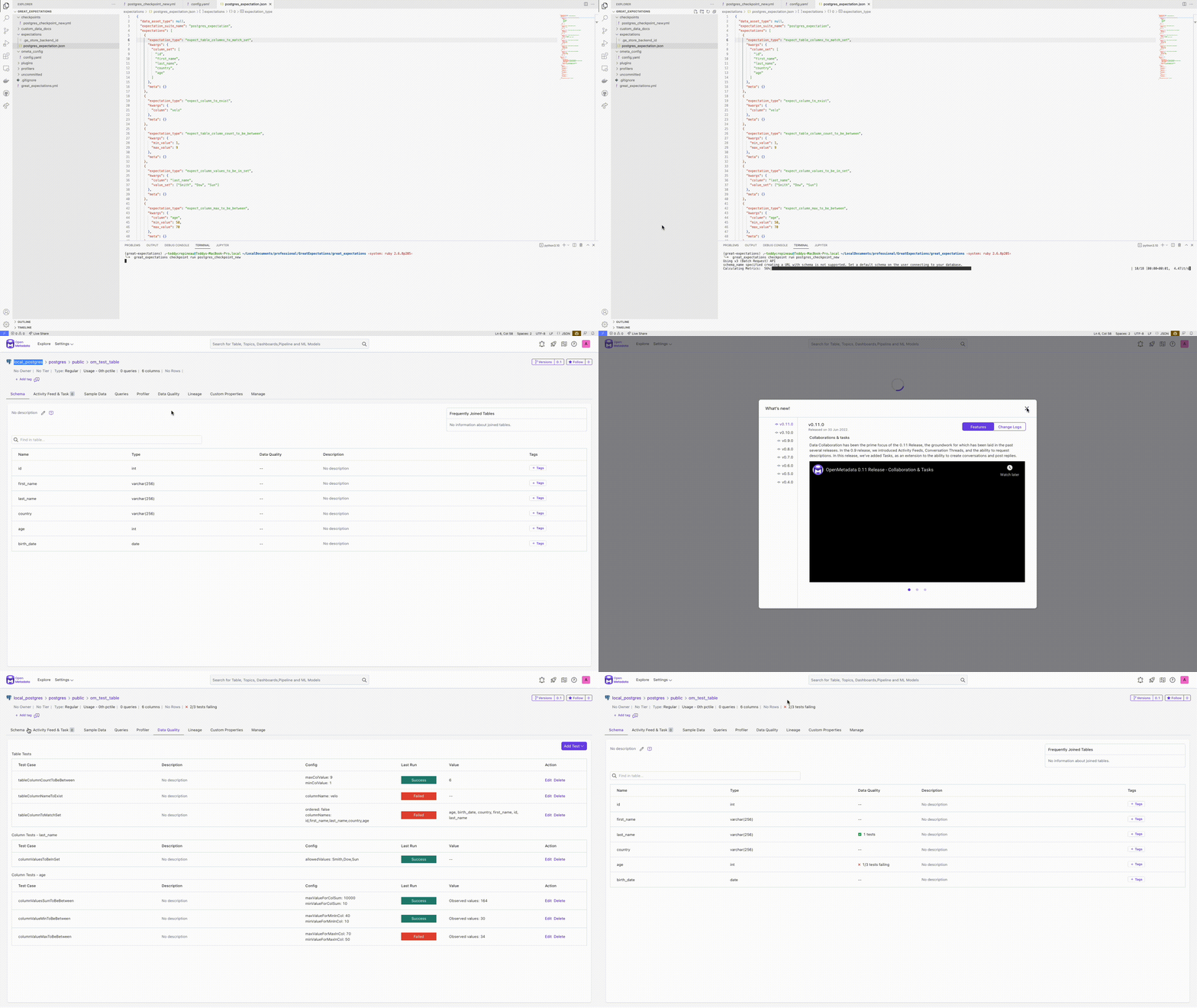
With everything set up, it is now time to run your checkpoint file.
```shell theme={null}
great_expectations checkpoint run
```
### Run your Great Expectations Checkpoint File
With everything set up, it is now time to run your checkpoint file.
```shell theme={null}
great_expectations checkpoint run
```
 ### Running GX using the Python SDK?
If you are running GX using their Python SDK below is a full example of how to add the action to your code
```python theme={null}
import great_expectations as gx
from great_expectations.checkpoint import Checkpoint
context = gx.get_context()
conn_string = f"postgresql+psycopg2://user:pw@host:port/db"
data_source = context.sources.add_postgres(
name="source_name",
connection_string=conn_string,
)
data_asset = data_source.add_table_asset(
name="name",
table_name="table_name",
schema_name="schema_name",
)
batch_request = data_source.get_asset("name").build_batch_request()
expectation_suite_name = "expectation_suite_name"
context.add_or_update_expectation_suite(expectation_suite_name=expectation_suite_name)
validator = context.get_validator(
batch_request=batch_request,
expectation_suite_name=expectation_suite_name,
)
validator.expect_column_values_to_not_be_null(column="column_name")
validator.expect_column_values_to_be_between(
column="column_name", min_value=min_value, max_value=max_value
)
validator.save_expectation_suite(discard_failed_expectations=False)
my_checkpoint_name = "my_sql_checkpoint"
checkpoint = Checkpoint(
name=my_checkpoint_name,
run_name_template="%Y%m%d-%H%M%S-my-run-name-template",
data_context=context,
batch_request=batch_request,
expectation_suite_name=expectation_suite_name,
action_list=[
{
"name": "store results in OpenMetadata",
"action": {
"module_name": "metadata.great_expectations.action",
"class_name": "OpenMetadataValidationAction",
"config_file_path": "path/to/config/file",
"database_service_name": "openmetadata_service_name",
"database_name": "database_name",
"table_name": "table_name",
"schema_name": "schema_name",
}
},
],
)
context.add_or_update_checkpoint(checkpoint=checkpoint)
checkpoint_result = checkpoint.run()
```
#### Multi-Table Checkpoint Example
Validate multiple tables in a single checkpoint run:
```python theme={null}
import great_expectations as gx
from great_expectations.checkpoint import Checkpoint
context = gx.get_context()
conn_string = "postgresql+psycopg2://user:pw@host:port/db"
data_source = context.sources.add_postgres(
name="my_datasource",
connection_string=conn_string,
)
# Set up users table validation
users_asset = data_source.add_table_asset(
name="users_asset",
table_name="users",
schema_name="public",
)
users_suite = "users_suite"
context.add_or_update_expectation_suite(expectation_suite_name=users_suite)
users_validator = context.get_validator(
batch_request=users_asset.build_batch_request(),
expectation_suite_name=users_suite,
)
users_validator.expect_column_values_to_not_be_null(column="email")
users_validator.save_expectation_suite(discard_failed_expectations=False)
# Set up orders table validation
orders_asset = data_source.add_table_asset(
name="orders_asset",
table_name="orders",
schema_name="public",
)
orders_suite = "orders_suite"
context.add_or_update_expectation_suite(expectation_suite_name=orders_suite)
orders_validator = context.get_validator(
batch_request=orders_asset.build_batch_request(),
expectation_suite_name=orders_suite,
)
orders_validator.expect_column_values_to_be_between(column="amount", min_value=0, max_value=1000000)
orders_validator.save_expectation_suite(discard_failed_expectations=False)
# Create multi-table checkpoint
checkpoint = Checkpoint(
name="multi_table_checkpoint",
run_name_template="%Y%m%d-%H%M%S-multi-table",
data_context=context,
validations=[
{
"batch_request": users_asset.build_batch_request(),
"expectation_suite_name": users_suite,
},
{
"batch_request": orders_asset.build_batch_request(),
"expectation_suite_name": orders_suite,
},
],
action_list=[
{
"name": "openmetadata_action",
"action": {
"module_name": "metadata.great_expectations.action",
"class_name": "OpenMetadataValidationAction",
"config_file_path": "/path/to/config/",
"database_service_name": "my_postgres_service",
"expectation_suite_table_config_map": {
"users_suite": {
"database_name": "production",
"schema_name": "public",
"table_name": "users",
},
"orders_suite": {
"database_name": "production",
"schema_name": "public",
"table_name": "orders",
},
},
}
},
],
)
context.add_or_update_checkpoint(checkpoint=checkpoint)
checkpoint_result = checkpoint.run()
```
### Working with GX 1.x.x?
In v1.x.x GX introduced significant changes to their SDK. One notable change was the removal of the `great_expectations` CLI. OpenMetadata introduced support for 1.x.x version through its `OpenMetadataValidationAction1xx` class. You will need to first \`pip install 'open-metadata\[great-expectations-1xx]'. Below is a complete example
```python theme={null}
import great_expectations as gx
from metadata.great_expectations.action1xx import OpenMetadataValidationAction1xx # OpenMetadata Validation Action for GX 1.x.x
context = gx.get_context()
conn_string = f"redshift+psycopg2://user:pw@host:port/db"
data_source = context.data_sources.add_redshift(
name="name",
connection_string=conn_string,
)
data_asset = data_source.add_table_asset(
name="name",
table_name="table_name",
schema_name="schema_name",
)
batch_definition = data_asset.add_batch_definition_whole_table("batch definition")
batch = batch_definition.get_batch()
suite = context.suites.add(
gx.core.expectation_suite.ExpectationSuite(name="name")
)
suite.add_expectation(
gx.expectations.ExpectColumnValuesToNotBeNull(
column="column_name"
)
)
suite.add_expectation(
gx.expectations.ExpectColumnValuesToBeBetween(column="column_name", min_value=50, max_value=1000000)
)
validation_definition = context.validation_definitions.add(
gx.core.validation_definition.ValidationDefinition(
name="validation definition",
data=batch_definition,
suite=suite,
)
)
action_list = [
OpenMetadataValidationAction1xx(
database_service_name="openmetadata_service_name",
database_name="openmetadata_database_name",
table_name="openmetadata_table_name",
schema_name="openmetadata_schema_name",
config_file_path="path/to/config/file",
)
]
checkpoint = context.checkpoints.add(
gx.checkpoint.checkpoint.Checkpoint(
name="checkpoint", validation_definitions=[validation_definition], actions=action_list
)
)
checkpoint_result = checkpoint.run()
```
### List of Great Expectations Supported Test
We currently only support a certain number of Great Expectations tests. The full list can be found in the [Tests](/v1.12.x/how-to-guides/data-quality-observability/quality/tests-yaml) section.
If a test is not supported, there is no need to worry about the execution of your Great Expectations test. We will simply skip the tests that are not supported and continue the execution of your test suite.
### Running GX using the Python SDK?
If you are running GX using their Python SDK below is a full example of how to add the action to your code
```python theme={null}
import great_expectations as gx
from great_expectations.checkpoint import Checkpoint
context = gx.get_context()
conn_string = f"postgresql+psycopg2://user:pw@host:port/db"
data_source = context.sources.add_postgres(
name="source_name",
connection_string=conn_string,
)
data_asset = data_source.add_table_asset(
name="name",
table_name="table_name",
schema_name="schema_name",
)
batch_request = data_source.get_asset("name").build_batch_request()
expectation_suite_name = "expectation_suite_name"
context.add_or_update_expectation_suite(expectation_suite_name=expectation_suite_name)
validator = context.get_validator(
batch_request=batch_request,
expectation_suite_name=expectation_suite_name,
)
validator.expect_column_values_to_not_be_null(column="column_name")
validator.expect_column_values_to_be_between(
column="column_name", min_value=min_value, max_value=max_value
)
validator.save_expectation_suite(discard_failed_expectations=False)
my_checkpoint_name = "my_sql_checkpoint"
checkpoint = Checkpoint(
name=my_checkpoint_name,
run_name_template="%Y%m%d-%H%M%S-my-run-name-template",
data_context=context,
batch_request=batch_request,
expectation_suite_name=expectation_suite_name,
action_list=[
{
"name": "store results in OpenMetadata",
"action": {
"module_name": "metadata.great_expectations.action",
"class_name": "OpenMetadataValidationAction",
"config_file_path": "path/to/config/file",
"database_service_name": "openmetadata_service_name",
"database_name": "database_name",
"table_name": "table_name",
"schema_name": "schema_name",
}
},
],
)
context.add_or_update_checkpoint(checkpoint=checkpoint)
checkpoint_result = checkpoint.run()
```
#### Multi-Table Checkpoint Example
Validate multiple tables in a single checkpoint run:
```python theme={null}
import great_expectations as gx
from great_expectations.checkpoint import Checkpoint
context = gx.get_context()
conn_string = "postgresql+psycopg2://user:pw@host:port/db"
data_source = context.sources.add_postgres(
name="my_datasource",
connection_string=conn_string,
)
# Set up users table validation
users_asset = data_source.add_table_asset(
name="users_asset",
table_name="users",
schema_name="public",
)
users_suite = "users_suite"
context.add_or_update_expectation_suite(expectation_suite_name=users_suite)
users_validator = context.get_validator(
batch_request=users_asset.build_batch_request(),
expectation_suite_name=users_suite,
)
users_validator.expect_column_values_to_not_be_null(column="email")
users_validator.save_expectation_suite(discard_failed_expectations=False)
# Set up orders table validation
orders_asset = data_source.add_table_asset(
name="orders_asset",
table_name="orders",
schema_name="public",
)
orders_suite = "orders_suite"
context.add_or_update_expectation_suite(expectation_suite_name=orders_suite)
orders_validator = context.get_validator(
batch_request=orders_asset.build_batch_request(),
expectation_suite_name=orders_suite,
)
orders_validator.expect_column_values_to_be_between(column="amount", min_value=0, max_value=1000000)
orders_validator.save_expectation_suite(discard_failed_expectations=False)
# Create multi-table checkpoint
checkpoint = Checkpoint(
name="multi_table_checkpoint",
run_name_template="%Y%m%d-%H%M%S-multi-table",
data_context=context,
validations=[
{
"batch_request": users_asset.build_batch_request(),
"expectation_suite_name": users_suite,
},
{
"batch_request": orders_asset.build_batch_request(),
"expectation_suite_name": orders_suite,
},
],
action_list=[
{
"name": "openmetadata_action",
"action": {
"module_name": "metadata.great_expectations.action",
"class_name": "OpenMetadataValidationAction",
"config_file_path": "/path/to/config/",
"database_service_name": "my_postgres_service",
"expectation_suite_table_config_map": {
"users_suite": {
"database_name": "production",
"schema_name": "public",
"table_name": "users",
},
"orders_suite": {
"database_name": "production",
"schema_name": "public",
"table_name": "orders",
},
},
}
},
],
)
context.add_or_update_checkpoint(checkpoint=checkpoint)
checkpoint_result = checkpoint.run()
```
### Working with GX 1.x.x?
In v1.x.x GX introduced significant changes to their SDK. One notable change was the removal of the `great_expectations` CLI. OpenMetadata introduced support for 1.x.x version through its `OpenMetadataValidationAction1xx` class. You will need to first \`pip install 'open-metadata\[great-expectations-1xx]'. Below is a complete example
```python theme={null}
import great_expectations as gx
from metadata.great_expectations.action1xx import OpenMetadataValidationAction1xx # OpenMetadata Validation Action for GX 1.x.x
context = gx.get_context()
conn_string = f"redshift+psycopg2://user:pw@host:port/db"
data_source = context.data_sources.add_redshift(
name="name",
connection_string=conn_string,
)
data_asset = data_source.add_table_asset(
name="name",
table_name="table_name",
schema_name="schema_name",
)
batch_definition = data_asset.add_batch_definition_whole_table("batch definition")
batch = batch_definition.get_batch()
suite = context.suites.add(
gx.core.expectation_suite.ExpectationSuite(name="name")
)
suite.add_expectation(
gx.expectations.ExpectColumnValuesToNotBeNull(
column="column_name"
)
)
suite.add_expectation(
gx.expectations.ExpectColumnValuesToBeBetween(column="column_name", min_value=50, max_value=1000000)
)
validation_definition = context.validation_definitions.add(
gx.core.validation_definition.ValidationDefinition(
name="validation definition",
data=batch_definition,
suite=suite,
)
)
action_list = [
OpenMetadataValidationAction1xx(
database_service_name="openmetadata_service_name",
database_name="openmetadata_database_name",
table_name="openmetadata_table_name",
schema_name="openmetadata_schema_name",
config_file_path="path/to/config/file",
)
]
checkpoint = context.checkpoints.add(
gx.checkpoint.checkpoint.Checkpoint(
name="checkpoint", validation_definitions=[validation_definition], actions=action_list
)
)
checkpoint_result = checkpoint.run()
```
### List of Great Expectations Supported Test
We currently only support a certain number of Great Expectations tests. The full list can be found in the [Tests](/v1.12.x/how-to-guides/data-quality-observability/quality/tests-yaml) section.
If a test is not supported, there is no need to worry about the execution of your Great Expectations test. We will simply skip the tests that are not supported and continue the execution of your test suite.