> ## Documentation Index
> Fetch the complete documentation index at: https://docs.open-metadata.org/llms.txt
> Use this file to discover all available pages before exploring further.
# OpenLineage | OpenMetadata Data Lineage Pipeline
> Connect your data pipelines with OpenMetadata's OpenLineage connector. Track data lineage, monitor pipeline metadata, and gain end-to-end visibility.
export const MetadataIngestionUi = ({connector, selectServicePath, addNewServicePath, serviceConnectionPath}) => {
return <>
To ingest metadata from your sources, you need to create a service connection.
The service connects your source system with OpenMetadata. Once you create
a service, you can use it to configure your ingestion workflows.
To create a service connection and ingest your metadata, follow the steps below:
-
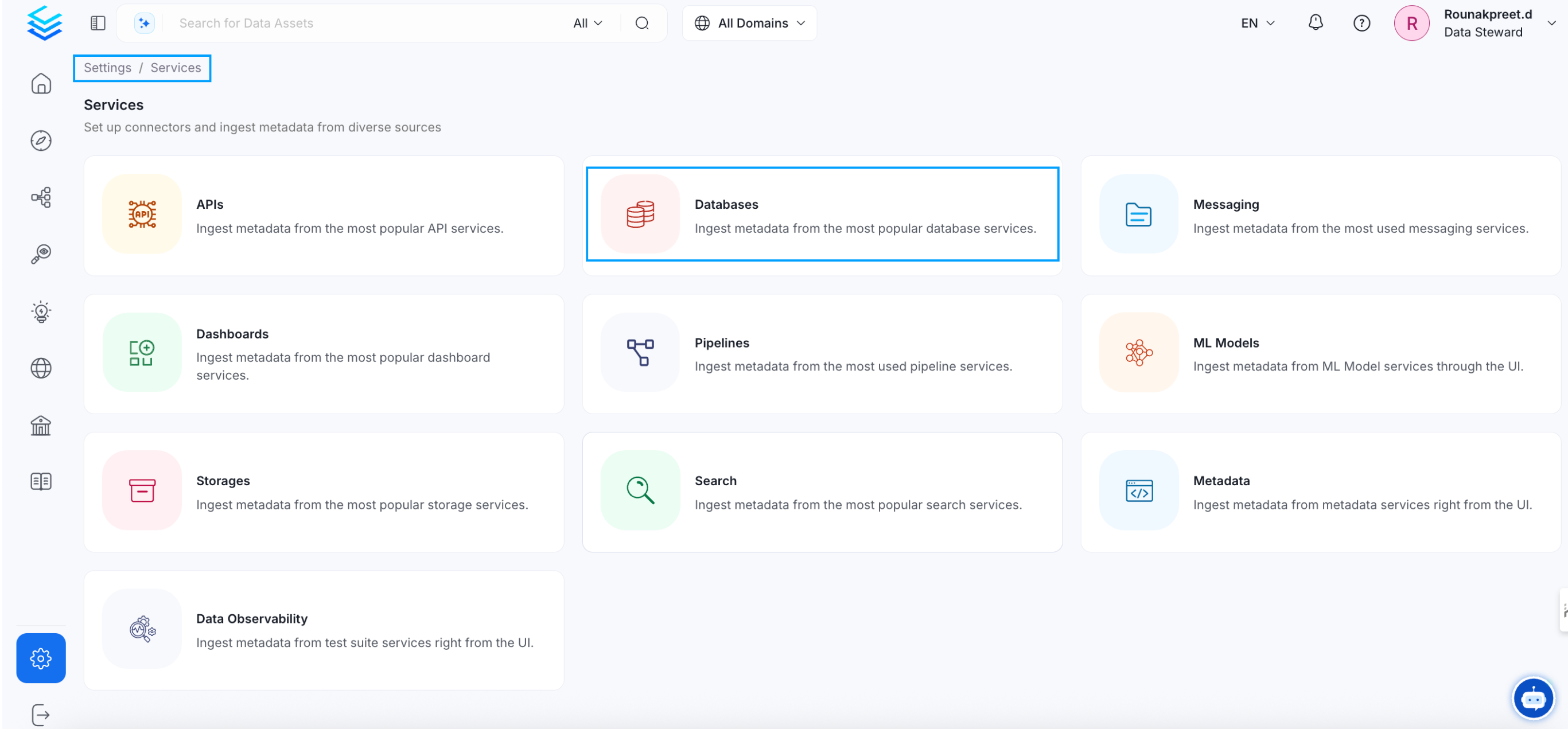
On the left navigation bar, click Settings.
-
On the next page, click Services, and then select the service.
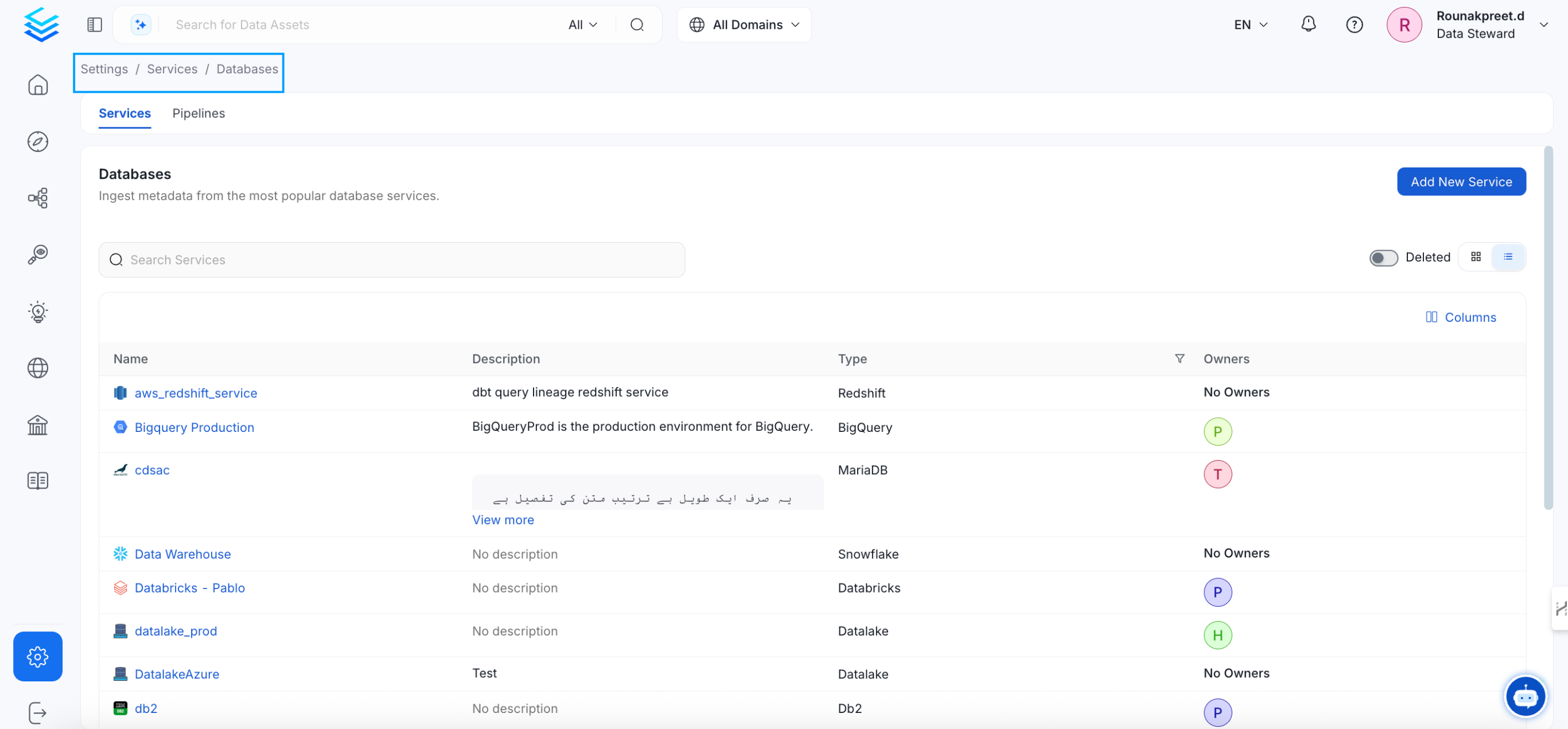
To add a new service connection, click Add New Service.
 Select {connector} as the service type and click Next.
{selectServicePath &&
Select {connector} as the service type and click Next.
{selectServicePath &&  }
Enter a unique Service Name and Description.
}
Enter a unique Service Name and Description.
- Service Name: OpenMetadata identifies services by their service name. Enter a name that distinguishes this deployment from other services, including other {connector} services you are ingesting metadata from.
The service name cannot be changed after it is set.
{addNewServicePath &&  }
Set up the connection settings required for {connector} to set up the service and start ingesting metadata from your sources. The right-hand panel displays help documentation for the selected connection type in the product UI.
{serviceConnectionPath &&
}
Set up the connection settings required for {connector} to set up the service and start ingesting metadata from your sources. The right-hand panel displays help documentation for the selected connection type in the product UI.
{serviceConnectionPath &&  }
;
};
export const ConnectorDetailsHeader = ({name, icon, stage, availableFeatures, unavailableFeatures = [], availableFeaturesCollate = []}) => {
const showSubHeading = availableFeatures?.length > 0 || unavailableFeatures?.length > 0 || availableFeaturesCollate?.length > 0;
const totalAvailableFeatures = [...availableFeatures || [], ...availableFeaturesCollate || []];
return
}
;
};
export const ConnectorDetailsHeader = ({name, icon, stage, availableFeatures, unavailableFeatures = [], availableFeaturesCollate = []}) => {
const showSubHeading = availableFeatures?.length > 0 || unavailableFeatures?.length > 0 || availableFeaturesCollate?.length > 0;
const totalAvailableFeatures = [...availableFeatures || [], ...availableFeaturesCollate || []];
return
{icon &&
}
{name}
{stage}
{showSubHeading &&
Feature List
{totalAvailableFeatures.map(feature =>
✓ {feature}
)}
{unavailableFeatures.map(feature =>
✕ {feature}
)}
}
;
};
In this section, we provide guides and references to use the OpenLineage connector.
Configure and schedule OpenLineage metadata workflows from the OpenMetadata UI:
* [Requirements](#requirements)
* [Metadata Ingestion](#metadata-ingestion)
* [Troubleshooting](/v1.12.x/connectors/pipeline/openlineage/troubleshooting)
## Requirements
OpenMetadata is integrated with OpenLineage up to version 1.7.0 and will continue to work for future OpenLineage versions.
OpenLineage is an open framework for data lineage collection and analysis. At its core is an extensible specification that systems can use to interoperate with lineage metadata.
Apart from being a specification, it is also a set of integrations collecting lineage from various systems such as Apache Airflow and Spark.
### OpenLineage Connector Events
OpenLineage connector consumes OpenLineage events from either a **Kafka broker** or **AWS Kinesis Data Streams** and translates them to OpenMetadata Lineage information.
### Kafka Configuration
#### Airflow OpenLineage Events (Kafka)
To configure your Airflow instance:
1. Install the appropriate provider in [Airflow](https://airflow.apache.org/docs/apache-airflow-providers-openlineage/stable/index.html)
2. Configure OpenLineage Provider in [Airflow](https://airflow.apache.org/docs/apache-airflow-providers-openlineage/stable/guides/user.html#using-openlineage-integration)
* Use `kafka` transport mode as OpenLineage events are collected from the Kafka topic. Detailed configuration options can be found [here](https://openlineage.io/docs/client/python/#configuration)
#### Spark OpenLineage Events (Kafka)
Configure Spark Session to produce OpenLineage events compatible with the OpenMetadata connector:
```python theme={null}
from pyspark.sql import SparkSession
from uuid import uuid4
spark = SparkSession.builder\
.config('spark.openlineage.namespace', 'mynamespace')\
.config('spark.openlineage.parentJobName', 'hello-world')\
.config('spark.openlineage.parentRunId', str(uuid4()))\
.config('spark.jars.packages', 'io.openlineage:openlineage-spark:1.7.0')\
.config('spark.extraListeners', 'io.openlineage.spark.agent.OpenLineageSparkListener')\
.config('spark.openlineage.transport.type', 'kafka')\
.getOrCreate()
```
### AWS Kinesis Configuration
The OpenLineage connector also supports consuming events from AWS Kinesis Data Streams. This is useful when your data pipelines publish OpenLineage events to Kinesis instead of Kafka.
#### Kinesis Requirements
* An AWS Kinesis Data Stream receiving OpenLineage events
* AWS credentials with permissions to read from the Kinesis stream:
* `kinesis:GetRecords`
* `kinesis:GetShardIterator`
* `kinesis:DescribeStream`
* `kinesis:ListShards`
#### Spark OpenLineage Events (Kinesis)
Configure Spark Session to produce OpenLineage events to Kinesis:
```python theme={null}
from pyspark.sql import SparkSession
from uuid import uuid4
spark = SparkSession.builder\
.config('spark.openlineage.namespace', 'mynamespace')\
.config('spark.openlineage.parentJobName', 'hello-world')\
.config('spark.openlineage.parentRunId', str(uuid4()))\
.config('spark.jars.packages', 'io.openlineage:openlineage-spark:1.7.0')\
.config('spark.extraListeners', 'io.openlineage.spark.agent.OpenLineageSparkListener')\
.config('spark.openlineage.transport.type', 'kinesis')\
.config('spark.openlineage.transport.streamName', 'openlineage-events')\
.config('spark.openlineage.transport.region', 'us-east-2')\
.getOrCreate()
```
## How Table Resolution Works
This section is specifically about dataset resolution. The connector can create pipeline services and pipeline entities from incoming OpenLineage job metadata, but table resolution is read-only: tables, schemas, and databases must already exist in OpenMetadata. **Ingest your database sources before running the OpenLineage pipeline** or lineage edges will not attach.
If a dataset in an OpenLineage event cannot be resolved to an existing OpenMetadata entity, it is skipped with a warning in the ingestion logs. The rest of the event is still processed.
### Resolution Order
Each dataset in an OpenLineage event is resolved using the following priority:
1. **Symlink identifiers** — if the event includes a `symlinks` facet, those identities are tried first. `LOCATION`-type symlinks (raw physical paths) are skipped. This is the shape Spark emits for Hive/Glue-cataloged tables backed by object storage (e.g. S3).
2. **Top-level namespace and name** — used as fallback if no symlink resolves.
The first candidate that matches a configured OpenMetadata service wins.
### Hive / Glue Tables on Object Storage
When Spark writes to a table in a Glue or Hive catalog backed by S3, the OpenLineage event identifies the dataset by its S3 path as the top-level namespace. The connector reads the `symlinks` facet first — which carries the catalog table identity — and resolves it correctly against the ingested service.
Ensure your Glue or Hive catalog tables are ingested into OpenMetadata before running the OpenLineage pipeline, so the symlink identity can be matched.
## Metadata Ingestion
## Connection Details
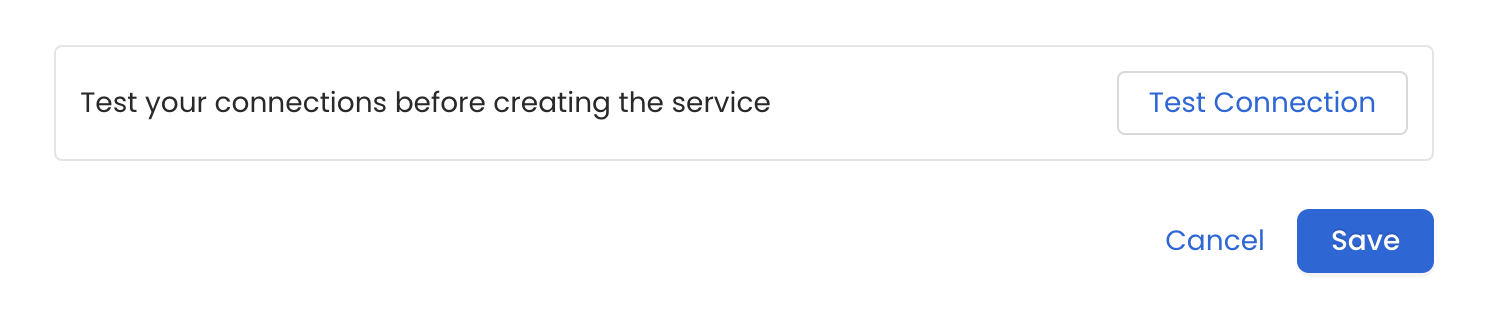
Once the credentials have been added, click on *Test Connection* and *Save* the changes.
 In this step we will configure the metadata ingestion pipeline,
Please follow the instructions below
In this step we will configure the metadata ingestion pipeline,
Please follow the instructions below
 #### Metadata Ingestion Options
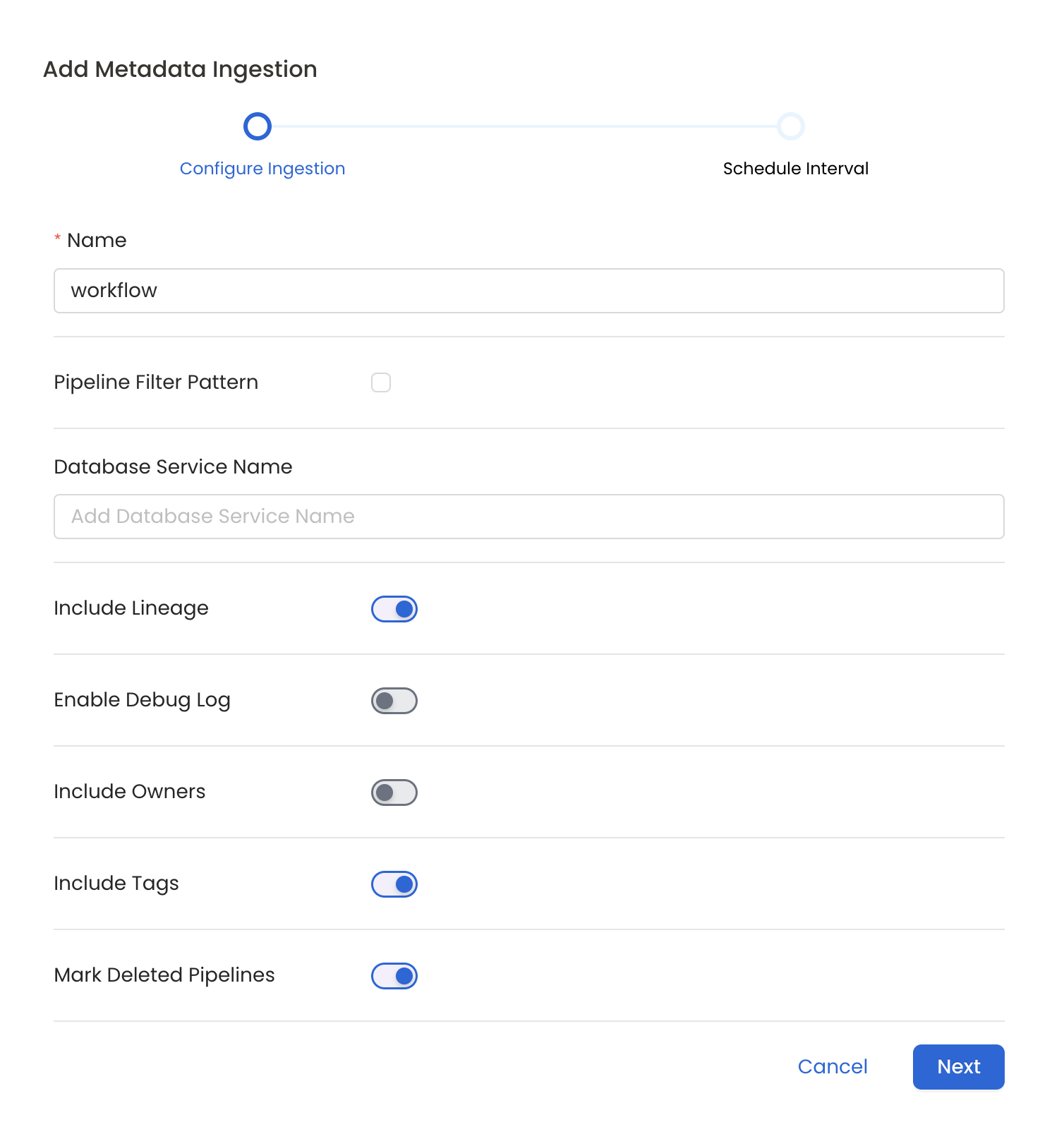
* **Name**: This field refers to the name of ingestion pipeline, you can customize the name or use the generated name.
* **Pipeline Filter Pattern (Optional)**: Use to pipeline filter patterns to control whether or not to include pipeline as part of metadata ingestion.
* **Include**: Explicitly include pipeline by adding a list of comma-separated regular expressions to the Include field. OpenMetadata will include all pipeline with names matching one or more of the supplied regular expressions. All other schemas will be excluded.
* **Exclude**: Explicitly exclude pipeline by adding a list of comma-separated regular expressions to the Exclude field. OpenMetadata will exclude all pipeline with names matching one or more of the supplied regular expressions. All other schemas will be included.
* **Include lineage (toggle)**: Set the Include lineage toggle to control whether to include lineage between pipelines and data sources as part of metadata ingestion.
* **Enable Debug Log (toggle)**: Set the Enable Debug Log toggle to set the default log level to debug.
* **Mark Deleted Pipelines (toggle)**: Set the Mark Deleted Pipelines toggle to flag pipelines as soft-deleted if they are not present anymore in the source system.
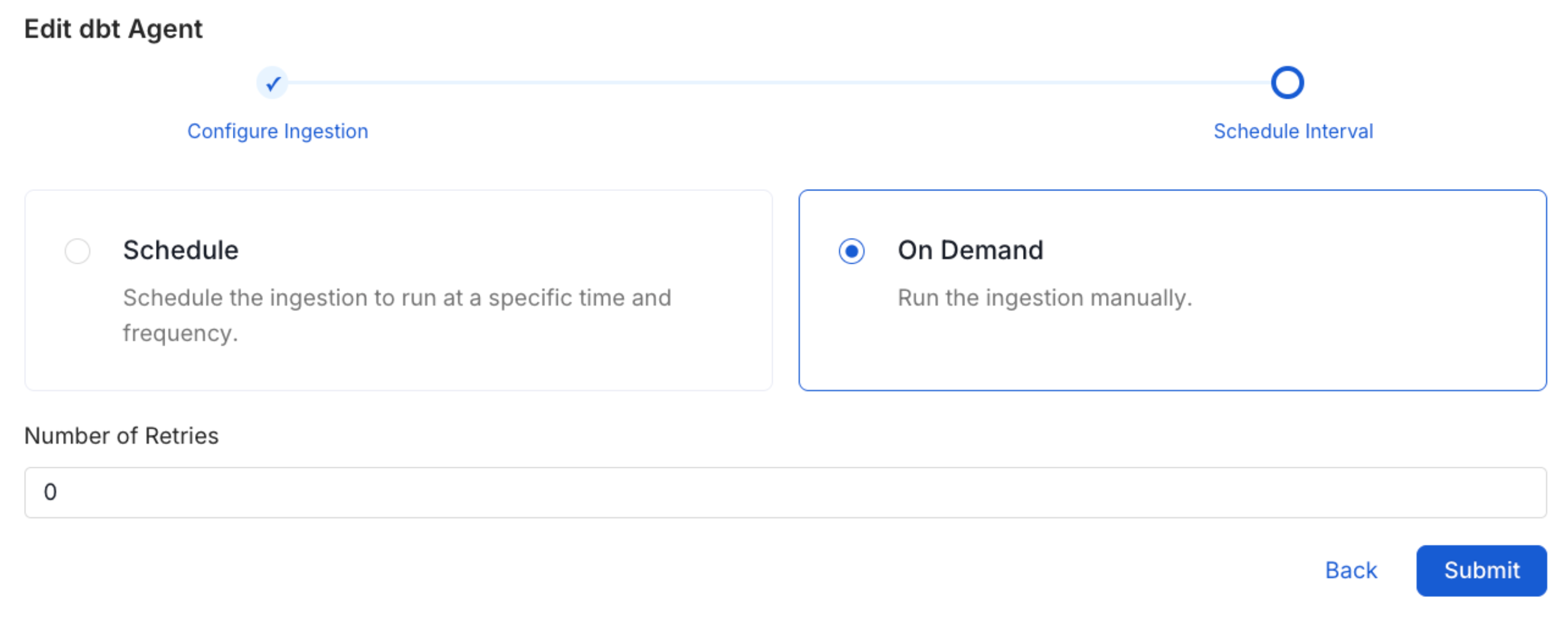
Scheduling can be set up at an hourly, daily, weekly, or manual cadence. The
timezone is in UTC. Select a Start Date to schedule for ingestion. It is
optional to add an End Date.
Review your configuration settings. If they match what you intended,
click Deploy to create the service and schedule metadata ingestion.
If something doesn't look right, click the Back button to return to the
appropriate step and change the settings as needed.
After configuring the workflow, you can click on Deploy to create the
pipeline.
#### Metadata Ingestion Options
* **Name**: This field refers to the name of ingestion pipeline, you can customize the name or use the generated name.
* **Pipeline Filter Pattern (Optional)**: Use to pipeline filter patterns to control whether or not to include pipeline as part of metadata ingestion.
* **Include**: Explicitly include pipeline by adding a list of comma-separated regular expressions to the Include field. OpenMetadata will include all pipeline with names matching one or more of the supplied regular expressions. All other schemas will be excluded.
* **Exclude**: Explicitly exclude pipeline by adding a list of comma-separated regular expressions to the Exclude field. OpenMetadata will exclude all pipeline with names matching one or more of the supplied regular expressions. All other schemas will be included.
* **Include lineage (toggle)**: Set the Include lineage toggle to control whether to include lineage between pipelines and data sources as part of metadata ingestion.
* **Enable Debug Log (toggle)**: Set the Enable Debug Log toggle to set the default log level to debug.
* **Mark Deleted Pipelines (toggle)**: Set the Mark Deleted Pipelines toggle to flag pipelines as soft-deleted if they are not present anymore in the source system.
Scheduling can be set up at an hourly, daily, weekly, or manual cadence. The
timezone is in UTC. Select a Start Date to schedule for ingestion. It is
optional to add an End Date.
Review your configuration settings. If they match what you intended,
click Deploy to create the service and schedule metadata ingestion.
If something doesn't look right, click the Back button to return to the
appropriate step and change the settings as needed.
After configuring the workflow, you can click on Deploy to create the
pipeline.
 Once the workflow has been successfully deployed, you can view the
Ingestion Pipeline running from the Service Page.
Once the workflow has been successfully deployed, you can view the
Ingestion Pipeline running from the Service Page.
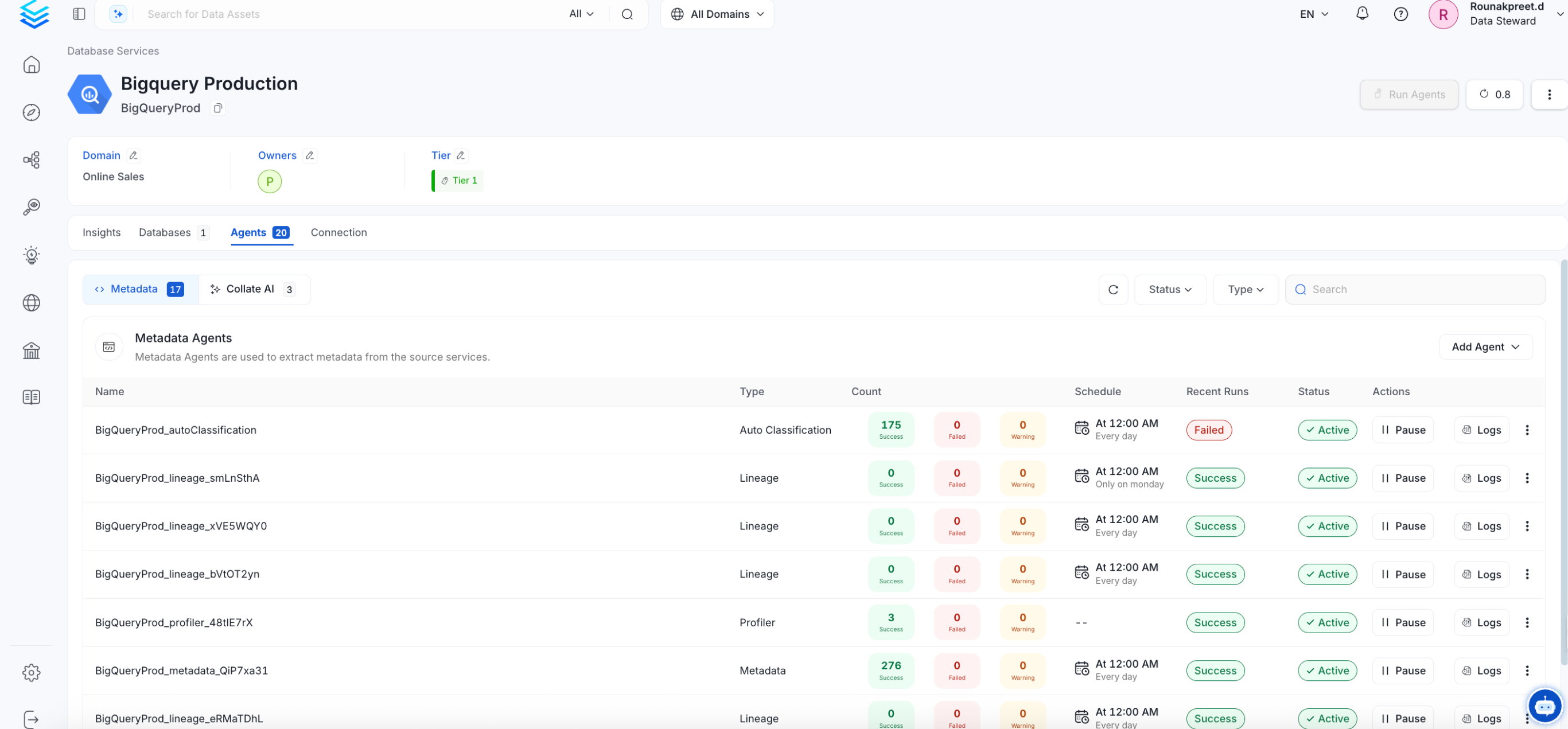 If AutoPilot is enabled, workflows like usage tracking, data lineage, and similar tasks will be handled automatically. Users don’t need to set up or manage them - AutoPilot takes care of everything in the system.
### Providing Connection Details Programmatically via API
#### 1. Preparing the Client
```python theme={null}
from metadata.generated.schema.entity.services.connections.metadata.openMetadataConnection import (
OpenMetadataConnection,
)
from metadata.generated.schema.security.client.openMetadataJWTClientConfig import (
OpenMetadataJWTClientConfig,
)
from metadata.ingestion.ometa.ometa_api import OpenMetadata
server_config = OpenMetadataConnection(
hostPort="http://localhost:8585/api",
authProvider="openmetadata",
securityConfig=OpenMetadataJWTClientConfig(
jwtToken=""
),
)
metadata = OpenMetadata(server_config)
assert metadata.health_check() # Will fail if we cannot reach the server
```
#### 2. Creating the OpenLineage Pipeline Service (Kafka)
```python theme={null}
from metadata.generated.schema.api.services.createPipelineService import CreatePipelineServiceRequest
from metadata.generated.schema.entity.services.pipelineService import (
PipelineServiceType,
PipelineConnection,
)
from metadata.generated.schema.entity.services.connections.pipeline.openLineageConnection import (
OpenLineageConnection,
KafkaBrokerConfig,
SecurityProtocol as KafkaSecurityProtocol,
ConsumerOffsets
)
from metadata.generated.schema.security.ssl.validateSSLClientConfig import (
ValidateSslClientConfig,
)
openlineage_service_request = CreatePipelineServiceRequest(
name='openlineage-kafka-service',
displayName='OpenLineage Kafka Service',
serviceType=PipelineServiceType.OpenLineage,
connection=PipelineConnection(
config=OpenLineageConnection(
brokerConfig=KafkaBrokerConfig(
brokersUrl='broker1:9092,broker2:9092',
topicName='openlineage-events',
consumerGroupName='openmetadata-consumer',
consumerOffsets=ConsumerOffsets.earliest,
poolTimeout=3.0,
sessionTimeout=60,
securityProtocol=KafkaSecurityProtocol.SSL,
# SSL config is optional and only used when securityProtocol=SSL
sslConfig=ValidateSslClientConfig(
sslCertificate='/path/to/kafka/certs/Certificate.pem',
sslKey='/path/to/kafka/certs/Key.pem',
caCertificate='/path/to/kafka/certs/RootCA.pem'
)
)
)
),
)
metadata.create_or_update(openlineage_service_request)
```
#### 3. Creating the OpenLineage Pipeline Service (Kinesis)
```python theme={null}
from metadata.generated.schema.api.services.createPipelineService import CreatePipelineServiceRequest
from metadata.generated.schema.entity.services.pipelineService import (
PipelineServiceType,
PipelineConnection,
)
from metadata.generated.schema.entity.services.connections.pipeline.openLineageConnection import (
OpenLineageConnection,
KinesisBrokerConfig,
KinesisConsumerOffsets
)
from metadata.generated.schema.security.credentials.awsCredentials import AWSCredentials
openlineage_service_request = CreatePipelineServiceRequest(
name='openlineage-kinesis-service',
displayName='OpenLineage Kinesis Service',
serviceType=PipelineServiceType.OpenLineage,
connection=PipelineConnection(
config=OpenLineageConnection(
brokerConfig=KinesisBrokerConfig(
streamName='openlineage-events',
consumerOffsets=KinesisConsumerOffsets.TRIM_HORIZON, # or LATEST
poolTimeout=1.0,
sessionTimeout=30,
awsConfig=AWSCredentials(
awsRegion='us-east-2',
awsAccessKeyId='', # Optional if using IAM roles
awsSecretAccessKey='', # Optional if using IAM roles
# awsSessionToken='', # Optional, for temporary credentials
)
)
)
),
)
metadata.create_or_update(openlineage_service_request)
```
If AutoPilot is enabled, workflows like usage tracking, data lineage, and similar tasks will be handled automatically. Users don’t need to set up or manage them - AutoPilot takes care of everything in the system.
### Providing Connection Details Programmatically via API
#### 1. Preparing the Client
```python theme={null}
from metadata.generated.schema.entity.services.connections.metadata.openMetadataConnection import (
OpenMetadataConnection,
)
from metadata.generated.schema.security.client.openMetadataJWTClientConfig import (
OpenMetadataJWTClientConfig,
)
from metadata.ingestion.ometa.ometa_api import OpenMetadata
server_config = OpenMetadataConnection(
hostPort="http://localhost:8585/api",
authProvider="openmetadata",
securityConfig=OpenMetadataJWTClientConfig(
jwtToken=""
),
)
metadata = OpenMetadata(server_config)
assert metadata.health_check() # Will fail if we cannot reach the server
```
#### 2. Creating the OpenLineage Pipeline Service (Kafka)
```python theme={null}
from metadata.generated.schema.api.services.createPipelineService import CreatePipelineServiceRequest
from metadata.generated.schema.entity.services.pipelineService import (
PipelineServiceType,
PipelineConnection,
)
from metadata.generated.schema.entity.services.connections.pipeline.openLineageConnection import (
OpenLineageConnection,
KafkaBrokerConfig,
SecurityProtocol as KafkaSecurityProtocol,
ConsumerOffsets
)
from metadata.generated.schema.security.ssl.validateSSLClientConfig import (
ValidateSslClientConfig,
)
openlineage_service_request = CreatePipelineServiceRequest(
name='openlineage-kafka-service',
displayName='OpenLineage Kafka Service',
serviceType=PipelineServiceType.OpenLineage,
connection=PipelineConnection(
config=OpenLineageConnection(
brokerConfig=KafkaBrokerConfig(
brokersUrl='broker1:9092,broker2:9092',
topicName='openlineage-events',
consumerGroupName='openmetadata-consumer',
consumerOffsets=ConsumerOffsets.earliest,
poolTimeout=3.0,
sessionTimeout=60,
securityProtocol=KafkaSecurityProtocol.SSL,
# SSL config is optional and only used when securityProtocol=SSL
sslConfig=ValidateSslClientConfig(
sslCertificate='/path/to/kafka/certs/Certificate.pem',
sslKey='/path/to/kafka/certs/Key.pem',
caCertificate='/path/to/kafka/certs/RootCA.pem'
)
)
)
),
)
metadata.create_or_update(openlineage_service_request)
```
#### 3. Creating the OpenLineage Pipeline Service (Kinesis)
```python theme={null}
from metadata.generated.schema.api.services.createPipelineService import CreatePipelineServiceRequest
from metadata.generated.schema.entity.services.pipelineService import (
PipelineServiceType,
PipelineConnection,
)
from metadata.generated.schema.entity.services.connections.pipeline.openLineageConnection import (
OpenLineageConnection,
KinesisBrokerConfig,
KinesisConsumerOffsets
)
from metadata.generated.schema.security.credentials.awsCredentials import AWSCredentials
openlineage_service_request = CreatePipelineServiceRequest(
name='openlineage-kinesis-service',
displayName='OpenLineage Kinesis Service',
serviceType=PipelineServiceType.OpenLineage,
connection=PipelineConnection(
config=OpenLineageConnection(
brokerConfig=KinesisBrokerConfig(
streamName='openlineage-events',
consumerOffsets=KinesisConsumerOffsets.TRIM_HORIZON, # or LATEST
poolTimeout=1.0,
sessionTimeout=30,
awsConfig=AWSCredentials(
awsRegion='us-east-2',
awsAccessKeyId='', # Optional if using IAM roles
awsSecretAccessKey='', # Optional if using IAM roles
# awsSessionToken='', # Optional, for temporary credentials
)
)
)
),
)
metadata.create_or_update(openlineage_service_request)
```