> ## Documentation Index
> Fetch the complete documentation index at: https://docs.open-metadata.org/llms.txt
> Use this file to discover all available pages before exploring further.
# Storage Services | OpenMetadata Cloud Storage Guide
# Storage Services
This is the supported list of connectors for Storage Services:

PROD
PROD
If you have a request for a new connector, don't hesitate to reach out in [Slack](https://slack.open-metadata.org/) or
open a [feature request](https://github.com/open-metadata/OpenMetadata/issues/new/choose) in our GitHub repo.
## Configuring the Ingestion
In any other connector, extracting metadata happens automatically. We have different ways to understand the information
in the sources and send that to OpenMetadata. However, what happens with generic sources such as S3 buckets, or ADLS containers?
In these systems we can have different types of information:
* Unstructured data, such as images or videos,
* Structured data in single and independent files (which can also be ingested with the [S3 Data Lake connector](/v1.12.x/connectors/database/s3-datalake))
* Structured data in partitioned files, e.g., `my_table/year=2022/...parquet`, `my_table/year=2023/...parquet`, etc.
The Storage Connector will help you bring in **Structured data in partitioned files**.
Then the question is, how do we know which data in each Container is relevant and which structure does it follow? In order to
optimize ingestion costs and make sure we are only bringing in useful metadata, the Storage Services ingestion process
follow this approach:
1. We list the top-level containers (e.g., S3 buckets), and bring generic insights, such as size and number of objects.
2. If there is an `openmetadata.json` manifest file present in the bucket root, we will ingest the informed paths
as children of the top-level container. Let's see how that works.
Note that the current implementation brings each entry in the `openmetadata.json` as a child container of the
top-level container. Even if your data path is `s3://bucket/my/deep/table`, we will bring `bucket` as the top-level
container and `my/deep/table` as its child.
We are flattening this structure to simplify the navigation.
## OpenMetadata Manifest
Our manifest file is defined as a [JSON Schema](https://github.com/open-metadata/OpenMetadata/blob/main/openmetadata-spec/src/main/resources/json/schema/metadataIngestion/storage/containerMetadataConfig.json),
and can look like this:
**Entries**: We need to add a list of `entries`. Each inner JSON structure will be ingested as a child container of the top-level one. In this case, we will be ingesting 7 children.
**Simple Container**: The simplest container we can have would be structured, but without partitions. Note that we still need to bring information about:
* **dataPath**: Where we can find the data. This should be a path relative to the top-level container.
* **structureFormat**: What is the format of the data we are going to find. This information will be used to read the data.
* **separator**: Optionally, for delimiter-separated formats such as CSV, you can specify the separator to use when reading the file. If you don't, we will use `,` for CSV and `/t` for TSV files.
After ingesting this container, we will bring in the schema of the data in the `dataPath`.
**Partitioned Container**: We can ingest partitioned data without bringing in any further details.
By informing the `isPartitioned` field as `true`, we'll flag the container as `Partitioned`. We will be reading the source files schemas', but won't add any other information.
**Single-Partition Container**: We can bring partition information by specifying the `partitionColumns`. Their definition is based on the [JSON Schema](https://github.com/open-metadata/OpenMetadata/blob/main/openmetadata-spec/src/main/resources/json/schema/entity/data/table.json#L232) definition for table columns. The minimum required information is the `name` and `dataType`.
When passing `partitionColumns`, these values will be added to the schema, on top of the inferred information from the files.
**Multiple-Partition Container**: We can add multiple columns as partitions.
Note how in the example we even bring our custom `displayName` for the column `dataTypeDisplay` for its type.
Again, this information will be added on top of the inferred schema from the data files.
**Automated Container Ingestion**: Registering all the data paths one by one can be a time consuming job, to make the automated structure container ingestion you can provide the depth at which all the data is available.
For example, suppose following is the file hierarchy within your bucket:
```
# prefix/depth1/depth2/depth3
athena_service/my_database_a/my_schema_a/table_a/date=01-01-2025/data.parquet
athena_service/my_database_a/my_schema_a/table_a/date=02-01-2025/data.parquet
athena_service/my_database_a/my_schema_a/table_b/date=01-01-2025/data.parquet
athena_service/my_database_a/my_schema_a/table_b/date=02-01-2025/data.parquet
athena_service/my_database_b/my_schema_a/table_a/date=01-01-2025/data.parquet
athena_service/my_database_b/my_schema_a/table_a/date=02-01-2025/data.parquet
athena_service/my_database_b/my_schema_a/table_b/date=01-01-2025/data.parquet
athena_service/my_database_b/my_schema_a/table_b/date=02-01-2025/data.parquet
```
All table folders containing actual data are at depth 3. When you specify `depth: 3` in the manifest entry, all following paths will get registered as containers in OpenMetadata with this single entry:
```
athena_service/my_database_a/my_schema_a/table_a
athena_service/my_database_a/my_schema_a/table_b
athena_service/my_database_b/my_schema_a/table_a
athena_service/my_database_b/my_schema_a/table_b
```
This saves effort - 1 entry instead of 4 individual entries.
**Unstructured Container**: OpenMetadata supports ingesting unstructured files like images, PDFs, etc. We support fetching the file names, size, and tags associated with such files.
* To ingest a **single unstructured file**: specify the full path of the file in `dataPath`
* To ingest **specific file types** (e.g., `pdf` & `png`): provide the folder name in `dataPath` and list of extensions in `unstructuredFormats`
* To ingest **all unstructured files** regardless of type: provide the folder name in `dataPath` and `["*"]` in `unstructuredFormats`
```json theme={null}
{
"entries": [
{
"dataPath": "transactions/",
"structureFormat": "csv",
"separator": ","
},
{
"dataPath": "orders/",
"structureFormat": "parquet",
"isPartitioned": true
},
{
"dataPath": "users/",
"structureFormat": "parquet",
"isPartitioned": true,
"partitionColumns": [
{
"name": "signup_date",
"dataType": "DATE"
}
]
},
{
"dataPath": "events/",
"structureFormat": "parquet",
"isPartitioned": true,
"partitionColumns": [
{
"name": "event_date",
"dataType": "DATE"
},
{
"name": "region",
"dataType": "STRING"
}
]
},
{
"depth": 3,
"structureFormat": "parquet"
},
{
"dataPath": "reports/report.pdf"
},
{
"dataPath": "documents/",
"unstructuredFormats": ["pdf", "png", "jpg"]
}
]
}
```
### Global Manifest
You can also manage a **single** manifest file to centralize the ingestion process for any container, named `openmetadata_storage_manifest.json`.
The fields shown above (`dataPath`, `structureFormat`, `isPartitioned`, etc.) are still valid and work the same way in the global manifest.
**Container Name**: Since we are using a single manifest for all your containers, the field `containerName` will help us identify which container (or Bucket in S3, etc.) contains the presented information.
Each entry in the global manifest must include a `containerName` to specify which bucket or container it belongs to.
```json theme={null}
{
"entries": [
{
"containerName": "my-s3-bucket-1",
"dataPath": "transactions/",
"structureFormat": "csv",
"separator": ","
},
{
"containerName": "my-s3-bucket-1",
"dataPath": "orders/",
"structureFormat": "parquet",
"isPartitioned": true
},
{
"containerName": "my-s3-bucket-2",
"dataPath": "users/",
"structureFormat": "parquet",
"isPartitioned": true,
"partitionColumns": [
{
"name": "signup_date",
"dataType": "DATE"
}
]
},
{
"containerName": "my-s3-bucket-2",
"dataPath": "events/",
"structureFormat": "json"
}
]
}
```
You can also keep local manifests `openmetadata.json` in each container, but if possible, we will always try to pick up the global manifest during the ingestion.
## Example
Let's show an example on how the data process and metadata look like. We will work with S3, using a global manifest,
and two buckets.
### S3 Data
In S3 we have:
```
S3
|__ om-glue-test # bucket
| |__ openmetadata_storage_manifest.json # Global Manifest
|__ openmetadata-demo-storage # bucket
|__ cities_multiple_simple/
| |__ 20230412/
| |__ State=AL/ # Directory with parquet files
| |__ State=AZ/ # Directory with parquet files
|__ cities_multiple/
| |__ Year=2023/
| |__ State=AL/ # Directory with parquet files
| |__ State=AZ/ # Directory with parquet files
|__ cities/
| |__ State=AL/ # Directory with parquet files
| |__ State=AZ/ # Directory with parquet files
|__ transactions_separator/ # Directory with CSV files using ;
|__ transactions/ # Directory with CSV files using ,
```
1. We have a bucket `om-glue-test` where our `openmetadata_storage_manifest.json` global manifest lives.
2. We have another bucket `openmetadata-demo-storage` where we want to ingest the metadata of 5 partitioned containers with different formats
1. The `cities_multiple_simple` container has a time partition (formatting just a date) and a `State` partition.
2. The `cities_multiple` container has a `Year` and a `State` partition.
3. The `cities` container is only partitioned by `State`.
4. The `transactions_separator` container contains multiple CSV files separated by `;`.
5. The `transactions` container contains multiple CSV files separated by `,`.
The ingestion process will pick up a random sample of files from the directories (or subdirectories).
### Global Manifest
Our global manifest looks like follows:
```json theme={null}
{
"entries":[
{
"dataPath": "transactions",
"structureFormat": "csv",
"isPartitioned": false,
"containerName": "openmetadata-demo-storage"
},
{
"dataPath": "solution.pdf",
},
{
"dataPath": "transactions_separator",
"structureFormat": "csv",
"isPartitioned": false,
"separator": ";",
"containerName": "openmetadata-demo-storage"
},
{
"dataPath": "cities",
"structureFormat": "parquet",
"isPartitioned": true,
"containerName": "openmetadata-demo-storage"
},
{
"dataPath": "cities_multiple",
"structureFormat": "parquet",
"isPartitioned": true,
"containerName": "openmetadata-demo-storage",
"partitionColumns": [
{
"name": "Year",
"dataType": "DATE",
"dataTypeDisplay": "date (year)"
},
{
"name": "State",
"dataType": "STRING"
}
]
},
{
"dataPath": "cities_multiple_simple",
"structureFormat": "parquet",
"isPartitioned": true,
"containerName": "openmetadata-demo-storage",
"partitionColumns": [
{
"name": "State",
"dataType": "STRING"
}
]
}
]
}
```
We are specifying:
1. Where to find the data for each container we want to ingest via the `dataPath`,
2. The `format`,
3. Indication if the data has sub partitions or not (e.g., `State` or `Year`),
4. The `containerName`, so that the process knows in which S3 bucket to look for this data.
### Source Config
In order to prepare the ingestion, we will:
1. Set the `sourceConfig` to include only the containers we are interested in.
2. Set the `storageMetadataConfigSource` pointing to the global manifest stored in S3, specifying the container name as `om-glue-test`.
```yaml theme={null}
source:
type: s3
serviceName: s3-demo
serviceConnection:
config:
type: S3
awsConfig:
awsAccessKeyId: ...
awsSecretAccessKey: ...
awsRegion: ...
sourceConfig:
config:
type: StorageMetadata
containerFilterPattern:
includes:
- openmetadata-demo-storage
- om-glue-test
storageMetadataConfigSource:
securityConfig:
awsAccessKeyId: ...
awsSecretAccessKey: ...
awsRegion: ...
prefixConfig:
containerName: om-glue-test
sink:
type: metadata-rest
config: {}
workflowConfig:
openMetadataServerConfig:
hostPort: http://localhost:8585/api
authProvider: openmetadata
securityConfig:
jwtToken: "..."
```
You can run this same process from the UI, or directly with the `metadata` CLI via `metadata ingest -c `.
### Checking the results
Once the ingestion process runs, we'll see the following metadata:
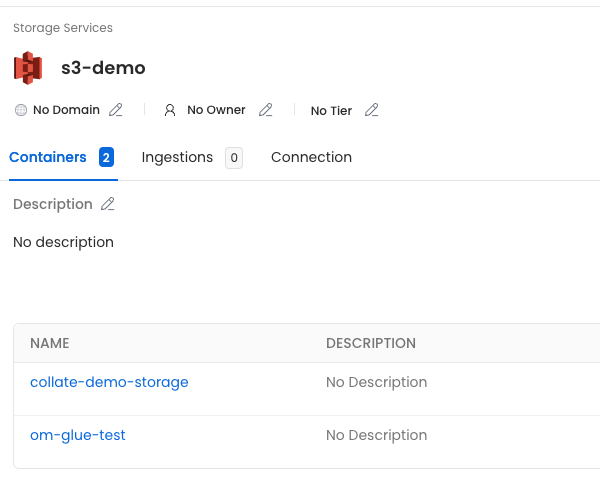
First, the service we called `s3-demo`, which has the two buckets we included in the filter.
 Then, if we click on the `openmetadata-demo-storage` container, we'll see all the children defined in the manifest.
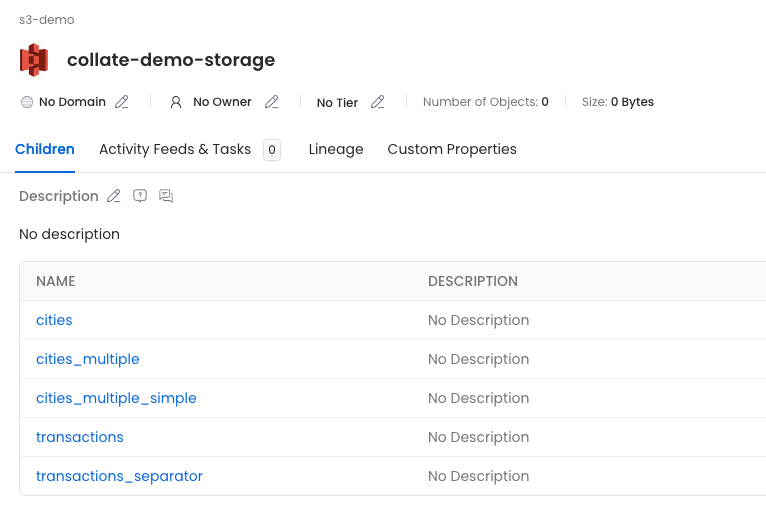 * **cities**: Will show the columns extracted from the sampled parquet files, since there is no partition columns specified.
* **cities\_multiple**: Will have the parquet columns and the `Year` and `State` columns indicated in the partitions.
* **cities\_multiple\_simple**: Will have the parquet columns and the `State` column indicated in the partition.
* **transactions** and **transactions\_separator**: Will have the CSV columns.
* **cities**: Will show the columns extracted from the sampled parquet files, since there is no partition columns specified.
* **cities\_multiple**: Will have the parquet columns and the `Year` and `State` columns indicated in the partitions.
* **cities\_multiple\_simple**: Will have the parquet columns and the `State` column indicated in the partition.
* **transactions** and **transactions\_separator**: Will have the CSV columns.