> ## Documentation Index
> Fetch the complete documentation index at: https://docs.open-metadata.org/llms.txt
> Use this file to discover all available pages before exploring further.
# Using Airflow Connections for Credentials
> Retrieve and use Airflow Connections to securely pass service credentials in OpenMetadata ingestion pipelines.
# Using Airflow Connections
In any connector page, you might have seen an example on how to build a DAG to run the ingestion with Airflow
(e.g., [Athena](/v1.12.x/connectors/database/athena/yaml)).
A possible approach to retrieving sensitive information from Airflow would be using Airflow's
[Connections](https://airflow.apache.org/docs/apache-airflow/stable/howto/connection.html). Note that these
connections can be stored as environment variables, to Airflow's underlying DB or to multiple external services such as
Hashicorp Vault. Note that for external systems, you'll need to provide the necessary package and configure the
[Secrets Backend](https://airflow.apache.org/docs/apache-airflow/stable/security/secrets/secrets-backend/index.html).
The best way to choose how to store these credentials is to go through Airflow's [docs](https://airflow.apache.org/docs/apache-airflow/stable/concepts/connections.html).
## Example
Let's go over an example on how to create a connection to extract data from MySQL and how a DAG would look like
afterwards.
### Step 1 - Create the Connection
From our Airflow host, (e.g., `docker exec -it openmetadata_ingestion bash` if testing in Docker), you can run:
```bash theme={null}
airflow connections add 'my_mysql_db' \
--conn-uri 'mysql+pymysql://openmetadata_user:openmetadata_password@mysql:3306/openmetadata_db'
```
You will see an output like
```
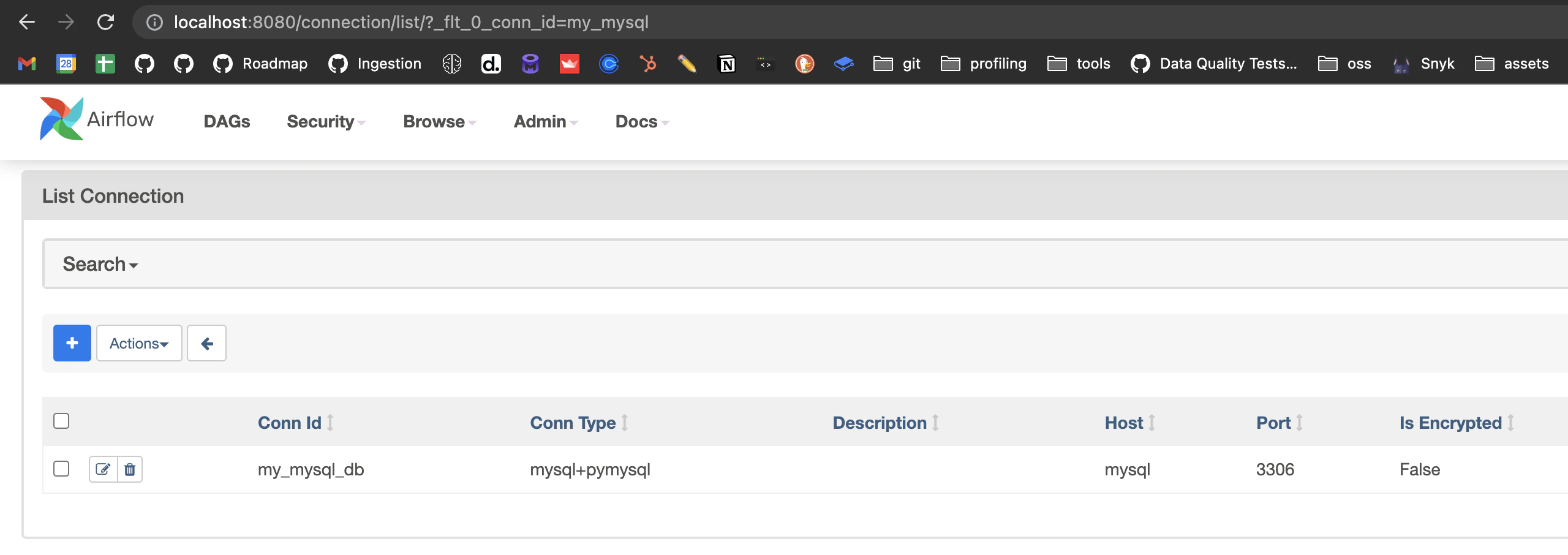
Successfully added `conn_id`=my_mysql_db : mysql+pymysql://openmetadata_user:openmetadata_password@mysql:3306/openmetadata_db
```
Checking the credentials from the Airflow UI, we will see:
 ### Step 2 - Understanding the shape of a Connection
In the same host, we can open a Python shell to explore the Connection object with some more details. To do so, we first
need to pick up the connection from Airflow. We will use the `BaseHook` for that as the connection is not stored
in any external system.
```python theme={null}
from airflow.hooks.base import BaseHook
# Retrieve the connection
connection = BaseHook.get_connection("my_mysql_db")
# Access the connection details
connection.host # 'mysql'
connection.port # 3306
connection.login # 'openmetadata_user'
connection.password # 'openmetadata_password'
```
Based on this information, we now know how to prepare the DAG!
### Step 3 - Write the DAG
A full example on how to write a DAG to ingest data from our Connection can look like this:
```python theme={null}
import pathlib
import yaml
from datetime import timedelta
from airflow import DAG
from airflow.utils.dates import days_ago
try:
from airflow.operators.python import PythonOperator
except ModuleNotFoundError:
from airflow.operators.python_operator import PythonOperator
from metadata.config.common import load_config_file
from metadata.workflow.metadata import MetadataWorkflow
# Import the hook
from airflow.hooks.base import BaseHook
# Retrieve the connection
connection = BaseHook.get_connection("my_mysql_db")
# Use the connection details when setting the YAML
# Note how we escaped the braces as {{}} to not be parsed by the f-string
config = f"""
source:
type: mysql
serviceName: mysql_from_connection
serviceConnection:
config:
type: Mysql
username: {connection.login}
password: {connection.password}
hostPort: {connection.host}:{connection.port}
# databaseSchema: schema
sourceConfig:
config:
markDeletedTables: true
includeTables: true
includeViews: true
sink:
type: metadata-rest
config: {{}}
workflowConfig:
openMetadataServerConfig:
hostPort: ""
authProvider: ""
"""
def metadata_ingestion_workflow():
workflow_config = yaml.safe_load(config)
workflow = MetadataWorkflow.create(workflow_config)
workflow.execute()
workflow.raise_from_status()
workflow.print_status()
workflow.stop()
with DAG(
"mysql_connection_ingestion",
description="An example DAG which runs a OpenMetadata ingestion workflow",
start_date=days_ago(1),
is_paused_upon_creation=False,
schedule_interval='*/5 * * * *',
catchup=False,
) as dag:
ingest_task = PythonOperator(
task_id="ingest_using_recipe",
python_callable=metadata_ingestion_workflow,
)
```
### Option B - Reuse an existing Service
As explained in the [Managing Credentials](/v1.12.x/deployment/ingestion/external/credentials#existing-services) guide, once a service exists in OpenMetadata its connection details are stored and can be reused — just omit the `serviceConnection` YAML entries in your DAG:
```python theme={null}
import pathlib
import yaml
from datetime import timedelta
from airflow import DAG
from airflow.utils.dates import days_ago
try:
from airflow.operators.python import PythonOperator
except ModuleNotFoundError:
from airflow.operators.python_operator import PythonOperator
from metadata.config.common import load_config_file
from metadata.workflow.metadata import MetadataWorkflow
config = """
source:
type: mysql
serviceName: existing_mysql_service
sourceConfig:
config:
markDeletedTables: true
includeTables: true
includeViews: true
sink:
type: metadata-rest
config: {}
workflowConfig:
openMetadataServerConfig:
hostPort: ""
authProvider: ""
"""
def metadata_ingestion_workflow():
workflow_config = yaml.safe_load(config)
workflow = MetadataWorkflow.create(workflow_config)
workflow.execute()
workflow.raise_from_status()
workflow.print_status()
workflow.stop()
with DAG(
"mysql_connection_ingestion",
description="An example DAG which runs a OpenMetadata ingestion workflow",
start_date=days_ago(1),
is_paused_upon_creation=False,
schedule_interval='*/5 * * * *',
catchup=False,
) as dag:
ingest_task = PythonOperator(
task_id="ingest_using_recipe",
python_callable=metadata_ingestion_workflow,
)
```
### Step 2 - Understanding the shape of a Connection
In the same host, we can open a Python shell to explore the Connection object with some more details. To do so, we first
need to pick up the connection from Airflow. We will use the `BaseHook` for that as the connection is not stored
in any external system.
```python theme={null}
from airflow.hooks.base import BaseHook
# Retrieve the connection
connection = BaseHook.get_connection("my_mysql_db")
# Access the connection details
connection.host # 'mysql'
connection.port # 3306
connection.login # 'openmetadata_user'
connection.password # 'openmetadata_password'
```
Based on this information, we now know how to prepare the DAG!
### Step 3 - Write the DAG
A full example on how to write a DAG to ingest data from our Connection can look like this:
```python theme={null}
import pathlib
import yaml
from datetime import timedelta
from airflow import DAG
from airflow.utils.dates import days_ago
try:
from airflow.operators.python import PythonOperator
except ModuleNotFoundError:
from airflow.operators.python_operator import PythonOperator
from metadata.config.common import load_config_file
from metadata.workflow.metadata import MetadataWorkflow
# Import the hook
from airflow.hooks.base import BaseHook
# Retrieve the connection
connection = BaseHook.get_connection("my_mysql_db")
# Use the connection details when setting the YAML
# Note how we escaped the braces as {{}} to not be parsed by the f-string
config = f"""
source:
type: mysql
serviceName: mysql_from_connection
serviceConnection:
config:
type: Mysql
username: {connection.login}
password: {connection.password}
hostPort: {connection.host}:{connection.port}
# databaseSchema: schema
sourceConfig:
config:
markDeletedTables: true
includeTables: true
includeViews: true
sink:
type: metadata-rest
config: {{}}
workflowConfig:
openMetadataServerConfig:
hostPort: ""
authProvider: ""
"""
def metadata_ingestion_workflow():
workflow_config = yaml.safe_load(config)
workflow = MetadataWorkflow.create(workflow_config)
workflow.execute()
workflow.raise_from_status()
workflow.print_status()
workflow.stop()
with DAG(
"mysql_connection_ingestion",
description="An example DAG which runs a OpenMetadata ingestion workflow",
start_date=days_ago(1),
is_paused_upon_creation=False,
schedule_interval='*/5 * * * *',
catchup=False,
) as dag:
ingest_task = PythonOperator(
task_id="ingest_using_recipe",
python_callable=metadata_ingestion_workflow,
)
```
### Option B - Reuse an existing Service
As explained in the [Managing Credentials](/v1.12.x/deployment/ingestion/external/credentials#existing-services) guide, once a service exists in OpenMetadata its connection details are stored and can be reused — just omit the `serviceConnection` YAML entries in your DAG:
```python theme={null}
import pathlib
import yaml
from datetime import timedelta
from airflow import DAG
from airflow.utils.dates import days_ago
try:
from airflow.operators.python import PythonOperator
except ModuleNotFoundError:
from airflow.operators.python_operator import PythonOperator
from metadata.config.common import load_config_file
from metadata.workflow.metadata import MetadataWorkflow
config = """
source:
type: mysql
serviceName: existing_mysql_service
sourceConfig:
config:
markDeletedTables: true
includeTables: true
includeViews: true
sink:
type: metadata-rest
config: {}
workflowConfig:
openMetadataServerConfig:
hostPort: ""
authProvider: ""
"""
def metadata_ingestion_workflow():
workflow_config = yaml.safe_load(config)
workflow = MetadataWorkflow.create(workflow_config)
workflow.execute()
workflow.raise_from_status()
workflow.print_status()
workflow.stop()
with DAG(
"mysql_connection_ingestion",
description="An example DAG which runs a OpenMetadata ingestion workflow",
start_date=days_ago(1),
is_paused_upon_creation=False,
schedule_interval='*/5 * * * *',
catchup=False,
) as dag:
ingest_task = PythonOperator(
task_id="ingest_using_recipe",
python_callable=metadata_ingestion_workflow,
)
```