> ## Documentation Index
> Fetch the complete documentation index at: https://docs.open-metadata.org/llms.txt
> Use this file to discover all available pages before exploring further.
# Run the ingestion from the OpenMetadata UI
> Learn how to deploy and configure OpenMetadata Ingestion pipelines. Complete setup guide with connectors, scheduling, and best practices.
# Run the ingestion from the OpenMetadata UI
When you create and manage ingestion workflows from OpenMetadata, under the hood we need to communicate
with an orchestration system. It does not matter which one, but we need it to have a set of APIs to create,
run, fetch the logs, etc. of our workflows.
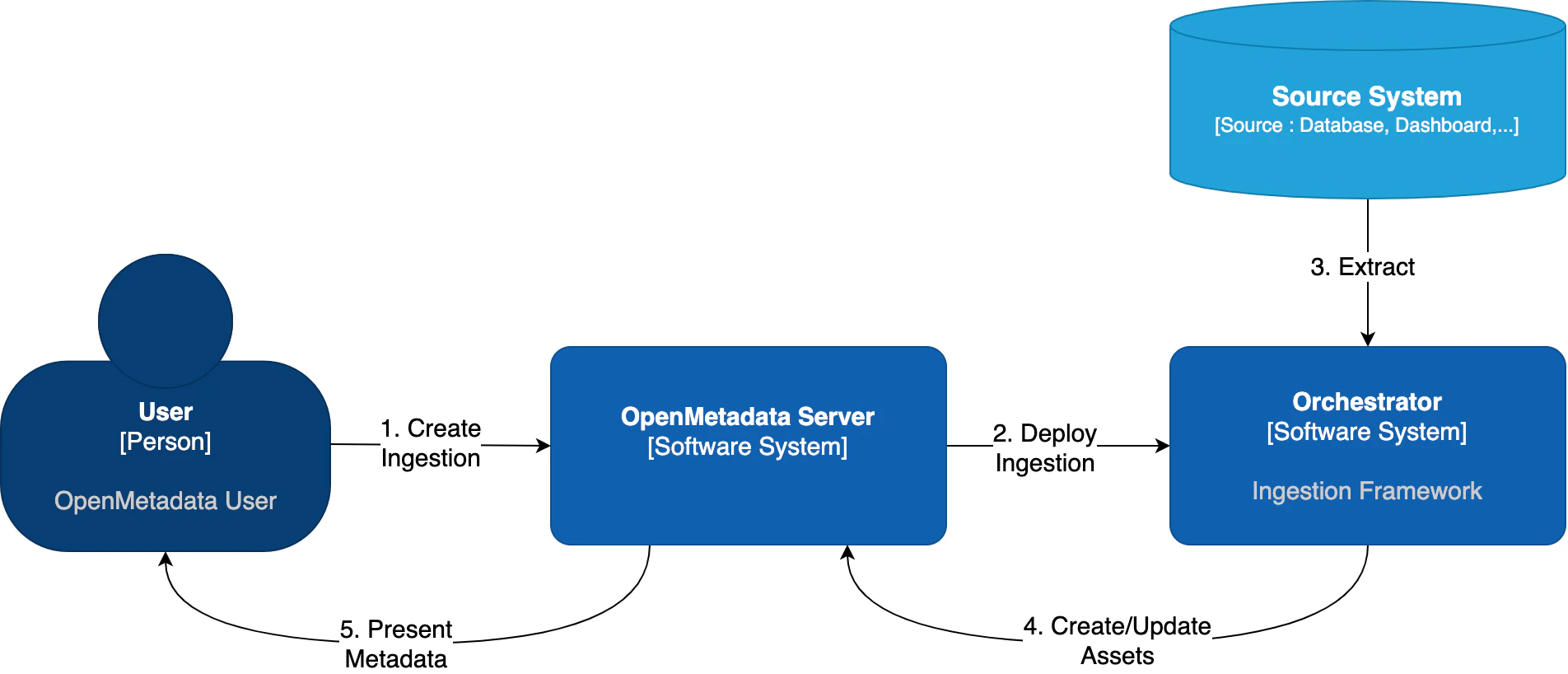 OpenMetadata supports two orchestration backends:
| Orchestrator | Description |
| --------------------- | ----------------------------------------------------------------------------- |
| **Apache Airflow** | The traditional approach - uses Airflow DAGs to manage pipelines |
| **Kubernetes Native** | **New in 1.12** - Uses native K8s Jobs and CronJobs without requiring Airflow |
Continue below for Airflow configuration
Use native K8s Jobs (no Airflow required)
***
## Airflow as Orchestrator
Out of the box, OpenMetadata comes with integration for Airflow. In this guide, we will show you how to manage
ingestions from OpenMetadata by linking it to an Airflow service.
Advanced note for developers: We have an [interface](https://github.com/open-metadata/OpenMetadata/blob/main/openmetadata-spec/src/main/java/org/openmetadata/sdk/PipelineServiceClient.java)
that can be extended to bring support to any other orchestrator. You can follow the implementation we have for [Airflow](https://github.com/open-metadata/OpenMetadata/blob/main/openmetadata-service/src/main/java/org/openmetadata/service/clients/pipeline/airflow/AirflowRESTClient.java)
or [Kubernetes](https://github.com/open-metadata/OpenMetadata/blob/main/openmetadata-service/src/main/java/org/openmetadata/service/clients/pipeline/k8s/K8sPipelineClient.java) as starting points.
1. **If you do not have an Airflow service** up and running on your platform, we provide a custom
[Docker](https://hub.docker.com/r/openmetadata/ingestion) image, which already contains the OpenMetadata ingestion
packages and custom [Airflow APIs](https://github.com/open-metadata/openmetadata-airflow-apis) to
deploy Workflows from the UI as well. **This is the simplest approach**.
2. If you already have Airflow up and running and want to use it for the metadata ingestion, you will
need to install the ingestion modules to the host. You can find more information on how to do this
in the Custom Airflow Installation section.
## Airflow permissions
These are the permissions required by the user that will manage the communication between the OpenMetadata Server
and Airflow's Webserver:
```
[
(permissions.ACTION_CAN_DELETE, permissions.RESOURCE_DAG),
(permissions.ACTION_CAN_CREATE, permissions.RESOURCE_DAG),
(permissions.ACTION_CAN_EDIT, permissions.RESOURCE_DAG),
(permissions.ACTION_CAN_READ, permissions.RESOURCE_DAG),
]
```
`User` permissions is enough for these requirements.
You can find more information on Airflow's Access Control [here](https://airflow.apache.org/docs/apache-airflow/stable/security/access-control.html).
## Shared Volumes
The Airflow Webserver, Scheduler and Workers - if using a distributed setup - need to have access to the same shared volumes
with RWX permissions.
We have specific instructions on how to set up the shared volumes in Kubernetes depending on your cloud deployment [here](/v1.12.x/deployment/kubernetes).
## Using the OpenMetadata Ingestion Image
If you are using our `openmetadata/ingestion` Docker image, there is just one thing to do: Configure the OpenMetadata server.
The OpenMetadata server takes all its configurations from a YAML file. You can find them in our [repo](https://github.com/open-metadata/OpenMetadata/tree/main/conf). In
`openmetadata.yaml`, update the `pipelineServiceClientConfiguration` section accordingly.
```yaml theme={null}
# For Bare Metal Installations
[...]
pipelineServiceClientConfiguration:
className: ${PIPELINE_SERVICE_CLIENT_CLASS_NAME:-"org.openmetadata.service.clients.pipeline.airflow.AirflowRESTClient"}
apiEndpoint: ${PIPELINE_SERVICE_CLIENT_ENDPOINT:-http://localhost:8080}
metadataApiEndpoint: ${SERVER_HOST_API_URL:-http://localhost:8585/api}
hostIp: ${PIPELINE_SERVICE_CLIENT_HOST_IP:-""}
verifySSL: ${PIPELINE_SERVICE_CLIENT_VERIFY_SSL:-"no-ssl"} # Possible values are "no-ssl", "ignore", "validate"
sslConfig:
certificatePath: ${PIPELINE_SERVICE_CLIENT_SSL_CERT_PATH:-""} # Local path for the Pipeline Service Client
# Default required parameters for Airflow as Pipeline Service Client
parameters:
username: ${AIRFLOW_USERNAME:-admin}
password: ${AIRFLOW_PASSWORD:-admin}
timeout: ${AIRFLOW_TIMEOUT:-10}
[...]
```
If using Docker, make sure that you are passing the correct environment variables:
```env theme={null}
PIPELINE_SERVICE_CLIENT_ENDPOINT: ${PIPELINE_SERVICE_CLIENT_ENDPOINT:-http://ingestion:8080}
SERVER_HOST_API_URL: ${SERVER_HOST_API_URL:-http://openmetadata-server:8585/api}
```
If using Kubernetes, make sure that you are passing the correct values to Helm Chart:
```yaml theme={null}
# Custom OpenMetadata Values.yaml
openmetadata:
config:
pipelineServiceClientConfig:
enabled: true
# endpoint url for airflow
apiEndpoint: http://openmetadata-dependencies-web.default.svc.cluster.local:8080
auth:
username: admin
password:
secretRef: airflow-secrets
secretKey: openmetadata-airflow-password
```
## Custom Airflow Installation
* Note that the `openmetadata-ingestion` only supports Python versions 3.9, 3,10, and 3.11.
* * The supported Airflow versions for OpenMetadata include 2.3, 2.4, 2.5, 2.6, and 2.7. Starting from release 1.6, OpenMetadata supports compatibility with Airflow versions up to 2.10.5. Specifically, OpenMetadata 1.5 supports Airflow 2.9, 1.6.4 supports Airflow 2.9.3, and 1.6.5 supports Airflow 2.10.5. Ensure that your Airflow version aligns with your OpenMetadata deployment for optimal performance.
You will need to follow three steps:
1. Install the `openmetadata-ingestion` package with the connector plugins that you need.
2. Install the `openmetadata-managed-apis` to deploy our custom APIs on top of Airflow.
3. Configure the Airflow environment.
4. Configure the OpenMetadata server.
### 1. Install the Connector Modules
The current approach we are following here is preparing the metadata ingestion DAGs as `PythonOperators`. This means that
the packages need to be present in the Airflow instances.
You will need to install:
```python theme={null}
pip3 install "openmetadata-ingestion[]==x.y.z"
```
And then run the DAG as explained in each [Connector](/v1.12.x/connectors), where `x.y.z` is the same version of your
OpenMetadata server. For example, if you are on version 1.0.0, then you can install the `openmetadata-ingestion`
with versions `1.0.0.*`, e.g., `1.0.0.0`, `1.0.0.1`, etc., but not `1.0.1.x`.
You can also install `openmetadata-ingestion[all]==x.y.z`, which will bring the requirements to run any connector.
You can check the [Connector Modules](/v1.12.x/connectors) guide above to learn how to install the `openmetadata-ingestion` package with the
necessary plugins. They are necessary because even if we install the APIs, the Airflow instance needs to have the
required libraries to connect to each source.
### 2. Install the Airflow APIs
The `openmetadata-ingestion-apis` has a dependency on `apache-airflow>=2.2.2`. Please make sure that
your host satisfies such requirement. Only installing the `openmetadata-ingestion-apis` won't result
in a proper full Airflow installation. For that, please follow the Airflow [docs](https://airflow.apache.org/docs/apache-airflow/stable/installation/index.html).
The goal of this module is to add some HTTP endpoints that the UI calls for deploying the Airflow DAGs.
The first step can be achieved by running:
```python theme={null}
pip3 install "openmetadata-managed-apis==x.y.z"
```
Here, the same versioning logic applies: `x.y.z` is the same version of your
OpenMetadata server. For example, if you are on version 1.0.0, then you can install the `openmetadata-managed-apis`
with versions `1.0.0.*`, e.g., `1.0.0.0`, `1.0.0.1`, etc., but not `1.0.1.x`.
### 3. Configure the Airflow environment
The ingestion image is built on Airflow's base image, ensuring it includes all necessary requirements to run Airflow. For Kubernetes deployments, the setup uses community Airflow charts with a modified base image, enabling it to function seamlessly as a **scheduler**, **webserver**, and **worker**.
We need a couple of settings:
#### AIRFLOW\_HOME
The APIs will look for the `AIRFLOW_HOME` environment variable to place the dynamically generated DAGs. Make
sure that the variable is set and reachable from Airflow.
#### Airflow APIs Basic Auth
Note that the integration of OpenMetadata with Airflow requires Basic Auth in the APIs. Make sure that your
Airflow configuration supports that. You can read more about it [here](https://airflow.apache.org/docs/apache-airflow/stable/security/api.html).
A possible approach here is to update your `airflow.cfg` entries for Airflow 3.x:
```
[api]
auth_backends = airflow.api_fastapi.auth.backend.basic_auth
```
#### DAG Generated Configs
Every time a DAG is created from OpenMetadata, it will also create a JSON file with some information about the
workflow that needs to be executed. By default, these files live under `${AIRFLOW_HOME}/dag_generated_configs`, which
in most environments translates to `/opt/airflow/dag_generated_configs`.
You can change this directory by specifying the environment variable `AIRFLOW__OPENMETADATA_AIRFLOW_APIS__DAG_GENERATED_CONFIGS`
or updating the `airflow.cfg` with:
```cfg theme={null}
[openmetadata_airflow_apis]
dag_generated_configs=/opt/airflow/dag_generated_configs
```
A safe way to validate if the configuration is properly set in Airflow is to run:
```bash theme={null}
airflow config get-value openmetadata_airflow_apis dag_generated_configs
```
### 4. Configure in the OpenMetadata Server
After installing the Airflow APIs, you will need to update your OpenMetadata Server.
The OpenMetadata server takes all its configurations from a YAML file. You can find them in our [repo](https://github.com/open-metadata/OpenMetadata/tree/main/conf). In
`openmetadata.yaml`, update the `pipelineServiceClientConfiguration` section accordingly.
```yaml theme={null}
# For Bare Metal Installations
[...]
pipelineServiceClientConfiguration:
className: ${PIPELINE_SERVICE_CLIENT_CLASS_NAME:-"org.openmetadata.service.clients.pipeline.airflow.AirflowRESTClient"}
apiEndpoint: ${PIPELINE_SERVICE_CLIENT_ENDPOINT:-http://localhost:8080}
metadataApiEndpoint: ${SERVER_HOST_API_URL:-http://localhost:8585/api}
hostIp: ${PIPELINE_SERVICE_CLIENT_HOST_IP:-""}
verifySSL: ${PIPELINE_SERVICE_CLIENT_VERIFY_SSL:-"no-ssl"} # Possible values are "no-ssl", "ignore", "validate"
sslConfig:
certificatePath: ${PIPELINE_SERVICE_CLIENT_SSL_CERT_PATH:-""} # Local path for the Pipeline Service Client
# Default required parameters for Airflow as Pipeline Service Client
parameters:
username: ${AIRFLOW_USERNAME:-admin}
password: ${AIRFLOW_PASSWORD:-admin}
timeout: ${AIRFLOW_TIMEOUT:-10}
[...]
```
If using Docker, make sure that you are passing the correct environment variables:
```env theme={null}
PIPELINE_SERVICE_CLIENT_ENDPOINT: ${PIPELINE_SERVICE_CLIENT_ENDPOINT:-http://ingestion:8080}
SERVER_HOST_API_URL: ${SERVER_HOST_API_URL:-http://openmetadata-server:8585/api}
```
If using Kubernetes, make sure that you are passing the correct values to Helm Chart:
```yaml theme={null}
# Custom OpenMetadata Values.yaml
openmetadata:
config:
pipelineServiceClientConfig:
enabled: true
# endpoint url for airflow
apiEndpoint: http://openmetadata-dependencies-web.default.svc.cluster.local:8080
auth:
username: admin
password:
secretRef: airflow-secrets
secretKey: openmetadata-airflow-password
```
***
For installation validation, Git Sync guidance, SSL configuration, and troubleshooting Airflow pipeline issues, see the [Airflow Troubleshooting & Advanced](/v1.12.x/deployment/ingestion/openmetadata/troubleshooting) guide.
OpenMetadata supports two orchestration backends:
| Orchestrator | Description |
| --------------------- | ----------------------------------------------------------------------------- |
| **Apache Airflow** | The traditional approach - uses Airflow DAGs to manage pipelines |
| **Kubernetes Native** | **New in 1.12** - Uses native K8s Jobs and CronJobs without requiring Airflow |
Continue below for Airflow configuration
Use native K8s Jobs (no Airflow required)
***
## Airflow as Orchestrator
Out of the box, OpenMetadata comes with integration for Airflow. In this guide, we will show you how to manage
ingestions from OpenMetadata by linking it to an Airflow service.
Advanced note for developers: We have an [interface](https://github.com/open-metadata/OpenMetadata/blob/main/openmetadata-spec/src/main/java/org/openmetadata/sdk/PipelineServiceClient.java)
that can be extended to bring support to any other orchestrator. You can follow the implementation we have for [Airflow](https://github.com/open-metadata/OpenMetadata/blob/main/openmetadata-service/src/main/java/org/openmetadata/service/clients/pipeline/airflow/AirflowRESTClient.java)
or [Kubernetes](https://github.com/open-metadata/OpenMetadata/blob/main/openmetadata-service/src/main/java/org/openmetadata/service/clients/pipeline/k8s/K8sPipelineClient.java) as starting points.
1. **If you do not have an Airflow service** up and running on your platform, we provide a custom
[Docker](https://hub.docker.com/r/openmetadata/ingestion) image, which already contains the OpenMetadata ingestion
packages and custom [Airflow APIs](https://github.com/open-metadata/openmetadata-airflow-apis) to
deploy Workflows from the UI as well. **This is the simplest approach**.
2. If you already have Airflow up and running and want to use it for the metadata ingestion, you will
need to install the ingestion modules to the host. You can find more information on how to do this
in the Custom Airflow Installation section.
## Airflow permissions
These are the permissions required by the user that will manage the communication between the OpenMetadata Server
and Airflow's Webserver:
```
[
(permissions.ACTION_CAN_DELETE, permissions.RESOURCE_DAG),
(permissions.ACTION_CAN_CREATE, permissions.RESOURCE_DAG),
(permissions.ACTION_CAN_EDIT, permissions.RESOURCE_DAG),
(permissions.ACTION_CAN_READ, permissions.RESOURCE_DAG),
]
```
`User` permissions is enough for these requirements.
You can find more information on Airflow's Access Control [here](https://airflow.apache.org/docs/apache-airflow/stable/security/access-control.html).
## Shared Volumes
The Airflow Webserver, Scheduler and Workers - if using a distributed setup - need to have access to the same shared volumes
with RWX permissions.
We have specific instructions on how to set up the shared volumes in Kubernetes depending on your cloud deployment [here](/v1.12.x/deployment/kubernetes).
## Using the OpenMetadata Ingestion Image
If you are using our `openmetadata/ingestion` Docker image, there is just one thing to do: Configure the OpenMetadata server.
The OpenMetadata server takes all its configurations from a YAML file. You can find them in our [repo](https://github.com/open-metadata/OpenMetadata/tree/main/conf). In
`openmetadata.yaml`, update the `pipelineServiceClientConfiguration` section accordingly.
```yaml theme={null}
# For Bare Metal Installations
[...]
pipelineServiceClientConfiguration:
className: ${PIPELINE_SERVICE_CLIENT_CLASS_NAME:-"org.openmetadata.service.clients.pipeline.airflow.AirflowRESTClient"}
apiEndpoint: ${PIPELINE_SERVICE_CLIENT_ENDPOINT:-http://localhost:8080}
metadataApiEndpoint: ${SERVER_HOST_API_URL:-http://localhost:8585/api}
hostIp: ${PIPELINE_SERVICE_CLIENT_HOST_IP:-""}
verifySSL: ${PIPELINE_SERVICE_CLIENT_VERIFY_SSL:-"no-ssl"} # Possible values are "no-ssl", "ignore", "validate"
sslConfig:
certificatePath: ${PIPELINE_SERVICE_CLIENT_SSL_CERT_PATH:-""} # Local path for the Pipeline Service Client
# Default required parameters for Airflow as Pipeline Service Client
parameters:
username: ${AIRFLOW_USERNAME:-admin}
password: ${AIRFLOW_PASSWORD:-admin}
timeout: ${AIRFLOW_TIMEOUT:-10}
[...]
```
If using Docker, make sure that you are passing the correct environment variables:
```env theme={null}
PIPELINE_SERVICE_CLIENT_ENDPOINT: ${PIPELINE_SERVICE_CLIENT_ENDPOINT:-http://ingestion:8080}
SERVER_HOST_API_URL: ${SERVER_HOST_API_URL:-http://openmetadata-server:8585/api}
```
If using Kubernetes, make sure that you are passing the correct values to Helm Chart:
```yaml theme={null}
# Custom OpenMetadata Values.yaml
openmetadata:
config:
pipelineServiceClientConfig:
enabled: true
# endpoint url for airflow
apiEndpoint: http://openmetadata-dependencies-web.default.svc.cluster.local:8080
auth:
username: admin
password:
secretRef: airflow-secrets
secretKey: openmetadata-airflow-password
```
## Custom Airflow Installation
* Note that the `openmetadata-ingestion` only supports Python versions 3.9, 3,10, and 3.11.
* * The supported Airflow versions for OpenMetadata include 2.3, 2.4, 2.5, 2.6, and 2.7. Starting from release 1.6, OpenMetadata supports compatibility with Airflow versions up to 2.10.5. Specifically, OpenMetadata 1.5 supports Airflow 2.9, 1.6.4 supports Airflow 2.9.3, and 1.6.5 supports Airflow 2.10.5. Ensure that your Airflow version aligns with your OpenMetadata deployment for optimal performance.
You will need to follow three steps:
1. Install the `openmetadata-ingestion` package with the connector plugins that you need.
2. Install the `openmetadata-managed-apis` to deploy our custom APIs on top of Airflow.
3. Configure the Airflow environment.
4. Configure the OpenMetadata server.
### 1. Install the Connector Modules
The current approach we are following here is preparing the metadata ingestion DAGs as `PythonOperators`. This means that
the packages need to be present in the Airflow instances.
You will need to install:
```python theme={null}
pip3 install "openmetadata-ingestion[]==x.y.z"
```
And then run the DAG as explained in each [Connector](/v1.12.x/connectors), where `x.y.z` is the same version of your
OpenMetadata server. For example, if you are on version 1.0.0, then you can install the `openmetadata-ingestion`
with versions `1.0.0.*`, e.g., `1.0.0.0`, `1.0.0.1`, etc., but not `1.0.1.x`.
You can also install `openmetadata-ingestion[all]==x.y.z`, which will bring the requirements to run any connector.
You can check the [Connector Modules](/v1.12.x/connectors) guide above to learn how to install the `openmetadata-ingestion` package with the
necessary plugins. They are necessary because even if we install the APIs, the Airflow instance needs to have the
required libraries to connect to each source.
### 2. Install the Airflow APIs
The `openmetadata-ingestion-apis` has a dependency on `apache-airflow>=2.2.2`. Please make sure that
your host satisfies such requirement. Only installing the `openmetadata-ingestion-apis` won't result
in a proper full Airflow installation. For that, please follow the Airflow [docs](https://airflow.apache.org/docs/apache-airflow/stable/installation/index.html).
The goal of this module is to add some HTTP endpoints that the UI calls for deploying the Airflow DAGs.
The first step can be achieved by running:
```python theme={null}
pip3 install "openmetadata-managed-apis==x.y.z"
```
Here, the same versioning logic applies: `x.y.z` is the same version of your
OpenMetadata server. For example, if you are on version 1.0.0, then you can install the `openmetadata-managed-apis`
with versions `1.0.0.*`, e.g., `1.0.0.0`, `1.0.0.1`, etc., but not `1.0.1.x`.
### 3. Configure the Airflow environment
The ingestion image is built on Airflow's base image, ensuring it includes all necessary requirements to run Airflow. For Kubernetes deployments, the setup uses community Airflow charts with a modified base image, enabling it to function seamlessly as a **scheduler**, **webserver**, and **worker**.
We need a couple of settings:
#### AIRFLOW\_HOME
The APIs will look for the `AIRFLOW_HOME` environment variable to place the dynamically generated DAGs. Make
sure that the variable is set and reachable from Airflow.
#### Airflow APIs Basic Auth
Note that the integration of OpenMetadata with Airflow requires Basic Auth in the APIs. Make sure that your
Airflow configuration supports that. You can read more about it [here](https://airflow.apache.org/docs/apache-airflow/stable/security/api.html).
A possible approach here is to update your `airflow.cfg` entries for Airflow 3.x:
```
[api]
auth_backends = airflow.api_fastapi.auth.backend.basic_auth
```
#### DAG Generated Configs
Every time a DAG is created from OpenMetadata, it will also create a JSON file with some information about the
workflow that needs to be executed. By default, these files live under `${AIRFLOW_HOME}/dag_generated_configs`, which
in most environments translates to `/opt/airflow/dag_generated_configs`.
You can change this directory by specifying the environment variable `AIRFLOW__OPENMETADATA_AIRFLOW_APIS__DAG_GENERATED_CONFIGS`
or updating the `airflow.cfg` with:
```cfg theme={null}
[openmetadata_airflow_apis]
dag_generated_configs=/opt/airflow/dag_generated_configs
```
A safe way to validate if the configuration is properly set in Airflow is to run:
```bash theme={null}
airflow config get-value openmetadata_airflow_apis dag_generated_configs
```
### 4. Configure in the OpenMetadata Server
After installing the Airflow APIs, you will need to update your OpenMetadata Server.
The OpenMetadata server takes all its configurations from a YAML file. You can find them in our [repo](https://github.com/open-metadata/OpenMetadata/tree/main/conf). In
`openmetadata.yaml`, update the `pipelineServiceClientConfiguration` section accordingly.
```yaml theme={null}
# For Bare Metal Installations
[...]
pipelineServiceClientConfiguration:
className: ${PIPELINE_SERVICE_CLIENT_CLASS_NAME:-"org.openmetadata.service.clients.pipeline.airflow.AirflowRESTClient"}
apiEndpoint: ${PIPELINE_SERVICE_CLIENT_ENDPOINT:-http://localhost:8080}
metadataApiEndpoint: ${SERVER_HOST_API_URL:-http://localhost:8585/api}
hostIp: ${PIPELINE_SERVICE_CLIENT_HOST_IP:-""}
verifySSL: ${PIPELINE_SERVICE_CLIENT_VERIFY_SSL:-"no-ssl"} # Possible values are "no-ssl", "ignore", "validate"
sslConfig:
certificatePath: ${PIPELINE_SERVICE_CLIENT_SSL_CERT_PATH:-""} # Local path for the Pipeline Service Client
# Default required parameters for Airflow as Pipeline Service Client
parameters:
username: ${AIRFLOW_USERNAME:-admin}
password: ${AIRFLOW_PASSWORD:-admin}
timeout: ${AIRFLOW_TIMEOUT:-10}
[...]
```
If using Docker, make sure that you are passing the correct environment variables:
```env theme={null}
PIPELINE_SERVICE_CLIENT_ENDPOINT: ${PIPELINE_SERVICE_CLIENT_ENDPOINT:-http://ingestion:8080}
SERVER_HOST_API_URL: ${SERVER_HOST_API_URL:-http://openmetadata-server:8585/api}
```
If using Kubernetes, make sure that you are passing the correct values to Helm Chart:
```yaml theme={null}
# Custom OpenMetadata Values.yaml
openmetadata:
config:
pipelineServiceClientConfig:
enabled: true
# endpoint url for airflow
apiEndpoint: http://openmetadata-dependencies-web.default.svc.cluster.local:8080
auth:
username: admin
password:
secretRef: airflow-secrets
secretKey: openmetadata-airflow-password
```
***
For installation validation, Git Sync guidance, SSL configuration, and troubleshooting Airflow pipeline issues, see the [Airflow Troubleshooting & Advanced](/v1.12.x/deployment/ingestion/openmetadata/troubleshooting) guide.