> ## Documentation Index
> Fetch the complete documentation index at: https://docs.open-metadata.org/llms.txt
> Use this file to discover all available pages before exploring further.

# Upgrade OpenMetadata | Official Documentation

> Upgrade the platform version with step-by-step instructions on migration, compatibility, and new feature adoption.

export const VERSION_MATRIX_DATA_WITH_UPDATES = [{
  service: "Java",
  version: "21"
}, {
  service: "Mysql",
  version: "8.0.42"
}, {
  service: "Postgres",
  version: "1.15.0"
}, {
  service: "OpenSearch",
  version: "3.2.0",
  updated: true
}, {
  service: "ElasticSearch",
  version: "9.3.0",
  updated: true
}];

export const VersionMatrix = ({data = []}) => {
  return <div className="vm-wrapper">
      <table className="vm-table">
        <thead>
          <tr className="vm-header-row">
            <th className="vm-th">Service</th>
            <th className="vm-th">Minimum Version</th>
          </tr>
        </thead>
        <tbody>
          {data.map((row, i) => <tr key={i} className={i % 2 === 0 ? "vm-row-even" : "vm-row-odd"}>
              <td className={`vm-td${row.updated ? " vm-td-updated" : ""}`}>
                {row.service}
              </td>
              <td className={`vm-td${row.updated ? " vm-td-updated" : ""}`}>
                {row.version}
                {row.updated && <span className="vm-updated-badge"><svg xmlns="http://www.w3.org/2000/svg" width="14" height="14" viewBox="0 0 24 24" className="vm-badge-icon"><path d="M1 21h22L12 2 1 21zm12-3h-2v-2h2v2zm0-4h-2v-4h2v4z" /></svg>Minimum version updated</span>}
              </td>
            </tr>)}
        </tbody>
      </table>
    </div>;
};

export const BreakingChanges = ({children}) => {
  return <div className="breaking-changes-container">
            <h2 className="breaking-changes-header">
                <svg className="breaking-changes-icon" viewBox="0 0 24 24" fill="none" stroke="white" strokeWidth="2" strokeLinecap="round" strokeLinejoin="round">
                    <path d="M10.29 3.86L1.82 18a2 2 0 001.71 3h16.94a2 2 0 001.71-3L13.71 3.86a2 2 0 00-3.42 0z" />
                    <line x1="12" y1="9" x2="12" y2="13" />
                    <line x1="12" y1="17" x2="12.01" y2="17" />
                </svg>
                <span className="breaking-changes-title">Breaking Changes</span>
            </h2>
            <div className="breaking-changes-content">
                {children}
            </div>
        </div>;
};

# Upgrade OpenMetadata

In this guide, you will find all the necessary information to safely upgrade your OpenMetadata instance to 1.12.6.

<BreakingChanges>
  * **OpenSearch/Elasticsearch Client Upgrade:** The search client libraries have been upgraded — the Elasticsearch client to **9.x** and the OpenSearch client to **3.x**. Users must ensure their search engine servers are on compatible versions:
    * **Elasticsearch:** Upgrade to **9.x** (minimum: **9.0.0**, recommended: **9.3.0**). The 9.x client is not compatible with 8.x or older servers.
    * **OpenSearch:** Upgrade to **3.x** (minimum: **3.0.0**, recommended: **3.3.0**). Note that AWS OpenSearch Service currently supports up to **OpenSearch 3.3**. If using AWS OpenSearch, you might not be able to upgrade from 2.X into 3.X directly. In this case, create a fresh installation with 3.3 and run a reindex. All the index data will be repopulated.

  * **Data Contract Schema Changes:** Security, SLAs, and Terms of Use can now be inherited from the Data Product's Data Contract. To support this:
    * Added the `inherited` property to **Security** and **SLAs**.
    * Converted `termsOfUse` from a simple Markdown field to an object that holds both the markdown information and the inheritance flag.

  * **Helm - Updated Airflow Section:** The `pipelineServiceClientConfig` key, previously used to host Airflow configuration directly, has been restructured. OpenMetadata now supports a native Kubernetes orchestration engine in addition to Airflow:

    * Added `pipelineServiceClientConfig.type` key to switch between `airflow` or `k8s`.
    * Moved orchestrator-specific configurations into nested levels: `pipelineServiceClientConfig.airflow` and `pipelineServiceClientConfig.k8s`.

    For more details, see [PR #436](https://github.com/open-metadata/openmetadata-helm-charts/pull/436).
</BreakingChanges>

## Prerequisites

Every time that you plan on upgrading OpenMetadata to a newer version, make sure to go over all these steps:

### Version Compatibility Matrix

Before upgrading your OpenMetadata instance, verify that the versions of the external services used in your deployment meet the minimum supported requirements. Upgrading OpenMetadata without compatible versions of these services may cause migration failures or runtime issues.

<VersionMatrix data={VERSION_MATRIX_DATA_WITH_UPDATES} />

## **Note:**

If your current deployment uses versions lower than the minimum supported versions listed above, upgrade the respective services before proceeding with the OpenMetadata upgrade process.

### Backup your Metadata

Before upgrading your OpenMetadata version we strongly recommend backing up the metadata.

The source of truth is stored in the underlying database (MySQL and Postgres supported). During each version upgrade there
is a database migration process that needs to run. It will directly attack your database and update the shape of the
data to the newest OpenMetadata release.

It is important that we backup the data because if we face any unexpected issues during the upgrade process,
you will be able to get back to the previous version without any loss.

<Tip>
  You can learn more about how the migration process works [here](/deployment/upgrade/how-does-it-work).

  **During the upgrade, please note that the backup is only for safety and should not be used to restore data to a higher version**.
</Tip>

Since version 1.4.0, **OpenMetadata encourages using the builtin-tools for creating logical backups of the metadata**:

* [mysqldump](https://dev.mysql.com/doc/refman/8.0/en/mysqldump.html) for MySQL
* [pg\_dump](https://www.postgresql.org/docs/current/app-pgdump.html) for Postgres

For PROD deployment we recommend users to rely on cloud services for their databases, be it [AWS RDS](https://docs.aws.amazon.com/rds/),
[Azure SQL](https://azure.microsoft.com/en-in/products/azure-sql/database) or [GCP Cloud SQL](https://cloud.google.com/sql/).

If you're a user of these services, you can leverage their backup capabilities directly:

* [Creating a DB snapshot in AWS](https://docs.aws.amazon.com/AmazonRDS/latest/UserGuide/USER_CreateSnapshot.html)
* [Backup and restore in Azure MySQL](https://learn.microsoft.com/en-us/azure/mysql/single-server/concepts-backup)
* [About GCP Cloud SQL backup](https://cloud.google.com/sql/docs/mysql/backup-recovery/backups)

You can refer to the following guide to get more details about the backup and restore:

<CardGroup cols={1}>
  <Card title="Backup Metadata" href="/v1.12.x/deployment/backup-restore-metadata">
    Learn how to back up MySQL or Postgres data.
  </Card>
</CardGroup>

### Understanding the "Running" State in OpenMetadata

In OpenMetadata, the **"Running"** state indicates that the OpenMetadata server has received a response from Airflow confirming that a workflow is in progress. However, if Airflow unexpectedly stops or crashes before it can send a failure status update through the **Failure Callback**, OpenMetadata remains unaware of the workflow’s actual state. As a result, the workflow may appear to be stuck in **"Running"** even though it is no longer executing.

This situation can also occur during an OpenMetadata upgrade. If an ingestion pipeline was running at the time of the upgrade and the process caused Airflow to shut down, OpenMetadata would not receive any further updates from Airflow. Consequently, the pipeline status remains **"Running"** indefinitely.

<img src="https://mintcdn.com/openmetadata/FFPgqWxUp0cM2_kH/public/images/deployment/upgrade/running-state-in-openmetadata.png?fit=max&auto=format&n=FFPgqWxUp0cM2_kH&q=85&s=2d5413de409372e799f261fff84d40d5" alt="Running State in OpenMetadata" width="2943" height="1413" data-path="public/images/deployment/upgrade/running-state-in-openmetadata.png" />

#### Expected Steps to Resolve

To resolve this issue:

* Ensure that Airflow is restarted properly after an unexpected shutdown.
* Manually update the pipeline status if necessary.
* Check Airflow logs to verify if the DAG execution was interrupted.

#### Update `sort_buffer_size` (MySQL) or `work_mem` (Postgres)

Before running the migrations, it is important to update these parameters to ensure there are no runtime errors.
A safe value would be setting them to 20MB.

**If using MySQL**

You can update it via SQL (note that it will reset after the server restarts):

```sql theme={null}
SET GLOBAL sort_buffer_size = 20971520
```

To make the configuration persistent, you'd need to navigate to your MySQL Server install directory and update the
`my.ini` or `my.cnf` [files](https://dev.mysql.com/doc/refman/8.0/en/option-files.html) with `sort_buffer_size = 20971520`.

If using RDS, you will need to update your instance's [Parameter Group](https://docs.aws.amazon.com/AmazonRDS/latest/UserGuide/USER_WorkingWithParamGroups.html)
to include the above change.

**If using Postgres**

You can update it via SQL (not that it will reset after the server restarts):

```sql theme={null}
SET work_mem = '20MB';
```

To make the configuration persistent, you'll need to update the `postgresql.conf` [file](https://www.postgresql.org/docs/9.3/config-setting.html)
with `work_mem = 20MB`.

If using RDS, you will need to update your instance's [Parameter Group](https://docs.aws.amazon.com/AmazonRDS/latest/UserGuide/USER_WorkingWithParamGroups.html)
to include the above change.

Note that this value would depend on the size of your `query_entity` table. If you still see `Out of Sort Memory Error`s
during the migration after bumping this value, you can increase them further.

After the migration is finished, you can revert this changes.

#### Enable `pg_trgm` Extension (Azure PostgreSQL Flexible Server)
<Warning>
  If you are using **Azure Database for PostgreSQL (Flexible Server)**, the migration process requires the `pg_trgm` extension. By default, Azure restricts this extension and you may encounter:

  ```
  ERROR: extension "pg_trgm" is not allow-listed for users in Azure Database for PostgreSQL
  ```
</Warning>

**Resolution Steps:**

1. **Allow the extension** - Go to **Azure Portal** → **PostgreSQL Flexible Server** → **Server Parameters** → Search for `azure.extensions` → Add `pg_trgm` (comma-separated if other extensions exist)
2. **Restart the PostgreSQL server** for changes to take effect
3. **Create the extension** by running:
   ```sql theme={null}
   CREATE EXTENSION IF NOT EXISTS pg_trgm;
   ```
4. **Proceed with the migration**

For detailed troubleshooting, see the [Kubernetes Upgrade Troubleshooting](/v1.12.x/deployment/upgrade/kubernetes-troubleshooting#azure-postgresql-pg_trgm-extension-requirement) section.

## Upgrade your installation

Once your metadata is safe, follow the required upgrade instructions based on your environment:

<CardGroup cols={3}>
  <Card title="Upgrade a Kubernetes Deployment" href="/v1.12.x/deployment/upgrade/kubernetes#upgrade-process">
    Upgrade your Kubernetes installation
  </Card>

  <Card title="Upgrade a Docker Deployment" href="/v1.12.x/deployment/upgrade/docker#upgrade-process">
    Upgrade your Docker installation
  </Card>

  <Card title="Upgrade a Bare Metal Deployment" href="/v1.12.x/deployment/upgrade/bare-metal#upgrade-process">
    Upgrade your Bare Metal installation
  </Card>
</CardGroup>

## Post-Upgrade Steps

### Reindex

#### With UI

Go to `Settings` -> `Applications` -> `Search Indexing`

<img src="https://mintcdn.com/openmetadata/FFPgqWxUp0cM2_kH/public/images/deployment/upgrade/search-index-app.png?fit=max&auto=format&n=FFPgqWxUp0cM2_kH&q=85&s=68a0228b52d810fbb1dbc0127a2f15d6" alt="search-index-app" width="1417" height="393" data-path="public/images/deployment/upgrade/search-index-app.png" />

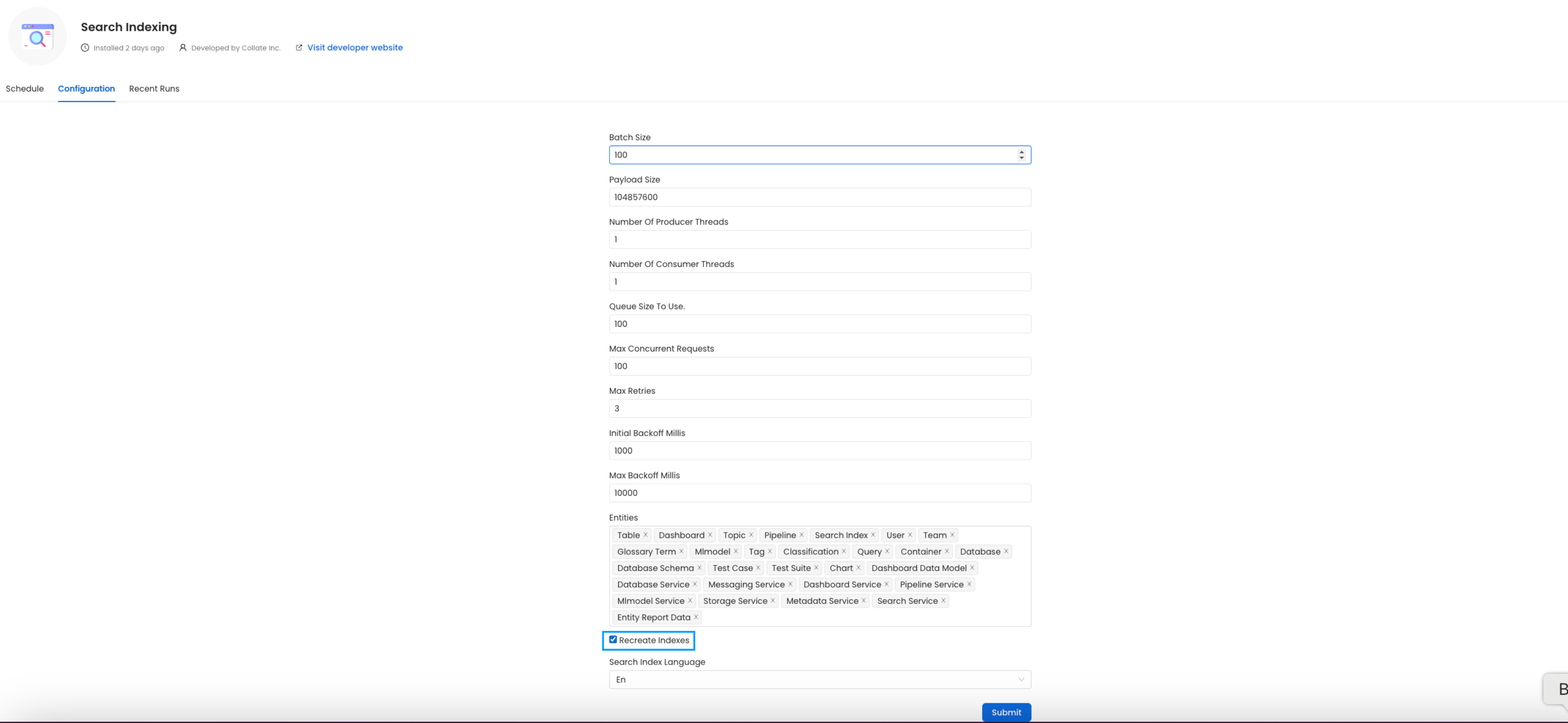
Before initiating the process by clicking `Run Now`, ensure that the `Recreate Indexes` option is enabled to allow rebuilding the indexes as needed.

In the configuration section, you can select the entities you want to reindex.
<img src="https://mintcdn.com/openmetadata/FFPgqWxUp0cM2_kH/public/images/deployment/upgrade/reindex-ES.png?fit=max&auto=format&n=FFPgqWxUp0cM2_kH&q=85&s=6f66e91e70b8db4224a179835b2dd112" alt="create-project" width="3252" height="1500" data-path="public/images/deployment/upgrade/reindex-ES.png" />

Since this is required after the upgrade, we want to reindex `All` the entities.

### (Optional) Update your OpenMetadata Ingestion Client

If you are running the ingestion workflows **externally** or using a custom Airflow installation, you need to make sure that the Python Client you use is aligned
with the OpenMetadata server version.

For example, if you are upgrading the server to the version `x.y.z`, you will need to update your client with

```bash theme={null}
pip install openmetadata-ingestion[<plugin>]==x.y.z
```

#### With Kubernetes

Follow these steps to reindex using the CLI:

1. List the CronJobs
   Use the following command to check the available CronJobs:

```bash theme={null}
kubectl get cronjobs
```

Upon running this command you should see output similar to the following.

```CommandLine theme={null}
kubectl get cronjobs
NAME                    SCHEDULE      TIMEZONE   SUSPEND   ACTIVE   LAST SCHEDULE   AGE
cron-reindex            0/5 * * * *   <none>     True      0        <none>          31m
```

2. Create a Job from a CronJob
   Create a one-time job from an existing CronJob using the following command:

```bash theme={null}
kubectl create job --from=cronjob/cron-deploy-pipelines <job_name>
```

<Tip> Replace `<job_name>` with the actual name of the job.</Tip>

Upon running this command you should see output similar to the following.

```CommandLine theme={null}
kubectl create job --from=cronjob/cron-reindex cron-reindex-one
job.batch/cron-reindex-one created
```

3. Check the Job Status
   Verify the status of the created job with:

```bash theme={null}
kubectl get jobs
```

Upon running this command you should see output similar to the following.

```CommandLine theme={null}
kubectl get jobs
NAME                       STATUS     COMPLETIONS   DURATION   AGE
cron-reindex-one           Complete   1/1           20s        109s
```

4. view logs
   To view the logs use the below command.

```bash theme={null}
kubectl logs job/<job_name>
```

<Tip> Replace `<job_name>` with the actual job name.</Tip>

The `plugin` parameter is a list of the sources that we want to ingest. An example would look like this `openmetadata-ingestion[mysql,snowflake,s3]==1.2.0`.
You will find specific instructions for each connector in the Connectors section.

Moreover, if working with your own Airflow deployment - not the `openmetadata-ingestion` image - you will need to upgrade
as well the `openmetadata-managed-apis` version:

```bash theme={null}
pip install openmetadata-managed-apis==x.y.z
```

### Re Deploy Ingestion Pipelines

#### With UI

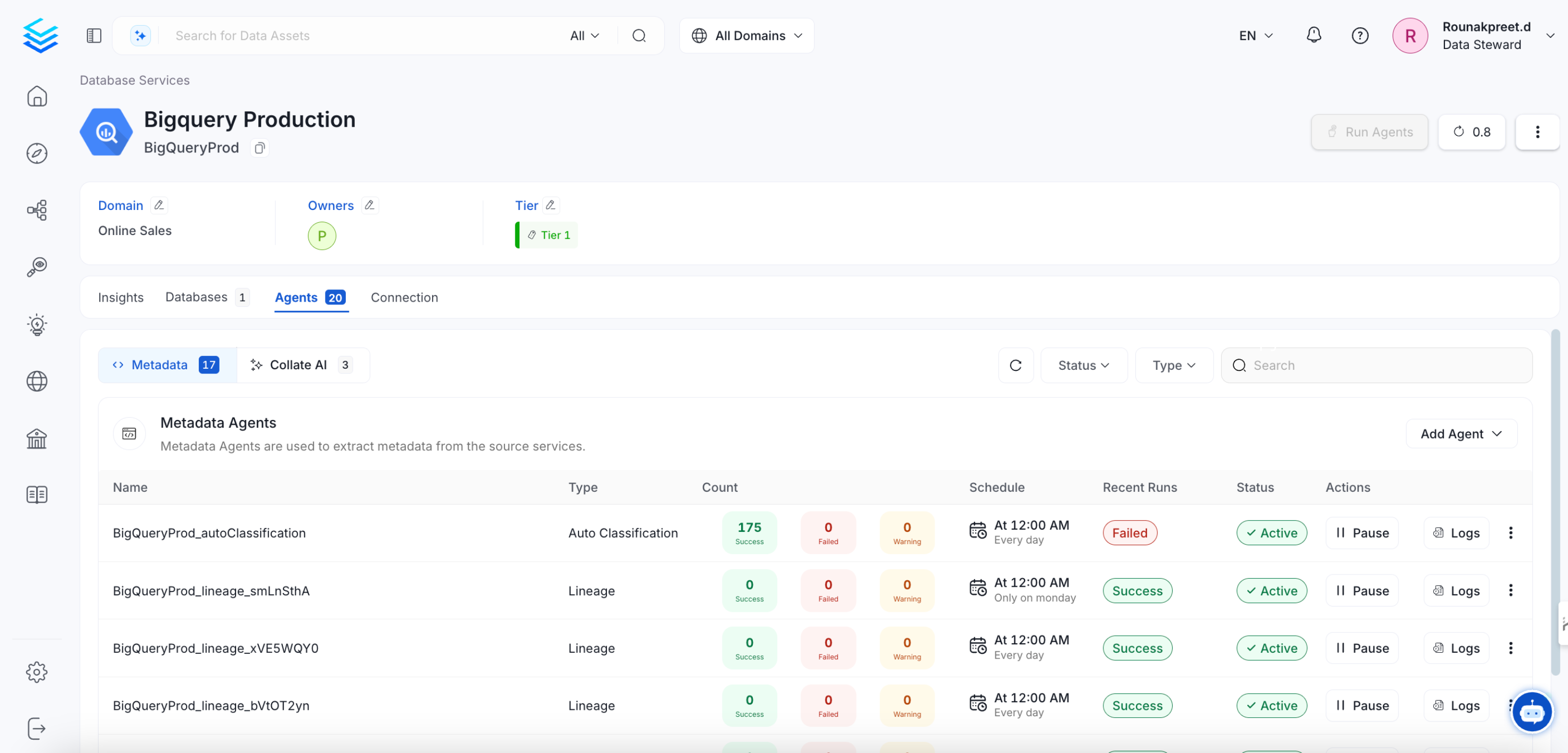
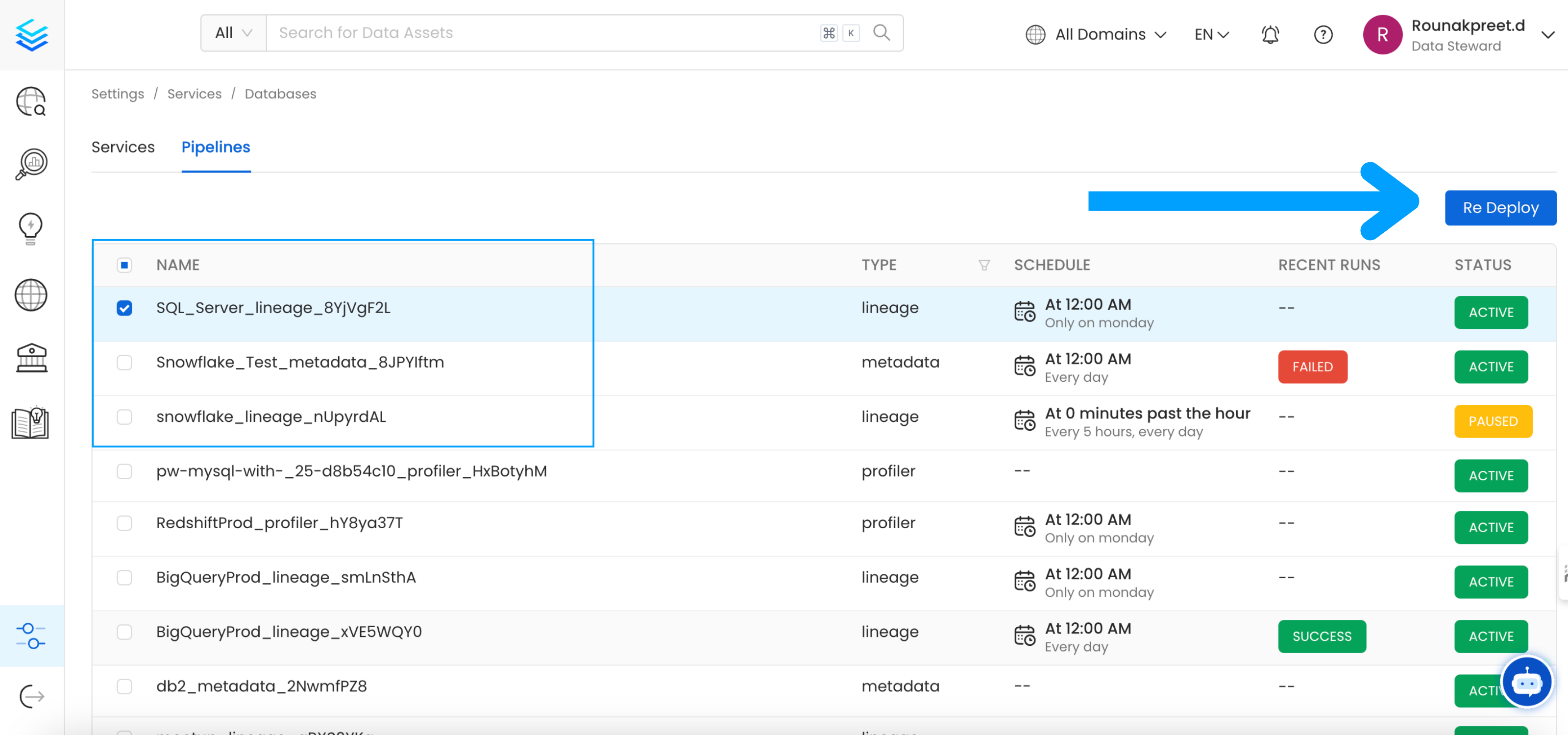
Go to `Settings` -> `{Services}` -> `{Databases}` -> `Pipelines`

<img src="https://mintcdn.com/openmetadata/FFPgqWxUp0cM2_kH/public/images/deployment/upgrade/redeploy.png?fit=max&auto=format&n=FFPgqWxUp0cM2_kH&q=85&s=eea6a0845c1fe9c1e5f960fa5903a6b4" alt="redeploy" width="3200" height="1500" data-path="public/images/deployment/upgrade/redeploy.png" />

Select the pipelines you want to Re Deploy click `Re Deploy`.

#### With Kubernetes

Follow these steps to deploy pipelines using the CLI:

1. List the CronJobs
   Use the following command to check the available CronJobs:

```bash theme={null}
kubectl get cronjobs
```

Upon running this command you should see output similar to the following.

```commandline theme={null}
kubectl get cronjobs
NAME                    SCHEDULE      TIMEZONE   SUSPEND   ACTIVE   LAST SCHEDULE   AGE
cron-deploy-pipelines   0/5 * * * *   <none>     True      0        <none>          4m7s
```

2. Create a Job from a CronJob
   Create a one-time job from an existing CronJob using the following command:

```bash theme={null}
kubectl create job --from=cronjob/cron-reindex <job_name>
```

<Tip>
  Replace `<job_name>` with the actual name of the job.
</Tip>

Upon running this command you should see output similar to the following.

```commandline theme={null}
kubectl create job --from=cronjob/cron-deploy-pipelines cron-deploy-pipeline-one
job.batch/cron-deploy-pipeline-one created
```

3. Check the Job Status
   Verify the status of the created job with:

```bash theme={null}
kubectl get jobs
```

Upon running this command you should see output similar to the following.

```CommandLine theme={null}
kubectl get jobs
NAME                       STATUS     COMPLETIONS   DURATION   AGE
cron-deploy-pipeline-one   Complete   1/1           13s        3m35s
```

4. view logs
   To view the logs use the below command.

```bash theme={null}
kubectl logs job/<job_name>
```

<Tip> Replace `<job_name>` with the actual job name.</Tip>

If you are seeing broken dags select all the pipelines from all the services and re deploy the pipelines.

# Openmetadata-ops Script

## Overview

The `openmetadata-ops` script is designed to manage and migrate databases and search indexes, reindex existing data into Elastic Search or OpenSearch, and redeploy service pipelines.

## Usage

```bash theme={null}
sh openmetadata-ops.sh [-dhV] [COMMAND]
```

#### Commands

* analyze-tables

Migrates secrets from the database to the configured Secrets Manager. Note that this command does not support migrating between external Secrets Managers.

* changelog

Prints the change log of database migration.

* check-connection

Checks if a connection can be successfully obtained for the target database.

* deploy-pipelines

Deploys all the service pipelines.

* drop-create

Deletes any tables in the configured database and creates new tables based on the current version of OpenMetadata. This command also re-creates the search indexes.

* info

Shows the list of migrations applied and the pending migrations waiting to be applied on the target database.

* migrate

Migrates the OpenMetadata database schema and search index mappings.

* migrate-secrets

Migrates secrets from the database to the configured Secrets Manager. Note that this command does not support migrating between external Secrets Managers.

* reindex

Reindexes data into the search engine from the command line.

* repair

Repairs the DATABASE\_CHANGE\_LOG table, which is used to track all the migrations on the target database. This involves removing entries for the failed migrations and updating the checksum of migrations already applied on the target database.

* validate

Checks if all the migrations have been applied on the target database.

### Examples

Display Help To display the help message:

```bash theme={null}
sh openmetadata-ops.sh --help
```

### Migrate Database Schema

To migrate the database schema and search index mappings:

```bash theme={null}
sh openmetadata-ops.sh migrate
```

### Reindex Data

To reindex data into the search engine:

```bash theme={null}
sh openmetadata-ops.sh reindex
```
