> ## Documentation Index
> Fetch the complete documentation index at: https://docs.open-metadata.org/llms.txt
> Use this file to discover all available pages before exploring further.
# Reindexing Search
# Reindexing Search
If you are encountering any of the following issues:
* Mismatch in counts of Data Assets.
* Data not appearing.
* Errors such as `shards_exception`.
* Problems with the search mechanism.
* Empty results in the Explore section.
* Missing lineage information.
Perform the reindexing process described below.
### Reindex
Go to `Settings` -> `Applications` -> `Search Indexing`
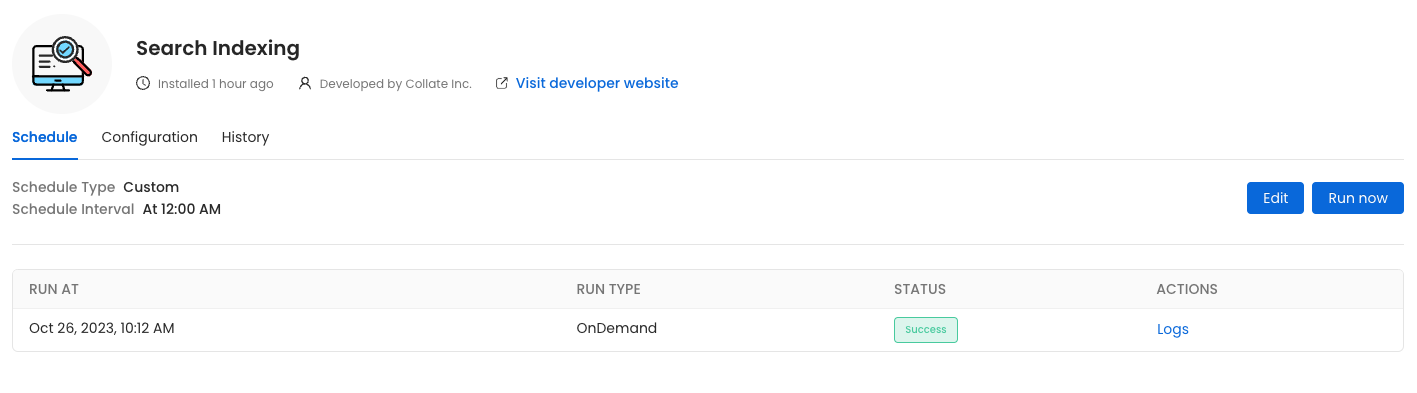 Before initiating the process by clicking `Run Now`, ensure that the `Recreate Indexes` option is enabled to allow rebuilding the indexes as needed.
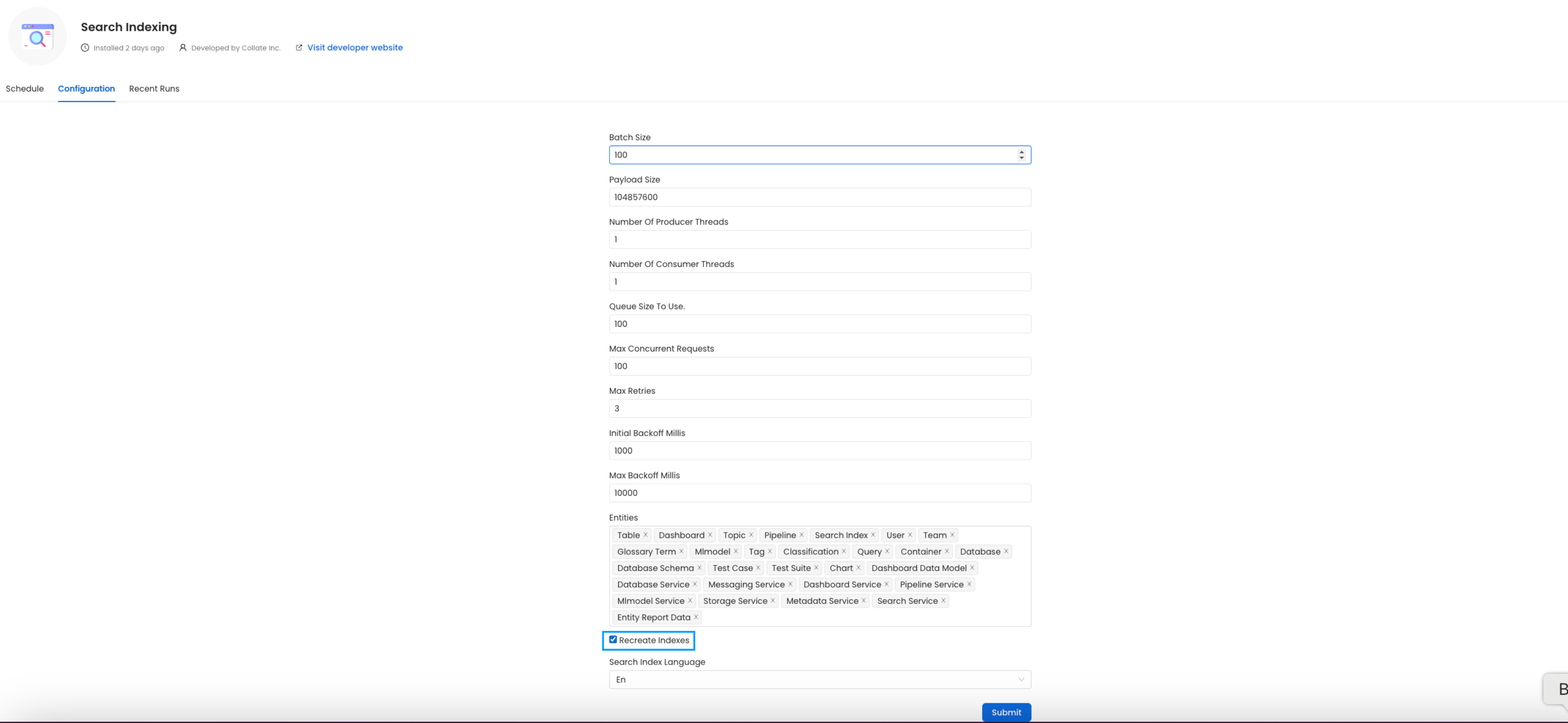
In the configuration section, you can select the entities you want to reindex.
Before initiating the process by clicking `Run Now`, ensure that the `Recreate Indexes` option is enabled to allow rebuilding the indexes as needed.
In the configuration section, you can select the entities you want to reindex.
 **Note:** If you continue to experience issues, consider `re-installing` the search application.
## Configuration Parameters for Reindexing
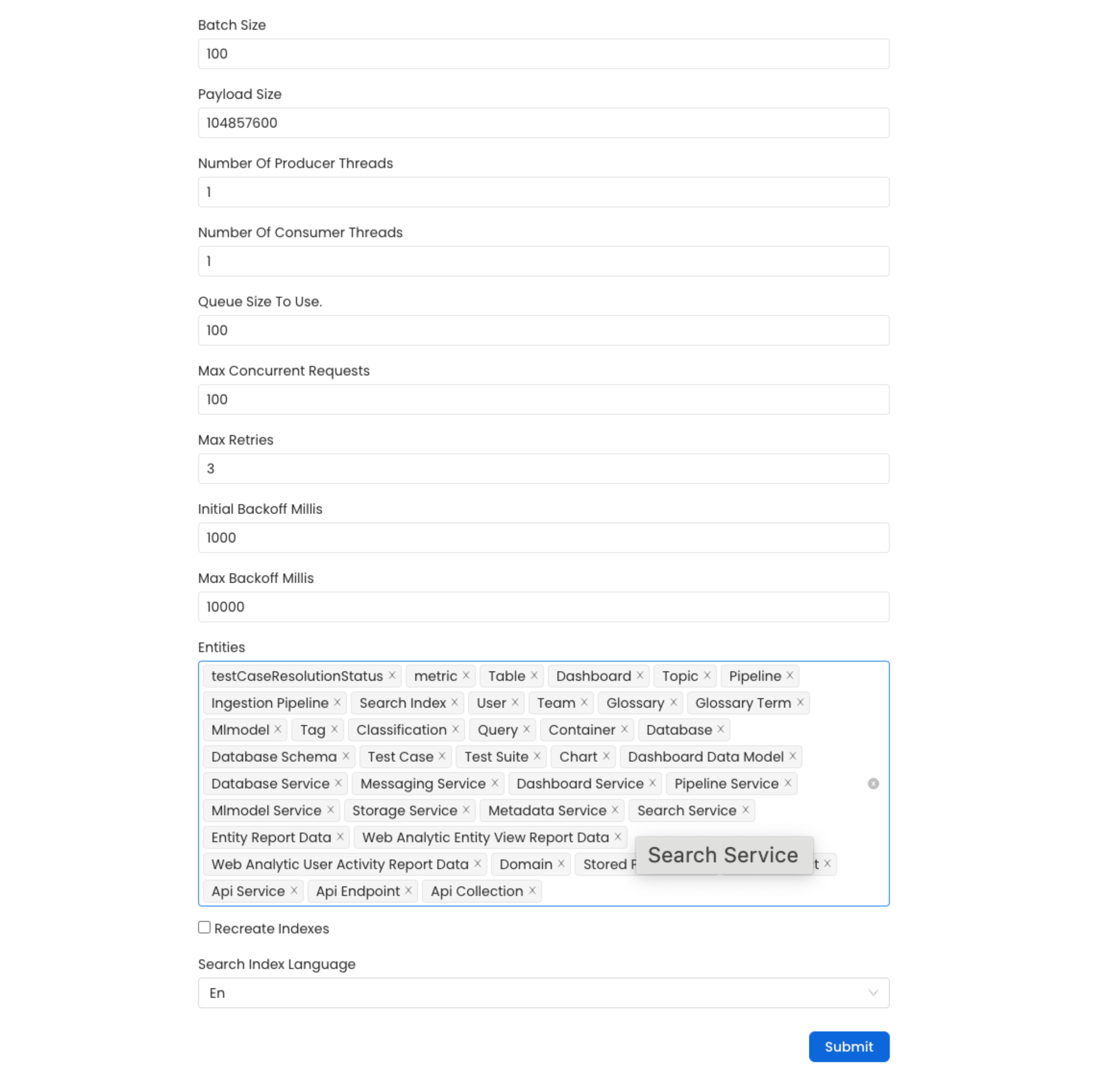
This document provides detailed descriptions and best practices for configuring the reindexing process parameters. Proper configuration ensures efficient and reliable reindexing while minimizing potential system bottlenecks.
**Note:** If you continue to experience issues, consider `re-installing` the search application.
## Configuration Parameters for Reindexing
This document provides detailed descriptions and best practices for configuring the reindexing process parameters. Proper configuration ensures efficient and reliable reindexing while minimizing potential system bottlenecks.
 ### 1. `recreateIndex`
**Description**:
Determines whether to recreate the index from scratch during the reindexing process. Setting this to `true` will drop the existing index and create a new one.
**Best Practice**:
Use this option with caution. Set it to `true` only when you need a clean slate, such as after significant changes to your data model or during data migration. For routine updates, keep it `false` to preserve the existing index.
### 2. `batchSize`
**Description**:
Defines the maximum number of events sent in a single batch during reindexing. The default value is `100`.
**Best Practice**:
Adjust the batch size based on system capabilities and event size. A larger batch size improves throughput but may increase memory usage and processing time. Monitor performance and fine-tune accordingly.
### 3. `payLoadSize`
**Description**:
Specifies the maximum payload size (in bytes) for events sent in a batch. Default: `104,857,600 bytes` (100 MB).
**Best Practice**:
Ensure the payload size is within your system’s handling capacity. If memory issues or timeouts occur, reduce this value to improve stability.
### 4. `producerThreads`
**Description**:
Indicates the number of threads used for producing events during reindexing. Default: `10`.
**Best Practice**:
Balance the number of threads with system CPU and I/O capacity. Increasing this number can improve throughput but may lead to contention if set too high.
### 5. `maxConcurrentRequests`
**Description**:
Specifies the maximum number of concurrent requests sent to the search index at any given time. Default: `100`.
**Best Practice**:
Tune this value based on the indexing server’s capacity. Too many concurrent requests can overwhelm the server, leading to failures or slowdowns.
### 6. `maxRetries`
**Description**:
Specifies the maximum number of retry attempts for failed requests. Default: `3 retries`.
**Best Practice**:
Keep this value reasonable to avoid excessive load during failures. Analyze failure patterns to optimize this setting.
### 7. `initialBackoff`
**Description**:
Defines the initial backoff time (in milliseconds) before retrying a failed request. Default: `1000 ms` (1 second).
**Best Practice**:
Start with the default value. Increase it if failures occur frequently due to server overload or network issues.
### 8. `maxBackoff`
**Description**:
Specifies the maximum backoff time (in milliseconds) for retries. Default: `10,000 ms` (10 seconds).
**Best Practice**:
Set this value to align with your application’s latency tolerance. A longer backoff can reduce system load during peak times but may slow recovery from errors.
### 9. `queueSize`
**Description**:
Defines the internal queue size used for reindexing operations. Default: `100`.
**Best Practice**:
Adjust the queue size based on expected load and available memory resources. A larger queue can handle spikes in processing but requires more memory.
## Example Configuration for Best Practices
For high-performance systems, consider the following values as a starting point:
```json theme={null}
{
"batchSize": 300,
"queueSize": 500,
"producerThreads": 20,
"maxConcurrentRequests": 500
}
```
Monitor system performance and adjust these parameters to optimize throughput and resource usage.
### 1. `recreateIndex`
**Description**:
Determines whether to recreate the index from scratch during the reindexing process. Setting this to `true` will drop the existing index and create a new one.
**Best Practice**:
Use this option with caution. Set it to `true` only when you need a clean slate, such as after significant changes to your data model or during data migration. For routine updates, keep it `false` to preserve the existing index.
### 2. `batchSize`
**Description**:
Defines the maximum number of events sent in a single batch during reindexing. The default value is `100`.
**Best Practice**:
Adjust the batch size based on system capabilities and event size. A larger batch size improves throughput but may increase memory usage and processing time. Monitor performance and fine-tune accordingly.
### 3. `payLoadSize`
**Description**:
Specifies the maximum payload size (in bytes) for events sent in a batch. Default: `104,857,600 bytes` (100 MB).
**Best Practice**:
Ensure the payload size is within your system’s handling capacity. If memory issues or timeouts occur, reduce this value to improve stability.
### 4. `producerThreads`
**Description**:
Indicates the number of threads used for producing events during reindexing. Default: `10`.
**Best Practice**:
Balance the number of threads with system CPU and I/O capacity. Increasing this number can improve throughput but may lead to contention if set too high.
### 5. `maxConcurrentRequests`
**Description**:
Specifies the maximum number of concurrent requests sent to the search index at any given time. Default: `100`.
**Best Practice**:
Tune this value based on the indexing server’s capacity. Too many concurrent requests can overwhelm the server, leading to failures or slowdowns.
### 6. `maxRetries`
**Description**:
Specifies the maximum number of retry attempts for failed requests. Default: `3 retries`.
**Best Practice**:
Keep this value reasonable to avoid excessive load during failures. Analyze failure patterns to optimize this setting.
### 7. `initialBackoff`
**Description**:
Defines the initial backoff time (in milliseconds) before retrying a failed request. Default: `1000 ms` (1 second).
**Best Practice**:
Start with the default value. Increase it if failures occur frequently due to server overload or network issues.
### 8. `maxBackoff`
**Description**:
Specifies the maximum backoff time (in milliseconds) for retries. Default: `10,000 ms` (10 seconds).
**Best Practice**:
Set this value to align with your application’s latency tolerance. A longer backoff can reduce system load during peak times but may slow recovery from errors.
### 9. `queueSize`
**Description**:
Defines the internal queue size used for reindexing operations. Default: `100`.
**Best Practice**:
Adjust the queue size based on expected load and available memory resources. A larger queue can handle spikes in processing but requires more memory.
## Example Configuration for Best Practices
For high-performance systems, consider the following values as a starting point:
```json theme={null}
{
"batchSize": 300,
"queueSize": 500,
"producerThreads": 20,
"maxConcurrentRequests": 500
}
```
Monitor system performance and adjust these parameters to optimize throughput and resource usage.