> ## Documentation Index
> Fetch the complete documentation index at: https://docs.open-metadata.org/llms.txt
> Use this file to discover all available pages before exploring further.
# Adding test suites through the UI
# Adding Test Suites Through the UI
Test Suites are logical container allowing you to group related Test Cases together from different tables. This is a great way to group related test cases together and set a single alert for test case failure.
**Note:** you will need to make sure you have the right permission in OpenMetadata to create a test.
## Step 1: Creating a Test Suite
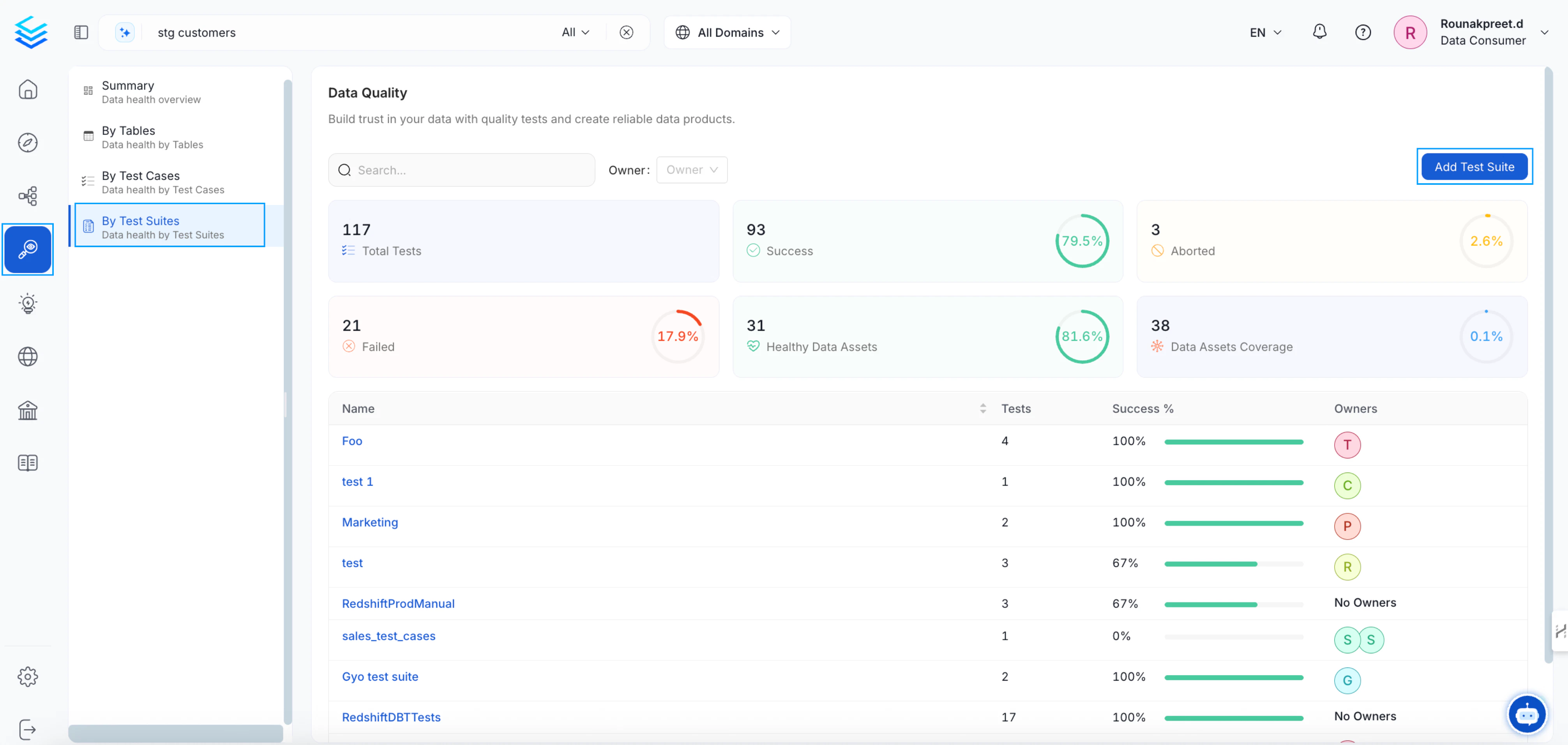
From the vertical navigation bar, click on `Quality icon > Data Quality` and navigate to the `By Test Suites` tab. From there click on `Add Test Suite` button on the top right corner.
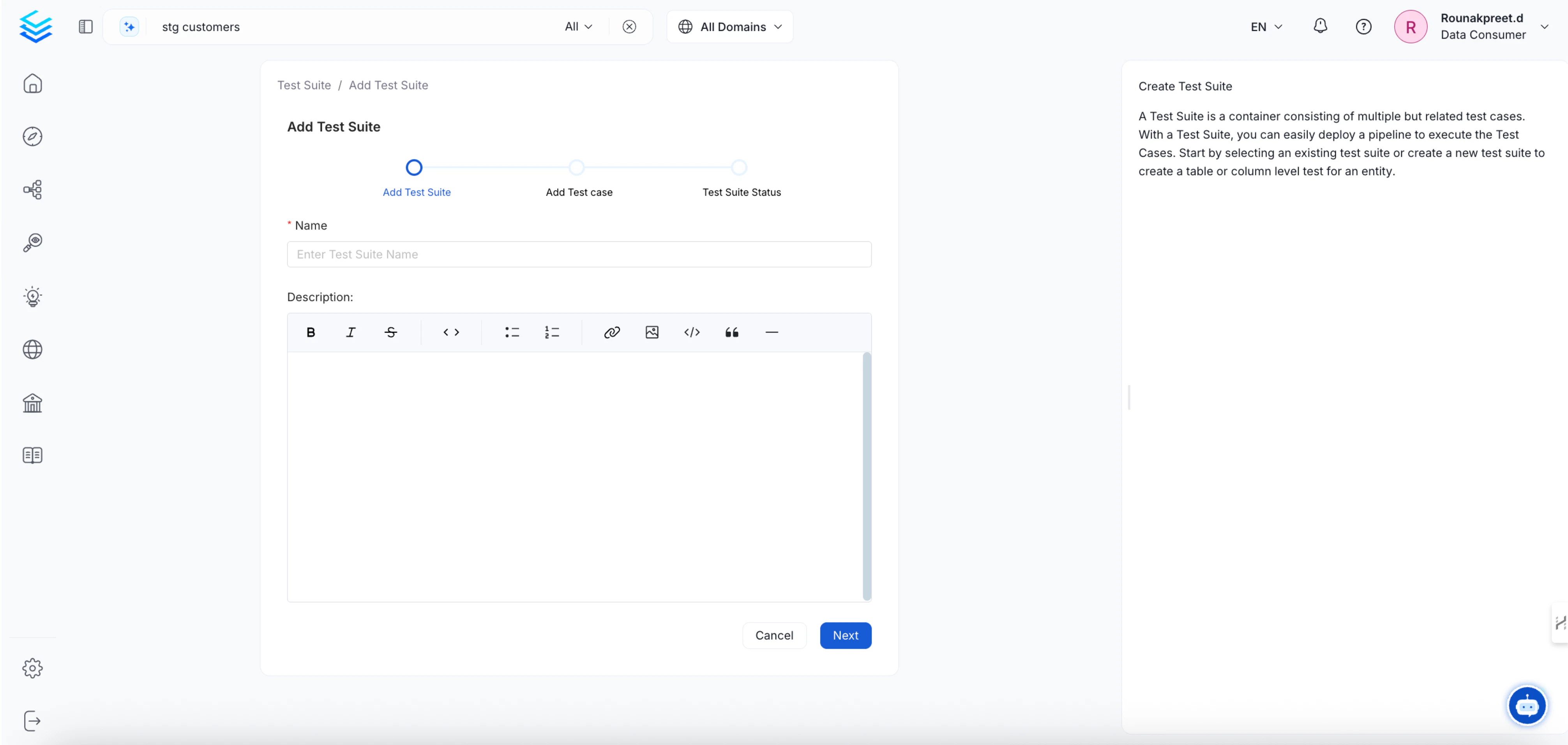
 On the next page, enter the name and description (optional) of your test suite.
 ## Step 2: Add Test Cases
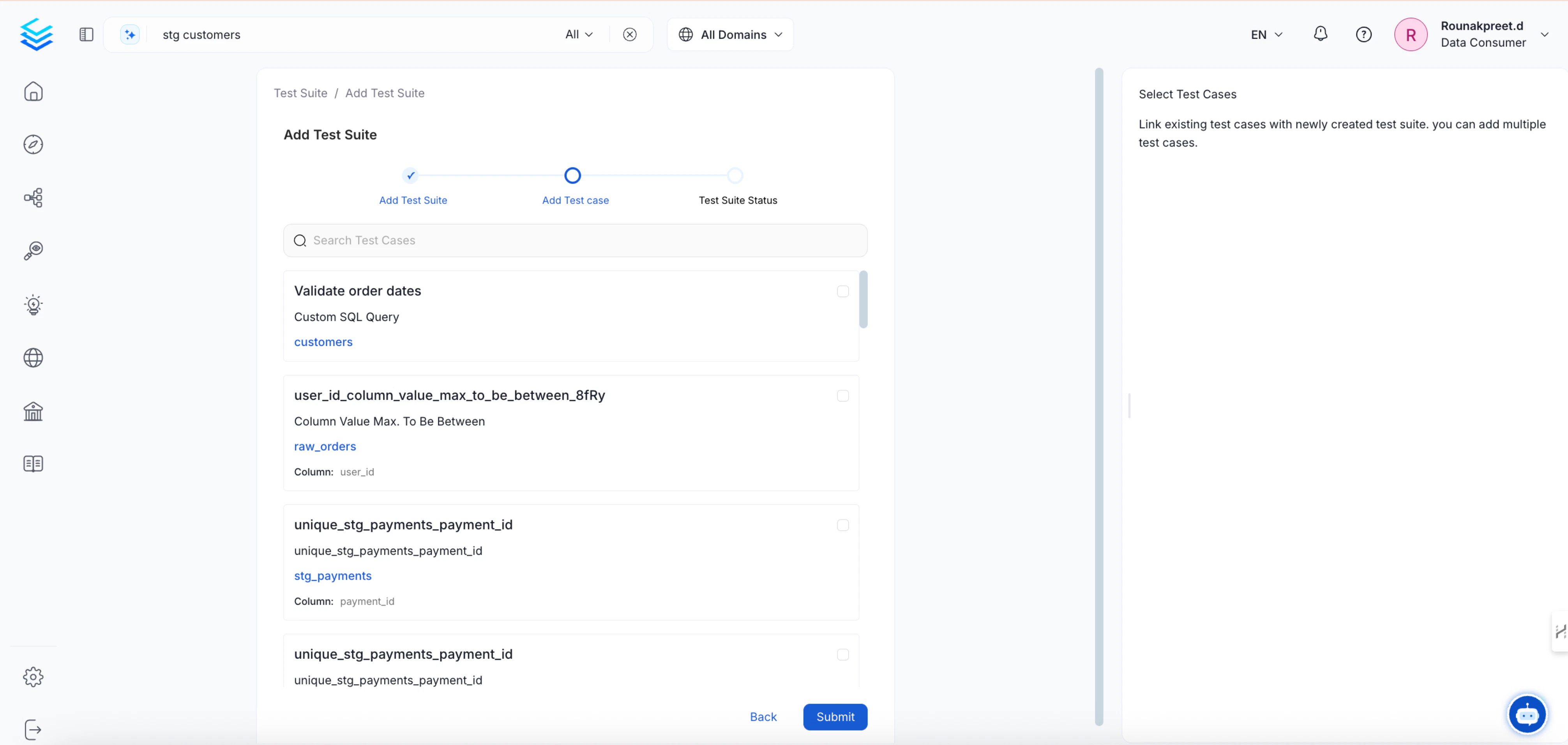
On the next page, you will be able to add existing test cases from different entity to your test suite. This allows you to group together test cases from different entities
**Note:** Test Case name needs to be unique across the whole platform. A warning message will show if your Test Case name is not unique.
## Step 2: Add Test Cases
On the next page, you will be able to add existing test cases from different entity to your test suite. This allows you to group together test cases from different entities
**Note:** Test Case name needs to be unique across the whole platform. A warning message will show if your Test Case name is not unique.
 ## Data Quality
### Adding Data Quality Test Cases from yaml config
When creating a JSON config for a test workflow the source configuration is very simple.
```yaml theme={null}
source:
type: TestSuite
serviceName:
sourceConfig:
config:
type: TestSuite
entityFullyQualifiedName:
```
The only sections you need to modify here are the `serviceName` (this name needs to be unique) and `entityFullyQualifiedName` (the entity for which we'll be executing tests against) keys.
Once you have defined your source configuration you'll need to define te processor configuration.
```yaml theme={null}
processor:
type: "orm-test-runner"
config:
forceUpdate:
testCases:
- name:
testDefinitionName: columnValueLengthsToBeBetween
columnName:
parameterValues:
- name: minLength
value: 10
- name: maxLength
value: 25
- name:
testDefinitionName: tableRowCountToEqual
parameterValues:
- name: value
value: 10
```
The processor type should be set to ` "orm-test-runner"`. For accepted test definition names and parameter value names refer to the [tests page](/how-to-guides/data-quality-observability/quality/tests-yaml).
Note that while you can define tests directly in this YAML configuration, running the
workflow will execute ALL THE TESTS present in the table, regardless of what you are defining in the YAML.
This makes it easy for any user to contribute tests via the UI, while maintaining the test execution external.
You can keep your YAML config as simple as follows if the table already has tests.
```yaml theme={null}
processor:
type: "orm-test-runner"
config: {}
```
### Key reference:
* `forceUpdate`: if the test case exists (base on the test case name) for the entity, implements the strategy to follow when running the test (i.e. whether or not to update parameters)
* `testCases`: list of test cases to add to the entity referenced. Note that we will execute all the tests present in the Table.
* `name`: test case name
* `testDefinitionName`: test definition
* `columnName`: only applies to column test. The name of the column to run the test against
* `parameterValues`: parameter values of the test
The `sink` and `workflowConfig` will have the same settings as the ingestion and profiler workflow.
### Full `yaml` config example
```yaml theme={null}
source:
type: TestSuite
serviceName: MyAwesomeTestSuite
sourceConfig:
config:
type: TestSuite
entityFullyQualifiedName: MySQL.default.openmetadata_db.tag_usage
# testCases: ["run_only_this_test_case"] # Optional, if not provided all tests will be executed
processor:
type: "orm-test-runner"
config:
forceUpdate: false
testCases:
- name: column_value_length_tagFQN
testDefinitionName: columnValueLengthsToBeBetween
columnName: tagFQN
parameterValues:
- name: minLength
value: 10
- name: maxLength
value: 25
- name: table_row_count_test
testDefinitionName: tableRowCountToEqual
parameterValues:
- name: value
value: 10
sink:
type: metadata-rest
config: {}
workflowConfig:
openMetadataServerConfig:
hostPort:
authProvider:
```
### How to Run Tests
To run the tests from the CLI execute the following command
```
metadata test -c /path/to/my/config.yaml
```
## Data Quality
### Adding Data Quality Test Cases from yaml config
When creating a JSON config for a test workflow the source configuration is very simple.
```yaml theme={null}
source:
type: TestSuite
serviceName:
sourceConfig:
config:
type: TestSuite
entityFullyQualifiedName:
```
The only sections you need to modify here are the `serviceName` (this name needs to be unique) and `entityFullyQualifiedName` (the entity for which we'll be executing tests against) keys.
Once you have defined your source configuration you'll need to define te processor configuration.
```yaml theme={null}
processor:
type: "orm-test-runner"
config:
forceUpdate:
testCases:
- name:
testDefinitionName: columnValueLengthsToBeBetween
columnName:
parameterValues:
- name: minLength
value: 10
- name: maxLength
value: 25
- name:
testDefinitionName: tableRowCountToEqual
parameterValues:
- name: value
value: 10
```
The processor type should be set to ` "orm-test-runner"`. For accepted test definition names and parameter value names refer to the [tests page](/how-to-guides/data-quality-observability/quality/tests-yaml).
Note that while you can define tests directly in this YAML configuration, running the
workflow will execute ALL THE TESTS present in the table, regardless of what you are defining in the YAML.
This makes it easy for any user to contribute tests via the UI, while maintaining the test execution external.
You can keep your YAML config as simple as follows if the table already has tests.
```yaml theme={null}
processor:
type: "orm-test-runner"
config: {}
```
### Key reference:
* `forceUpdate`: if the test case exists (base on the test case name) for the entity, implements the strategy to follow when running the test (i.e. whether or not to update parameters)
* `testCases`: list of test cases to add to the entity referenced. Note that we will execute all the tests present in the Table.
* `name`: test case name
* `testDefinitionName`: test definition
* `columnName`: only applies to column test. The name of the column to run the test against
* `parameterValues`: parameter values of the test
The `sink` and `workflowConfig` will have the same settings as the ingestion and profiler workflow.
### Full `yaml` config example
```yaml theme={null}
source:
type: TestSuite
serviceName: MyAwesomeTestSuite
sourceConfig:
config:
type: TestSuite
entityFullyQualifiedName: MySQL.default.openmetadata_db.tag_usage
# testCases: ["run_only_this_test_case"] # Optional, if not provided all tests will be executed
processor:
type: "orm-test-runner"
config:
forceUpdate: false
testCases:
- name: column_value_length_tagFQN
testDefinitionName: columnValueLengthsToBeBetween
columnName: tagFQN
parameterValues:
- name: minLength
value: 10
- name: maxLength
value: 25
- name: table_row_count_test
testDefinitionName: tableRowCountToEqual
parameterValues:
- name: value
value: 10
sink:
type: metadata-rest
config: {}
workflowConfig:
openMetadataServerConfig:
hostPort:
authProvider:
```
### How to Run Tests
To run the tests from the CLI execute the following command
```
metadata test -c /path/to/my/config.yaml
```