> ## Documentation Index
> Fetch the complete documentation index at: https://docs.open-metadata.org/llms.txt
> Use this file to discover all available pages before exploring further.
# Breaking Changes - Discovery & Search | Official Documentation
> The redesigned OpenMetadata 2.0 Explore page, the new browse-and-filter query bar, changed URL parameters, facet scoping, staged ranking and async CSV export.
# Discovery & Search (Explore)
The Explore page is redesigned in 2.0. Filtering, browsing, pagination, ranking and export all behave
differently. This is the most user-visible change in the release.
The mental model changed from *"the tree replaces your filters"* to *"the tree sets a browse location
that stacks with your filters"*.
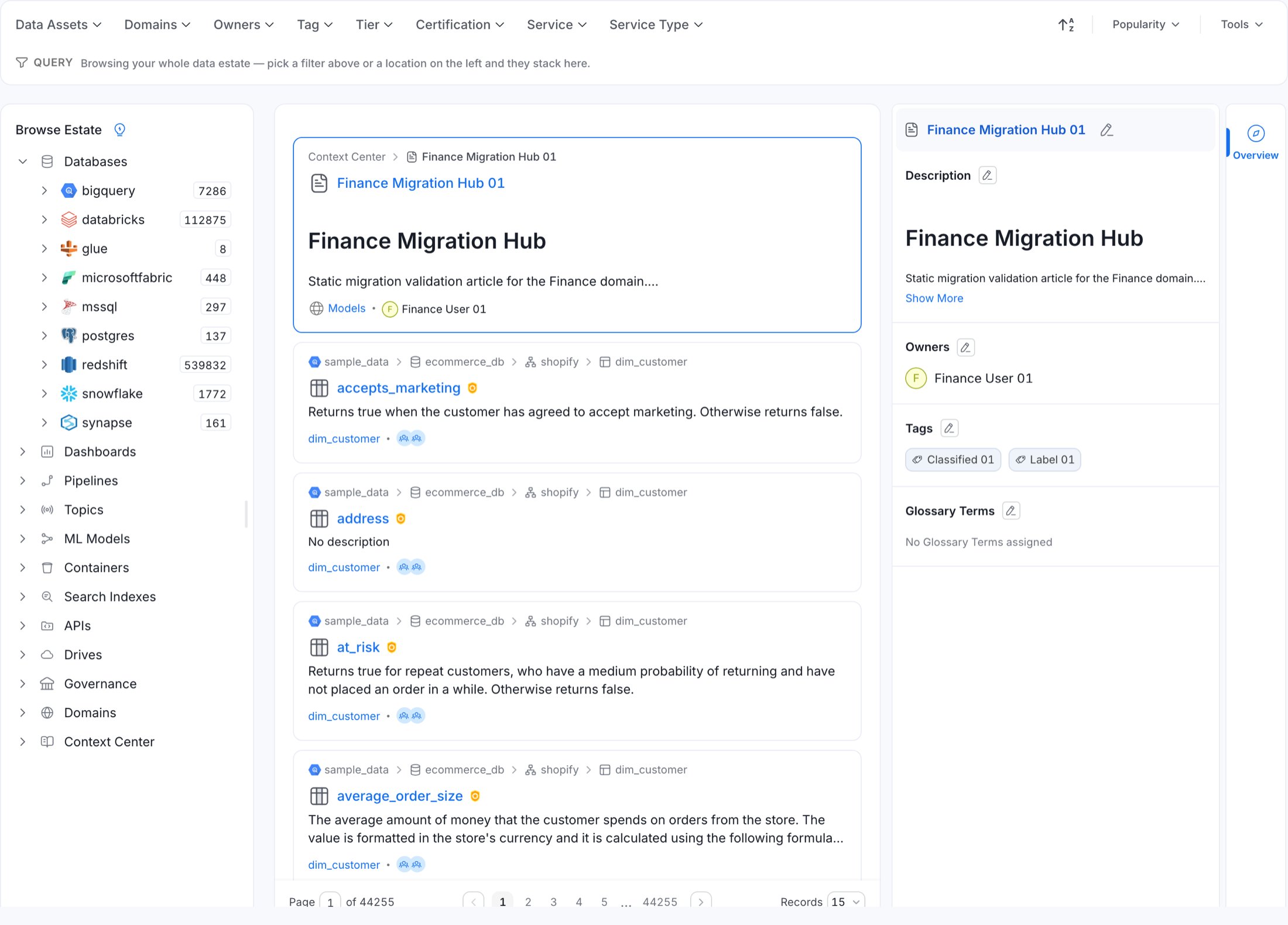 ## What changed at a glance
| | 1.13 | 2.0 |
| --------------------- | --------------------------------------------- | -------------------------------------------------------------------------------------------------------- |
| Left panel title | **Data Assets** | **Browse Estate** |
| Left panel role | Tree selection **replaced** the quick filters | Tree sets a *browse location* that **ANDs with** the quick filters |
| Active filter display | A single "Clear all" text link | A dedicated **query chip row** — one chip per browse level and per selected filter value, each removable |
| Filter apply | Pick values, then click **Update** | **Immediate apply** on selection; the Update button is gone |
| Pagination | Inline pagination inside the results card | A dedicated pagination card below the results, with a page-size selector |
| Tab switching | Refetch with a spinner every time | Served from a short-lived client cache, then silently revalidated |
| Result relevance | `searchFields` scoring | Staged ranking (`nameFirstLexicalThenSignals`) with an optional per-result explanation |
| CSV export | Synchronous browser download | Background job surfaced in the **Background jobs** tray |
## Explore URL parameters changed
**Breaking.** Affects bookmarks, saved links, embedded iframes, and anything that constructs Explore
URLs.
| Parameter | 1.13 | 2.0 |
| --------------- | ------------------- | ------------------------------------------ |
| Page number | `page` | **`currentPage`** |
| Page size | `size` | **`pageSize`** |
| Browse location | — | **`browsePath`** (JSON-encoded field list) |
| Cursor paging | — | `cursorType`, `cursorValue` |
| Free text | `search` | `search` (unchanged) |
| Quick filters | `quickFilter` | `quickFilter` (unchanged) |
| Sort | `sort`, `sortOrder` | unchanged |
| Deleted | `showDeleted` | unchanged |
```
/explore/tables?search=orders&page=3&size=25&sort=_score&sortOrder=desc
```
```
/explore/tables?search=orders¤tPage=3&pageSize=25&sort=_score&sortOrder=desc
```
A 1.13 link with `?page=3&size=25` still loads Explore, but silently lands on **page 1 at the default
page size**. There is no error and no redirect.
The route itself (`/explore/:tab`) is unchanged.
Update deep links, embedded dashboards and internal documentation to the new parameter names.
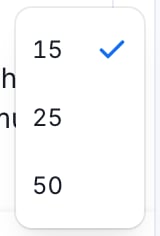
### Page size is constrained to 15, 25 or 50
**Behavioural.** Explore accepts only 15, 25 and 50 rows per page. Any other `pageSize` — including a
value inherited from the user's stored global page size — is coerced back to 15.
## What changed at a glance
| | 1.13 | 2.0 |
| --------------------- | --------------------------------------------- | -------------------------------------------------------------------------------------------------------- |
| Left panel title | **Data Assets** | **Browse Estate** |
| Left panel role | Tree selection **replaced** the quick filters | Tree sets a *browse location* that **ANDs with** the quick filters |
| Active filter display | A single "Clear all" text link | A dedicated **query chip row** — one chip per browse level and per selected filter value, each removable |
| Filter apply | Pick values, then click **Update** | **Immediate apply** on selection; the Update button is gone |
| Pagination | Inline pagination inside the results card | A dedicated pagination card below the results, with a page-size selector |
| Tab switching | Refetch with a spinner every time | Served from a short-lived client cache, then silently revalidated |
| Result relevance | `searchFields` scoring | Staged ranking (`nameFirstLexicalThenSignals`) with an optional per-result explanation |
| CSV export | Synchronous browser download | Background job surfaced in the **Background jobs** tray |
## Explore URL parameters changed
**Breaking.** Affects bookmarks, saved links, embedded iframes, and anything that constructs Explore
URLs.
| Parameter | 1.13 | 2.0 |
| --------------- | ------------------- | ------------------------------------------ |
| Page number | `page` | **`currentPage`** |
| Page size | `size` | **`pageSize`** |
| Browse location | — | **`browsePath`** (JSON-encoded field list) |
| Cursor paging | — | `cursorType`, `cursorValue` |
| Free text | `search` | `search` (unchanged) |
| Quick filters | `quickFilter` | `quickFilter` (unchanged) |
| Sort | `sort`, `sortOrder` | unchanged |
| Deleted | `showDeleted` | unchanged |
```
/explore/tables?search=orders&page=3&size=25&sort=_score&sortOrder=desc
```
```
/explore/tables?search=orders¤tPage=3&pageSize=25&sort=_score&sortOrder=desc
```
A 1.13 link with `?page=3&size=25` still loads Explore, but silently lands on **page 1 at the default
page size**. There is no error and no redirect.
The route itself (`/explore/:tab`) is unchanged.
Update deep links, embedded dashboards and internal documentation to the new parameter names.
### Page size is constrained to 15, 25 or 50
**Behavioural.** Explore accepts only 15, 25 and 50 rows per page. Any other `pageSize` — including a
value inherited from the user's stored global page size — is coerced back to 15.

 ## Browsing no longer clears your filters
**Behavioural.** Affects every Explore user.
In 1.13 the left tree drove the quick filters directly — clicking a service **overwrote** the filter
state. In 2.0 the tree writes to its own `browsePath` parameter, which is compiled into a separate
search filter and `AND`-ed with the dropdown filters.
## Browsing no longer clears your filters
**Behavioural.** Affects every Explore user.
In 1.13 the left tree drove the quick filters directly — clicking a service **overwrote** the filter
state. In 2.0 the tree writes to its own `browsePath` parameter, which is compiled into a separate
search filter and `AND`-ed with the dropdown filters.
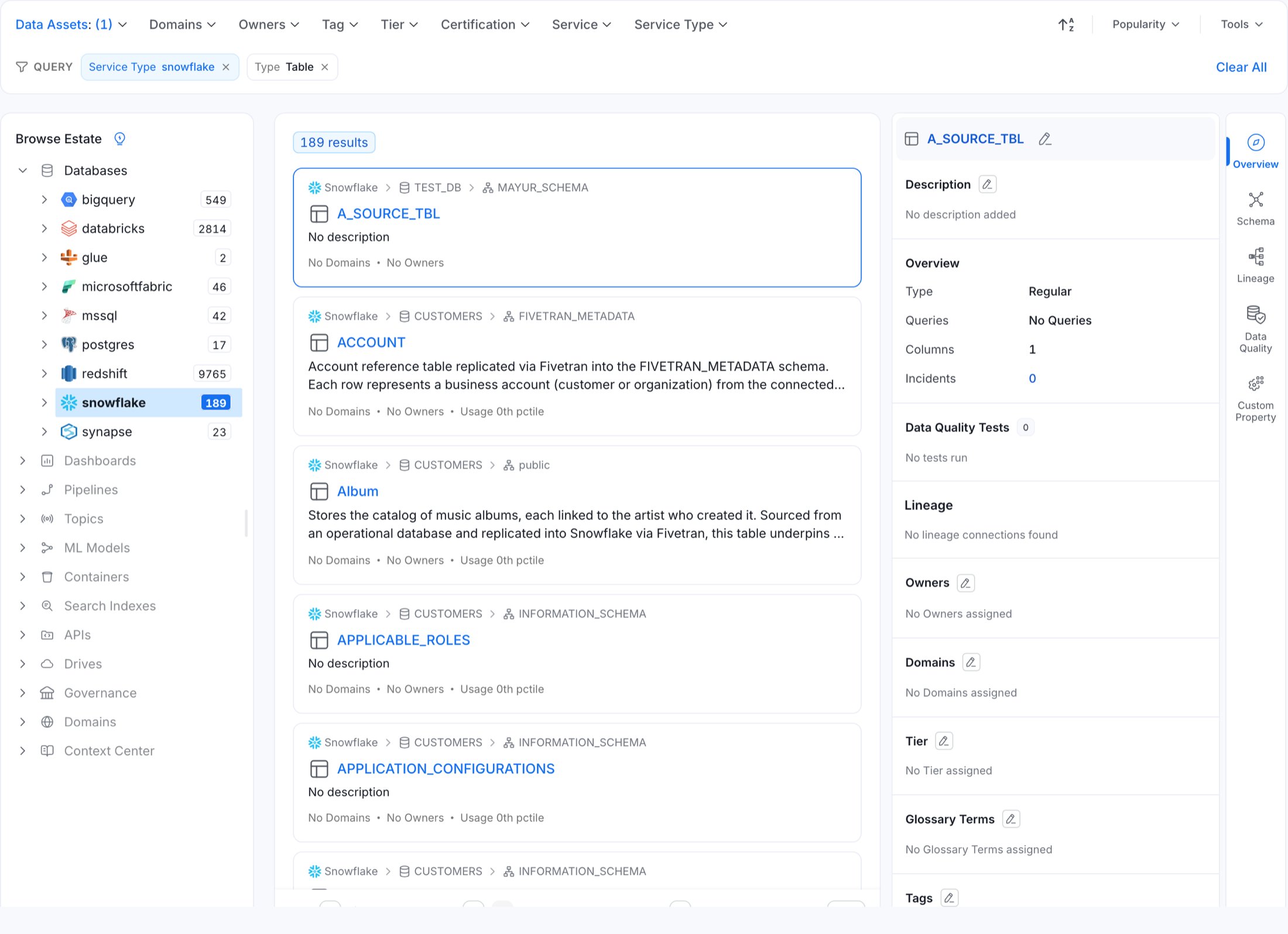 In the screenshot above, `Service Type: snowflake` (from the tree) and `Type: Table` (from the Data
Assets dropdown) are active together, the tree counts are re-scoped to the filter, and both are
rendered as removable chips.
What this means in practice:
* Selecting **Tier 1** and then browsing to a schema keeps the Tier 1 filter.
* Clicking a **type leaf** (Tables, Columns) in the tree writes the parent levels into `browsePath`
*and* sets the type in the Data Assets quick filter — both land in one navigation.
* Removing a **browse chip truncates the path from that level down** — dropping the *Service* chip
also drops the Database and Schema beneath it.
* Category roots that cannot hold the selected asset type are greyed out. Selecting "Table" disables
every non-Database service root.
The resulting URL carries both parameters independently:
```
/explore/tables
?quickFilter={"query":{"bool":{"must":[{"bool":{"should":[{"term":{"entityType.keyword":"table"}}]}}]}}}
&browsePath=[{"label":"serviceType","key":"serviceType","value":[{"key":"snowflake","label":"snowflake"}]}]
```
The Explore quick filter uses `entityType.keyword`, and values are stored **lowercased**
(`tablecolumn`, not `tableColumn`). If you construct `quickFilter` URLs by hand, use the lowercased
value.
## Facet options are scoped differently
**Behavioural.** Changes which options appear in each dropdown.
In 1.13 every dropdown's aggregation was computed against the *full* combined filter — including that
dropdown's own selection. Selecting `Table` in **Data Assets** shrank the Data Assets dropdown to just
`Table`.
2.0 excludes a facet's own field from its own aggregation, giving the conventional faceted-search
model:
* **Within one facet**, values are `OR`-ed and the option list keeps showing the alternatives.
* **Across facets**, constraints are `AND`-ed.
* The browse location is always applied, including to facet option lists.
In the screenshot above, `Service Type: snowflake` (from the tree) and `Type: Table` (from the Data
Assets dropdown) are active together, the tree counts are re-scoped to the filter, and both are
rendered as removable chips.
What this means in practice:
* Selecting **Tier 1** and then browsing to a schema keeps the Tier 1 filter.
* Clicking a **type leaf** (Tables, Columns) in the tree writes the parent levels into `browsePath`
*and* sets the type in the Data Assets quick filter — both land in one navigation.
* Removing a **browse chip truncates the path from that level down** — dropping the *Service* chip
also drops the Database and Schema beneath it.
* Category roots that cannot hold the selected asset type are greyed out. Selecting "Table" disables
every non-Database service root.
The resulting URL carries both parameters independently:
```
/explore/tables
?quickFilter={"query":{"bool":{"must":[{"bool":{"should":[{"term":{"entityType.keyword":"table"}}]}}]}}}
&browsePath=[{"label":"serviceType","key":"serviceType","value":[{"key":"snowflake","label":"snowflake"}]}]
```
The Explore quick filter uses `entityType.keyword`, and values are stored **lowercased**
(`tablecolumn`, not `tableColumn`). If you construct `quickFilter` URLs by hand, use the lowercased
value.
## Facet options are scoped differently
**Behavioural.** Changes which options appear in each dropdown.
In 1.13 every dropdown's aggregation was computed against the *full* combined filter — including that
dropdown's own selection. Selecting `Table` in **Data Assets** shrank the Data Assets dropdown to just
`Table`.
2.0 excludes a facet's own field from its own aggregation, giving the conventional faceted-search
model:
* **Within one facet**, values are `OR`-ed and the option list keeps showing the alternatives.
* **Across facets**, constraints are `AND`-ed.
* The browse location is always applied, including to facet option lists.
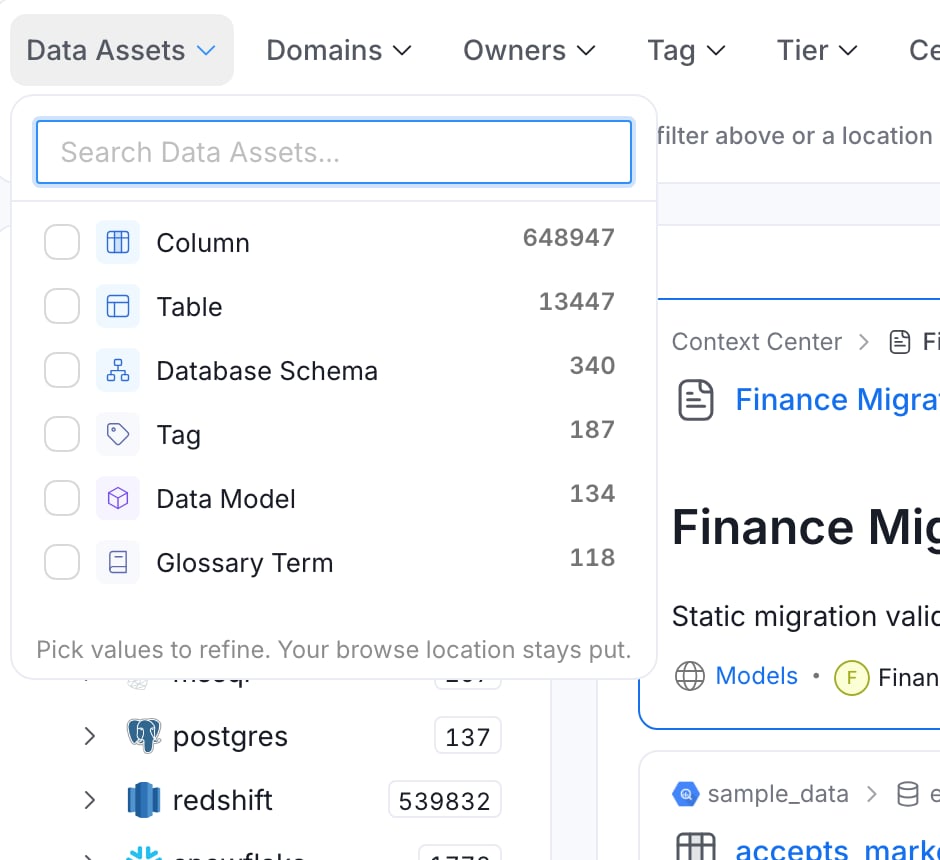 The dropdown also gains entity icons, human-readable labels (`tableColumn` renders as **Column**), and
the helper text *"Pick values to refine. Your browse location stays put."*
UI tests that clicked **Update** to commit a dropdown selection must drop that step — selections now
apply immediately. Expect option lists to be longer than in 1.13 and to change as you browse.
## The query chip row
**New UI.** Replaces the "Clear all" text link.
A **Query** row sits under the filter dropdowns and renders the whole active query as chips.
The dropdown also gains entity icons, human-readable labels (`tableColumn` renders as **Column**), and
the helper text *"Pick values to refine. Your browse location stays put."*
UI tests that clicked **Update** to commit a dropdown selection must drop that step — selections now
apply immediately. Expect option lists to be longer than in 1.13 and to change as you browse.
## The query chip row
**New UI.** Replaces the "Clear all" text link.
A **Query** row sits under the filter dropdowns and renders the whole active query as chips.
 * Browse levels are labelled `In`, `Service Type`, `Service`, `Database` and `Schema`.
* The Data Assets facet renders as `Type` with a human-readable label.
* With nothing selected the row shows a placeholder: *"Browsing your whole data estate — pick a filter
above or a location on the left and they stack here."*
### "Clear all" scope changed
| Control | 1.13 | 2.0 |
| ---------------------------------------------------------- | ---------------------------------------------- | ---------------------------------------------------------------------------------- |
| "Clear all" link next to Tools | Reset all filters | Removed — replaced by **Clear All** on the chip row, which still resets everything |
| Clear (×) on the **Advanced Search** applied-filter banner | Reset **all** filters, including quick filters | Clears **only** the advanced query; quick filters and browse location survive |
Test suites keyed on `data-testid="clear-filters"` must move to the chip row
(`data-testid="explore-query-filter-chips"`). Dismissing an advanced-search query no longer resets the
rest of the filter state.
## Tools menu changes
* Browse levels are labelled `In`, `Service Type`, `Service`, `Database` and `Schema`.
* The Data Assets facet renders as `Type` with a human-readable label.
* With nothing selected the row shows a placeholder: *"Browsing your whole data estate — pick a filter
above or a location on the left and they stack here."*
### "Clear all" scope changed
| Control | 1.13 | 2.0 |
| ---------------------------------------------------------- | ---------------------------------------------- | ---------------------------------------------------------------------------------- |
| "Clear all" link next to Tools | Reset all filters | Removed — replaced by **Clear All** on the chip row, which still resets everything |
| Clear (×) on the **Advanced Search** applied-filter banner | Reset **all** filters, including quick filters | Clears **only** the advanced query; quick filters and browse location survive |
Test suites keyed on `data-testid="clear-filters"` must move to the chip row
(`data-testid="explore-query-filter-chips"`). Dismissing an advanced-search query no longer resets the
rest of the filter state.
## Tools menu changes
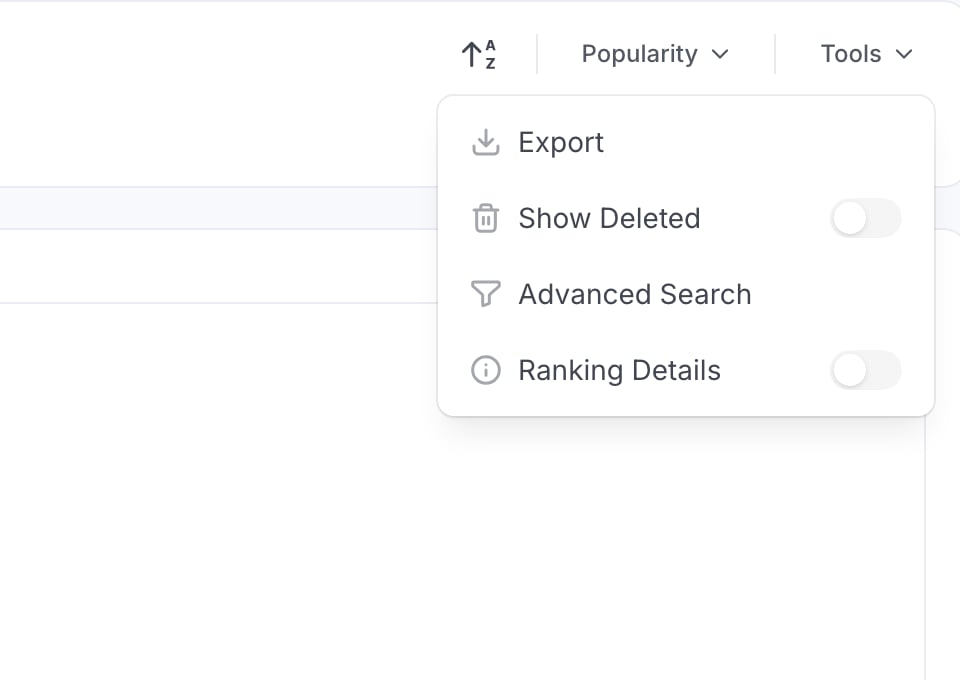 | Item | 1.13 | 2.0 |
| ------------------- | -------------------- | ------------------------- |
| Deleted toggle | Labelled **Deleted** | Labelled **Show Deleted** |
| Export | Synchronous download | Queues a background job |
| Advanced Search | unchanged | unchanged |
| **Ranking Details** | — | **New toggle** |
### Ranking Details
Turning on **Ranking Details** re-runs the search with explanation enabled and renders, per result
card, the relevance score, the score explanation, and which ranking stages matched. It is part of the
Explore fetch key, so toggling it forces a refetch.
## Result ordering changes
**Behavioural.** Affects every search and Explore result list.
Search settings gain a per-asset-type `ranking` block:
```json theme={null}
{
"algorithm": "nameFirstLexicalThenSignals",
"enabled": true,
"disMaxTieBreaker": 0.05,
"stages": [ /* ordered lexical ranking stages */ ],
"signals": { "boostMode": "sum", "scoreMode": "sum", "maxBoost": 2.0 },
"stopWords": [],
"stopWordsByLanguage": { "en": ["a", "an", "and", "are", "as", "at", "by", "for", "from", "in", "into", "is", "of", "on", "or", "the", "to", "with"] }
}
```
The model is **ordered lexical stages first** — name matches outrank description and context matches —
then **bounded metadata signals** (Tier, usage) capped at `maxBoost: 2.0` so they act as tie-breakers
rather than dominating relevance. Setting `ranking.enabled: false` falls back to the legacy
`searchFields` scoring.
The 2.0.0 migration writes the default ranking configuration into any **existing** stored search
settings, merging in missing stages rather than overwriting operator customisations.
Expect different result ordering after the upgrade: same query, same corpus, different order. If you
have automated tests asserting the top result for a given query, re-baseline them. Tune the behaviour
under **Settings → Search → Ranking**, which also gains a **Reset to Default** button in 2.0.
## CSV export is now a background job
**Behavioural.** Affects Explore users exporting search results.
Choosing **Tools → Export** no longer downloads a file directly. It queues a background job and shows
*"Export started — track progress and download the CSV from Background jobs."* The job is tracked as
`jobType: CSV_EXPORT` and downloaded from `GET /v1/csvAsyncJobs/{jobId}/result`.
The export scope modal also changed: exporting "all" now covers the full tab result set with an
accurate pre-count, capped at 200,000 rows.
The synchronous endpoint still exists. `GET /v1/search/export` is unchanged and still streams CSV
directly — only the **UI** switched to `GET /v1/search/export/async`. Scripted exporters do not need to
change.
## Explore result caching
**Behavioural.** Affects perceived freshness on tab switches.
2.0 adds a short-lived stale-while-revalidate cache keyed by the full search dependency string
(filters, browse path, query, sort, page, page size, search index, ranking-details flag).
* **Cache hit** — results render synchronously with **no spinner**, then a background refetch updates
them.
* **Cache miss** — normal loading path.
* A stale-response guard drops in-flight responses whose key no longer matches the current search, so
a slow response can no longer overwrite a newer result set.
UI tests that wait for a loading spinner on tab switch need to key off content instead.
## Explore tree count semantics
**Behavioural.**
Tree counts now aggregate over the whole data-asset index at every level, so a node's count is the
total matching objects in its **subtree** (parent ≥ child), and they respect the active quick filters,
advanced query filter and browse path. In 1.13 counts came from the per-entity index for the immediate
children only.
A count refresh no longer rebuilds the tree from scratch: lazily-loaded expanded nodes keep their
children, counts and selection.
## Search API changes
The `search_after` parameter is now repeated once per sort value instead of comma-joined. See
[API & Schema Contracts](/v2.0.x-SNAPSHOT/deployment/upgrade/breaking-changes/api-and-schema) for the
full search API contract changes.
| Item | 1.13 | 2.0 |
| ------------------- | -------------------- | ------------------------- |
| Deleted toggle | Labelled **Deleted** | Labelled **Show Deleted** |
| Export | Synchronous download | Queues a background job |
| Advanced Search | unchanged | unchanged |
| **Ranking Details** | — | **New toggle** |
### Ranking Details
Turning on **Ranking Details** re-runs the search with explanation enabled and renders, per result
card, the relevance score, the score explanation, and which ranking stages matched. It is part of the
Explore fetch key, so toggling it forces a refetch.
## Result ordering changes
**Behavioural.** Affects every search and Explore result list.
Search settings gain a per-asset-type `ranking` block:
```json theme={null}
{
"algorithm": "nameFirstLexicalThenSignals",
"enabled": true,
"disMaxTieBreaker": 0.05,
"stages": [ /* ordered lexical ranking stages */ ],
"signals": { "boostMode": "sum", "scoreMode": "sum", "maxBoost": 2.0 },
"stopWords": [],
"stopWordsByLanguage": { "en": ["a", "an", "and", "are", "as", "at", "by", "for", "from", "in", "into", "is", "of", "on", "or", "the", "to", "with"] }
}
```
The model is **ordered lexical stages first** — name matches outrank description and context matches —
then **bounded metadata signals** (Tier, usage) capped at `maxBoost: 2.0` so they act as tie-breakers
rather than dominating relevance. Setting `ranking.enabled: false` falls back to the legacy
`searchFields` scoring.
The 2.0.0 migration writes the default ranking configuration into any **existing** stored search
settings, merging in missing stages rather than overwriting operator customisations.
Expect different result ordering after the upgrade: same query, same corpus, different order. If you
have automated tests asserting the top result for a given query, re-baseline them. Tune the behaviour
under **Settings → Search → Ranking**, which also gains a **Reset to Default** button in 2.0.
## CSV export is now a background job
**Behavioural.** Affects Explore users exporting search results.
Choosing **Tools → Export** no longer downloads a file directly. It queues a background job and shows
*"Export started — track progress and download the CSV from Background jobs."* The job is tracked as
`jobType: CSV_EXPORT` and downloaded from `GET /v1/csvAsyncJobs/{jobId}/result`.
The export scope modal also changed: exporting "all" now covers the full tab result set with an
accurate pre-count, capped at 200,000 rows.
The synchronous endpoint still exists. `GET /v1/search/export` is unchanged and still streams CSV
directly — only the **UI** switched to `GET /v1/search/export/async`. Scripted exporters do not need to
change.
## Explore result caching
**Behavioural.** Affects perceived freshness on tab switches.
2.0 adds a short-lived stale-while-revalidate cache keyed by the full search dependency string
(filters, browse path, query, sort, page, page size, search index, ranking-details flag).
* **Cache hit** — results render synchronously with **no spinner**, then a background refetch updates
them.
* **Cache miss** — normal loading path.
* A stale-response guard drops in-flight responses whose key no longer matches the current search, so
a slow response can no longer overwrite a newer result set.
UI tests that wait for a loading spinner on tab switch need to key off content instead.
## Explore tree count semantics
**Behavioural.**
Tree counts now aggregate over the whole data-asset index at every level, so a node's count is the
total matching objects in its **subtree** (parent ≥ child), and they respect the active quick filters,
advanced query filter and browse path. In 1.13 counts came from the per-entity index for the immediate
children only.
A count refresh no longer rebuilds the tree from scratch: lazily-loaded expanded nodes keep their
children, counts and selection.
## Search API changes
The `search_after` parameter is now repeated once per sort value instead of comma-joined. See
[API & Schema Contracts](/v2.0.x-SNAPSHOT/deployment/upgrade/breaking-changes/api-and-schema) for the
full search API contract changes.