> ## Documentation Index
> Fetch the complete documentation index at: https://docs.open-metadata.org/llms.txt
> Use this file to discover all available pages before exploring further.
# Manage Classification
> Add, edit, delete, export, and import classifications to keep your tagging taxonomy organized.
# Manage Classification
Add and manage classifications in OpenMetadata to organize how data assets are tagged across your organization. This includes creating a new classification, editing its details, deleting one you no longer need, and exporting or importing its tags in bulk using a CSV file.
## Add a Classification
To create a new classification:
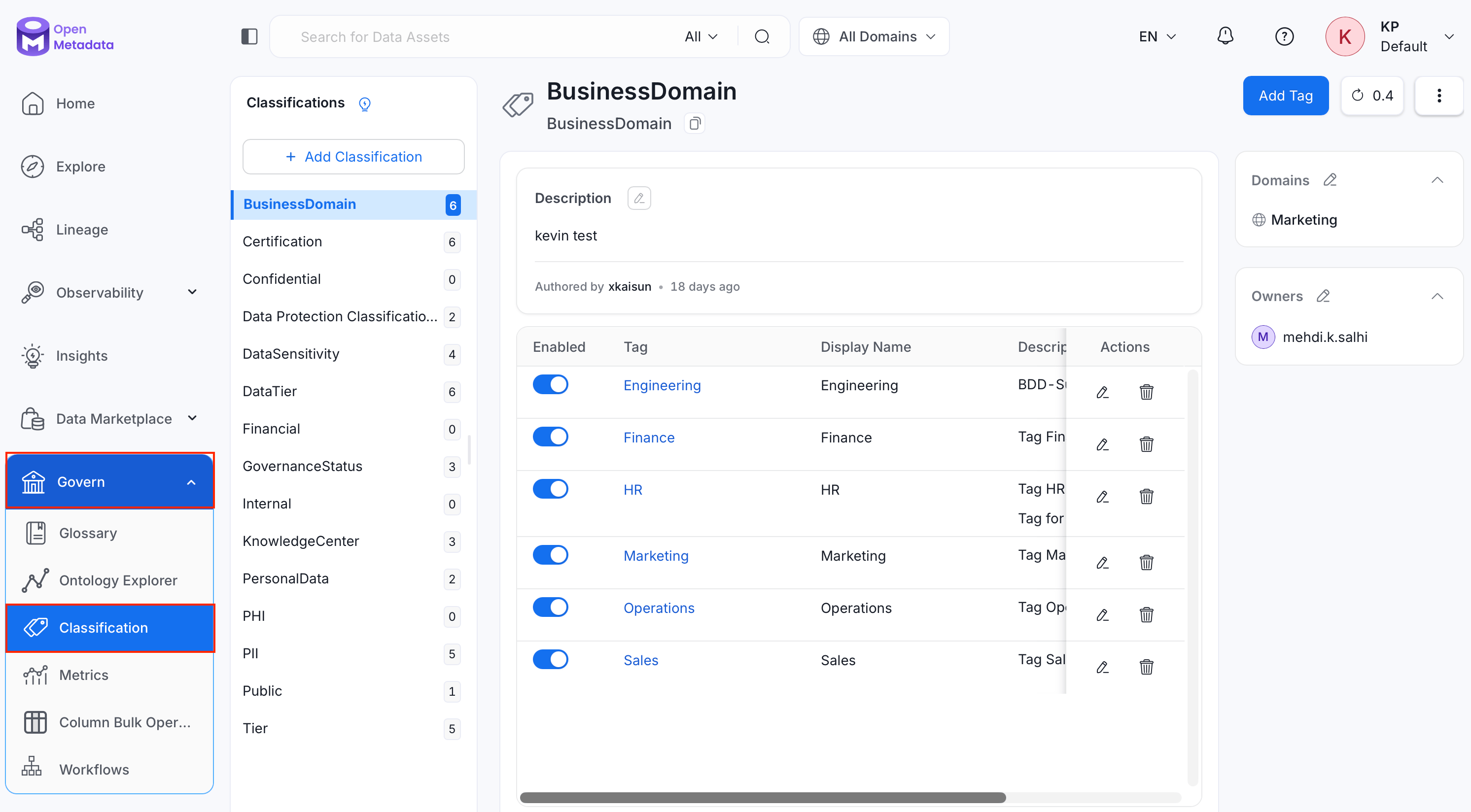
1. Navigate to **Govern** > **Classification**.
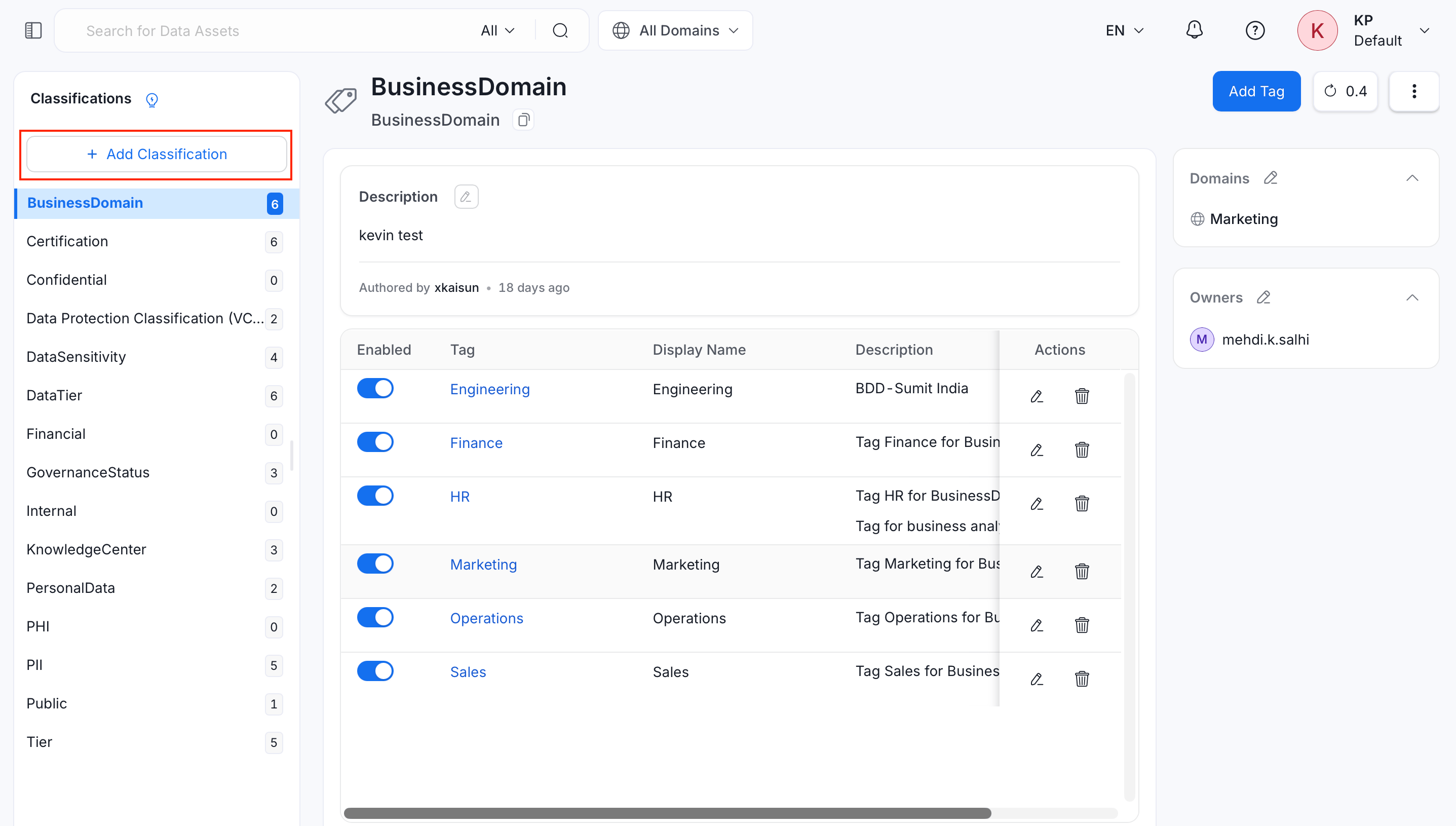
 2. Click **Add Classification**.
 3. Fill in the following details:
* **Name** (required): A unique name for the classification.
* **Display Name**: A human-friendly label shown in the UI.
* **Description** (required): Describe what this classification is used for.
* **Mutually Exclusive**: When enabled, only one tag from this classification can be assigned to a data asset at a time. For example, an asset can be tagged as either `PII-Sensitive` or `PII-NonSensitive`, but not both.
* **Owners**: Search for and assign one or more teams or users as owners of the classification.
* **Domains**: Search for and assign one or more domains to the classification.
3. Fill in the following details:
* **Name** (required): A unique name for the classification.
* **Display Name**: A human-friendly label shown in the UI.
* **Description** (required): Describe what this classification is used for.
* **Mutually Exclusive**: When enabled, only one tag from this classification can be assigned to a data asset at a time. For example, an asset can be tagged as either `PII-Sensitive` or `PII-NonSensitive`, but not both.
* **Owners**: Search for and assign one or more teams or users as owners of the classification.
* **Domains**: Search for and assign one or more domains to the classification.
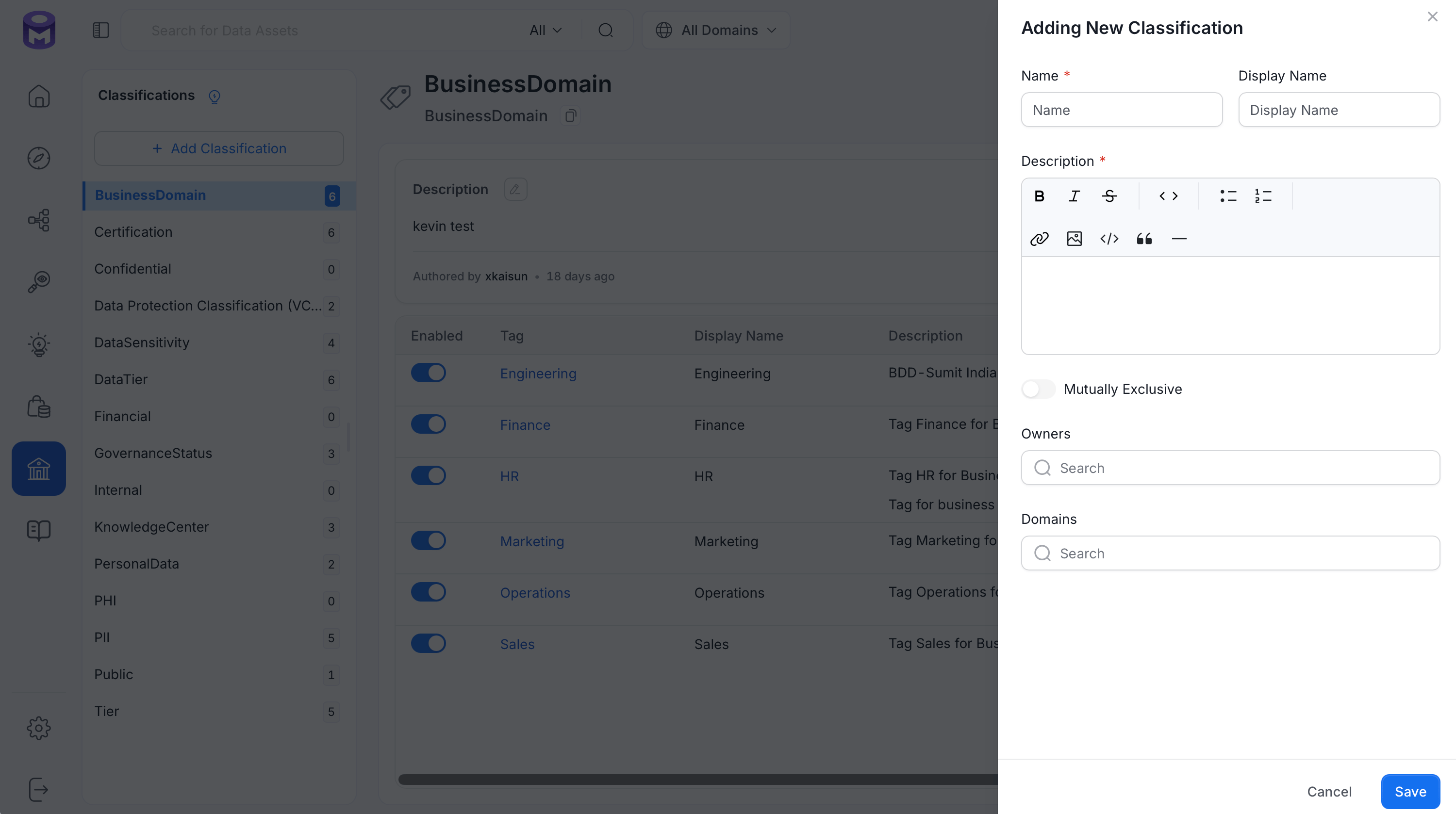 4. Click **Save**.
## Add Tags to a Classification
After a classification is created, add tags under it:
1. Select the Classification from the **Classification** page.
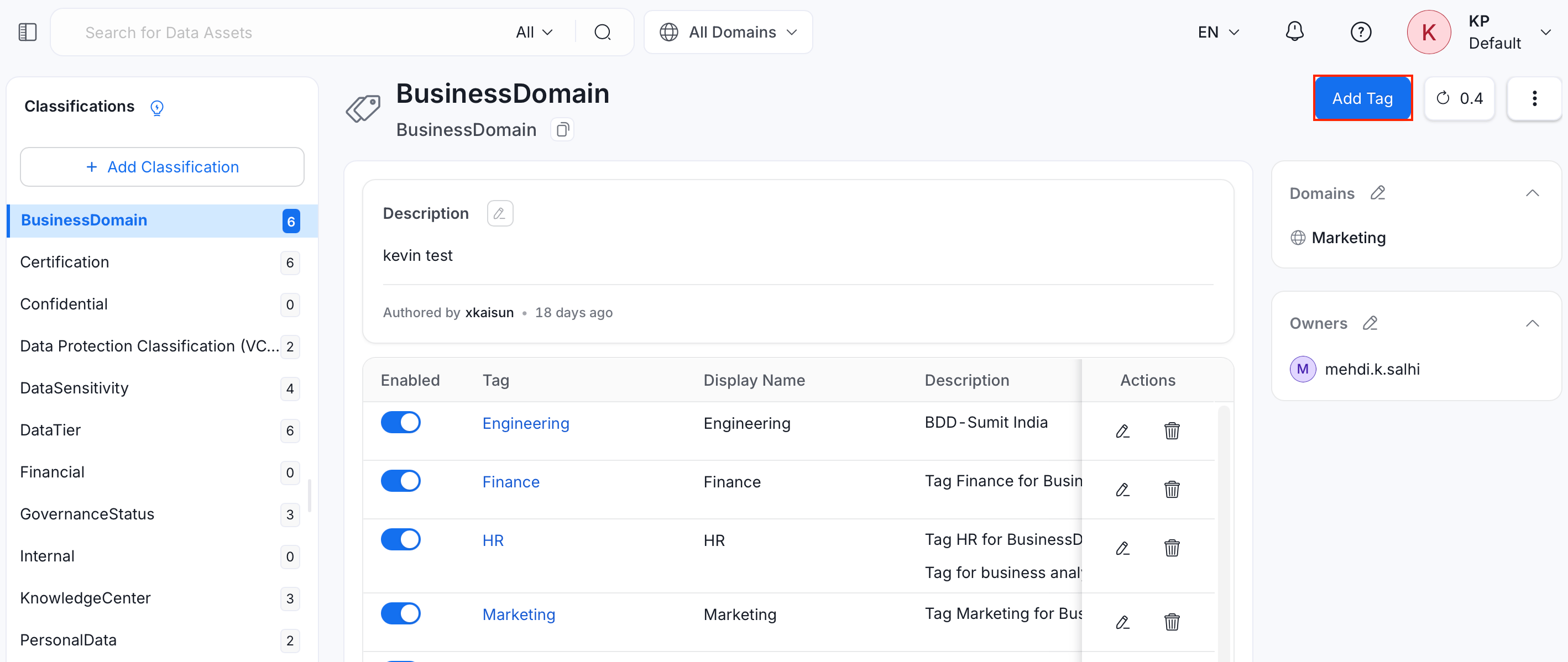
2. Click **Add Tag**.
4. Click **Save**.
## Add Tags to a Classification
After a classification is created, add tags under it:
1. Select the Classification from the **Classification** page.
2. Click **Add Tag**.
 3. Fill in the following details:
* **Name** (required): A unique name for the tag.
* **Display Name**: A human-friendly label shown in the UI.
* **Icon**: Pick an icon to represent the tag.
* **Color**: Pick a color swatch for the tag's icon.
* **Description** (required): Describe what the tag means, using the rich text editor.
* **Owners**: Search for and assign one or more teams or users as owners of the tag.
* **Domains**: Search for and assign one or more domains to the tag.
3. Fill in the following details:
* **Name** (required): A unique name for the tag.
* **Display Name**: A human-friendly label shown in the UI.
* **Icon**: Pick an icon to represent the tag.
* **Color**: Pick a color swatch for the tag's icon.
* **Description** (required): Describe what the tag means, using the rich text editor.
* **Owners**: Search for and assign one or more teams or users as owners of the tag.
* **Domains**: Search for and assign one or more domains to the tag.
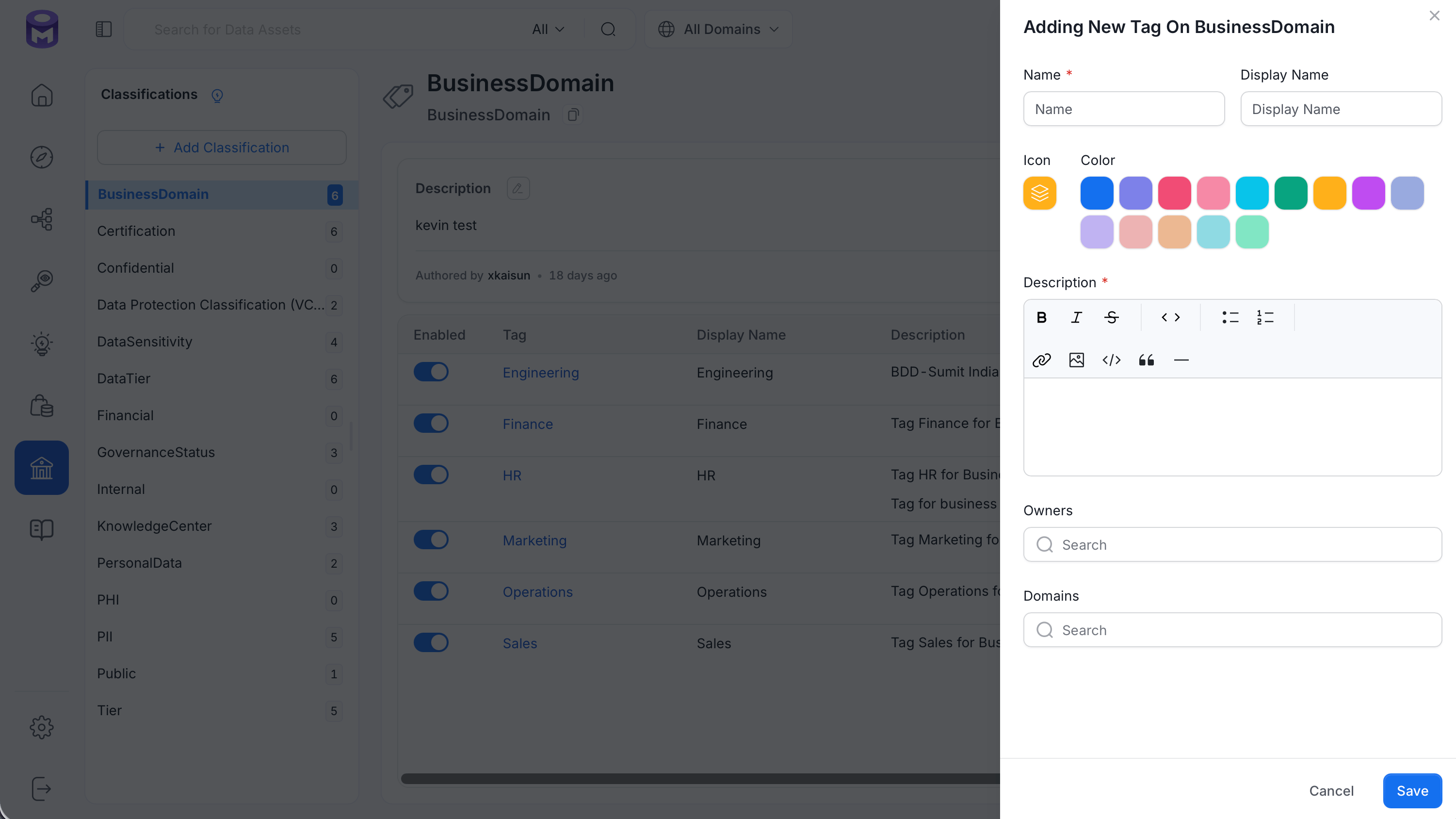 4. Click **Save**.
The pencil icon next to **Description** on a classification's or tag's page also allows a quick inline edit, and the tag table has an **Enabled** toggle for each tag.
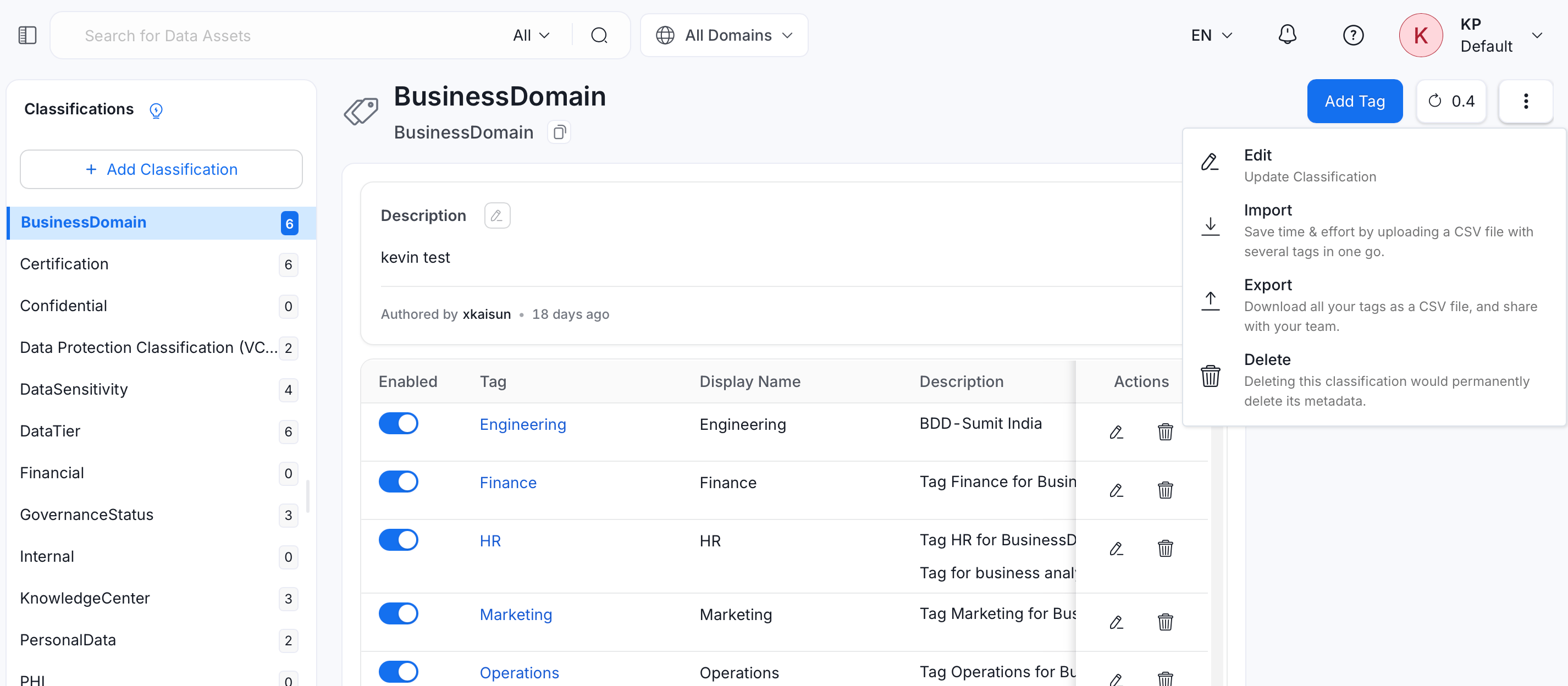
Select the Classification, then click the **⋮** icon in the top right to open the menu with **Edit**, **Import**, **Export**, and **Delete** options.
4. Click **Save**.
The pencil icon next to **Description** on a classification's or tag's page also allows a quick inline edit, and the tag table has an **Enabled** toggle for each tag.
Select the Classification, then click the **⋮** icon in the top right to open the menu with **Edit**, **Import**, **Export**, and **Delete** options.
 ## Edit a Classification
Update a classification's details after it's created:
1. Select the Classification you want to update.
2. Click the **⋮** icon and select **Edit**. This opens the same form as [Add a Classification](#add-a-classification), pre-filled with the current values.
3. Update any field and click **Save**.
`Name` cannot be changed for **system** classifications (such as `PII` and `Tiers`) after they're created.
## Import Tags into a Classification
OpenMetadata supports classification import to save time and effort by uploading a CSV with several tags in one go, creating or updating multiple tags simultaneously. Each row in the CSV creates or updates one **Tag** under the selected Classification.
To import tags into a classification:
1. Navigate to **Govern** > **Classification**.
2. Select the classification you want to import tags into.
3. Click the **⋮** icon and select **Import**.
4. Drag and drop a file, or click **Browse** to upload your tags. Click **Download CSV Template** for a starter file, or **View Column References** for the full list of supported columns.
## Edit a Classification
Update a classification's details after it's created:
1. Select the Classification you want to update.
2. Click the **⋮** icon and select **Edit**. This opens the same form as [Add a Classification](#add-a-classification), pre-filled with the current values.
3. Update any field and click **Save**.
`Name` cannot be changed for **system** classifications (such as `PII` and `Tiers`) after they're created.
## Import Tags into a Classification
OpenMetadata supports classification import to save time and effort by uploading a CSV with several tags in one go, creating or updating multiple tags simultaneously. Each row in the CSV creates or updates one **Tag** under the selected Classification.
To import tags into a classification:
1. Navigate to **Govern** > **Classification**.
2. Select the classification you want to import tags into.
3. Click the **⋮** icon and select **Import**.
4. Drag and drop a file, or click **Browse** to upload your tags. Click **Download CSV Template** for a starter file, or **View Column References** for the full list of supported columns.
 The template includes the following columns:
| Column | Required | Description |
| --------------------- | -------- | --------------------------------------------------------------------------------------------------------------------------------------------------------------------------------------------------- |
| **parent** | No | Leave blank to add the tag at the top level of the classification. |
| **name** | Yes | The name of the tag. Reuse an existing tag's name to update that tag. A different name produces a different fully qualified name, so it creates a **new** tag instead of renaming the original one. |
| **displayName** | No | The display name of the tag. |
| **description** | No | The description or details of the tag. |
| **reviewers** | No | Users who review and approve changes to the tag. |
| **owner** | No | The team or user who owns the tag. |
| **tagStatus** | No | The tag's approval status. |
| **color** | No | The color of the tag's icon. |
| **iconURL** | No | The icon shown for the tag. |
| **domains** | No | The domain(s) the tag belongs to. |
| **mutuallyExclusive** | No | Whether the tag is mutually exclusive with other tags in the same classification. |
Leaving `mutuallyExclusive`, `tagStatus`, `color`, or `iconURL` blank on an update keeps the tag's current value. Leaving `displayName`, `description`, `reviewers`, `owner`, or `domains` blank clears that field instead.
5. Click **Next: Preview**.
6. Preview and validate your uploaded data. Make any additions or corrections directly in the table if needed. A **Passed** and **Failed** count is displayed above the table to help you quickly identify any rows with validation errors before proceeding.
7. Click **Next** to import the tags.
System classifications (such as `PII` and `Tiers`) cannot be imported into or exported.
## Export a Classification
Download a classification's tags as a CSV file to share with your team:
1. Select the classification you want to export.
2. Click the **⋮** icon and select **Export**.
## Delete a Classification
Removing a classification permanently deletes its metadata:
1. Select the classification you want to remove.
2. Click the **⋮** icon and select **Delete**.
3. Click **Confirm** to delete the classification.
System classifications (such as `PII` and `Tiers`) cannot be deleted. Disable their tags or edit descriptions instead.
Add tags to data assets, or request them and discuss about the same, all within OpenMetadata.
The template includes the following columns:
| Column | Required | Description |
| --------------------- | -------- | --------------------------------------------------------------------------------------------------------------------------------------------------------------------------------------------------- |
| **parent** | No | Leave blank to add the tag at the top level of the classification. |
| **name** | Yes | The name of the tag. Reuse an existing tag's name to update that tag. A different name produces a different fully qualified name, so it creates a **new** tag instead of renaming the original one. |
| **displayName** | No | The display name of the tag. |
| **description** | No | The description or details of the tag. |
| **reviewers** | No | Users who review and approve changes to the tag. |
| **owner** | No | The team or user who owns the tag. |
| **tagStatus** | No | The tag's approval status. |
| **color** | No | The color of the tag's icon. |
| **iconURL** | No | The icon shown for the tag. |
| **domains** | No | The domain(s) the tag belongs to. |
| **mutuallyExclusive** | No | Whether the tag is mutually exclusive with other tags in the same classification. |
Leaving `mutuallyExclusive`, `tagStatus`, `color`, or `iconURL` blank on an update keeps the tag's current value. Leaving `displayName`, `description`, `reviewers`, `owner`, or `domains` blank clears that field instead.
5. Click **Next: Preview**.
6. Preview and validate your uploaded data. Make any additions or corrections directly in the table if needed. A **Passed** and **Failed** count is displayed above the table to help you quickly identify any rows with validation errors before proceeding.
7. Click **Next** to import the tags.
System classifications (such as `PII` and `Tiers`) cannot be imported into or exported.
## Export a Classification
Download a classification's tags as a CSV file to share with your team:
1. Select the classification you want to export.
2. Click the **⋮** icon and select **Export**.
## Delete a Classification
Removing a classification permanently deletes its metadata:
1. Select the classification you want to remove.
2. Click the **⋮** icon and select **Delete**.
3. Click **Confirm** to delete the classification.
System classifications (such as `PII` and `Tiers`) cannot be deleted. Disable their tags or edit descriptions instead.
Add tags to data assets, or request them and discuss about the same, all within OpenMetadata.