> ## Documentation Index
> Fetch the complete documentation index at: https://docs.open-metadata.org/llms.txt
> Use this file to discover all available pages before exploring further.
# Import & Export an Ontology | OpenMetadata
> Bring an OWL, Turtle, N-Triples, or JSON-LD ontology into OpenMetadata as glossary terms and typed relations, and export back to OWL, SKOS, JSON-LD, or CSV.
# Import & Export
OpenMetadata is not a dead end for your semantics. An ontology authored in Protégé, exported from an EDM tool, or produced by a standards body can be imported as first-class glossary terms and typed relations — and exported back out in a form other tools accept.
Open **Import / Export** from the Ontology Studio header.
## Import
### Accepted Formats
| Syntax | Extensions | `format` value |
| ------------- | ---------------------- | ------------------ |
| Turtle | `.ttl` | `turtle` (default) |
| OWL / RDF/XML | `.rdf`, `.owl`, `.xml` | `rdfxml` |
| N-Triples | `.nt` | `ntriples` |
| JSON-LD | `.jsonld`, `.json` | `jsonld` |
The modal auto-detects the syntax from the file you choose. JSON-LD can use inline contexts or the bundled OpenMetadata contexts.
### What Gets Mapped
| Source construct | Becomes |
| ---------------------------------------------------------------------------- | ------------------------------------------- |
| `skos:Concept` / `owl:Class` | Glossary term (concept) |
| `skos:broader` / `rdfs:subClassOf` | Parent hierarchy |
| `owl:ObjectProperty` edges | Governed typed relationships |
| `owl:DatatypeProperty` definitions | Per-concept ontology attributes |
| `skos:exactMatch`, `closeMatch`, `broadMatch`, `narrowMatch`, `relatedMatch` | Concept mappings |
| Everything else in the file | Preserved in the **lossless annex** (below) |
Relationship types referenced by the ontology are registered if they do not already exist — that step requires admin, so a non-admin import proceeds without registering new global types rather than silently escalating privileges.
### Dry Run First
**Parse / dry run** validates the file and produces a full preview with **nothing persisted**. The result reports:
* Terms created and terms updated
* Relations added and relationship types registered
* Concept mappings added
* Per-concept attributes created
* Messages for anything skipped or needing review
* A SHACL validation report when validation is enabled
Only after you review that do you commit. On commit, imported terms enter **Draft** status if the target glossary has reviewers configured, so an import lands in your normal approval flow instead of bypassing it.
### The Lossless Annex
Real-world ontologies contain more than OpenMetadata's model represents — annotation properties, provenance triples, vendor extensions, SWRL rules. Discarding them would make import a one-way door.
Instead, OpenMetadata computes the **difference** between the source graph and what it represented natively, canonicalizes it, and stores it as an **annex revision** keyed by content checksum against the glossary. On export, the annex is merged back in.
That is what makes the round-trip honest: what you import is what you get back, even for the parts OpenMetadata does not model itself.
### API
```bash theme={null}
curl -X PUT "$OM_HOST/api/v1/glossaries/name/{glossaryName}/importRdf?format=turtle&dryRun=true" \
-H "Authorization: Bearer $TOKEN" \
-H "Content-Type: text/turtle" \
--data-binary @my-ontology.ttl
```
Set `dryRun=false` to commit. Requires `EditAll` on the target glossary. Content types accepted: `text/turtle`, `application/rdf+xml`, `application/n-triples`, `application/ld+json`, `text/plain`.
## Export
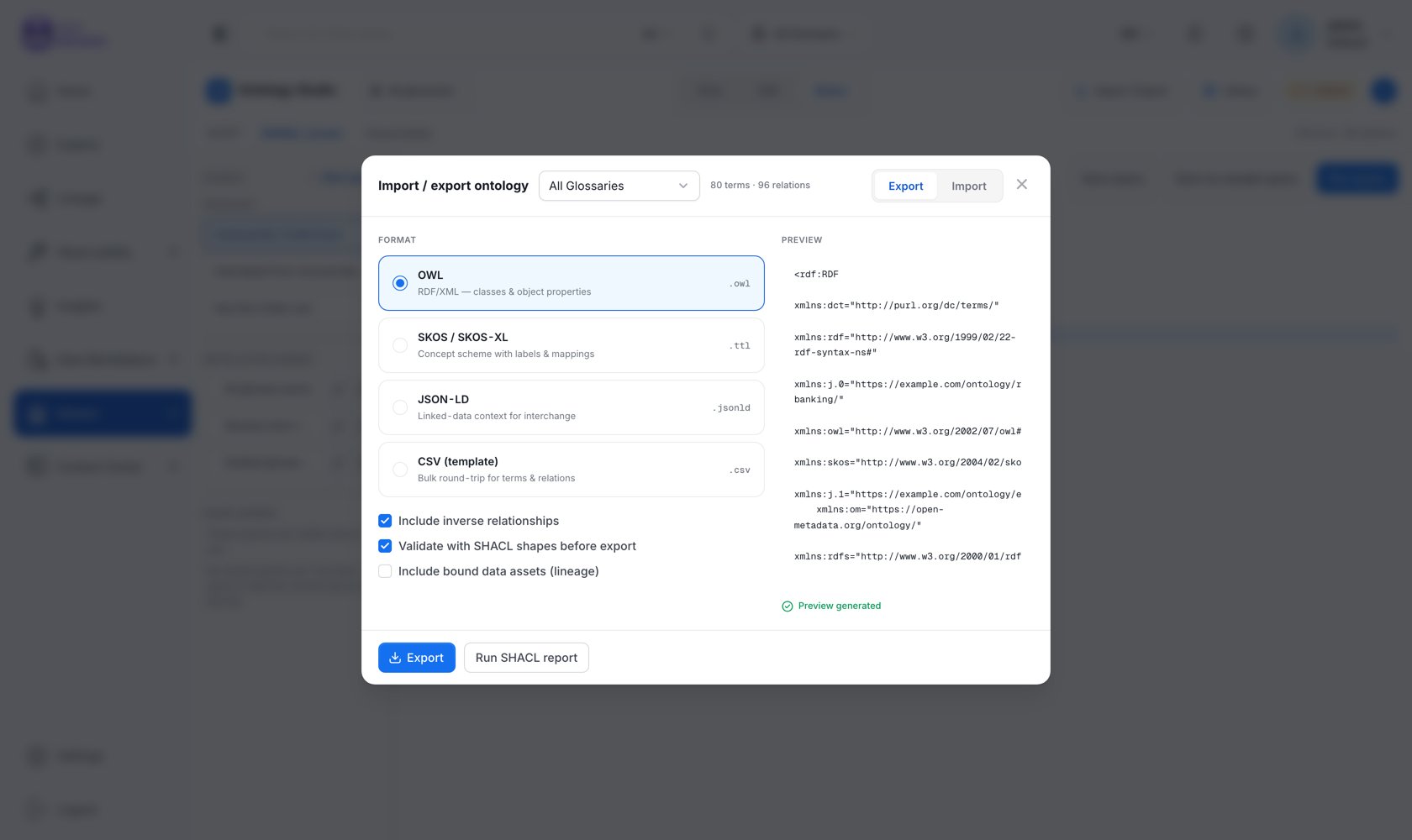 ### Formats
| Format | Extension | What it is |
| ------------------ | --------- | ------------------------------------------------------------------------------ |
| **OWL** | `.owl` | RDF/XML — classes and object properties. |
| **SKOS / SKOS-XL** | `.ttl` | Concept scheme with labels and mappings. |
| **JSON-LD** | `.jsonld` | Linked-data context for interchange. |
| **CSV (template)** | `.csv` | Bulk round-trip for terms and relations, via the standard glossary CSV export. |
### Options
* **Include inverse relationships** — emit the inverse of each typed relation as well, using each relationship type's declared `owl:inverseOf`. Maps to the `includeRelations` API parameter.
* **Validate with SHACL shapes before export** *(admin only)* — run SHACL validation first and warn if the model does not conform. Violations do not block the export; you get the report and decide. **Run SHACL report** downloads the full `sh:ValidationReport` as Turtle.
A live, syntax-highlighted preview of the serialized output is rendered beside the options, showing exactly what you are about to download before you download it.
Selecting **All glossaries** exports each model and merges the results into one document.
### What Is Exported
The export is built from the **database-primary** model, not the triple store — so it works with RDF disabled. It includes:
* The glossary as an `owl:Ontology` / `skos:ConceptScheme` with its base IRI and prefixes
* Concepts with labels, definitions, and IRIs
* Hierarchy
* Typed relationships, with each relationship type declared as an `owl:ObjectProperty` carrying its characteristics and `owl:inverseOf`
* Ontology attributes as `owl:DatatypeProperty` declarations
* Authored OWL axioms
* Concept mappings as `skos:*Match` / `owl:sameAs`
* The lossless annex
### API
```bash theme={null}
# Turtle (default)
curl "$OM_HOST/api/v1/glossaries/{id}/exportOntology" \
-H "Authorization: Bearer $TOKEN"
# RDF/XML without inverse relations
curl "$OM_HOST/api/v1/glossaries/{id}/exportOntology?format=rdfxml&includeRelations=false" \
-H "Authorization: Bearer $TOKEN"
```
Requires `ViewAll` on the glossary. `format` accepts `turtle`, `rdfxml`, `ntriples`, `jsonld`.
## Exporting the Graph, Not the Model
The formats above export **one ontology model**. To export a slice of the *knowledge graph* — an entity and its neighborhood, including instance data — use `GET /api/v1/rdf/graph/explore/export` (Turtle or JSON-LD, admin only), or `GET /api/v1/rdf/ontology` for the canonical OpenMetadata ontology itself.
## Next
Pre-verified packs that install without an import step.
What SHACL validation checks.
### Formats
| Format | Extension | What it is |
| ------------------ | --------- | ------------------------------------------------------------------------------ |
| **OWL** | `.owl` | RDF/XML — classes and object properties. |
| **SKOS / SKOS-XL** | `.ttl` | Concept scheme with labels and mappings. |
| **JSON-LD** | `.jsonld` | Linked-data context for interchange. |
| **CSV (template)** | `.csv` | Bulk round-trip for terms and relations, via the standard glossary CSV export. |
### Options
* **Include inverse relationships** — emit the inverse of each typed relation as well, using each relationship type's declared `owl:inverseOf`. Maps to the `includeRelations` API parameter.
* **Validate with SHACL shapes before export** *(admin only)* — run SHACL validation first and warn if the model does not conform. Violations do not block the export; you get the report and decide. **Run SHACL report** downloads the full `sh:ValidationReport` as Turtle.
A live, syntax-highlighted preview of the serialized output is rendered beside the options, showing exactly what you are about to download before you download it.
Selecting **All glossaries** exports each model and merges the results into one document.
### What Is Exported
The export is built from the **database-primary** model, not the triple store — so it works with RDF disabled. It includes:
* The glossary as an `owl:Ontology` / `skos:ConceptScheme` with its base IRI and prefixes
* Concepts with labels, definitions, and IRIs
* Hierarchy
* Typed relationships, with each relationship type declared as an `owl:ObjectProperty` carrying its characteristics and `owl:inverseOf`
* Ontology attributes as `owl:DatatypeProperty` declarations
* Authored OWL axioms
* Concept mappings as `skos:*Match` / `owl:sameAs`
* The lossless annex
### API
```bash theme={null}
# Turtle (default)
curl "$OM_HOST/api/v1/glossaries/{id}/exportOntology" \
-H "Authorization: Bearer $TOKEN"
# RDF/XML without inverse relations
curl "$OM_HOST/api/v1/glossaries/{id}/exportOntology?format=rdfxml&includeRelations=false" \
-H "Authorization: Bearer $TOKEN"
```
Requires `ViewAll` on the glossary. `format` accepts `turtle`, `rdfxml`, `ntriples`, `jsonld`.
## Exporting the Graph, Not the Model
The formats above export **one ontology model**. To export a slice of the *knowledge graph* — an entity and its neighborhood, including instance data — use `GET /api/v1/rdf/graph/explore/export` (Turtle or JSON-LD, admin only), or `GET /api/v1/rdf/ontology` for the canonical OpenMetadata ontology itself.
## Next
Pre-verified packs that install without an import step.
What SHACL validation checks.