> ## Documentation Index
> Fetch the complete documentation index at: https://docs.open-metadata.org/llms.txt
> Use this file to discover all available pages before exploring further.
# Ontology Studio | OpenMetadata
> A tour of Ontology Studio — the workspace where you explore, author, query, and AI-assist your business ontology in OpenMetadata.
# Ontology Studio
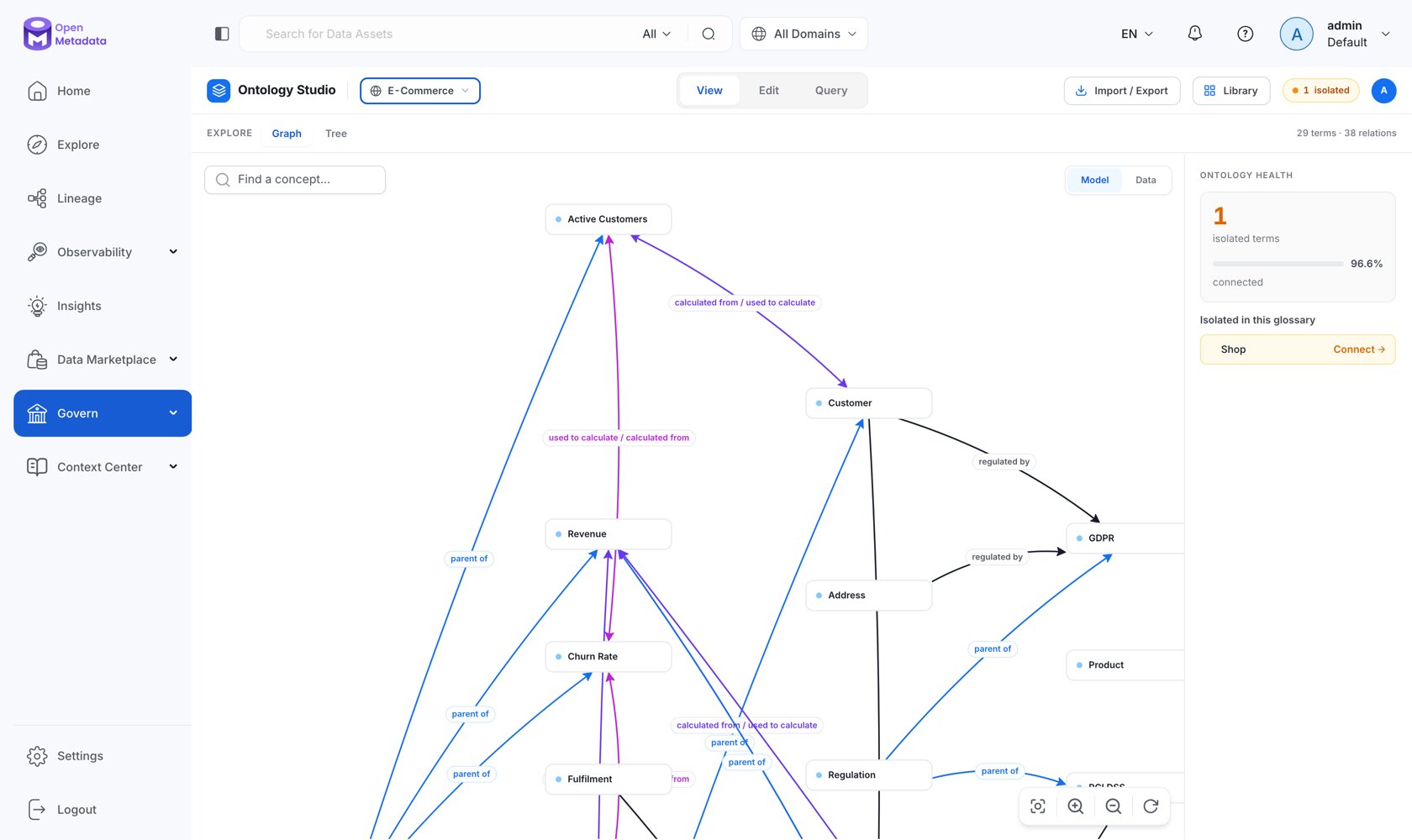
**Ontology Studio** is the workspace where your glossary stops being a list and becomes a model. It is one page with four modes — **View**, **Edit**, **Query**, and **AI** — over the same graph, so you never lose your place moving between reading the model, changing it, and interrogating it.
Open it from **Govern → Ontology Studio** in the left navigation, or go directly to `/governance/ontology`.
## The Shell
Every mode shares the same header:
| Control | What it does |
| --------------------- | ------------------------------------------------------------------------------------------------------------------------------------ |
| **Glossary selector** | Scopes the whole studio to one ontology model, or **All glossaries**. Shows a term count per glossary. |
| **Mode tabs** | **View · Edit · Query · AI**. Edit appears only if you have edit permission; AI only if AI-assisted flows are enabled on the server. |
| **Import / Export** | Ontology import and export in OWL, Turtle, N-Triples, JSON-LD, SKOS, and CSV. |
| **Library** | Opens the **Ontology Library** of standards-aligned starter packs. |
| **Isolated badge** | A live count of concepts with no relationships — the single most useful health signal in the studio. |
Below the header, a sub-mode bar switches the surface within the current mode and shows a running `N terms · M relations` count.
 ## The Four Modes
**Graph** and **Tree** surfaces for reading the model — filters, health, search, export, and a details inspector for any concept or relation.
**Graph** authoring plus a **Model** workbench for IRIs, patterns, subsets, merges, and OWL constraints. Guarded by an editing lease.
A **SPARQL console** with saved queries and shared templates, and a **Visual builder** for people who would rather not write SPARQL.
Propose relationships, external mappings, SPARQL, and whole domain drafts — always as a reviewable draft, never applied directly.
## What Each Mode Needs
| Mode | Requires | Notes |
| --------- | -------------------------------------------------------------------------------- | ------------------------------------------------------------------------ |
| **View** | Nothing beyond a glossary | Works with RDF disabled. |
| **Edit** | `EditAll` / `EditGlossaryTerms` / `EditEntityRelationship` on Glossary, or admin | Acquires an editing lease per glossary. |
| **Query** | RDF enabled | Without it, the mode shows an explanatory notice instead of the console. |
| **AI** | `RDF_ASK_COLLATE_ENABLED=true` **and** a configured LLM provider | The tab is hidden entirely when disabled. |
`GET /api/v1/rdf/status` is the single source of truth the UI uses for this gating. It returns `enabled`, `storageType`, `inference`, `projectionState` (`DISABLED` / `READY` / `REBUILDING` / `DEGRADED`), and `askCollateEnabled`.
## A First Pass Through the Studio
Choose a glossary in the header. Studio scopes graph, tree, authoring, and query to that model. Leave it on **All glossaries** to see cross-glossary relationships.
Look at the **isolated** badge. Isolated concepts are terms nobody has connected to anything — they are definitions, not a model. Getting that number down is the work.
Use **View → Graph** for structure and **View → Tree** for hierarchy. The tree flags both isolated terms and polyhierarchic ones (concepts with more than one parent), which are the usual sources of ambiguity.
Switch to **Edit → Graph**, take the lease, and draw typed relations between concepts. Add attributes and external mappings in the inspector.
Switch to **Query**. Start from a shared template, or use the visual builder and click **Edit as SPARQL** to see the query it produced.
## Where the Data Comes From
Ontology Studio reads from ordinary OpenMetadata APIs, which is why most of it works with the triple store switched off:
| Surface | API |
| ---------------------- | --------------------------------------------------------------------------------------------------------- |
| Graph and stats | `GET /api/v1/glossaryTerms/studio/summary`, `GET /api/v1/glossaryTerms/studio/data` |
| Concept relations | `GET /api/v1/glossaryTerms/{id}/relationsGraph`, `POST\|PUT\|DELETE /api/v1/glossaryTerms/{id}/relations` |
| Attached assets | `GET /api/v1/glossaryTerms/{id}/studioAssets`, `GET /api/v1/glossaryTerms/assets/counts` |
| Relationship types | `GET /api/v1/relationshipTypes`, `GET /api/v1/glossaryTerms/relationTypes/usage` |
| Glossary-scoped SPARQL | `POST /api/v1/glossaries/{id}/sparql` — works without RDF storage |
| Catalog-wide SPARQL | `GET\|POST /api/v1/rdf/sparql` — requires RDF |
The full endpoint list is in the [Ontology API reference](/v2.1.x-SNAPSHOT/how-to-guides/ontology/studio/api).
## In This Section
## The Four Modes
**Graph** and **Tree** surfaces for reading the model — filters, health, search, export, and a details inspector for any concept or relation.
**Graph** authoring plus a **Model** workbench for IRIs, patterns, subsets, merges, and OWL constraints. Guarded by an editing lease.
A **SPARQL console** with saved queries and shared templates, and a **Visual builder** for people who would rather not write SPARQL.
Propose relationships, external mappings, SPARQL, and whole domain drafts — always as a reviewable draft, never applied directly.
## What Each Mode Needs
| Mode | Requires | Notes |
| --------- | -------------------------------------------------------------------------------- | ------------------------------------------------------------------------ |
| **View** | Nothing beyond a glossary | Works with RDF disabled. |
| **Edit** | `EditAll` / `EditGlossaryTerms` / `EditEntityRelationship` on Glossary, or admin | Acquires an editing lease per glossary. |
| **Query** | RDF enabled | Without it, the mode shows an explanatory notice instead of the console. |
| **AI** | `RDF_ASK_COLLATE_ENABLED=true` **and** a configured LLM provider | The tab is hidden entirely when disabled. |
`GET /api/v1/rdf/status` is the single source of truth the UI uses for this gating. It returns `enabled`, `storageType`, `inference`, `projectionState` (`DISABLED` / `READY` / `REBUILDING` / `DEGRADED`), and `askCollateEnabled`.
## A First Pass Through the Studio
Choose a glossary in the header. Studio scopes graph, tree, authoring, and query to that model. Leave it on **All glossaries** to see cross-glossary relationships.
Look at the **isolated** badge. Isolated concepts are terms nobody has connected to anything — they are definitions, not a model. Getting that number down is the work.
Use **View → Graph** for structure and **View → Tree** for hierarchy. The tree flags both isolated terms and polyhierarchic ones (concepts with more than one parent), which are the usual sources of ambiguity.
Switch to **Edit → Graph**, take the lease, and draw typed relations between concepts. Add attributes and external mappings in the inspector.
Switch to **Query**. Start from a shared template, or use the visual builder and click **Edit as SPARQL** to see the query it produced.
## Where the Data Comes From
Ontology Studio reads from ordinary OpenMetadata APIs, which is why most of it works with the triple store switched off:
| Surface | API |
| ---------------------- | --------------------------------------------------------------------------------------------------------- |
| Graph and stats | `GET /api/v1/glossaryTerms/studio/summary`, `GET /api/v1/glossaryTerms/studio/data` |
| Concept relations | `GET /api/v1/glossaryTerms/{id}/relationsGraph`, `POST\|PUT\|DELETE /api/v1/glossaryTerms/{id}/relations` |
| Attached assets | `GET /api/v1/glossaryTerms/{id}/studioAssets`, `GET /api/v1/glossaryTerms/assets/counts` |
| Relationship types | `GET /api/v1/relationshipTypes`, `GET /api/v1/glossaryTerms/relationTypes/usage` |
| Glossary-scoped SPARQL | `POST /api/v1/glossaries/{id}/sparql` — works without RDF storage |
| Catalog-wide SPARQL | `GET\|POST /api/v1/rdf/sparql` — requires RDF |
The full endpoint list is in the [Ontology API reference](/v2.1.x-SNAPSHOT/how-to-guides/ontology/studio/api).
## In This Section