> ## Documentation Index
> Fetch the complete documentation index at: https://docs.open-metadata.org/llms.txt
> Use this file to discover all available pages before exploring further.
# Ontology Library | OpenMetadata
> Install standards-aligned starter ontologies — FIBO, HL7 FHIR, GS1, EPCIS, ISA-95, HR Open — into OpenMetadata as reference glossaries.
# Ontology Library
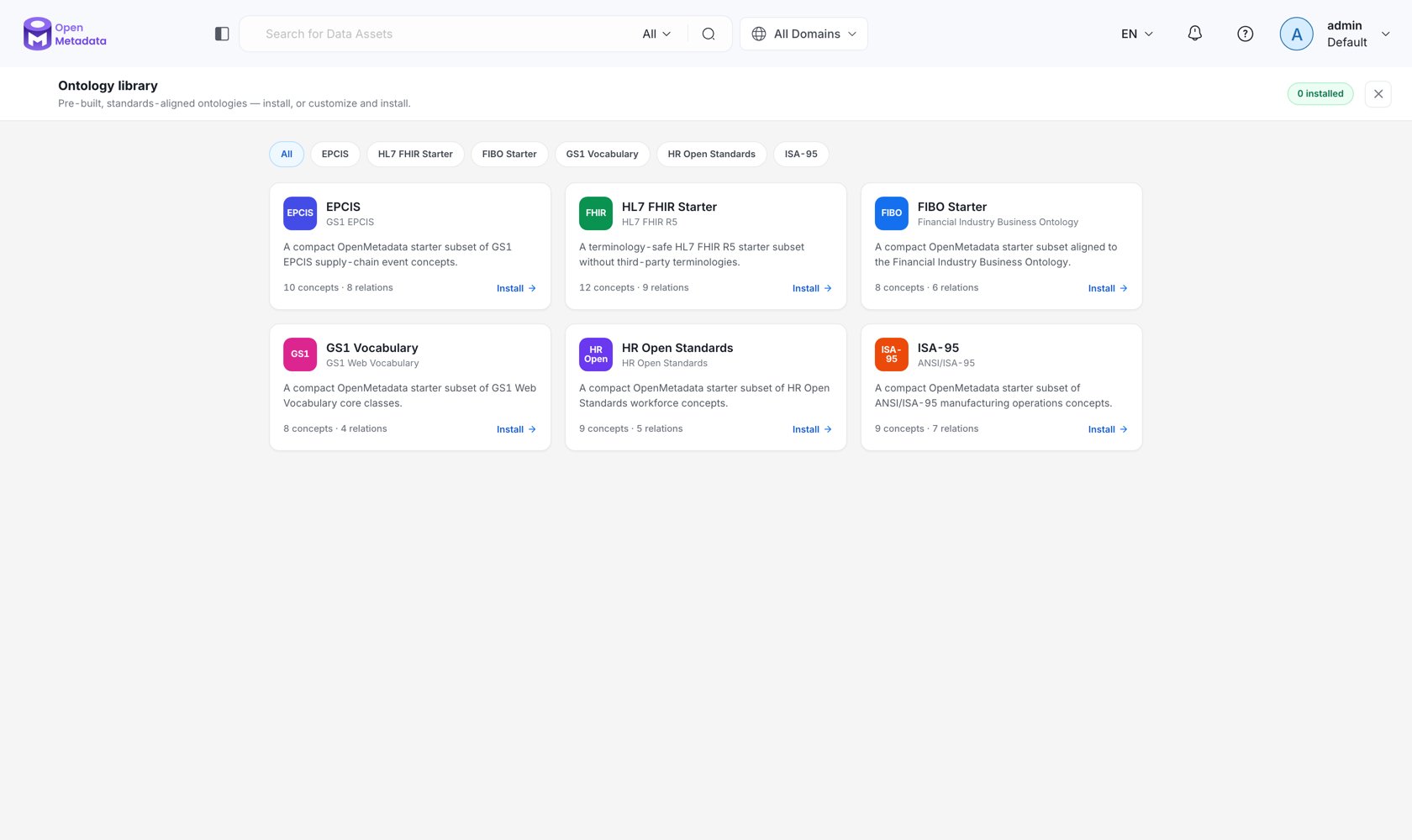
Most organizations do not need to invent a model of *Customer* from first principles. Their industry already has one. The **Ontology Library** ships compact, standards-aligned starter packs you can install as a reference glossary and adapt.
Open it from the **Library** button in the Ontology Studio header.
 ## What Ships
| Pack | Standard | Version | License | Concepts / relationships | Modules |
| --------------------- | ------------------------------------ | ------------ | -------------------------------------------- | ------------------------ | ------------------------------------------------------------------------------ |
| **FIBO Starter** | Financial Industry Business Ontology | `2025Q1-om1` | MIT | 8 / 6 | Foundations; Business entities *(requires Foundations)* |
| **HL7 FHIR Starter** | HL7 FHIR R5 | `5.0.0-om1` | CC0 1.0 (excludes third-party terminologies) | 12 / 9 | Core resources; Clinical records *(requires Core)*; Workflow *(requires Core)* |
| **GS1 Vocabulary** | GS1 Web Vocabulary | `2025Q1-om1` | MIT | 8 / 4 | Core vocabulary |
| **EPCIS** | GS1 EPCIS supply-chain events | `2025Q1-om1` | MIT | 10 / 8 | Event model |
| **ISA-95** | ANSI/ISA-95 manufacturing operations | `2025Q1-om1` | MIT | 9 / 7 | Manufacturing operations |
| **HR Open Standards** | HR Open Standards workforce | `2025Q1-om1` | MIT | 9 / 5 | Workforce |
These are deliberately **starter subsets**, not full standards. FIBO in its entirety is tens of thousands of classes; a compact, curated subset is what actually gets adopted. Each pack links to the upstream `sourceUrl` when you need the complete specification, and each ships under a license that permits redistribution — third-party terminologies with restrictive licensing (for example, in FHIR) are excluded rather than shipped ambiguously.
## Installing a Pack
Click **Library** in the studio header. The catalog shows each pack with its standard, version, license, and installed state.
Packs are split into modules. Selecting a module automatically selects its dependencies, and the concept and relationship counts update live. A graph preview highlights the selected modules around the standard.
Install into a new glossary (enter a name) or an existing one.
Validate first. The dry run reports how many concepts and relationships are ready to install and surfaces problems without writing anything.
Confirm. OpenMetadata creates the reference glossary, its concepts, typed relationships, and — for admins — any relationship types the pack requires.
## Integrity and Governance
* **Content is checksum-verified.** Every module records a SHA-256 of its Turtle payload, checked at install time. A tampered or truncated pack fails to install rather than partially applying.
* **Installation is permissioned.** Installing into an existing glossary requires edit permission on it; installing into a new one requires create permission. Only admins can create the relationship types a pack needs — a non-admin install proceeds without them rather than silently escalating.
* **Installed packs are recorded.** The target glossary's ontology configuration keeps an `installedPacks` list keyed by stable pack ID, so you always know what a reference model was assembled from.
* **Reference models can be read-only.** Set `readOnly` on the glossary's ontology configuration to prevent direct edits to an installed standard — then build your own model at a less foundational [layer](/v2.1.x-SNAPSHOT/how-to-guides/ontology/concepts#ontology-layers) and import it.
**The recommended shape.** Install standards packs as **L1** models and mark them read-only. Build your enterprise model at **L2**, importing from L1. Give projects **L3** subsets pinned off L2. Layer validation then enforces the dependency direction for you: nothing at L1 can ever end up depending on a project's model.
## Catalog-only Packs
A pack can be listed but still require independently licensed content before installation. Those show an **External payload required** state in the catalog and remain catalog-only until the content is supplied — the metadata is present so you can plan, without OpenMetadata redistributing content it is not licensed to ship.
## API
| Endpoint | Purpose |
| --------------------------------------------- | ----------------------------------------------------------------- |
| `GET /api/v1/ontologyPacks` | List available packs. |
| `GET /api/v1/ontologyPacks/{packId}` | Pack manifest: modules, dependencies, counts, checksums, license. |
| `POST /api/v1/ontologyPacks/{packId}/install` | Dry-run or install selected modules into a target glossary. |
## Next
Bring in an ontology that is not in the library.
Layers, imports, and why the dependency direction matters.
## What Ships
| Pack | Standard | Version | License | Concepts / relationships | Modules |
| --------------------- | ------------------------------------ | ------------ | -------------------------------------------- | ------------------------ | ------------------------------------------------------------------------------ |
| **FIBO Starter** | Financial Industry Business Ontology | `2025Q1-om1` | MIT | 8 / 6 | Foundations; Business entities *(requires Foundations)* |
| **HL7 FHIR Starter** | HL7 FHIR R5 | `5.0.0-om1` | CC0 1.0 (excludes third-party terminologies) | 12 / 9 | Core resources; Clinical records *(requires Core)*; Workflow *(requires Core)* |
| **GS1 Vocabulary** | GS1 Web Vocabulary | `2025Q1-om1` | MIT | 8 / 4 | Core vocabulary |
| **EPCIS** | GS1 EPCIS supply-chain events | `2025Q1-om1` | MIT | 10 / 8 | Event model |
| **ISA-95** | ANSI/ISA-95 manufacturing operations | `2025Q1-om1` | MIT | 9 / 7 | Manufacturing operations |
| **HR Open Standards** | HR Open Standards workforce | `2025Q1-om1` | MIT | 9 / 5 | Workforce |
These are deliberately **starter subsets**, not full standards. FIBO in its entirety is tens of thousands of classes; a compact, curated subset is what actually gets adopted. Each pack links to the upstream `sourceUrl` when you need the complete specification, and each ships under a license that permits redistribution — third-party terminologies with restrictive licensing (for example, in FHIR) are excluded rather than shipped ambiguously.
## Installing a Pack
Click **Library** in the studio header. The catalog shows each pack with its standard, version, license, and installed state.
Packs are split into modules. Selecting a module automatically selects its dependencies, and the concept and relationship counts update live. A graph preview highlights the selected modules around the standard.
Install into a new glossary (enter a name) or an existing one.
Validate first. The dry run reports how many concepts and relationships are ready to install and surfaces problems without writing anything.
Confirm. OpenMetadata creates the reference glossary, its concepts, typed relationships, and — for admins — any relationship types the pack requires.
## Integrity and Governance
* **Content is checksum-verified.** Every module records a SHA-256 of its Turtle payload, checked at install time. A tampered or truncated pack fails to install rather than partially applying.
* **Installation is permissioned.** Installing into an existing glossary requires edit permission on it; installing into a new one requires create permission. Only admins can create the relationship types a pack needs — a non-admin install proceeds without them rather than silently escalating.
* **Installed packs are recorded.** The target glossary's ontology configuration keeps an `installedPacks` list keyed by stable pack ID, so you always know what a reference model was assembled from.
* **Reference models can be read-only.** Set `readOnly` on the glossary's ontology configuration to prevent direct edits to an installed standard — then build your own model at a less foundational [layer](/v2.1.x-SNAPSHOT/how-to-guides/ontology/concepts#ontology-layers) and import it.
**The recommended shape.** Install standards packs as **L1** models and mark them read-only. Build your enterprise model at **L2**, importing from L1. Give projects **L3** subsets pinned off L2. Layer validation then enforces the dependency direction for you: nothing at L1 can ever end up depending on a project's model.
## Catalog-only Packs
A pack can be listed but still require independently licensed content before installation. Those show an **External payload required** state in the catalog and remain catalog-only until the content is supplied — the metadata is present so you can plan, without OpenMetadata redistributing content it is not licensed to ship.
## API
| Endpoint | Purpose |
| --------------------------------------------- | ----------------------------------------------------------------- |
| `GET /api/v1/ontologyPacks` | List available packs. |
| `GET /api/v1/ontologyPacks/{packId}` | Pack manifest: modules, dependencies, counts, checksums, license. |
| `POST /api/v1/ontologyPacks/{packId}/install` | Dry-run or install selected modules into a target glossary. |
## Next
Bring in an ontology that is not in the library.
Layers, imports, and why the dependency direction matters.