> ## Documentation Index
> Fetch the complete documentation index at: https://docs.open-metadata.org/llms.txt
> Use this file to discover all available pages before exploring further.
# Query the Ontology (Query Mode) | OpenMetadata
> Run SPARQL against your ontology and knowledge graph from Ontology Studio — the SPARQL console, saved queries, shared templates, and the visual query builder.
# Query Mode
Query mode is where the model earns its keep. A graph canvas shows you shape; a query answers a question.
Two surfaces: the **SPARQL console** and the **Visual builder**.
Query mode requires the RDF knowledge graph to be enabled. When it is off, the mode renders an explanatory notice instead of the console. See [Enabling Ontology & Knowledge Graph](/v2.1.x-SNAPSHOT/how-to-guides/ontology/enable).
## Two Scopes, One Console
Which endpoint your query runs against depends on the glossary selector in the studio header — and this determines who is allowed to run it.
| Header selection | Endpoint | Who can run it | Scope |
| ------------------- | ------------------------------------- | -------------------------------------- | --------------------------------------------------------------- |
| A specific glossary | `POST /api/v1/glossaries/{id}/sparql` | Anyone with `ViewAll` on that glossary | That glossary's ontology only |
| **All glossaries** | `POST /api/v1/rdf/sparql` | **Admins only** | The whole knowledge graph — every entity, tag, and lineage edge |
Non-admin users who leave the selector on **All glossaries** are prompted to pick one.
**Why glossary-scoped SPARQL is different.** It executes against the database-primary glossary model, not the triple store. It cannot reach other metadata assets, external datasets, or `SERVICE` endpoints — and it stays available even when RDF storage is off. That makes it the safe surface to open up to modelers; catalog-wide SPARQL stays admin-only because it reads across every entity without re-applying per-entity view authorization.
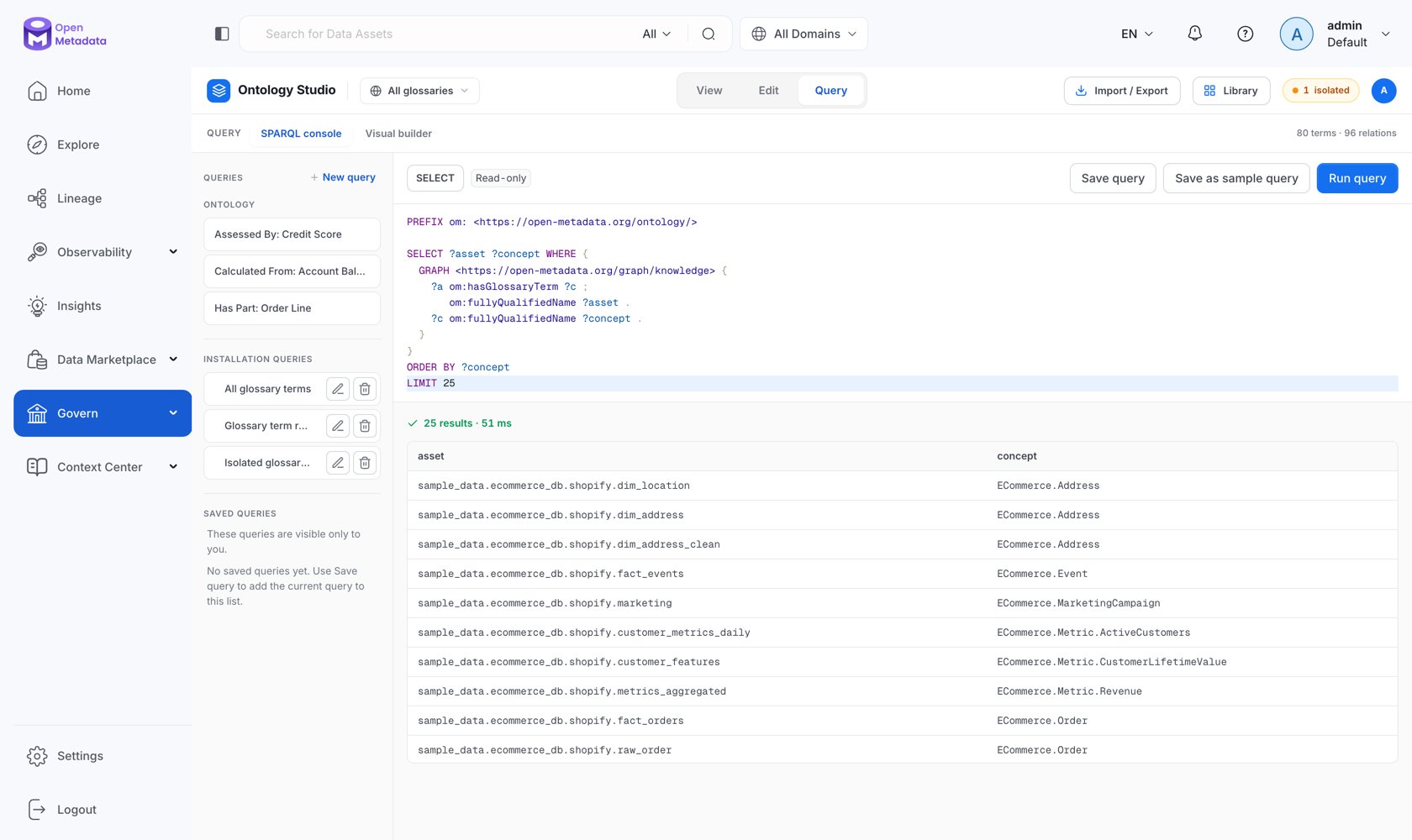
## The SPARQL Console
 ### The Query Rail
The left rail holds three groups:
* **Ontology** — context-aware starter queries generated from the model you have selected. **New query** starts from a blank scaffold:
```sparql theme={null}
PREFIX om:
SELECT ?conceptFqn WHERE {
?concept a om:GlossaryTerm ;
om:fullyQualifiedName ?conceptFqn .
}
LIMIT 100
```
* **Installation queries** — shared templates curated for the whole deployment. Everyone authenticated can read and run them; only admins can create, edit, or delete them (**Save as sample query**). OpenMetadata seeds three: *All glossary terms*, *Glossary term relationships*, and *Isolated glossary terms*.
* **Saved queries** — your private library. **Save query** stores the current editor contents against your user.
### Running and Reading Results
* **Read-only** — the console rejects `INSERT`, `DELETE`, `DROP`, `LOAD`, `CLEAR`, and `CREATE`. Writes go through the admin-only `POST /api/v1/rdf/sparql/update` endpoint, deliberately not exposed in the UI.
* **Format** — `SELECT`/`ASK` results as JSON (default), CSV, TSV, or XML; `CONSTRUCT`/`DESCRIBE` results as Turtle, JSON-LD, N-Triples, or RDF/XML.
* **Inference level** — `none`, `rdfs`, `owl`, or `custom`. See [Reasoning & Validation](/v2.1.x-SNAPSHOT/how-to-guides/ontology/knowledge-graph/reasoning).
### Limits
Every SPARQL read runs behind an admission guard with hard limits, so one expensive query cannot take the triple store down:
| Limit | Value |
| ------------------------- | -------------------- |
| Default result limit | 1,000 rows |
| Maximum result limit | 10,000 rows |
| Maximum query length | 100,000 characters |
| Maximum output | 10 MB |
| Query timeout | 30 seconds |
| Global concurrency | 8 concurrent queries |
| Per-principal concurrency | 2 concurrent queries |
Queries that exceed capacity or the timeout fail with an explicit error rather than degrading everyone else's latency.
## The Visual Builder
Not everyone writing governance questions wants to write SPARQL. The visual builder composes a query from chips — *"Find **Concepts** where **Used To Calculate** **Churn Rate**"* — and compiles it live.
### The Query Rail
The left rail holds three groups:
* **Ontology** — context-aware starter queries generated from the model you have selected. **New query** starts from a blank scaffold:
```sparql theme={null}
PREFIX om:
SELECT ?conceptFqn WHERE {
?concept a om:GlossaryTerm ;
om:fullyQualifiedName ?conceptFqn .
}
LIMIT 100
```
* **Installation queries** — shared templates curated for the whole deployment. Everyone authenticated can read and run them; only admins can create, edit, or delete them (**Save as sample query**). OpenMetadata seeds three: *All glossary terms*, *Glossary term relationships*, and *Isolated glossary terms*.
* **Saved queries** — your private library. **Save query** stores the current editor contents against your user.
### Running and Reading Results
* **Read-only** — the console rejects `INSERT`, `DELETE`, `DROP`, `LOAD`, `CLEAR`, and `CREATE`. Writes go through the admin-only `POST /api/v1/rdf/sparql/update` endpoint, deliberately not exposed in the UI.
* **Format** — `SELECT`/`ASK` results as JSON (default), CSV, TSV, or XML; `CONSTRUCT`/`DESCRIBE` results as Turtle, JSON-LD, N-Triples, or RDF/XML.
* **Inference level** — `none`, `rdfs`, `owl`, or `custom`. See [Reasoning & Validation](/v2.1.x-SNAPSHOT/how-to-guides/ontology/knowledge-graph/reasoning).
### Limits
Every SPARQL read runs behind an admission guard with hard limits, so one expensive query cannot take the triple store down:
| Limit | Value |
| ------------------------- | -------------------- |
| Default result limit | 1,000 rows |
| Maximum result limit | 10,000 rows |
| Maximum query length | 100,000 characters |
| Maximum output | 10 MB |
| Query timeout | 30 seconds |
| Global concurrency | 8 concurrent queries |
| Per-principal concurrency | 2 concurrent queries |
Queries that exceed capacity or the timeout fail with an explicit error rather than degrading everyone else's latency.
## The Visual Builder
Not everyone writing governance questions wants to write SPARQL. The visual builder composes a query from chips — *"Find **Concepts** where **Used To Calculate** **Churn Rate**"* — and compiles it live.
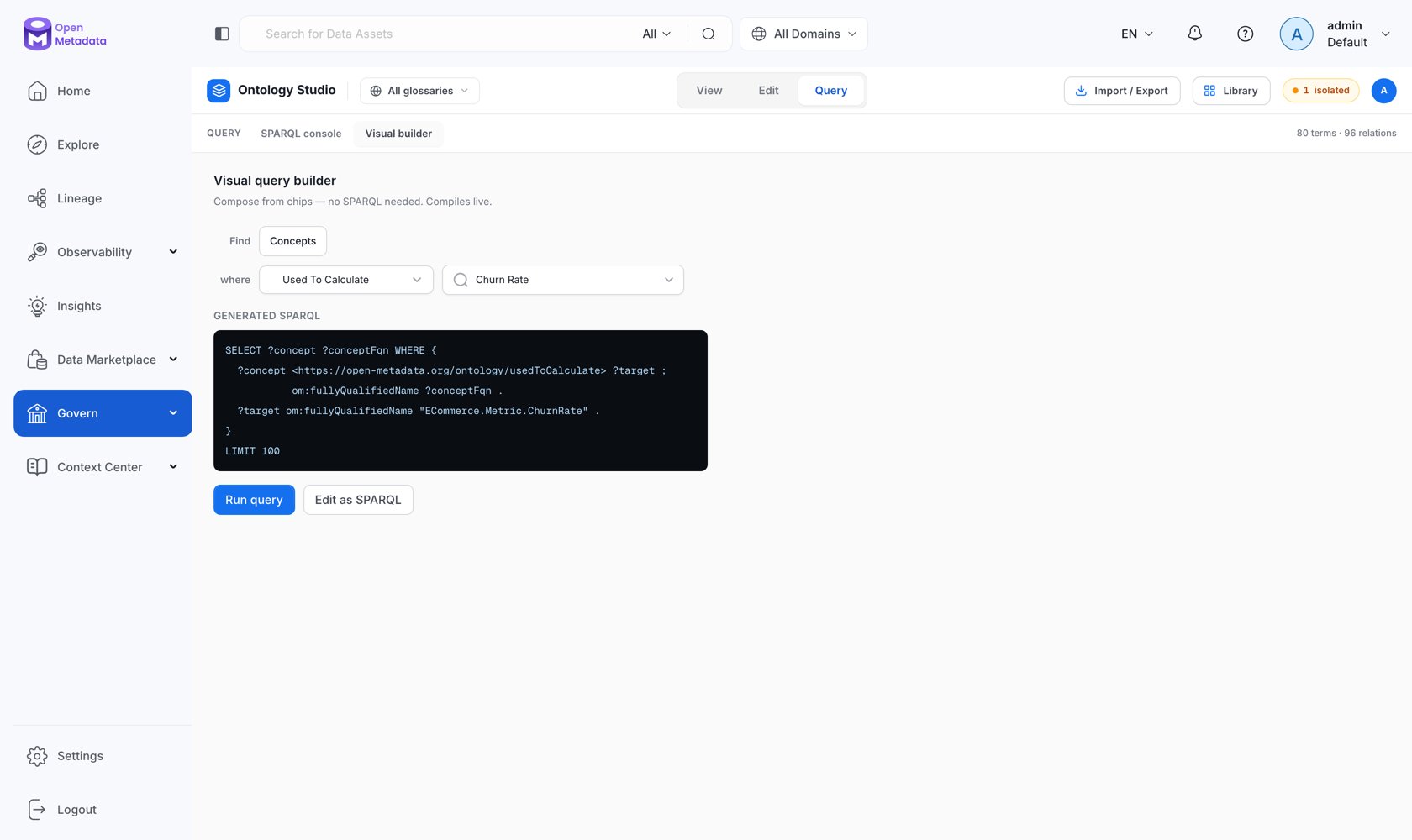 * **Find** — the starting set, drawn from the current model.
* **where** — a relationship type and a target concept: the edge to traverse and where it lands.
* **Generated SPARQL** — the compiled query, updated as you change the chips, with a live `N concepts match` count.
Two actions:
* **Run query** — execute it in place.
* **Edit as SPARQL** — hand the generated query to the console. This is the fastest way to *learn* SPARQL against your own model: build it visually, then read what it produced.
## The Standalone SPARQL Playground
The same console is also available on its own at `/governance/sparql`, without the studio chrome — useful when you are querying the whole catalog rather than working on a model. It is not in the left navigation; navigate to it directly.
It carries the same saved-query library, shared templates, format and inference selectors, and limits, and runs against the catalog-wide endpoint (admin only).
## Starter Queries
```sparql theme={null}
# Concepts with no relationships to any other concept
PREFIX om:
PREFIX rdf:
SELECT ?conceptFqn WHERE {
GRAPH {
?concept a om:GlossaryTerm ;
om:fullyQualifiedName ?conceptFqn .
FILTER NOT EXISTS { ?concept ?p ?t . ?t a om:GlossaryTerm . FILTER(?p != rdf:type) }
FILTER NOT EXISTS { ?s ?p2 ?concept . ?s a om:GlossaryTerm . FILTER(?p2 != rdf:type) }
}
}
ORDER BY ?conceptFqn
LIMIT 100
```
```sparql theme={null}
# Every typed relationship between concepts
PREFIX om:
PREFIX skos:
SELECT ?sourceFqn ?relationship ?targetFqn WHERE {
GRAPH {
?source a om:GlossaryTerm ;
om:fullyQualifiedName ?sourceFqn ;
?relationship ?target .
?target a om:GlossaryTerm ;
om:fullyQualifiedName ?targetFqn .
VALUES ?relationship {
om:relatedTo om:antonym om:partOf om:hasPart
om:calculatedFrom om:usedToCalculate
skos:broader skos:narrower skos:exactMatch
}
}
}
LIMIT 100
```
More recipes — PII propagation, lineage traversal, coverage gaps, contract checks — are in the [SPARQL cookbook](/v2.1.x-SNAPSHOT/how-to-guides/ontology/knowledge-graph/sparql#cookbook).
## Next
Named graphs, the vocabulary, and a full cookbook.
What each inference level actually does.
* **Find** — the starting set, drawn from the current model.
* **where** — a relationship type and a target concept: the edge to traverse and where it lands.
* **Generated SPARQL** — the compiled query, updated as you change the chips, with a live `N concepts match` count.
Two actions:
* **Run query** — execute it in place.
* **Edit as SPARQL** — hand the generated query to the console. This is the fastest way to *learn* SPARQL against your own model: build it visually, then read what it produced.
## The Standalone SPARQL Playground
The same console is also available on its own at `/governance/sparql`, without the studio chrome — useful when you are querying the whole catalog rather than working on a model. It is not in the left navigation; navigate to it directly.
It carries the same saved-query library, shared templates, format and inference selectors, and limits, and runs against the catalog-wide endpoint (admin only).
## Starter Queries
```sparql theme={null}
# Concepts with no relationships to any other concept
PREFIX om:
PREFIX rdf:
SELECT ?conceptFqn WHERE {
GRAPH {
?concept a om:GlossaryTerm ;
om:fullyQualifiedName ?conceptFqn .
FILTER NOT EXISTS { ?concept ?p ?t . ?t a om:GlossaryTerm . FILTER(?p != rdf:type) }
FILTER NOT EXISTS { ?s ?p2 ?concept . ?s a om:GlossaryTerm . FILTER(?p2 != rdf:type) }
}
}
ORDER BY ?conceptFqn
LIMIT 100
```
```sparql theme={null}
# Every typed relationship between concepts
PREFIX om:
PREFIX skos:
SELECT ?sourceFqn ?relationship ?targetFqn WHERE {
GRAPH {
?source a om:GlossaryTerm ;
om:fullyQualifiedName ?sourceFqn ;
?relationship ?target .
?target a om:GlossaryTerm ;
om:fullyQualifiedName ?targetFqn .
VALUES ?relationship {
om:relatedTo om:antonym om:partOf om:hasPart
om:calculatedFrom om:usedToCalculate
skos:broader skos:narrower skos:exactMatch
}
}
}
LIMIT 100
```
More recipes — PII propagation, lineage traversal, coverage gaps, contract checks — are in the [SPARQL cookbook](/v2.1.x-SNAPSHOT/how-to-guides/ontology/knowledge-graph/sparql#cookbook).
## Next
Named graphs, the vocabulary, and a full cookbook.
What each inference level actually does.