Getting Started with Data Quality as Code
This guide will help you install the OpenMetadata Python SDK and configure authentication to start running data quality tests programmatically.
Prerequisites
Before you begin, ensure you have:
- Python 3.10 or higher installed
- pip package manager
- Access to an OpenMetadata instance (version 1.11.0 or later)
- A JWT token for authentication (see Authentication below)
Installation
Install the openmetadata-ingestion package with the necessary extras for your use case:
Basic Installation
Installation with Database Connectors
Install additional dependencies based on the databases you'll be testing:
Installation with DataFrame Support
If you plan to use DataFrame validation features:
Installation with Multiple Features
Combine multiple extras as needed:
Authentication
Data Quality as Code requires authentication with your OpenMetadata instance. The SDK supports JWT token authentication.
Getting a JWT Token
You can obtain a JWT token in two ways:
Option 1: Using an Existing Bot Token
OpenMetadata provides pre-configured bots like the ingestion-bot:
- Log in to your OpenMetadata instance
- Navigate to Settings > Bots
- Find the ingestion-bot (or create a new bot)
- Copy the JWT token
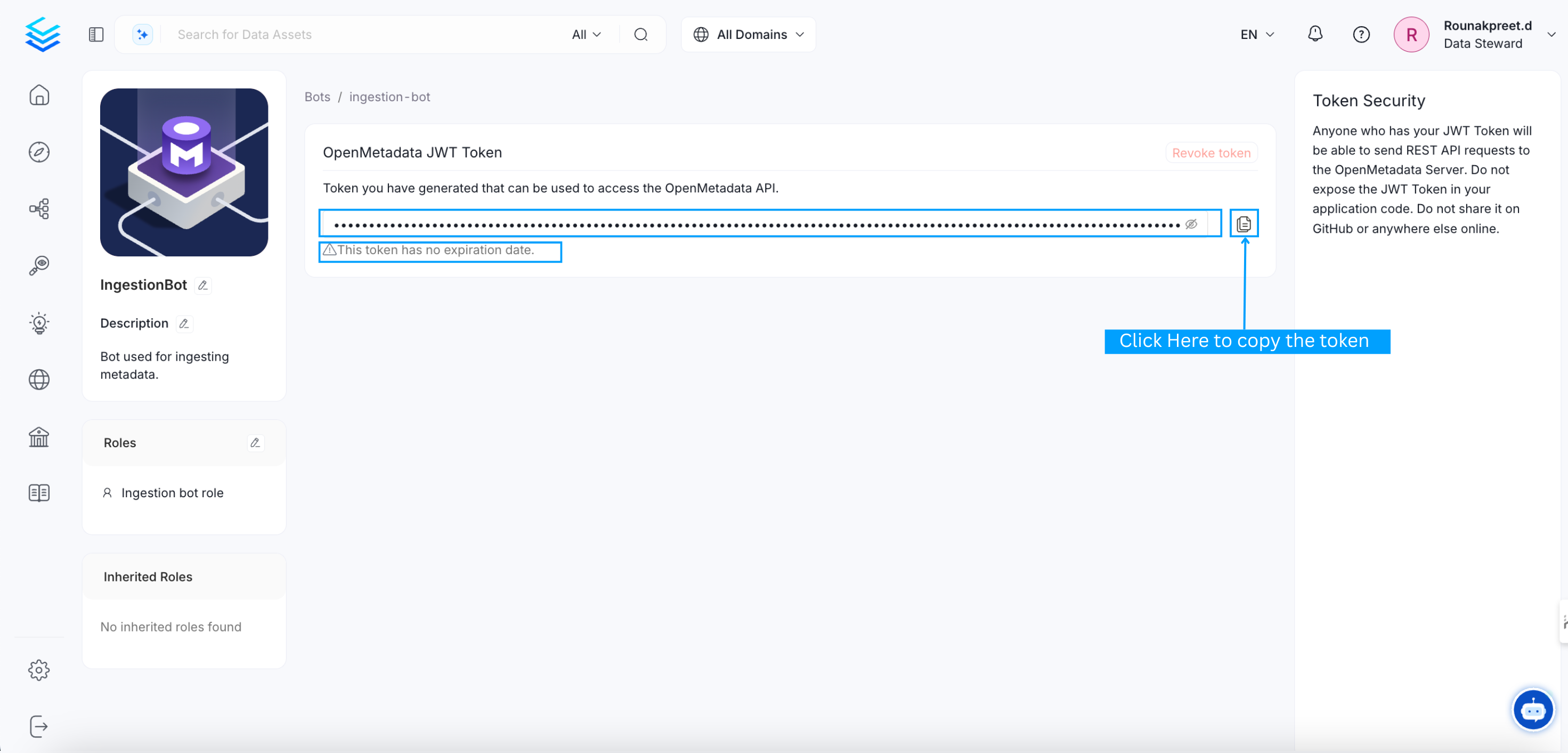
Obtain Bot JWT Token from OpenMetadata UI
Option 2: Creating a Custom Bot
For production use, create a dedicated bot with specific permissions:
- Go to Settings > Bots
- Click Add Bot
- Provide a name and description
- Assign appropriate roles (typically
DefaultBotPolicyandIngestion Bot Policy) - Copy the generated JWT token
Configuring the SDK
Once you have a JWT token, configure the SDK in your Python code:
Using Environment Variables
For better security, let configure pick them up from environment variables:
Set the environment variable before running your script:
Configuration Parameters
The configure() function accepts the following parameters:
| Parameter | Type | Required | Description | Environment Variable |
|---|---|---|---|---|
host | str | No | OpenMetadata API URL (e.g., http://localhost:8585/api) | OPENMETADATA_HOST |
jwt_token | str | No | JWT authentication token | OPENMETADATA_JWT_TOKEN |
Verify Installation
Create a simple test to verify your setup:
Replace "your_service.database.schema.table" with the fully qualified name of an actual table in your OpenMetadata instance.
Your First Data Quality Test
Now that you're set up, let's run your first data quality test:
Common Installation Issues
Connection Timeout
If you experience connection timeouts, verify:
- OpenMetadata instance is running and accessible
- API URL is correct (should end with
/api) - Network connectivity between your script and OpenMetadata
- Firewall rules allow the connection
Import Errors
If you encounter import errors:
Verify the package is installed correctly:
If not listed, reinstall:
Next Steps
Now that you have the SDK installed and configured:
- Learn how to run table-level tests using the TestRunner API
- Explore DataFrame validation for ETL pipelines
- Review the complete test definitions reference