Documentation Index
Fetch the complete documentation index at: https://docs.open-metadata.org/llms.txt
Use this file to discover all available pages before exploring further.
Ldap Authentication for Bare Metal
Authentication Configuration
The following configuration controls the auth mechanism for OpenMetadata. Update the mentioned fields as required.
authenticationConfiguration:
  provider: ${AUTHENTICATION_PROVIDER:-ldap}
  publicKeyUrls: ${AUTHENTICATION_PUBLIC_KEYS:-[{your domain}/api/v1/system/config/jwks]} # Update with your Domain and Make sure this "/api/v1/system/config/jwks" is always configured to enable JWT tokens
  authority: ${AUTHENTICATION_AUTHORITY:-https://accounts.google.com}
  enableSelfSignup : ${AUTHENTICATION_ENABLE_SELF_SIGNUP:-false}
  ldapConfiguration:
    host: ${AUTHENTICATION_LDAP_HOST:-localhost}
    port: ${AUTHENTICATION_LDAP_PORT:-10636}
    dnAdminPrincipal: ${AUTHENTICATION_LOOKUP_ADMIN_DN:-"cn=admin,dc=example,dc=com"}
    dnAdminPassword: ${AUTHENTICATION_LOOKUP_ADMIN_PWD:-"secret"}
    userBaseDN: ${AUTHENTICATION_USER_LOOKUP_BASEDN:-"ou=people,dc=example,dc=com"}
    mailAttributeName: ${AUTHENTICATION_USER_MAIL_ATTR:-email}
    # Optional
    maxPoolSize: ${AUTHENTICATION_LDAP_POOL_SIZE:-3}
    sslEnabled: ${AUTHENTICATION_LDAP_SSL_ENABLED:-true}
    truststoreConfigType: ${AUTHENTICATION_LDAP_TRUSTSTORE_TYPE:-TrustAll} # {CustomTrustStore, HostName, JVMDefault, TrustAll}
    trustStoreConfig:
      customTrustManagerConfig:
        trustStoreFilePath: ${AUTHENTICATION_LDAP_TRUSTSTORE_PATH:-}
        trustStoreFilePassword: ${AUTHENTICATION_LDAP_KEYSTORE_PASSWORD:-}
        trustStoreFileFormat: ${AUTHENTICATION_LDAP_SSL_KEY_FORMAT:-}
        verifyHostname: ${AUTHENTICATION_LDAP_SSL_VERIFY_CERT_HOST:-}
        examineValidityDates: ${AUTHENTICATION_LDAP_EXAMINE_VALIDITY_DATES:-}
      hostNameConfig:
        allowWildCards: ${AUTHENTICATION_LDAP_ALLOW_WILDCARDS:-}
        acceptableHostNames: ${AUTHENTICATION_LDAP_ALLOWED_HOSTNAMES:-[]}
      jvmDefaultConfig:
        verifyHostname: ${AUTHENTICATION_LDAP_SSL_VERIFY_CERT_HOST:-}
      trustAllConfig:
        examineValidityDates: ${AUTHENTICATION_LDAP_EXAMINE_VALIDITY_DATES:-true}
provider: ldappublicKeyUrls: {http|https}://{your_domain}:{port}/api/v1/system/config/jwksauthority: {your_domain}enableSelfSignup: This has to be false for Ldap.
Mandatory LDAP Specific Configuration:
host: hostName for the Ldap Server (Ex - localhost).port: port of the Ldap Server to connect to (Ex - 10636).dnAdminPrincipal: This is the DN Admin Principal(Complete path Example :- cn=admin,dc=example,dc=com ) with a lookup access in the Directory.dnAdminPassword: Above Admin Principal Password.userBaseDN: User Base DN(Complete path Example :- ou=people,dc=example,dc=com).
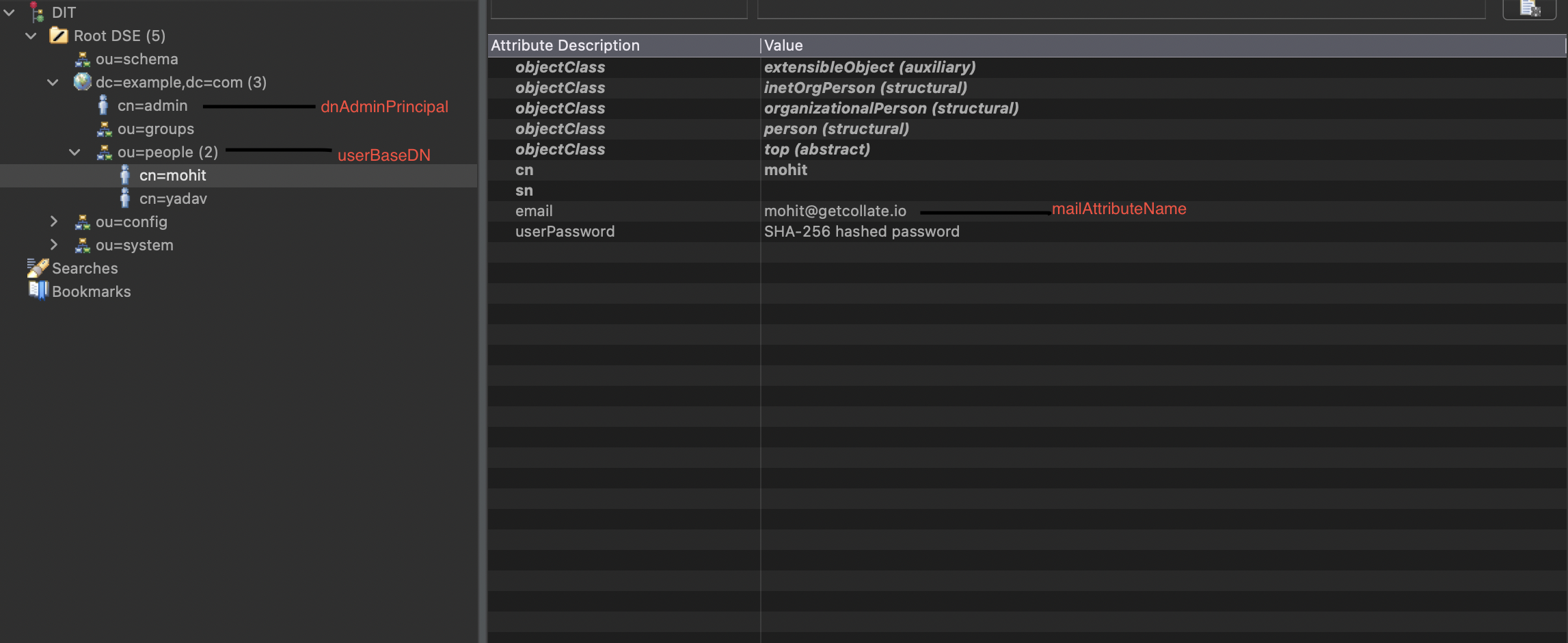 Advanced LDAP Specific Configuration (Optional):
maxPoolSize: Connection Pool Size to use to connect to LDAP Server.sslEnabled: Set to true if the SSL is enable to connect to LDAP Server.truststoreConfigType: Truststore type. It is required. Can select from CustomTrustStore, HostName, JVMDefault, TrustAlltrustStoreConfig: Config for the selected truststore type. Please check below note for setting this up.
Based on the different truststoreConfigType, we have following different trustStoreConfig.
  truststoreConfigType: ${AUTHENTICATION_LDAP_TRUSTSTORE_TYPE:-TrustAll}
  trustStoreConfig:
    trustAllConfig:
      examineValidityDates: ${AUTHENTICATION_LDAP_EXAMINE_VALIDITY_DATES:-true}
examineValidityDates: Indicates whether to reject certificates if the current time is outside the validity window for the certificate.
2. JVMDefault
Provides an implementation of a trust manager that relies on the JVM’s default set of trusted issuers.
  truststoreConfigType: ${AUTHENTICATION_LDAP_TRUSTSTORE_TYPE:-JVMDefault}
  trustStoreConfig:
    jvmDefaultConfig:
      verifyHostname: ${AUTHENTICATION_LDAP_SSL_VERIFY_CERT_HOST:-true}
verifyHostname: Controls using TrustAllSSLSocketVerifier vs HostNameSSLSocketVerifier. In case the certificate contains cn=hostname of the Ldap Server set it to true.
3. HostName
Provides an SSL trust manager that will only accept certificates whose hostname matches an expected value.
  truststoreConfigType: ${AUTHENTICATION_LDAP_TRUSTSTORE_TYPE:-HostName}
  trustStoreConfig:
    hostNameConfig:
      allowWildCards: ${AUTHENTICATION_LDAP_ALLOW_WILDCARDS:-false}
      acceptableHostNames: ${AUTHENTICATION_LDAP_ALLOWED_HOSTNAMES:-[localhost]}
allowWildCards: Indicates whether to allow wildcard certificates which contain an asterisk as the first component of a CN subject attribute or dNSName subjectAltName extension.acceptableHostNames: The set of hostnames and/or IP addresses that will be considered acceptable. Only certificates with a CN or subjectAltName value that exactly matches one of these names (ignoring differences in capitalization) will be considered acceptable. It must not be null or empty.
4. CustomTrustStore
Use the custom Truststore by providing the below details in the config.
  truststoreConfigType: ${AUTHENTICATION_LDAP_TRUSTSTORE_TYPE:-CustomTrustStore}
  trustStoreConfig:
    customTrustManagerConfig:
      trustStoreFilePath: ${AUTHENTICATION_LDAP_TRUSTSTORE_PATH:-/Users/parthpanchal/trusted.ks}
      trustStoreFilePassword: ${AUTHENTICATION_LDAP_KEYSTORE_PASSWORD:-secret}
      trustStoreFileFormat: ${AUTHENTICATION_LDAP_SSL_KEY_FORMAT:-JKS}
      verifyHostname: ${AUTHENTICATION_LDAP_SSL_VERIFY_CERT_HOST:-true}
      examineValidityDates: ${AUTHENTICATION_LDAP_EXAMINE_VALIDITY_DATES:-true}
trustStoreFilePath: The path to the trust store file to use. It must not be null.trustStoreFilePassword: The PIN to use to access the contents of the trust store. It may be null if no PIN is required.trustStoreFileFormat: The format to use for the trust store. (Example :- JKS, PKCS12).verifyHostname: Controls using TrustAllSSLSocketVerifier vs HostNameSSLSocketVerifier. In case the certificate contains cn=hostname of the Ldap Server set it to true.examineValidityDates: Indicates whether to reject certificates if the current time is outside the validity window for the certificate.
Authorizer Configuration
This configuration controls the authorizer for OpenMetadata:
authorizerConfiguration:
  adminPrincipals: ${AUTHORIZER_ADMIN_PRINCIPALS:-[admin]}
  principalDomain: ${AUTHORIZER_PRINCIPAL_DOMAIN:-"open-metadata.org"}
adminPrincipals: This is the list of admin Principal for the OpenMetadata , if mail in ldap is example@open-metadata.org, then if we want this user to be admin in the OM, we should add ‘example’, in this list.principalDomain: Company Domain.
Once your server security is set, it’s time to review the ingestion configuration. Our bots support JWT tokens
to authenticate to the server when sending requests.
Find more information on Enabling JWT Tokens and JWT Troubleshooting to ensure seamless authentication.