
Using Airflow Connections

In any connector page, you might have seen an example on how to build a DAG to run the ingestion with Airflow (e.g., Athena). A possible approach to retrieving sensitive information from Airflow would be using Airflow’s Connections. Note that these connections can be stored as environment variables, to Airflow’s underlying DB or to multiple external services such as Hashicorp Vault. Note that for external systems, you’ll need to provide the necessary package and configure the Secrets Backend. The best way to choose how to store these credentials is to go through Airflow’s docs.

Example

Let’s go over an example on how to create a connection to extract data from MySQL and how a DAG would look like afterwards.

Step 1 - Create the Connection

From our Airflow host, (e.g., docker exec -it openmetadata_ingestion bash if testing in Docker), you can run:
airflow connections add 'my_mysql_db' \
    --conn-uri 'mysql+pymysql://openmetadata_user:openmetadata_password@mysql:3306/openmetadata_db'
You will see an output like
Successfully added `conn_id`=my_mysql_db : mysql+pymysql://openmetadata_user:openmetadata_password@mysql:3306/openmetadata_db
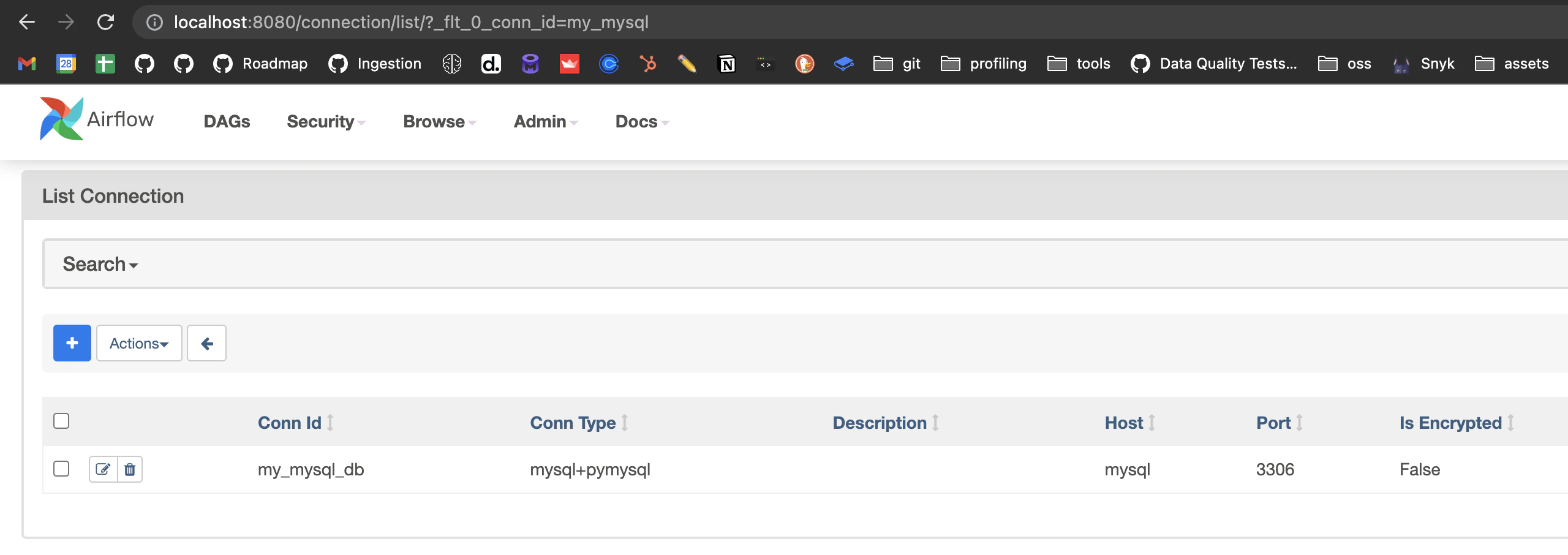
Checking the credentials from the Airflow UI, we will see: Airflow Connection

Step 2 - Understanding the shape of a Connection

In the same host, we can open a Python shell to explore the Connection object with some more details. To do so, we first need to pick up the connection from Airflow. We will use the BaseHook for that as the connection is not stored in any external system.
from airflow.hooks.base import BaseHook

# Retrieve the connection
connection = BaseHook.get_connection("my_mysql_db")

# Access the connection details
connection.host  # 'mysql'
connection.port  # 3306
connection.login  # 'openmetadata_user'
connection.password  # 'openmetadata_password'
Based on this information, we now know how to prepare the DAG!

Step 3 - Write the DAG

A full example on how to write a DAG to ingest data from our Connection can look like this:
import pathlib
import yaml
from datetime import timedelta
from airflow import DAG
from airflow.utils.dates import days_ago

try:
    from airflow.operators.python import PythonOperator
except ModuleNotFoundError:
    from airflow.operators.python_operator import PythonOperator

from metadata.config.common import load_config_file
from metadata.workflow.metadata import MetadataWorkflow


# Import the hook
from airflow.hooks.base import BaseHook

# Retrieve the connection
connection = BaseHook.get_connection("my_mysql_db")

# Use the connection details when setting the YAML
# Note how we escaped the braces as {{}} to not be parsed by the f-string
config = f"""
source:
  type: mysql
  serviceName: mysql_from_connection
  serviceConnection:
    config:
      type: Mysql
      username: {connection.login}
      password: {connection.password}
      hostPort: {connection.host}:{connection.port}
      # databaseSchema: schema
  sourceConfig:
    config:
      markDeletedTables: true
      includeTables: true
      includeViews: true
sink:
  type: metadata-rest
  config: {{}}
workflowConfig:
  openMetadataServerConfig:
    hostPort: "<OpenMetadata host and port>"
    authProvider: "<OpenMetadata auth provider>"
"""

def metadata_ingestion_workflow():
    workflow_config = yaml.safe_load(config)
    workflow = MetadataWorkflow.create(workflow_config)
    workflow.execute()
    workflow.raise_from_status()
    workflow.print_status()
    workflow.stop()

with DAG(
    "mysql_connection_ingestion",
    description="An example DAG which runs a OpenMetadata ingestion workflow",
    start_date=days_ago(1),
    is_paused_upon_creation=False,
    schedule_interval='*/5 * * * *',
    catchup=False,
) as dag:
    ingest_task = PythonOperator(
        task_id="ingest_using_recipe",
        python_callable=metadata_ingestion_workflow,
    )

Option B - Reuse an existing Service

As explained in the Managing Credentials guide, once a service exists in OpenMetadata its connection details are stored and can be reused — just omit the serviceConnection YAML entries in your DAG:
import pathlib
import yaml
from datetime import timedelta
from airflow import DAG
from airflow.utils.dates import days_ago

try:
    from airflow.operators.python import PythonOperator
except ModuleNotFoundError:
    from airflow.operators.python_operator import PythonOperator

from metadata.config.common import load_config_file
from metadata.workflow.metadata import MetadataWorkflow


config = """
source:
  type: mysql
  serviceName: existing_mysql_service
  sourceConfig:
    config:
      markDeletedTables: true
      includeTables: true
      includeViews: true
sink:
  type: metadata-rest
  config: {}
workflowConfig:
  openMetadataServerConfig:
    hostPort: "<OpenMetadata host and port>"
    authProvider: "<OpenMetadata auth provider>"
"""

def metadata_ingestion_workflow():
    workflow_config = yaml.safe_load(config)
    workflow = MetadataWorkflow.create(workflow_config)
    workflow.execute()
    workflow.raise_from_status()
    workflow.print_status()
    workflow.stop()

with DAG(
    "mysql_connection_ingestion",
    description="An example DAG which runs a OpenMetadata ingestion workflow",
    start_date=days_ago(1),
    is_paused_upon_creation=False,
    schedule_interval='*/5 * * * *',
    catchup=False,
) as dag:
    ingest_task = PythonOperator(
        task_id="ingest_using_recipe",
        python_callable=metadata_ingestion_workflow,
    )