
Query Mode
Query mode is where the model earns its keep. A graph canvas shows you shape; a query answers a question. Two surfaces: the SPARQL console and the Visual builder.Two Scopes, One Console
Which endpoint your query runs against depends on the glossary selector in the studio header — and this determines who is allowed to run it.
Non-admin users who leave the selector on All glossaries are prompted to pick one.
Why glossary-scoped SPARQL is different. It executes against the database-primary glossary model, not the triple store. It cannot reach other metadata assets, external datasets, or
SERVICE endpoints — and it stays available even when RDF storage is off. That makes it the safe surface to open up to modelers; catalog-wide SPARQL stays admin-only because it reads across every entity without re-applying per-entity view authorization.The SPARQL Console
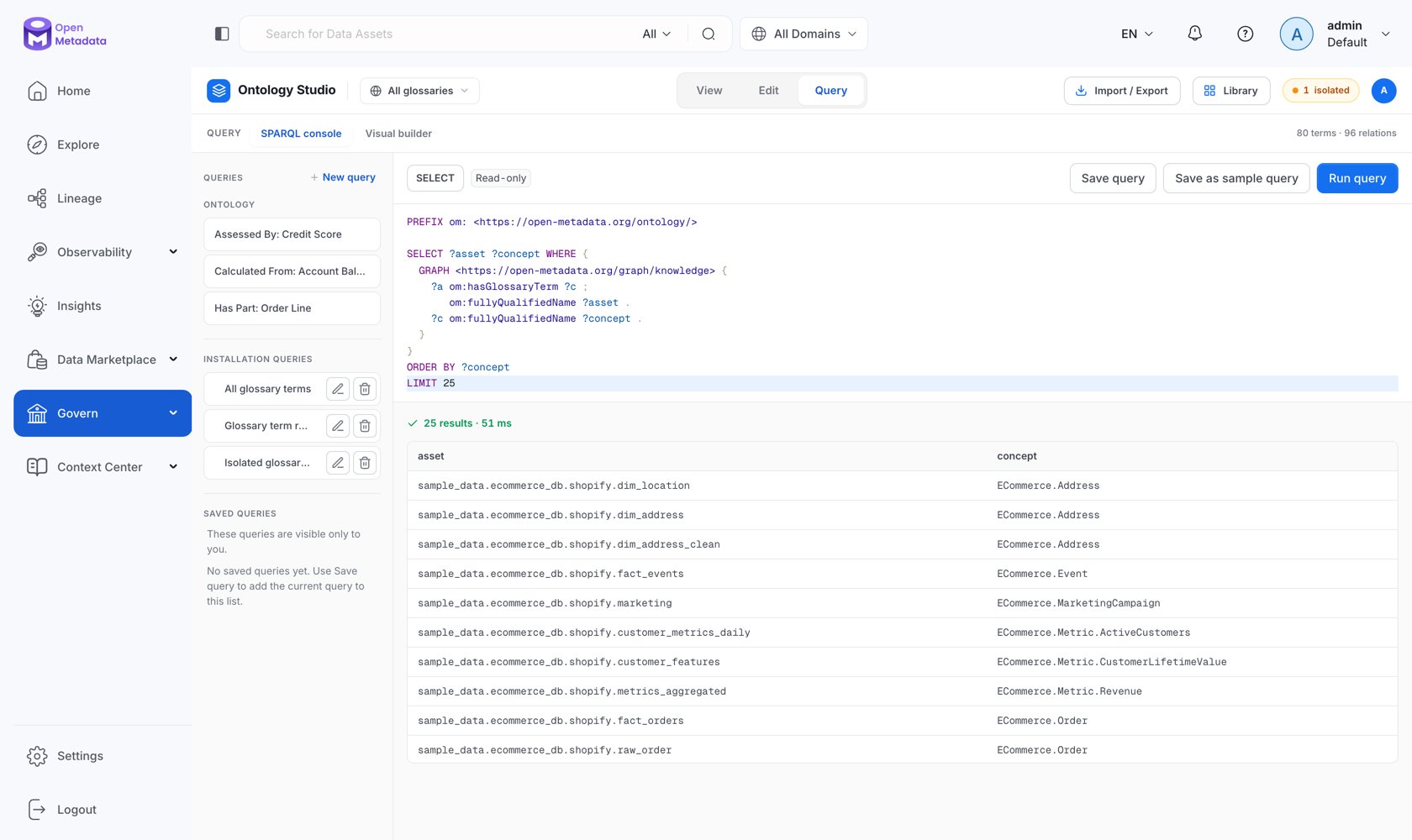
The Query Rail
The left rail holds three groups:-
Ontology — context-aware starter queries generated from the model you have selected. New query starts from a blank scaffold:
- Installation queries — shared templates curated for the whole deployment. Everyone authenticated can read and run them; only admins can create, edit, or delete them (Save as sample query). OpenMetadata seeds three: All glossary terms, Glossary term relationships, and Isolated glossary terms.
- Saved queries — your private library. Save query stores the current editor contents against your user.
Running and Reading Results
- Read-only — the console rejects
INSERT,DELETE,DROP,LOAD,CLEAR, andCREATE. Writes go through the admin-onlyPOST /api/v1/rdf/sparql/updateendpoint, deliberately not exposed in the UI. - Format —
SELECT/ASKresults as JSON (default), CSV, TSV, or XML;CONSTRUCT/DESCRIBEresults as Turtle, JSON-LD, N-Triples, or RDF/XML. - Inference level —
none,rdfs,owl, orcustom. See Reasoning & Validation.
Limits
Every SPARQL read runs behind an admission guard with hard limits, so one expensive query cannot take the triple store down:
Queries that exceed capacity or the timeout fail with an explicit error rather than degrading everyone else’s latency.
The Visual Builder
Not everyone writing governance questions wants to write SPARQL. The visual builder composes a query from chips — “Find Concepts where Used To Calculate Churn Rate” — and compiles it live.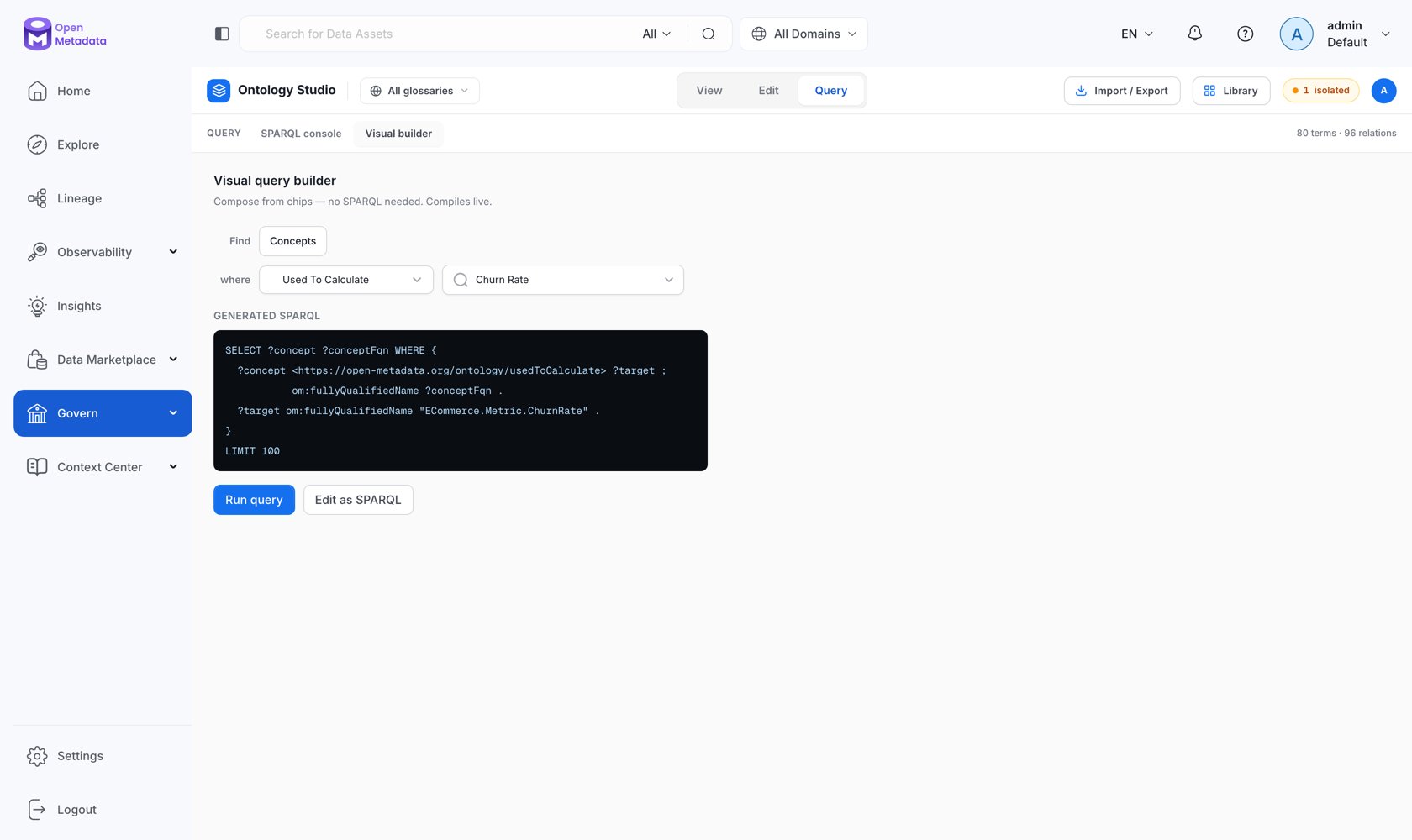
- Find — the starting set, drawn from the current model.
- where — a relationship type and a target concept: the edge to traverse and where it lands.
- Generated SPARQL — the compiled query, updated as you change the chips, with a live
N concepts matchcount.
- Run query — execute it in place.
- Edit as SPARQL — hand the generated query to the console. This is the fastest way to learn SPARQL against your own model: build it visually, then read what it produced.
The Standalone SPARQL Playground
The same console is also available on its own at/governance/sparql, without the studio chrome — useful when you are querying the whole catalog rather than working on a model. It is not in the left navigation; navigate to it directly.
It carries the same saved-query library, shared templates, format and inference selectors, and limits, and runs against the catalog-wide endpoint (admin only).
Starter Queries
Next
Querying with SPARQL
Named graphs, the vocabulary, and a full cookbook.
Reasoning & Validation
What each inference level actually does.