
Ingest Lineage from dbt
Ingest the lineage information from dbtmanifest.json file into OpenMetadata.
OpenMetadata extracts the lineage information from the depends_on and compiled_query/compiled_code keys from the manifest file.
To capture lineage, the
compiled_code field must be present in the manifest.json file.- If
compiled_codeis missing, lineage will not be captured for that node. - To ensure
compiled_codeis populated in your dbt manifest, run the following commands in your dbt project:dbt compiledbt docs generate
1. Lineage information from dbt “depends_on” key
Openmetadata fetches the lineage information from themanifest.json file. Below is a sample manifest.json file node containing lineage information under node_name->depends_on->nodes.
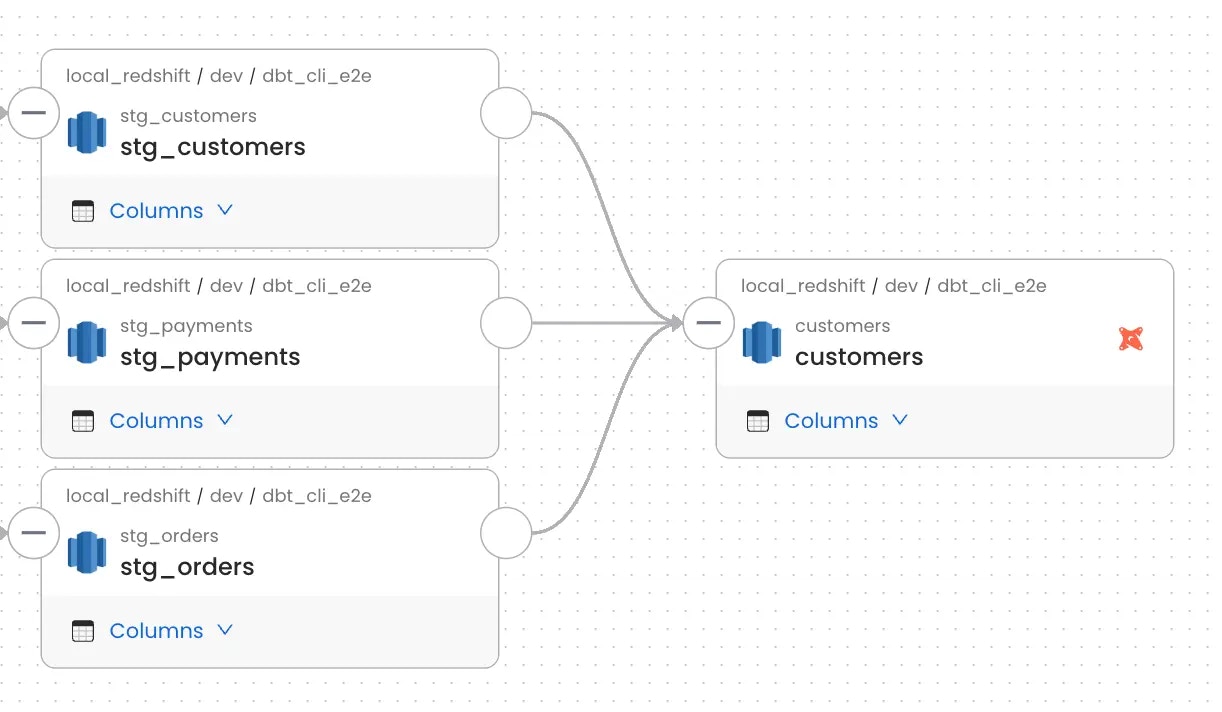
2. Lineage information from dbt queries
Openmetadata fetches the dbt query information from themanifest.json file.
Below is a sample manifest.json file node containing dbt query information under node_name->compiled_code or node_name->compiled_sql.
dbt Sources with a Different Table Identifier
In dbt, a source has a logicalname, which you use in source() calls, and an optional identifier, which is the name of the physical table in the warehouse. When a source sets an identifier, OpenMetadata uses it to find the table, so the source and the lineage that depends on it link to the right table. If the source has no identifier, OpenMetadata uses the source name.
- Literal match: OpenMetadata matches the identifier as written. A
*or?in the identifier is treated as part of the table name, not as a search pattern, so the source does not attach to another table by accident. - Models: Models keep using their alias or name, as before.
raw_customers_v2.
Map dbt Catalog Names to OpenMetadata Databases
OpenMetadata matches each model inmanifest.json to a table using the database name that dbt writes into the manifest. That name can differ from the name the connector ingested the table under. For example, dbt-trino writes the Trino catalog name (bq_catalog) for tables that the BigQuery connector ingests under the GCP project ID (my-gcp-project). Without a match, OpenMetadata can’t link the dbt model to the table.
Use Catalog Mapping in the dbt ingestion configuration to resolve this. Add one entry per catalog:
- Key: the database name in the dbt manifest, for example
bq_catalog. Keys are matched ignoring case. - Value: the database name in OpenMetadata, for example
my-gcp-project.
catalogMapping under sourceConfig.config:
meta.openmetadata block. If no table is found, OpenMetadata logs a warning.