When you create and manage ingestion workflows from OpenMetadata, under the hood we need to communicate
with an orchestration system. It does not matter which one, but we need it to have a set of APIs to create,
run, fetch the logs, etc. of our workflows.OpenMetadata supports two orchestration backends:
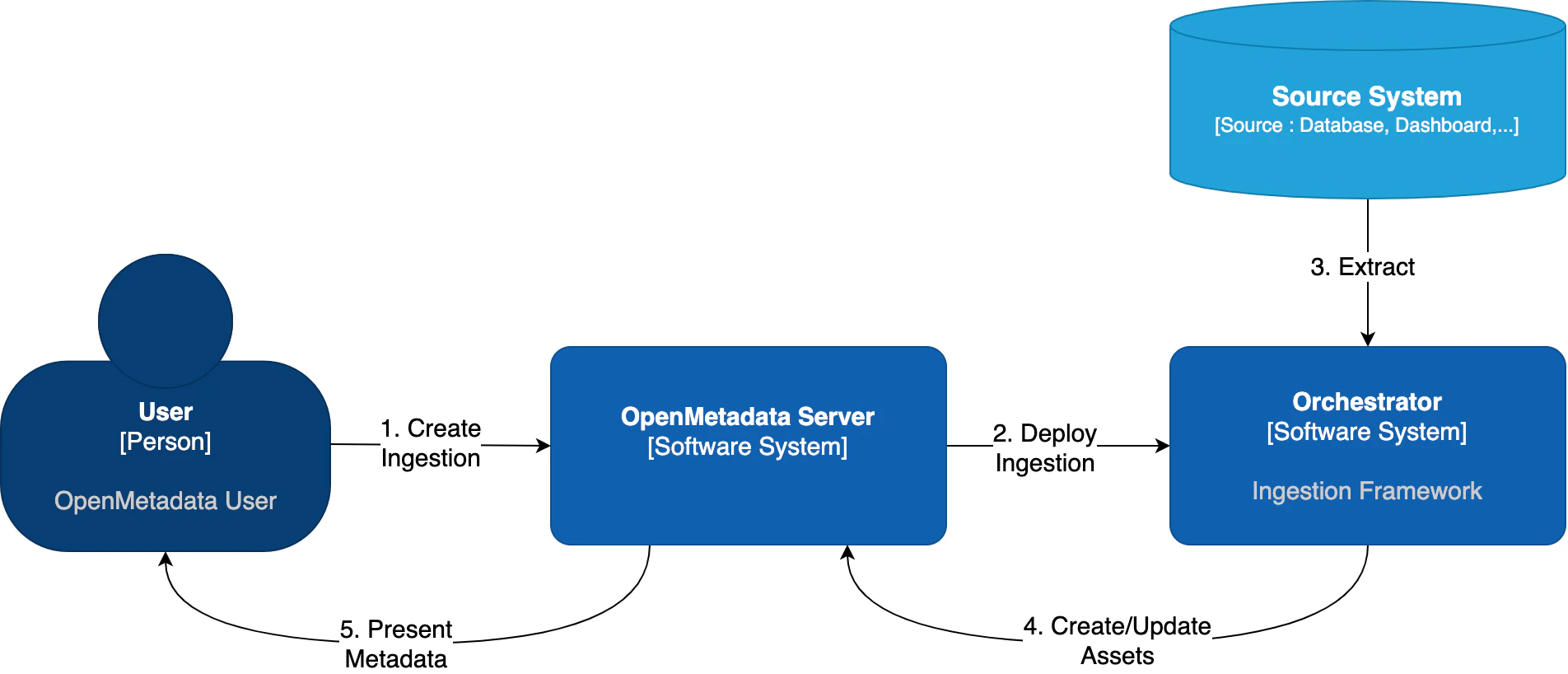
Orchestrator
Description
Apache Airflow
The traditional approach - uses Airflow DAGs to manage pipelines
Kubernetes Native
New in 1.12 - Uses native K8s Jobs and CronJobs without requiring Airflow
Out of the box, OpenMetadata comes with integration for Airflow. In this guide, we will show you how to manage
ingestions from OpenMetadata by linking it to an Airflow service.
Advanced note for developers: We have an interface
that can be extended to bring support to any other orchestrator. You can follow the implementation we have for Airflow
or Kubernetes as starting points.
If you do not have an Airflow service up and running on your platform, we provide a custom
Docker image, which already contains the OpenMetadata ingestion
packages and custom Airflow APIs to
deploy Workflows from the UI as well. This is the simplest approach.
If you already have Airflow up and running and want to use it for the metadata ingestion, you will
need to install the ingestion modules to the host. You can find more information on how to do this
in the Custom Airflow Installation section.
If you are using our openmetadata/ingestion Docker image, there is just one thing to do: Configure the OpenMetadata server.The OpenMetadata server takes all its configurations from a YAML file. You can find them in our repo. In
openmetadata.yaml, update the pipelineServiceClientConfiguration section accordingly.
# For Bare Metal Installations[...]pipelineServiceClientConfiguration: className: ${PIPELINE_SERVICE_CLIENT_CLASS_NAME:-"org.openmetadata.service.clients.pipeline.airflow.AirflowRESTClient"} apiEndpoint: ${PIPELINE_SERVICE_CLIENT_ENDPOINT:-http://localhost:8080} metadataApiEndpoint: ${SERVER_HOST_API_URL:-http://localhost:8585/api} hostIp: ${PIPELINE_SERVICE_CLIENT_HOST_IP:-""} verifySSL: ${PIPELINE_SERVICE_CLIENT_VERIFY_SSL:-"no-ssl"} # Possible values are "no-ssl", "ignore", "validate" sslConfig: certificatePath: ${PIPELINE_SERVICE_CLIENT_SSL_CERT_PATH:-""} # Local path for the Pipeline Service Client # Default required parameters for Airflow as Pipeline Service Client parameters: username: ${AIRFLOW_USERNAME:-admin} password: ${AIRFLOW_PASSWORD:-admin} timeout: ${AIRFLOW_TIMEOUT:-10}[...]
If using Docker, make sure that you are passing the correct environment variables:
Note that the openmetadata-ingestion only supports Python versions 3.9, 3,10, and 3.11.
The supported Airflow versions for OpenMetadata include 2.3, 2.4, 2.5, 2.6, and 2.7. Starting from release 1.6, OpenMetadata supports compatibility with Airflow versions up to 2.10.5. Specifically, OpenMetadata 1.5 supports Airflow 2.9, 1.6.4 supports Airflow 2.9.3, and 1.6.5 supports Airflow 2.10.5. Ensure that your Airflow version aligns with your OpenMetadata deployment for optimal performance.
You will need to follow three steps:
Install the openmetadata-ingestion package with the connector plugins that you need.
Install the openmetadata-managed-apis to deploy our custom APIs on top of Airflow.
The current approach we are following here is preparing the metadata ingestion DAGs as PythonOperators. This means that
the packages need to be present in the Airflow instances.You will need to install:
And then run the DAG as explained in each Connector, where x.y.z is the same version of your
OpenMetadata server. For example, if you are on version 1.0.0, then you can install the openmetadata-ingestion
with versions 1.0.0.*, e.g., 1.0.0.0, 1.0.0.1, etc., but not 1.0.1.x.
You can also install openmetadata-ingestion[all]==x.y.z, which will bring the requirements to run any connector.
You can check the Connector Modules guide above to learn how to install the openmetadata-ingestion package with the
necessary plugins. They are necessary because even if we install the APIs, the Airflow instance needs to have the
required libraries to connect to each source.
The openmetadata-ingestion-apis has a dependency on apache-airflow>=2.2.2. Please make sure that
your host satisfies such requirement. Only installing the openmetadata-ingestion-apis won’t result
in a proper full Airflow installation. For that, please follow the Airflow docs.
The goal of this module is to add some HTTP endpoints that the UI calls for deploying the Airflow DAGs.
The first step can be achieved by running:
pip3 install "openmetadata-managed-apis==x.y.z"
Here, the same versioning logic applies: x.y.z is the same version of your
OpenMetadata server. For example, if you are on version 1.0.0, then you can install the openmetadata-managed-apis
with versions 1.0.0.*, e.g., 1.0.0.0, 1.0.0.1, etc., but not 1.0.1.x.
The ingestion image is built on Airflow’s base image, ensuring it includes all necessary requirements to run Airflow. For Kubernetes deployments, the setup uses community Airflow charts with a modified base image, enabling it to function seamlessly as a scheduler, webserver, and worker.
The APIs will look for the AIRFLOW_HOME environment variable to place the dynamically generated DAGs. Make
sure that the variable is set and reachable from Airflow.
Note that the integration of OpenMetadata with Airflow requires Basic Auth in the APIs. Make sure that your
Airflow configuration supports that. You can read more about it here.A possible approach here is to update your airflow.cfg entries with:
Every time a DAG is created from OpenMetadata, it will also create a JSON file with some information about the
workflow that needs to be executed. By default, these files live under ${AIRFLOW_HOME}/dag_generated_configs, which
in most environments translates to /opt/airflow/dag_generated_configs.You can change this directory by specifying the environment variable AIRFLOW__OPENMETADATA_AIRFLOW_APIS__DAG_GENERATED_CONFIGS
or updating the airflow.cfg with:
After installing the Airflow APIs, you will need to update your OpenMetadata Server.The OpenMetadata server takes all its configurations from a YAML file. You can find them in our repo. In
openmetadata.yaml, update the pipelineServiceClientConfiguration section accordingly.
# For Bare Metal Installations[...]pipelineServiceClientConfiguration: className: ${PIPELINE_SERVICE_CLIENT_CLASS_NAME:-"org.openmetadata.service.clients.pipeline.airflow.AirflowRESTClient"} apiEndpoint: ${PIPELINE_SERVICE_CLIENT_ENDPOINT:-http://localhost:8080} metadataApiEndpoint: ${SERVER_HOST_API_URL:-http://localhost:8585/api} hostIp: ${PIPELINE_SERVICE_CLIENT_HOST_IP:-""} verifySSL: ${PIPELINE_SERVICE_CLIENT_VERIFY_SSL:-"no-ssl"} # Possible values are "no-ssl", "ignore", "validate" sslConfig: certificatePath: ${PIPELINE_SERVICE_CLIENT_SSL_CERT_PATH:-""} # Local path for the Pipeline Service Client # Default required parameters for Airflow as Pipeline Service Client parameters: username: ${AIRFLOW_USERNAME:-admin} password: ${AIRFLOW_PASSWORD:-admin} timeout: ${AIRFLOW_TIMEOUT:-10}[...]
If using Docker, make sure that you are passing the correct environment variables:
What we need to verify here is that the OpenMetadata server can reach the Airflow APIs endpoints
(wherever they live: bare metal, containers, k8s pods…). One way to ensure that is to connect to the deployment
hosting your OpenMetadata server and running a query against the /health endpoint. For example:
It is important to do this validation passing the command as is (i.e., curl -XGET ${PIPELINE_SERVICE_CLIENT_ENDPOINT}/api/v1/openmetadata/health)
and allowing the environment to do the substitution for you. That’s the only way we can be sure that the setup is
correct.
One recurrent question when setting up Airflow is the possibility of using git-sync
to manage the ingestion DAGs.Let’s remark the differences between git-sync and what we want to achieve by installing our custom API plugins:
git-sync will use Git as the source of truth for your DAGs. Meaning, any DAG you have on Git will eventually be used and scheduled in Airflow.
With the openmetadata-managed-apis we are using the OpenMetadata server as the source of truth. We are enabling dynamic DAG
creation from the OpenMetadata into your Airflow instance every time that you create a new Ingestion Workflow.
Then, should you use git-sync?
If you have an existing Airflow instance, and you want to build and maintain your own ingestion DAGs then you can go for it. Check a DAG example here.
If instead, you want to use the full deployment process from OpenMetadata, git-sync would not be the right tool, since the DAGs won’t be backed up by Git, but rather created from OpenMetadata. Note that if anything
would to happen where you might lose the Airflow volumes, etc. You can just redeploy the DAGs from OpenMetadata.
Validate the installation, making sure that from the OpenMetadata server you can reach the Airflow host, and the
call to /health gives us the proper response:
GetServiceException: Could not get service from type XYZ
In this case, the OpenMetadata client running in the Airflow host had issues getting the service you are trying to
deploy from the API. Note that once pipelines are deployed, the auth happens via the ingestion-bot. Here there are
a couple of points to validate:
The JWT of the ingestion bot is valid. You can check services such as https://jwt.io/ to help you
review if the token is expired or if there are any configuration issues.
The ingestion-bot does not have the proper role. If you go to <openmetadata-server>/bots/ingestion-bot, the bot
should present the Ingestion bot role. You can validate the role policies as well to make sure they were not
updated and the bot can indeed view and access services from the API.
Run an API call for your service to verify the issue. An example trying to get a database service would look like follows:
[...]task_run _dag = get_dag(args.subdir, args.dag_id) File "/home/airflow/.local/lib/python3.9/site-packages/airflow/utils/cli.py", line 235, in get_dag raise AirflowException(airflow.exceptions.AirflowException: Dag '...' could not be found; either it does not exist or it failed to parse.
This is a common situation where you have not properly enabled the shared volumes between Webserver <> Scheduler <> Worker
in your distributed environment.We have specific instructions on how to set up the shared volumes in Kubernetes depending on your cloud deployment here.
The main root cause here is a version mismatch between the server and the client. Make sure that the openmetadata-ingestion
python package you installed on the Airflow host has the same version as the OpenMetadata server. For example, to set up
OpenMetadata server 0.13.2 you will need to install openmetadata-ingestion~=0.13.2. Note that we are validating
the version as in x.y.z. Any differences after the PATCH versioning are not taken into account, as they are usually
small bugfixes on existing functionalities.
If you get this response during a Test Connection or Deploy:
airflow API returned Unauthorized and response{ "detail": null, "status": 401, "title": "Unauthorized", "type": "https://airflow.apache.org/docs/apache-airflow/2.3.3/stable-rest-api-ref.html#section/Errors/Unauthenticated" }
This is a communication issue between the OpenMetadata Server and the Airflow instance. You are able to reach the
Airflow host, but your provided user and password are not correct. Note the following section of the server configuration:
CentOS / Debian - The name ‘template_blueprint’ is already registered
If you are using a CentOS / Debian system to install the openmetadata-managed-apis you might encounter the following issue
when starting Airflow:
airflow standalonestandalone | Starting Airflow Standalonestandalone | Checking database is initializedINFO [alembic.runtime.migration] Context impl SQLiteImpl.INFO [alembic.runtime.migration] Will assume non-transactional DDL.WARNI [airflow.models.crypto] empty cryptography key - values will not be stored encrypted.standalone | Database ready[2023-08-11 05:39:28,851] {manager.py:508} INFO - Created Permission View: can create on DAGs[2023-08-11 05:39:28,910] {manager.py:508} INFO - Created Permission View: menu access on REST API Plugin[2023-08-11 05:39:28,916] {manager.py:568} INFO - Added Permission menu access on REST API Plugin to role AdminTraceback (most recent call last): File "/home/pmcevoy/airflow233/bin/airflow", line 8, in <module> sys.exit(main()) File "/home/pmcevoy/airflow233/lib64/python3.9/site-packages/airflow/__main__.py", line 38, in main args.func(args) File "/home/pmcevoy/airflow233/lib64/python3.9/site-packages/airflow/cli/cli_parser.py", line 51, in command return func(*args, **kwargs) File "/home/pmcevoy/airflow233/lib64/python3.9/site-packages/airflow/cli/commands/standalone_command.py", line 48, in entrypoint StandaloneCommand().run() File "/home/pmcevoy/airflow233/lib64/python3.9/site-packages/airflow/cli/commands/standalone_command.py", line 64, in run self.initialize_database() File "/home/pmcevoy/airflow233/lib64/python3.9/site-packages/airflow/cli/commands/standalone_command.py", line 180, in initialize_database appbuilder = cached_app().appbuilder File "/home/pmcevoy/airflow233/lib64/python3.9/site-packages/airflow/www/app.py", line 158, in cached_app app = create_app(config=config, testing=testing) File "/home/pmcevoy/airflow233/lib64/python3.9/site-packages/airflow/www/app.py", line 140, in create_app init_plugins(flask_app) File "/home/pmcevoy/airflow233/lib64/python3.9/site-packages/airflow/www/extensions/init_views.py", line 141, in init_plugins app.register_blueprint(blue_print["blueprint"]) File "/home/pmcevoy/airflow233/lib64/python3.9/site-packages/flask/scaffold.py", line 56, in wrapper_func return f(self, *args, **kwargs) File "/home/pmcevoy/airflow233/lib64/python3.9/site-packages/flask/app.py", line 1028, in register_blueprint blueprint.register(self, options) File "/home/pmcevoy/airflow233/lib64/python3.9/site-packages/flask/blueprints.py", line 305, in register raise ValueError(ValueError: The name 'template_blueprint' is already registered for this blueprint. Use 'name=' to provide a unique name.
The issue occurs because a symlink exists inside the venv
(airflow233) [pmcevoy@lab1 airflow233]$ ls -latotal 28drwxr-xr-x 6 pmcevoy pmcevoy 4096 Aug 14 00:34 .drwx------ 6 pmcevoy pmcevoy 4096 Aug 14 00:32 ..drwxr-xr-x 3 pmcevoy pmcevoy 4096 Aug 14 00:34 bindrwxr-xr-x 3 pmcevoy pmcevoy 4096 Aug 14 00:33 includedrwxr-xr-x 3 pmcevoy pmcevoy 4096 Aug 14 00:32 liblrwxrwxrwx 1 pmcevoy pmcevoy 3 Aug 14 00:32 lib64 -> lib-rw-r--r-- 1 pmcevoy pmcevoy 70 Aug 14 00:32 pyvenv.cfgdrwxr-xr-x 3 pmcevoy pmcevoy 4096 Aug 14 00:34 share