
Overview
Google Single Sign-On (SSO) enables users to log in with their Google Workspace accounts using OAuth 2.0 and OpenID Connect (OIDC). This guide covers both Public and Confidential client configurations. Use a confidential client for web applications and backend services that can securely store credentials, and a public client for single-page and mobile applications.Configure Google SSO
Complete the following steps to configure Google SSO.-
Navigate to Settings > SSO.
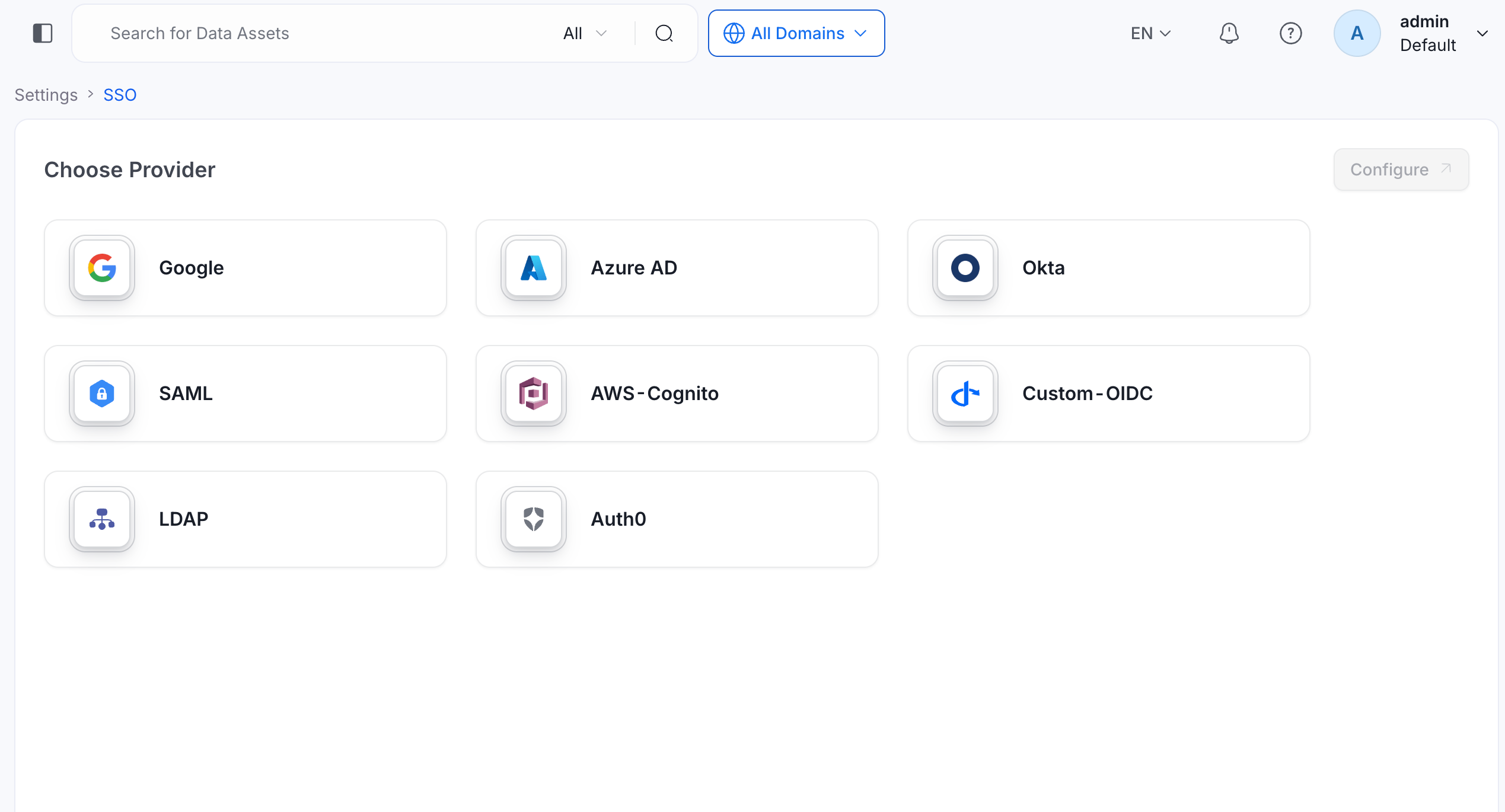
- Click Google, and then click Configure.
- Enter the configuration details. For more information, see Configuration Fields.
- Click Test Login and complete the sign-in. For more information, see Test Login.
- Click Save to finish the SSO configuration.
Configuration Fields
This section lists all fields in the order they appear in the OpenMetadata SSO configuration form.Authentication Configuration
Configure the identity provider connection and basic authentication behavior.Provider Name
- Definition: A human-readable name for this Google SSO configuration instance.
- Example:
Google SSO,Company Google SSO,Google Workspace - Why it matters: Helps identify this specific SSO configuration in logs and user interfaces.
- Note: This is a display name and doesn’t affect authentication functionality.
Client Type
- Definition: Defines whether the application is public (no client secret) or confidential (requires client secret).
- Options: Public | Confidential
- Example: Confidential
- Why it matters: Determines security level and authentication flow. Confidential clients can securely store secrets.
- Note:
- Use
Confidentialfor backend services and web applications. - Use
Publicfor single-page applications (SPAs) and mobile apps. - Google typically uses Confidential client type.
- You can’t change Client Type after you save the configuration.
- Use
Enable Self Signup
- Definition: Allows users to automatically create OpenMetadata accounts on their first SSO login.
- Options: Enabled | Disabled
- Example: Enabled
- Why it matters: Controls whether new users join automatically or need manual provisioning.
- Note: Disable for stricter control over user access.
Authority
- Definition: Google’s authorization server endpoint for OAuth 2.0 authentication.
- Default:
https://accounts.google.com - Why it matters: Specifies the Google authorization server that handles authentication requests.
- Note: This is Google’s standard OAuth 2.0 authorization endpoint and typically doesn’t need to be changed.
Public Client Configuration
When Client Type is set to Public, the form shows the following fields instead of OIDC Configuration.Client ID
- Definition: The client ID of the Google application that OpenMetadata uses to identify itself.
- Why it matters: A public client has no client secret, so the client ID is the only application credential.
Callback URL
- Definition: The redirect URL where Google sends authentication responses after login.
- Note:
- This field is read-only: OpenMetadata fills it in as
{your-domain}/callback. - Copy this URL and register it as an authorized redirect URI in your Google application.
- Use HTTPS in production.
- This field is read-only: OpenMetadata fills it in as
Authority
- Definition: The URL of the Google authorization server.
- Example:
https://accounts.google.com - Why it matters: Specifies where OpenMetadata sends authentication requests.
Public Key URLs
- Definition: One or more URLs where Google publishes its JSON Web Token (JWT) signing keys.
- Example:
https://www.googleapis.com/oauth2/v3/certs - Why it matters: OpenMetadata uses the keys to verify the signature of the tokens that Google issues.
Token Validation Algorithm
- Options:
RS256|RS384|RS512 - Note: The value must match the signing algorithm that Google uses. Most providers use
RS256.
OIDC Configuration
Configure the OIDC client credentials and token handling. These fields appear when Client Type is set to Confidential.OIDC Client ID
- Definition: OAuth 2.0 client ID assigned to your application in Google Cloud Console.
- Example:
123456789012-abcdefghijklmnopqrstuvwxyz123456.apps.googleusercontent.com - Why it matters: Identifies your application to Google in OIDC flows.
- Note: Found in Google Cloud Console > APIs & Services > Credentials > OAuth 2.0 Client IDs.
OIDC Client Secret
- Definition: Secret key for confidential client authentication with Google.
- Example:
GOCSPX-abcdefghijklmnopqrstuvwxyz123456 - Why it matters: Required for confidential clients to securely authenticate with Google.
- Note:
- Generate in Google Cloud Console > APIs & Services > Credentials.
- Store securely and rotate regularly.
OIDC Request Scopes
- Definition: Permissions requested from Google during authentication.
- Default:
openid email profile - Example:
openid email profile https://www.googleapis.com/auth/userinfo.email - Why it matters: Determines what user information OpenMetadata can access.
- Note:
openid,email, andprofileare required for basic user identification.
OIDC Discovery URI
- Definition: Google’s OpenID Connect metadata endpoint.
- Default:
https://accounts.google.com/.well-known/openid-configuration - Why it matters: Allows OpenMetadata to automatically discover Google’s OIDC endpoints.
- Note: Google’s standard discovery endpoint, which rarely needs to be changed.
OIDC Callback URL
- Definition: URL where Google redirects after authentication.
- Example:
https://openmetadata.company.com/callback - Why it matters: Must be registered in your Google Cloud Console configuration.
- Note:
- This field is read-only: it is auto-populated as
{your-domain}/callback. - Copy this URL and add it to Google Cloud Console > OAuth 2.0 Client > Authorized redirect URIs.
- This field is read-only: it is auto-populated as
OIDC Prompt
- Definition: Controls Google’s authentication prompt behavior.
- Options:
none,login,consent,select_account - Default: Empty. Leave it empty unless you need to force a specific behavior. OpenMetadata sends
noneitself when it re-authenticates a user silently. - Example:
select_account - Why it matters: Defines how the login experience behaves for users.
- Note:
login: Always prompt for credentials.consent: Prompt for permissions.select_account: Show account picker.none: Silent authentication (may fail if user isn’t logged in).
OIDC Custom Parameters
- Definition: Additional parameters to include in OIDC authentication requests.
- Example:
{"hd": "company.com", "prompt": "select_account"} - Why it matters: Allows customization of Google authentication behavior.
- Note:
hd: Hosted domain. Restricts login to a specific Google Workspace domain.prompt: Controls authentication prompts.login_hint: Pre-fills the email address field.
Advanced Configuration
The following fields are grouped under Advanced Config in the UI (collapsed by default):OIDC Use Nonce
- Definition: Security feature to prevent replay attacks in OIDC flows.
- Default:
false - Why it matters: Enhances security by ensuring each authentication request is unique.
OIDC Disable PKCE
- Definition: Whether to disable Proof Key for Code Exchange.
- Default:
false - Why it matters: PKCE adds security to the authorization code flow.
- Note: Should remain
false(enabled) in most cases.
OIDC Max Clock Skew
- Definition: Maximum allowed time difference in seconds between systems when validating tokens.
- Example:
0 - Why it matters: Prevents token validation failures due to minor clock differences between servers.
OIDC Token Validity
- Definition: Duration in seconds that tokens remain valid.
- Default:
3600 - Example:
3600 - Why it matters: Balances token lifetime against security requirements.
- Note: The value must be positive. OpenMetadata rejects a zero or negative value, and falls back to
3600at runtime if an invalid value is ever persisted.
OIDC Max Age
- Definition: The
max_agerequest parameter, in seconds, that OpenMetadata sends to the identity provider. - Default: Empty.
- Why it matters: Leave it empty so the identity provider can reuse its own session. A value of
0is treated as not set. To force users to re-enter their credentials, set OIDC Prompt tologin.
OIDC Session Expiry
- Definition: How long user sessions remain valid in seconds.
- Default:
604800(7 days) - Why it matters: Controls session timeout for confidential clients.
End Session With Identity Provider
- Definition: Controls whether OpenMetadata ties a user session to the identity provider’s session.
- Default:
false - Note:
- Available for confidential OIDC clients only.
- When on, OpenMetadata renews the identity provider’s tokens on the provider’s schedule while the user is active. It signs the user out when the provider rejects the refresh token. The token that OpenMetadata issues is shortened to that schedule, with a minimum of 120 seconds. A renewal never extends the session beyond OIDC Session Expiry.
- When off, a session lasts for the configured OIDC Session Expiry.
- The sign-out depends on the provider. Keycloak revokes refresh tokens together with the provider session, and Microsoft Entra ID doesn’t.
JWT Claims
Map identity token claims to OpenMetadata user identities and team assignments.JWT Principal Claims
- Definition: JWT fields used to identify users in OpenMetadata. The first claim that returns a value is used.
- Default:
["email", "preferred_username", "sub"] - Example:
["email", "sub", "preferred_username"] - Why it matters: Determines how users are matched to their OpenMetadata accounts.
- Note:
- At least one claim must correspond to the user’s email address.
- Common Google claims:
email(recommended),sub,preferred_username. - Order matters: the first matching claim is used.
JWT Principal Claims Mapping
Definition: Maps JSON Web Token (JWT) claims to OpenMetadata user profile fields. Supported keys: Onlyemail and username are valid mapping targets in jwtPrincipalClaimsMapping.
Example:
openmetadata_field:jwt_claim (for example, "email:email").
Note: The display name is derived automatically from standard OIDC/JWT claims, so you don’t need to configure it using
jwtPrincipalClaimsMapping. If you need richer name handling, make sure Google Workspace is configured to include given_name and family_name as claims in the ID token. OpenMetadata picks them up automatically.JWT Team Claim Mapping
- Definition: Google Workspace claim containing team or department information for automatic team assignment in OpenMetadata.
- Example:
department,groups,organizationalUnit - Why it matters: Automatically assigns users to existing OpenMetadata teams based on their Google Workspace attributes at login.
- Note:
- Common custom attributes can be configured in Google Admin Console.
- For group-based teams, use the
groupsclaim (requires appropriate OAuth scopes). - The team must already exist in OpenMetadata for assignment to work.
- Only teams of type Group can be auto-assigned. Team names are case-sensitive.
Authorizer Configuration
Control which users and domains are permitted to access OpenMetadata.Admin Principals
- Definition: Users granted admin access in OpenMetadata.
- Example:
["admin", "superuser"] - Why it matters: Grants full admin privileges in OpenMetadata.
- Note: Enter usernames only, not email addresses. Use the part of the email before
@(for example, foradmin@company.com, enteradmin).
Principal Domain
- Definition: Default domain for user principals.
- Example:
company.com - Why it matters: Used to construct full user identifiers when only a username is provided.
- Note: Typically your organization’s Google Workspace domain.
Enforce Principal Domain
- Definition: Restricts login to users belonging to the configured Principal Domain.
- Default:
false - Example:
true - Why it matters: Adds an extra layer of security by limiting access to a specific domain.
- Note: Useful when combined with the Google Workspace
hdOIDC Custom Parameter.
Enable Secure Socket Connection
- Definition: Enables Secure Sockets Layer/Transport Layer Security (SSL/TLS) for all SSO communication.
- Default:
false - Example:
true - Why it matters: Ensures encrypted communication between OpenMetadata and Google.
- Note: Recommended in production environments.
Allowed Domains
- Definition: List of email domains permitted to authenticate with OpenMetadata.
- Example:
["company.com", "contractor-company.com"] - Why it matters: Provides fine-grained control over which email domains can log in via Google SSO.
- Note:
- Works in conjunction with Enforce Principal Domain.
- Leave empty if you only use a single domain configured in Principal Domain.
- Useful when you have multiple Google Workspace domains or want to allow specific external domains.
Use Roles From Provider
- Definition: Use roles returned by Google in the token to assign OpenMetadata roles.
- Default:
false - Why it matters: Enables role-based access control driven by your Google Workspace role assignments.
- Note: Roles must be included in the Google token and must match existing OpenMetadata role names.
- Roles sync on every login. A role change in Google takes effect the next time the user signs in.
- If the token omits the roles claim entirely, OpenMetadata treats it as no roles. Some providers leave the claim out once a user’s last role is removed.
- A fresh sign-in then removes the roles and administrator access that the provider no longer grants.
- Roles from the provider can promote a user to Admin. A sign-in never demotes an admin assigned through Admin Principals.
Default OAuth Role
- Definition: Default role assigned to new users when they first sign in via SSO self-signup.
- Example:
DataConsumer - Why it matters: Controls the starting permission level for new users who join through self-signup.
- Note: Leave empty to create users without any role. Requires Enable Self Signup to be active. The role must already exist in OpenMetadata.
Summary
Quick reference of all configuration fields and their example values.Troubleshooting
Troubleshooting
If users are automatically logged out and unable to log in again due to a bad authentication configuration, you can reset the security setup using the following command:Docker Security
Configure SSO for your Docker deployment.
Bare Metal Security
Configure SSO for your bare metal deployment.
Kubernetes Security
Configure SSO for your Kubernetes deployment.